Repository navigation
Releases: oauramos/tunetape
Release list
v1.0.0 — tunetape for your terminal and your AI agent

tunetape 1.0 stops being only a window and becomes a small music server for your terminal. The player, the command line and your AI agent all drive the same queue.
Highlights
Your AI agent can DJ now (MCP)
tunetape mcp is a built-in Model Context Protocol server. Claude Code, Claude Desktop, Cursor and any other MCP client can play, queue, skip, seek, change the volume and ask for AI suggestions.
claude mcp add --scope user tunetape -- tunetape mcpThen just ask: "play lofi hip hop", "queue this album after it", "what's playing?".
Press m on the menu for a setup screen. It shows the exact command and the mcpServers JSON for your install, copies either one, and can add tunetape to Claude Code with one key. Full tool list: docs/mcp.md.
Music keeps playing in the background
Playback lives in a lightweight daemon that starts on demand and exits after 10 idle minutes.
- b goes back to the menu with the music still playing.
- A "now playing" row on the menu (or n) brings the player back.
- q quits and stops the music.
Every action is a command
tunetape play https://www.youtube.com/watch?v=jfKfPfyJRdk
tunetape add lofi hip hop --next
tunetape status
tunetape next | pause | volume +10 | seek 1:30 | queue | history | discover <words>
An open tunetape window follows along with whatever you queue from the shell, or from an agent.
More things to play
- Direct audio links (MP3, FLAC, OGG, …) and local files.
- Any site yt-dlp supports.
- Plain words, searched on YouTube.
- YouTube, Spotify and KHInsider, as before.
An open protocol, and a Rust client
- The daemon speaks a documented JSON-RPC protocol over a local socket: docs/protocol.md, with a JSON Schema in
protocol/and a 142-test conformance suite. tunetape-cliis a Rust client with the same commands and output. It is a ~500 KB binary that starts in ~2 ms (build it withcargo install --path rust/tunetape-cli).
Fixes
- KHInsider pages load again behind Cloudflare (#7).
- The AI settings' "test connection" no longer stalls the interface.
- A race where a new connection could answer before the daemon had registered it.
- Piped CLI output on Windows is UTF-8.
Upgrade
brew upgrade oauramos/tunetape/tunetape
# or
pip install -U git+https://github.com/oauramos/tunetape.gitv0.9.0 — a new interface
tunetape gets a whole new interface, built on Textual. Every screen moved; the keys you know still work, and the mouse works now too.
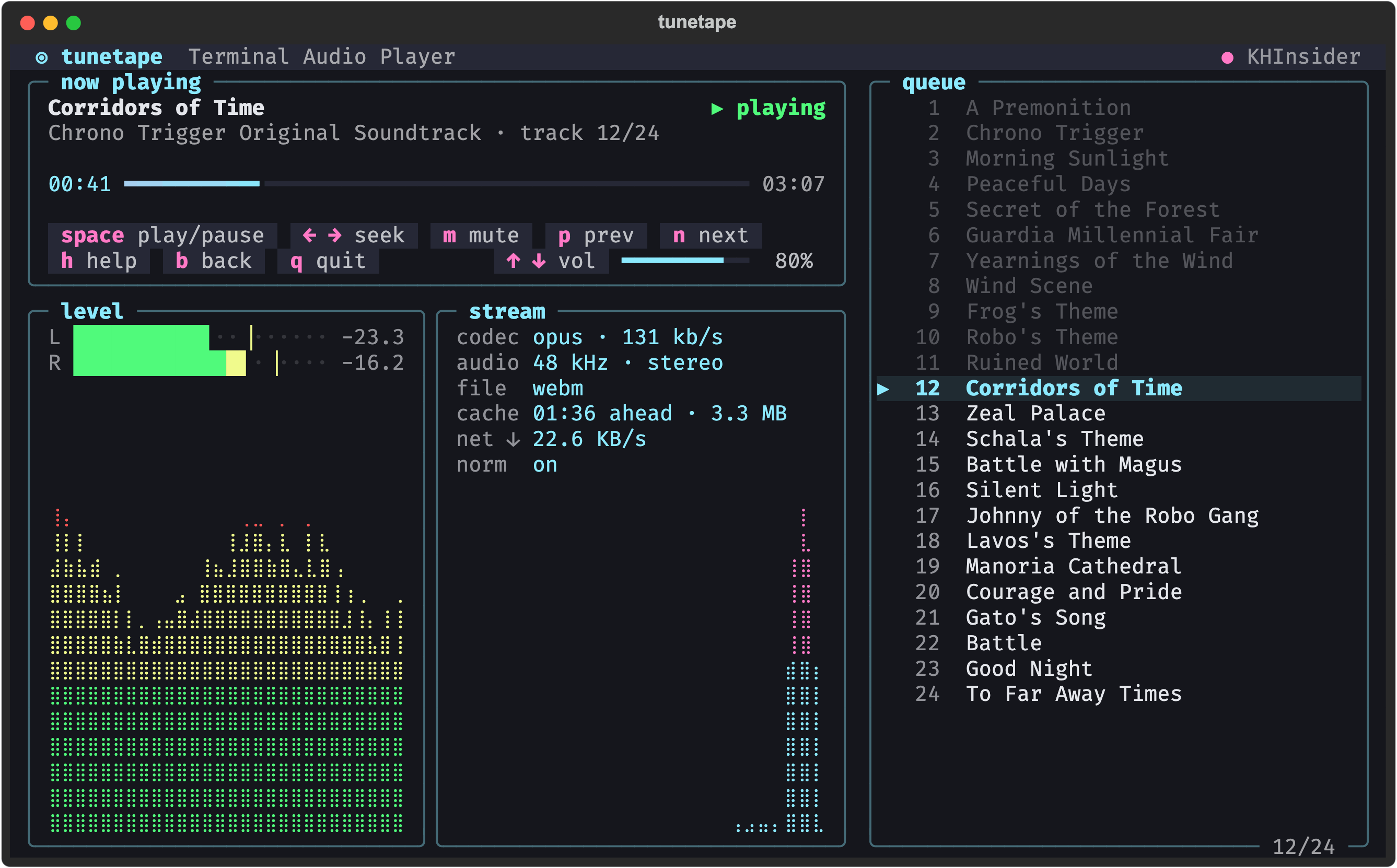
A btop-style player
- now playing — the track, a progress bar (click to seek), the controls and a volume gauge (click or scroll the wheel). Long titles scroll across like a car radio display.
- level — live left/right levels in dB with peak ticks, plus a scrolling loudness graph, measured from the audio mpv is playing.
- stream — codec and bitrate, sample rate and channels, container, how much is cached ahead, and download speed with its own graph.
- queue — albums and playlists show their queue on wide terminals;
tabinto it and press Enter (or click) to jump to a track. Moving between tracks no longer redraws the screen.
Everywhere else
- Welcome screen — the hand-drawn ASCII tuna with its cassette is back, with a shine sweeping across it.
- Same navigation on every screen —
b/escback,qquit,h/?help,ctrl+cquits even while loading or typing. Every screen's buttons end withh help,b back,q quit, and buttons can be clicked. - Loading — a small box lists each step (fetching, loading track) with how long it took.
- Themes — Settings → Theme replaces the accent color: more than twenty themes with a live preview, also from
ctrl+panywhere. The choice is saved. - Small terminals — every screen works down to 60 columns; below 96 columns the player's buttons keep just their keys.
- Lists — history, suggestions and settings are navigated with the arrows, Enter or a click. The Play screen tells you which source a link belongs to as you paste it.
Under the hood
- Textual is now a dependency (it brings
richalong); the Homebrew formula includes it. - mpv runs a measuring-only
astatsfilter for the level meter; if it can't start with its filters it retries without them. python -m tunetape.demo [--album]runs the player on fake data.
Install / upgrade
brew upgrade oauramos/tunetape/tunetape   # macOS
pip install -U git+https://github.com/oauramos/tunetape.git   # Windows / Linux
The README and the wiki have screenshots of every screen.
Full changelog: v0.8.1...v0.9.0
tunetape 0.8.1
Fixes YouTube playback stalling at 0:00 or failing to load. YouTube began rejecting most web_embedded stream URLs, and yt-dlp removed the tv_embedded client. tunetape now resolves streams with the visionos client first and falls back to web_embedded (#5).
v0.8.0 — Windows and Linux support
tunetape now runs on Windows and Linux alongside macOS. The platform-specific pieces are isolated behind small internal modules, so the rest of the code stays platform-agnostic and existing macOS behavior is unchanged.
Cross-platform
- mpv IPC — an
AF_UNIXsocket on macOS/Linux, a named pipe on Windows (viapywin32), behind oneMpvIpcinterface. - Terminal input — raw-mode single-key reading via
termios/tty/selecton POSIX andmsvcrton Windows, normalized to the same key tokens. - Data directory —
%LOCALAPPDATA%\tunetapeon Windows;~/.local/share/tunetapestays put on macOS/Linux. - Executable discovery —
mpv/yt-dlpare looked up onPATHfirst, then in the standard winget/scoop install locations (those installers don't always updatePATH). Install hints are per-OS. - CI — test matrix across Ubuntu / macOS / Windows on Python 3.9 and 3.13, plus an import smoke test.
- README — per-OS install instructions (Homebrew / apt / winget / scoop).
Install
brew install oauramos/tunetape/tunetape   # macOS
winget install shinchiro.mpv yt-dlp.yt-dlp && pip install tunetape   # Windows
sudo apt install mpv yt-dlp && pip install tunetape   # Linux
Cross-platform work contributed by @albertowd in #4.
Full changelog: v0.7.1...v0.8.0
Contributors

Assets 2
v0.7.1 — YouTube playback fix
Fixes YouTube playback stalling at 0:00.
What was wrong
YouTube's SABR rollout changed the stream URLs yt-dlp returns from its default client (android_vr). Those URLs carry rqh=1 and only answer small, bounded ranged requests — but ffmpeg, and therefore mpv, always opens a stream with an open-ended Range: bytes=0-. Every request came back HTTP 403, so a track would load, the UI would come up, and the timer would sit at 0:00 forever.
It looked like nothing was wrong because mpv's output went to /dev/null, so the 403 was never surfaced anywhere.
What changed
- Streams now resolve with the
web_embeddedclient, whose URLs are not range-capped, withtv_embeddedandandroid_vras fallbacks for videos it has no formats for. $TUNETAPE_YTDLP_CLIENToverrides that list, so if YouTube shifts again you can work around it in place:TUNETAPE_YTDLP_CLIENT=tv_embedded tunetape.- mpv's output is now captured into the debug log. A failed stream load shows up on the Debug/Logs screen (
d) instead of silently stalling.
No changes to configuration, stored history, or dependencies. Upgrade with brew upgrade tunetape.
See yt-dlp#12482 for the upstream context.
tunetape 0.7.0
What's new
- Discover (AI): describe a vibe — "upbeat 80s synthwave", "calm piano for focus" — and an AI suggests real songs you can pick and play (streamed via YouTube). Bring your own Anthropic API key, or point it at any OpenAI-compatible endpoint (OpenAI, Ollama, local models, gateways) from Settings → AI discovery. The feature stays off until a key is provided.
- AI settings screen: provider, key, model, endpoint, and auth mode, with a built-in connection test.
- History integration: AI-played songs and Discover requests land in Recently played — a saved request re-runs discovery for a fresh list.
- Refreshed README screenshots generated from the current UI, including a new Recently Played screen.
Full Changelog: v0.6.0...v0.7.0
v0.6.0 — Spotify & YouTube playlists
Adds Spotify (playlists + single tracks) and YouTube playlists as playable sources.
The menu now has a single Play entry — paste any supported URL and the source is auto-detected:
- YouTube video or playlist
- Spotify track or playlist
- KHInsider album
Spotify audio is DRM-locked, so Spotify is used as a metadata source (public embed, no login) and each song streams from its YouTube match via yt-dlp. No new dependencies — reuses the existing mpv + yt-dlp binaries.
Playlists and albums resume where you left off; Recently-played tags each entry by source (YT / PL / SP / KH).
🤖 Generated with Claude Code
v0.5.0 — Animated tuna, themes & volume meter
tunetape v0.5.0
Highlights
- 🎞️ Animated "shine" that sweeps across the cassette (tuna) on the greeting screen
- 🎨 Settings → Accent color: live picker with 8 colors, recolors the whole UI (persisted)
- 🔊 YouTube-style volume meter with bars + percentage in the player
- 🏷️ Author signature moved inside the cassette label
- 🧭 Standardized navigation everywhere:
qquit,bback,enterselect - 🪟 btop-style boxed menu buttons (two rows) + Help (
h) and Debug/Logs (d) screens - ⏳ Loading spinner while fetching streams
Install / upgrade
brew upgrade oauramos/tunetape/tunetape
v0.4.0
tunetape 0.4.0
Install (recommended)
brew install oauramos/tunetape/tunetapeHighlights
- Homebrew tap install —
brew install oauramos/tunetape/tunetapepulls in mpv, yt-dlp, and Python (ffmpeg via mpv). Thecurl | bashscript remains as a hardened fallback. - Recently played — a new menu remembers every YouTube title and KHInsider album so you can re-listen; albums resume at the track you left off, with delete/clear. Stored in
~/.local/share/tunetape/. - Even volume — opt-in loudness normalization via mpv's built-in filter (Settings menu, on by default), no extra dependency.
- Volume & mute controls —
+/-/mand arrow keys.
Fixes & internals
- Single-sourced version +
tunetape --version. - Hardened installer (non-interactive Homebrew, robust venv/pip, brew shellenv).
- KHInsider now fails forward past a bad track; accepts flac/ogg/m4a/wav albums.
- More robust mpv IPC and yt-dlp stream extraction; offline pytest suite added.
- Corrected README install/uninstall.
v0.3.0 — KHInsider Playlist Support
What's New
KHInsider Album Playlists
- New source: Option 2 in the menu — paste a KHInsider album URL to play a full video game soundtrack as a playlist
- Track navigation:
nfor next track,pfor previous track - Auto-advance: automatically plays the next track when one ends
- Lazy loading: only fetches each track's direct URL when it's about to play (1 request per track, cached)
- Temp cache: playlist state saved to a temp file, cleaned up on exit
Improvements
- Lazy yt-dlp check: yt-dlp is only required when using YouTube (option 1) — KHInsider works without it
- Thread-safe UI: fixed race condition where both display and input threads could overwrite the result simultaneously
- Rich markup injection fix: error messages from external tools no longer break the UI
- Broader CDN matching: track downloads no longer hardcode a single CDN domain
- Tighter mpv lifecycle: prevents orphaned mpv processes on signal during controller creation
Controls (Playlist Mode)
[space] play/pause    [←/→] seek ±10s    [,/.] seek ±30s
[n] next track        [p] prev track
[b] back to menu      [q] quit