Repository navigation
Releases
OM0RX-xLog 1.6.74 for Windows

OM0RX-xLog has moved to OM0RX xSuite. Newer versions, and this release with its source ZIP, are published there: xLog downloads.
OM0RX-xLog 1.6.74 is a Windows update to the local-first amateur radio logbook. It works alongside Nexus (OM0RX-xNexus) and keeps xLog as the master logbook. macOS and Linux users should stay on 1.6.0 for now.
| Download | Use it when |
|---|---|
| Current-user installer | You use one Windows account. No administrator rights needed. Recommended. |
| All-users installer | Everyone on the PC should get the app. Needs administrator approval. |
| Portable ZIP | You don't want to install. Extract the whole ZIP; needs the Microsoft Evergreen WebView2 Runtime. |
Windows 10 or 11, x64. The installers are not code-signed, so Windows SmartScreen may warn you: choose More info → Run anyway. Check the downloads against SHA256SUMS. PROVENANCE.json records the exact source commit and build details.
Before upgrading, back up your workspace, keep your previous installer, and quit xLog normally. Installing over an existing copy keeps your logbook and settings. Stay with the scope (current user or all users) you installed before.
What's new since 1.6.0 on Windows
Fewer interruptions
- The "Something went wrong" dialog now opens only for a real failure. Status lines, background progress and past sync history stay as quiet notes beside their control. Repeated messages are counted instead of piling up.
- Brief station-service hiccups are ridden out instead of reported. A slow read no longer restarts the station service, so radio and rotor sessions stay connected.
- After a recovery, xLog checks an uncertain radio operation by itself.
Country and callsign data
- Country lookup uses the latest
cty.datfrom country-files.com, checked and downloaded automatically. With a Club Log API key saved in Settings, Club Log's country data is downloaded on the same schedule and used as the main source. - Calls such as SX602N (special Greek prefixes) now show the right country instead of "Unknown". Genuinely ambiguous prefixes are still not guessed.
Station
- Direct FLEX receive and control (including FLEX-8400), Elecraft support, and KPA500/KAT500 amplifier and tuner instruments.
- KPA500 and KAT500 follow the radio's band changes and confirm them.
- Nexus: xLog can follow the station Nexus is working into the Active QSO, with a switch to turn it off.
Logbook, sync and export
- Wavelog sync handles local edits and replacement contacts, and shows each run's history.
- Export all streams and pages through large logbooks without running out of memory.
- Backup, references and a compact logbook view.
Operating windows
- An Alerts workspace with compact alert management and live QSY to an alert, retained chase reports, and Special station activations.
- Every Window-menu window was reviewed and fixed. Native file choosers open in front of the window that asked.
Settings
- Settings were redesigned: a grouped menu (Station, Logbook, Spots & digital, Lookup & data, Application), a clear title and description on each page, and one save bar.
- Data management shows station-service restarts with their cause, and an opt-in diagnostics log.
Contesting
- SAC scoring is corrected: a Scandinavian station's multipliers count only non-Scandinavian country/band pairs. New SAC logs use the corrected scoring; saved logs keep their original scoring.
- Contest window and serial-number fixes.
Testing
On the release source: 5,330 UI tests, the full Rust suite (1,323 unit and 37 Hamlib tests), the Python contest host suites and the Swift country suites all pass. The package passed its payload privacy check (3,255 files, no personal logbook, settings or credentials). It was installed and run on Windows 10 x64 with a live logbook.
Physical radio, amplifier, rotor and transmit behaviour depends on your equipment and was checked only on the author's station. Please report reproducible problems in Issues with synthetic data, and leave out credentials, station addresses and personal logs.
The corresponding source is tagged v1.6.74; see BUILD.md to build it.
OM0RX-xLog 1.6.0
OM0RX-xLog has moved to OM0RX xSuite. Newer versions, and this release with its source ZIP, are published there: xLog downloads.
OM0RX-xLog 1.6.0 is a local-first logbook for amateur radio operators on macOS, Windows and Linux. Start with the Operator Desk to log and find contacts; enable Wavelog synchronization, station control and contest tools as needed.
| Platform | Download | Installation |
|---|---|---|
| macOS, Apple Silicon | DMG · ZIP | Drag the app to Applications. Deployment target: macOS 14+. |
| Windows 11, x64 | Current-user installer · All-users installer · Portable ZIP | Use current-user for one account. All-users needs administrator approval during installation. Extract the entire portable ZIP; Evergreen WebView2 must be installed. |
| Ubuntu 24.04, amd64 | DEB · Relocatable archive | Install the DEB with apt, or install the documented runtime dependencies and run the extracted archive's launch script. |
Before upgrading, make a backup of your workspace and audio, keep your previous installer and quit the app normally. After opening the existing workspace, check a familiar contact, your draft and the synchronization schedule.
Changes since Beta 1
- Wavelog conflict resolution checks that the local contact and remote proposal still match what the operator reviewed. Keeping a local edit preserves its known remote identity. Station checks isolate responses to the intended station, and a remote deletion can be reconciled when the local contact is already deleted.
- Stopping, editing or leaving a pending Voice Desk send cancels the stale request. The DCU1 rotator now processes adjacent position reports in order and rejects commands before its connection is ready.
- Windows and Linux show the availability of macOS-only digital integrations without background polling. Switching contest lanes recovers from stale draft reads, and resetting the UI scale respects the reserved shortcut.
- Linux includes the upstream correction for GLib string-array iteration (RUSTSEC-2024-0429). Distribution metadata and component notices identify the stable release and the origins of bundled components.
Support limits. WSJT-X/JTDX UDP logging and fldigi integration are macOS-only. Radio, CW, rotator, voice and PTT capabilities depend on the provider, OS and connected equipment. Simulated output does not qualify an untested physical device. Contest definitions have separate exchange, scoring and export capabilities; local awards are not sponsor-issued credit. The embedded CW decoder remains retired.
The source build instructions list toolchains, dependency pins and the map-data retrieval step. See SHA256SUMS to check downloads, and PROVENANCE.json for source identities and package qualification. Use Issues to report reproducible problems with synthetic data; please omit credentials, station endpoints and personal logs.
Qualification of these packages
| Release platform | What was qualified | Limits |
|---|---|---|
| macOS Apple Silicon | macOS 27.2; Developer ID signed, notarized and stapled app and DMG. Gatekeeper accepted the app from both packages. | Deployment target 14.0. The oldest supported macOS and Intel Macs were not tested; no Intel package is distributed. |
| Windows 11 x64 | Unsigned current-user and all-users installers; portable ZIP verified against its manifest. A nonadmin Standard user ran the app twice for each installed scope. Default paths, registration, Start menu entries, ordinary exits and uninstall preserving the profile marker passed. | Tested on Windows 11 ARM64 under x64 emulation. No physical native x64, Windows 10, or custom-path/interactive wizard qualification is claimed. |
| Ubuntu 24.04 amd64 | Ordinary user in an SDK-free environment under x86-64 emulation on Apple Silicon. Three X11 sessions and one nested Weston/Wayland session covered the DEB and relocated archive, including ordinary Quit and worker cleanup. | Requires the listed OS libraries and Python 3.12. Physical GPU, every compositor and other Linux distributions were not qualified. |
The release reuses Beta evidence for the unchanged large-log, backup/restore and inbound-only Wavelog paths. Simulated remote responses and disposable databases were used to test the new conflict and station-identity checks. The release did not repeat live synchronization or the long idle study.
One earlier Windows current-user test stopped during detached Logbook lifecycle verification with a WebView receive error. Its exact cause is unresolved. A single clean repeat on the same installer passed both full journeys, with independent native window and process observations. The failed run is excluded from the passing count.
Station and digital integrations in 1.6.0
“Available” identifies an implemented connection path in the released application. The release used simulated devices, protocol fixtures and loopback services to check software behavior. It did not qualify a physical transmitter, keyer, rotator, microphone or audio wiring.
| Integration | macOS Apple Silicon | Windows x64 | Linux x64 | Operating scope |
|---|---|---|---|---|
| Hamlib radio and rotor | Available | Available | Available | Bundled Hamlib 4.7.2 rigctld and rotctld, or an existing local daemon. Frequency, mode, rotor positioning and other operations depend on the selected model and its reported capabilities. Dummy-device tests covered commands, observed motion and helper shutdown. |
| Independent serial WinKeyer | Available | Available | Available | Select a serial port and explicitly connect and arm. Supported legacy host revisions are WK2 23 and WK3 30/31. Software tests cover buffer handling, typed CW and Stop. Physical serial and keying behavior depends on the device and wiring. |
| Direct TCI | Available | Unavailable | Unavailable | Receive control over WebSocket. Transmit requires explicit permission, ExpertSDR3 advertising TCI 2.1, TX enable and fresh status. PTT addresses the selected TRX. CW accepts whole literal messages up to 128 characters and requires exactly one advertised TRX. TCI transmit-audio injection is unavailable. |
| Direct FLEX LAN and CWX | Available | Unavailable | Unavailable | Whole-message CW and, when the radio reports usable indexed CWX status, live literal-text append. Radio-reported progress depends on matching handle and character range. Buffered speed changes and typed prosigns are unavailable on this adapter. |
| Remote Station Agent client | Available | Unavailable | Unavailable | A Mac can connect to an existing Remote Station Agent. The Agent FLEX route sends whole CW messages. Index-based direct FLEX typing requires the direct LAN route. |
| Desk PTT and normal native voice memories | Available on eligible routes | Unavailable | Unavailable | Desk PTT requires a supported active Agent, direct FLEX or direct TCI route with the required ownership and station observations. Normal voice recording, monitor preview and transmitter audio use separately selected CoreAudio routes on macOS. Windows and Linux retain their separate contest WebView WAV playback path. |
| WSJT-X / JTDX UDP logging | Available | Unavailable | Unavailable | Receive and log supported external messages. Contest selection is non-transmitting. External Reply is unavailable. |
| fldigi integration | Available | Unavailable | Unavailable | The Mac bridge supports received text over XML-RPC and review of logged events for eligible contest destinations. Simulated external endpoints exercised these workflows. |
Inside the app
These screenshots show the released macOS app in a disposable workspace with synthetic contacts. Station output and external writes are disabled.
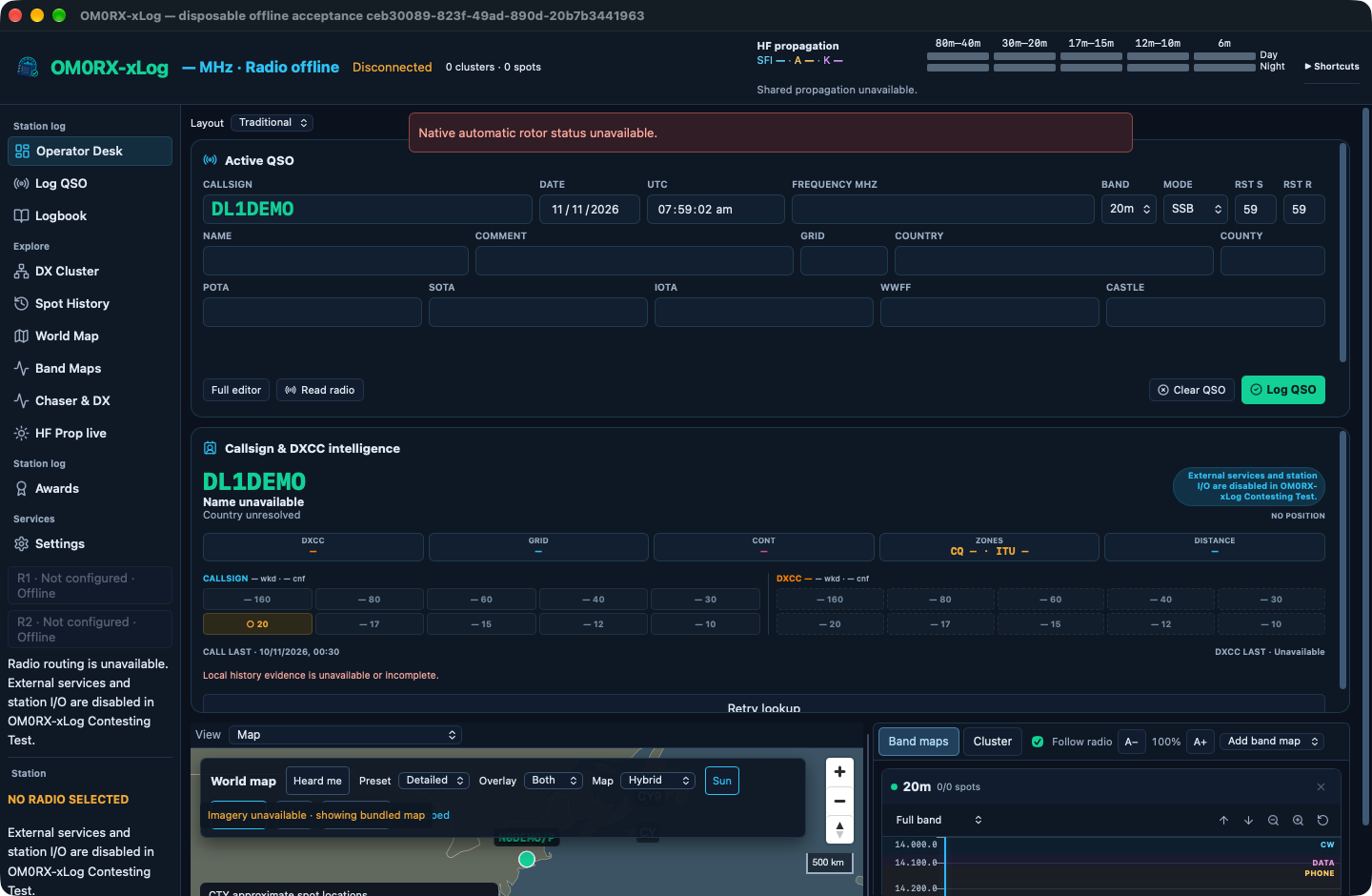
Operator Desk on macOS with the unsaved synthetic DL1DEMO contact and simulated station N0DEMO/P. Station output is disabled.
View the Logbook, World Map and Awards
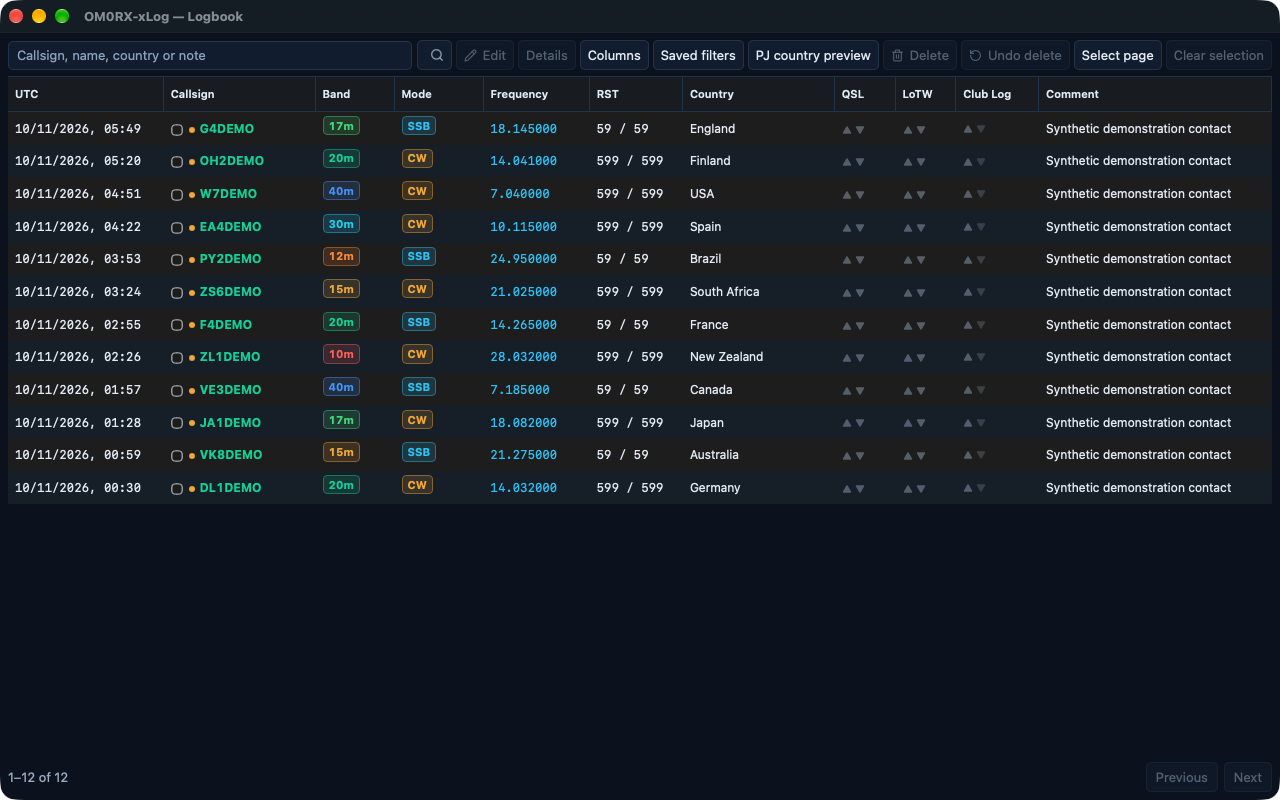
Detached Logbook on macOS showing 12 synthetic contacts across bands and modes.
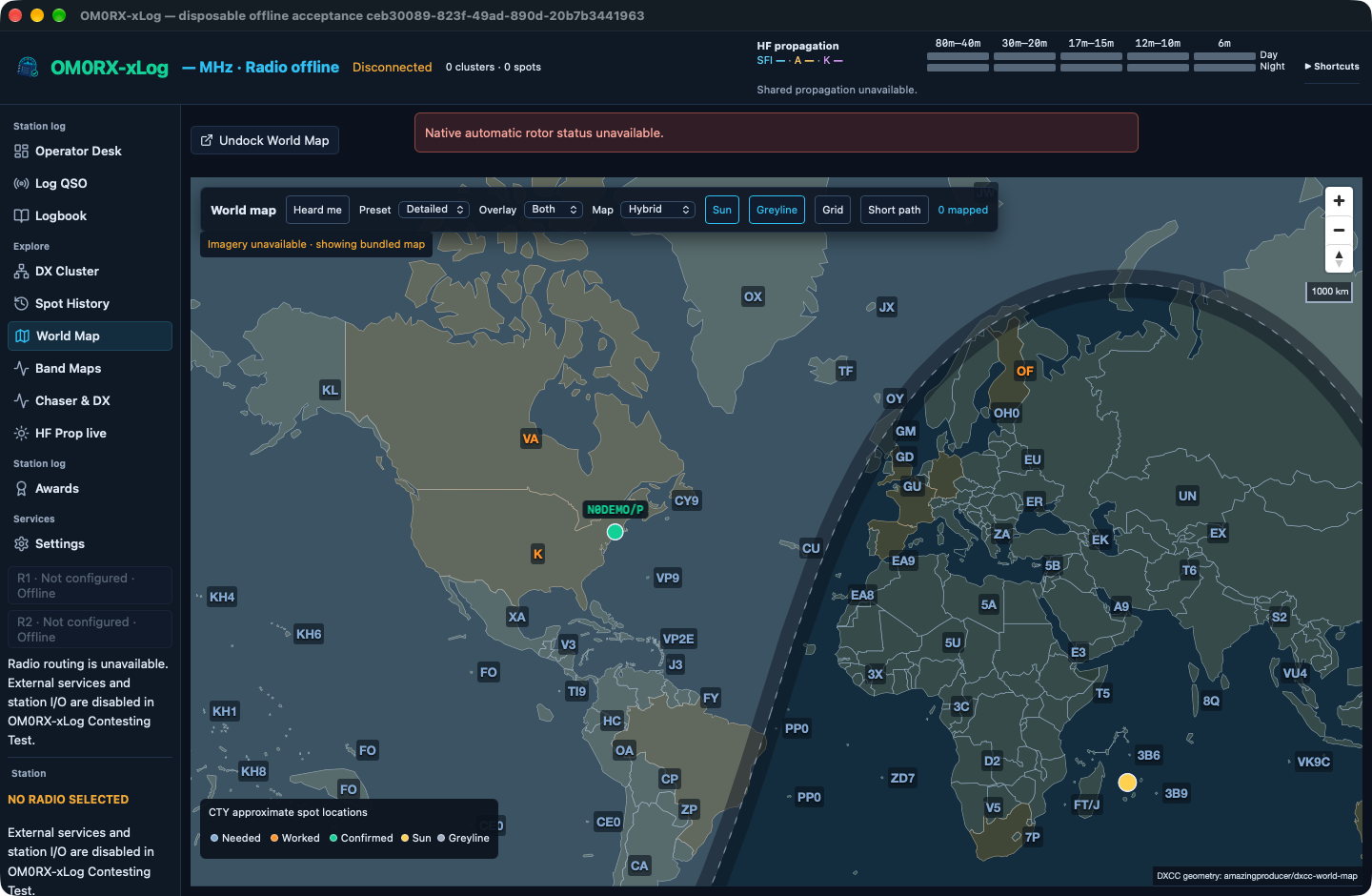
World Map on macOS with bundled country geometry, grayline, worked-country markers and the synthetic N0DEMO/P station.
![Detached Awards window showing local progress and the pro...