 GitHub Community

Replies: 4 comments 4 replies

|
💬 Your Product Feedback Has Been Submitted 🎉 Thank you for taking the time to share your insights with us! Your feedback is invaluable as we build a better GitHub experience for all our users. Here's what you can expect moving forward ⏩
Where to look to see what's shipping 👀
What you can do in the meantime 💻
As a member of the GitHub community, your participation is essential. While we can't promise that every suggestion will be implemented, we want to emphasize that your feedback is instrumental in guiding our decisions and priorities. Thank you once again for your contribution to making GitHub even better! We're grateful for your ongoing support and collaboration in shaping the future of our platform. ⭐ |

|
Right now you can't set a description from the workflow, so the environment name is the only thing the history page shows and lets you filter by. That is the part to use for now.
environment:
  name: registry-prod-${{ matrix.os }}
  url: https://quay.io/repository/freeipa/freeipa-server?tab=tags&tag=${{ matrix.os }}
That gives you one row per image, like registry-prod-fedora-45 and registry-prod-almalinux-10, and you can filter the history by each one to see just its pushes.
The description field you quoted is for deployment statuses made through the API, and it is not shown on the deployments history page, so it would not fix the view you are looking at. The environment name is the part that shows up there. Let me know if it works. |

|
Technically the approach with one environment per matrix value might work but I need to think about the implications before acting upon it. I currently run without environments and I hoped to actually be able to move the secrets from the repo level to the environment, to improve the secret scoping posture. In a sense this approach would push me in the opposite direction. I can script creating the environments but eventually they are bound to get out of sync as folks (or I) will just edit for example protection rules of one of them, forgetting about the rest. So it feels like a liability. I wonder if others have been in similar situations and if some parametrisation of the deployments is something that other would find useful, or whether it's just me. |

|
There's a way to get per-image history without splitting your secrets: keep a single environment for secrets and protection rules, and record each image's push as its own deployment through the Deployments API. A deployment created through the API can target any environment name, and that name is what the deployments history groups and filters by. The job keeps jobs:
push:
environment:
name: registry-prod # secrets and protection rules stay here, in one place
deployment: false # no registry-prod entry in the deployments history
permissions:
contents: read
deployments: write
strategy:
fail-fast: false
matrix:
os: ${{ fromJSON(needs.test-plan.outputs.matrix-push) }}
steps:
- name: Open the image deployment
id: image
env:
GH_TOKEN: ${{ github.token }}
run: |
id=$(jq -n --arg ref "$GITHUB_SHA" --arg env "image-${{ matrix.os }}" \
'{ref: $ref, environment: $env, auto_merge: false, required_contexts: [], description: ("Push of " + $env)}' \
| gh api "repos/$GITHUB_REPOSITORY/deployments" --input - --jq .id)
echo "id=$id" >> "$GITHUB_OUTPUT"
# ... your build and push steps ...
- name: Close the image deployment
if: always() && steps.image.outputs.id
env:
GH_TOKEN: ${{ github.token }}
run: |
gh api "repos/$GITHUB_REPOSITORY/deployments/${{ steps.image.outputs.id }}/statuses" \
-f state=${{ job.status == 'success' && 'success' || 'failure' }} \
-f environment_url='https://quay.io/repository/freeipa/freeipa-server?tab=tags&tag=${{ matrix.os }}' \
-f log_url="$GITHUB_SERVER_URL/$GITHUB_REPOSITORY/actions/runs/$GITHUB_RUN_ID"What it gives you:
With GitHub also lists the |
|
This sounds almost perfect, thank you! With we can even avoid having those |

|
That is a much better fit than my first answer, glad jul6art spotted it. Keeping the secrets and protection rules in one place in registry-prod, and letting the API deployments carry the per-image history, gives you both things you wanted. The secrets move the way you wanted them to, and there are no eleven copies of the rules to drift apart. And nice catch on the deployment false bit. If that keeps the registry-prod entries out of the history too, the per-image view stays clean. Let me know how it goes once you try it. If it works as planned, that combination is the answer here, not my one-environment-per-value idea. |

|
Good find, thanks! I've updated the answer above with Does it look right to you now? If it works on your side, could you mark it as the answer? |

|
sorry, I have not interest
…On Wed, 25 Nov 2026 at 9:06 PM Julius Caesar < ***@***.***> wrote:
There's a way to get per-image history without splitting your secrets:
keep a single environment for secrets and protection rules, and record each
image's push as its own deployment through the Deployments API.
A deployment created through the API can target any environment name, and
that name is what the deployments history groups and filters by. The job
keeps environment: registry-prod (secrets, reviewers and branch rules
stay there), and two steps per matrix leg record a deployment named after
the image:
jobs:
push:
environment: registry-prod # secrets and protection rules stay here, in one place
permissions:
contents: read
deployments: write
strategy:
fail-fast: false
matrix:
os: ${{ fromJSON(needs.test-plan.outputs.matrix-push) }}
steps:
- name: Open the image deployment
id: image
env:
GH_TOKEN: ${{ github.token }}
run: | id=$(jq -n --arg ref "$GITHUB_SHA" --arg env "image-${{ matrix.os }}" \ '{ref: $ref, environment: $env, auto_merge: false, required_contexts: [], description: ("Push of " + $env)}' \ | gh api "repos/$GITHUB_REPOSITORY/deployments" --input - --jq .id) echo "id=$id" >> "$GITHUB_OUTPUT" # ... your build and push steps ...
- name: Close the image deployment
if: always() && steps.image.outputs.id
env:
GH_TOKEN: ${{ github.token }}
run: | gh api "repos/$GITHUB_REPOSITORY/deployments/${{ steps.image.outputs.id }}/statuses" \ -f state=${{ job.status == 'success' && 'success' || 'failure' }} \ -f environment_url='https://quay.io/repository/freeipa/freeipa-server?tab=tags&tag=${{ matrix.os }}' \ -f log_url="$GITHUB_SERVER_URL/$GITHUB_REPOSITORY/actions/runs/$GITHUB_RUN_ID"
What it gives you:
- *one entry per image* in the deployments history (image-fedora-45,
image-rocky-9…), each with its own filter, a link to the pushed tag
and a link to the run. "What was pushed 9 hours ago" and "the history of
rocky-9" become one click each;
- *nothing to keep in sync*: the image-* names are only labels, with
no secrets and no protection rules. Your secrets can move from the
repository into registry-prod, which is the scoping you were after;
- required_contexts: [] stops the API from checking the commit's
statuses first (a pending check would make the creation fail), and auto_merge:
false stops it from trying to merge the default branch into the ref.
The deployments the job itself creates in registry-prod still appear, as
today; the per-image view lives under the image-* names. GitHub also
lists those names among the repository's environments, the way deployment
integrations show up there. That's the one bit of noise this adds.
—
Reply to this email directly, view it on GitHub
<#214007?email_source=notifications&email_token=CNNGM7AJ26VTE3EXRSWEVPL524GR7A5CNFSNUABIM5UWIORPF5TWS5BNNB2WEL2ENFZWG5LTONUW63SDN5WW2ZLOOQXTCOJYHE2TOMZRUZZGKYLTN5XKU43VMJZWG4TJMJSWJJLFOZSW45FMMZXW65DFOJPWG3DJMNVQ#discussioncomment-19895731>,
or unsubscribe
<https://github.com/notifications/unsubscribe-auth/CNNGM7HM4L6SXGCT525W4CL524GR7AVCNFSNUABIKJSXA33TNF2G64TZHMZTAMJVG4ZTGNBUHNCGS43DOVZXG2LPNY5TCMJTHE2TINRQUF3AE>
.
Triage notifications, keep track of coding agent tasks and review pull
requests on the go with GitHub Mobile for iOS
<https://github.com/notifications/mobile/ios/CNNGM7GWHUKCUB4PEMNPSDL524GR7A5CNFSNUABIM5UWIORPF5TWS5BNNB2WEL2ENFZWG5LTONUW63SDN5WW2ZLOOQXTCOJYHE2TOMZRUZZGKYLTN5XKU43VMJZWG4TJMJSWJJLFOZSW45FKMZXW65DFOJPWS33T>
and Android
<https://github.com/notifications/mobile/android/CNNGM7BXQH3TR36QDTLTSJD524GR7A5CNFSNUABIM5UWIORPF5TWS5BNNB2WEL2ENFZWG5LTONUW63SDN5WW2ZLOOQXTCOJYHE2TOMZRUZZGKYLTN5XKU43VMJZWG4TJMJSWJJLFOZSW45FOMZXW65DFOJPWC3TEOJXWSZA>.
Download it today!
You are receiving this because you are subscribed to this thread.Message
ID: ***@***.***
com>
|


Uh oh!
There was an error while loading. Please reload this page.
Uh oh!
There was an error while loading. Please reload this page.
🏷️ Discussion Type
Product Feedback
💬 Feature/Topic Area
Workflow Configuration
Discussion Details
In https://github.com/freeipa/freeipa-container we build and test FreeIPA container images using multiple base operating system images. We compare the base image, packages (rpms) installed by the job, and the repository content with those of images already in the target registries. We then produce matrix definition for the Push images to registries job to include only images that logically differ from their counterpart already in the registry:
We thus have workflow runs where all images were updated (https://github.com/freeipa/freeipa-container/actions/runs/45001653181), where only some were updated (https://github.com/freeipa/freeipa-container/actions/runs/45197135102), as well as those where none were updated and the push job gets skipped altogether (https://github.com/freeipa/freeipa-container/actions/runs/45006666270). I currently use the green / blue distinction in the step summary tables that we produce in our planning job to see if the workflow run updated the image or not.
I started to look into using deployments to get an easier overview of the deployment (push) history of those images on the GitHub Actions side but I've hit a hurdle: in the deployments history page they all look the same. There is no way to easily distinguish a push of
fedora-45image andalmalinux-10image, neither in the deployment history list nor in the filters.I tried to use the
matrix.osin theenvironment.urlasand that gives me a "link out" in the history list but I still have to hover over it to see which image was pushed.
To demonstrate the problem, try to quickly figure out what images were pushed 9 hours ago (that run was without the
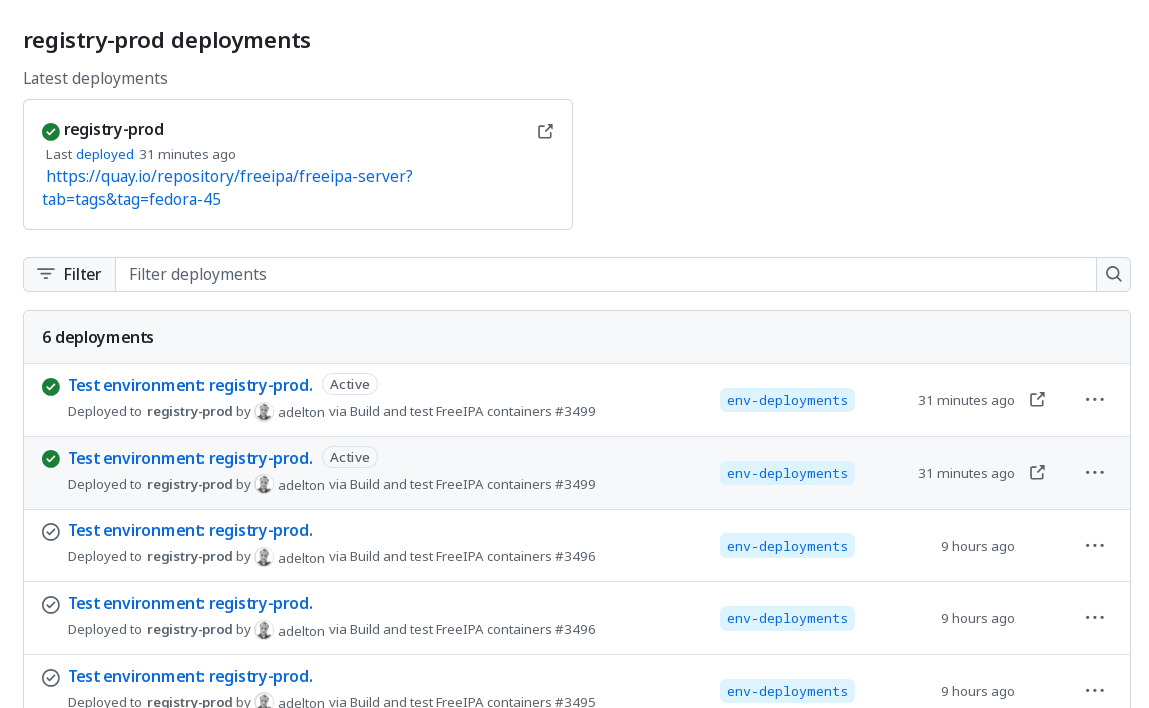
urlspecified) and which were pushed 31 minutes ago:At the top we can see the URL of one of those 31-minutes-ago deployments and we can deduce that one of those was for
fedora-45... but what about the other one which happened to run a couple of seconds before that, for a different image? And if I wanted to see the history ofrocky-9image pushes, how would I do that?The documentation https://docs.github.com/en/rest/deployments/deployments?apiVersion=2026-03-10 says
That sounds great ... but how do I set the
descriptionfrom the workflow definition?Please consider adding a
descriptionor a set of parameters to theenvironmentsyntax, and expose them on the deployment overview page, ideally in filters as well, so that it is easy to deploy multiple similar things to a single environment and have a way to distinguish them in the deployments history.Something like
or
might do the trick on the syntax side of things.
I also tried to use job steps summaries, hoping they might be exposed on the deployments history page, but they are not.
And I've considered using the
${{ matrix.os }}in the environment name to have the distinction on that level but that would mean duplicating the same set of exactly the same secrets in eleven environments I would need, a maintenance nightmare.All reactions