Repository navigation
Releases
Achievement Companion v0.40.0

Full Changelog: v0.39.1...v0.40.0
v0.40.0
A more focused Quick Access experience
Keep your current game and next achievement prominent, manage saved targets in one place, and expand activity calendars when you need them.
What's New
Game-first Quick Access
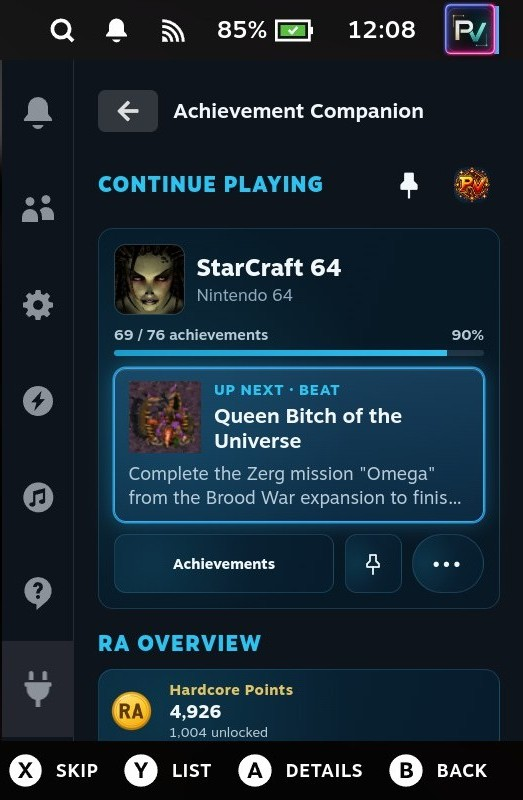
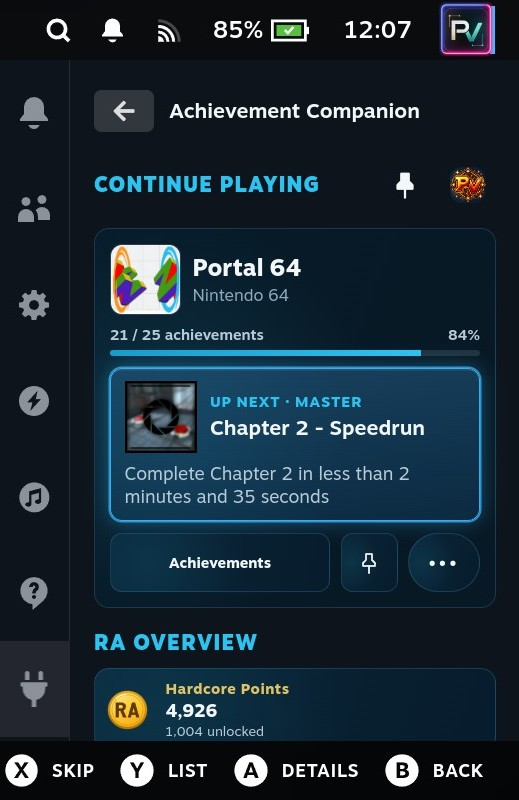
- Replace the large Profile card with compact avatar and Pinned Achievements shortcuts beside Continue Playing or Current Game.
- Read larger game titles and full-width achievement descriptions beneath the Up Next artwork and title.
- Keep achievement progress, recommendation details, pinning and suggestion controls together in the game card.
| Beat goal | Master goal |
|---|---|
 |
 |
Pinned Achievements viewer
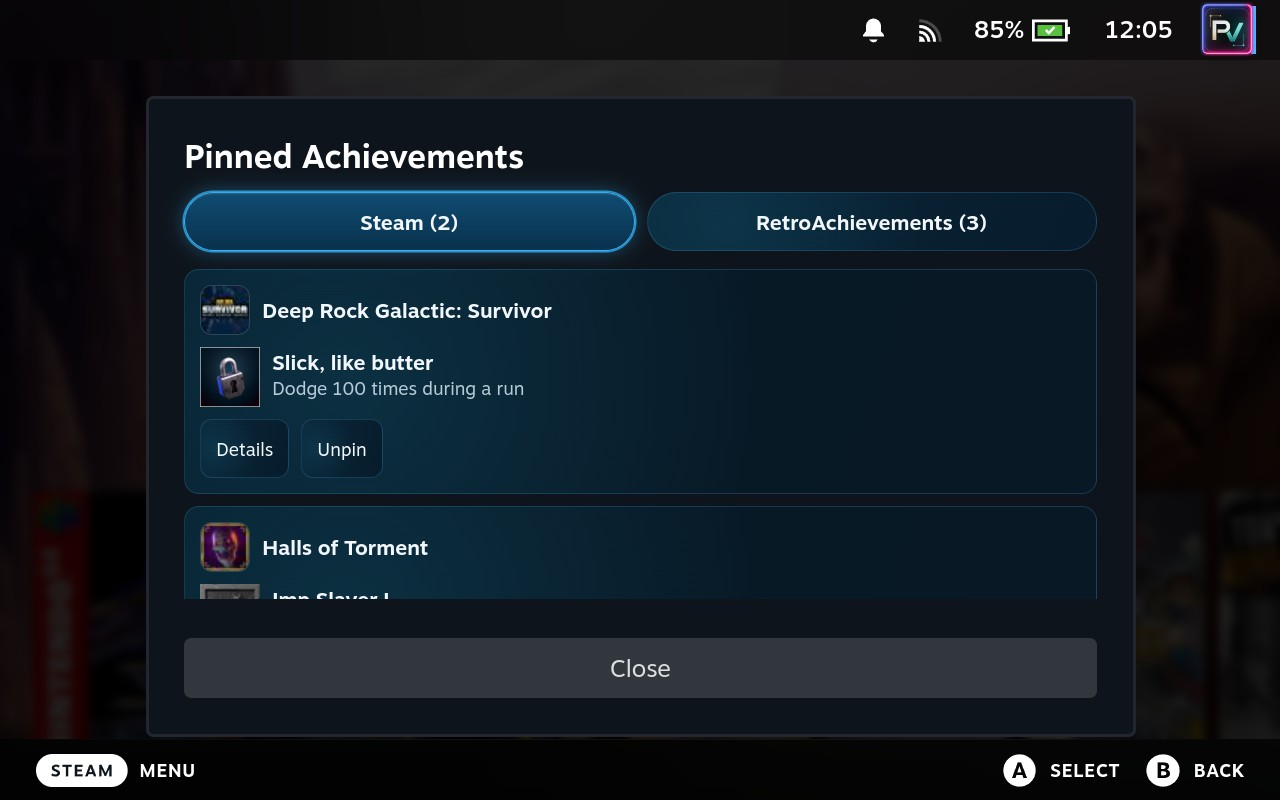
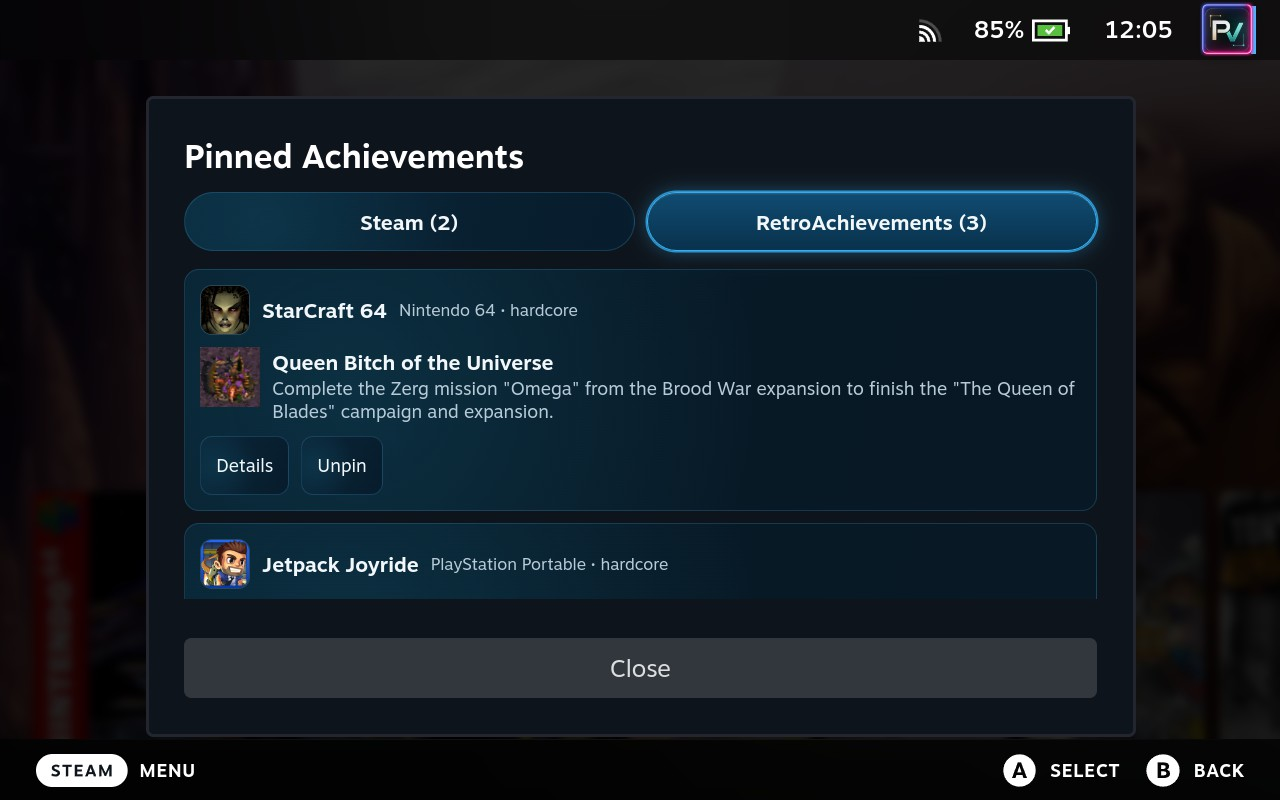
- Open the header thumbtack to browse saved targets for your configured Steam and RetroAchievements accounts.
- Switch provider tabs to see pin counts, game and achievement information, descriptions, and relevant RetroAchievements completion modes.
- Open Details or Unpin directly from each entry. Changes stay synchronized across supported views.
- Choose View Game from Details to open the compact game overview, then press B to return to the pinned viewer at the originating entry.
| Steam | RetroAchievements |
|---|---|
 |
 |
Collapsible Activity Calendars
- Steam and RetroAchievements calendars now start collapsed and remember their expanded state separately between sessions and restarts.
- Expand a calendar to use its existing activity visualization and date-selection controls.
- Selected date filters remain visible while collapsed, with a Clear date filter action available without reopening the calendar.
Your game, your progress, and your saved targets—closer at hand in Quick Access.
Achievement Companion v0.39.1
Full Changelog: v0.38.2...v0.39.1
v0.39.1
🎃 Happy Halloween — choose your next achievement!
Happy Halloween, achievement hunters! Dress up Achievement Companion with the Halloween theme, pin your next personal challenge, and keep it close across Quick Access, full-screen Overview, and native Steam game pages.
What's New
Pinned achievements
- Pin an unfinished Steam or RetroAchievements achievement as your Up Next target.
- Use the thumbtack controls in Quick Access and full-screen Overview, or Y Pin/Unpin in the native RetroAchievements Up Next tab.
- Keep separate saved targets for each account and game, shared across supported views and preserved between sessions.
- Return to automatic recommendations when a pin is removed or completed.
- Preserve your Beat/Master goals and RetroAchievements Hardcore/Softcore completion requirements.
Native game-page previews
- See your current Up Next achievement beside the native achievement badge for Steam and matched RetroAchievements games.
- Choose On Focus, Always Show, or Hidden for Up Next Preview.
- Control Achievement Description separately with the same three options. Both settings default to On Focus.
- Use neutral Minimal-style previews that follow the badge's position and width, support Classic and Minimal badges, and preserve square achievement artwork.
- Identify manually pinned targets with a subtle thumbtack indicator.
| Classic badge with Up Next | Minimal badge with Up Next |
|---|---|
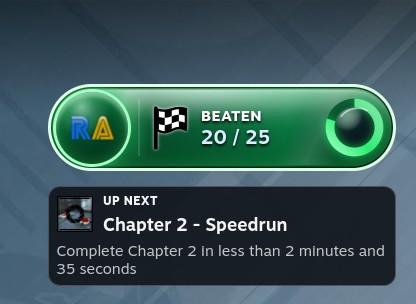 |
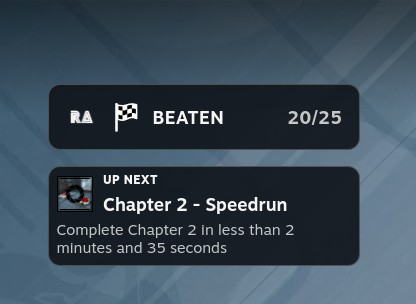 |
Full-screen Up Next
- Browse three equal-height recommendation cards with centered content and thumbtack controls.
- Keep the Up Next heading without repeating selection-source labels inside each card.
- Read compact, two-line description summaries without pushing recommendations outside the panel. Open achievement details for the complete description.
🎃 A Halloween treat for your Deck
- Choose Halloween in Plugin Settings → Theme Settings → Theme for orange accents, deep purple surfaces, and mint highlights.
- Apply the theme across Achievement Companion's Quick Access and full-screen interfaces while native game-page previews retain their neutral Steam-style appearance.
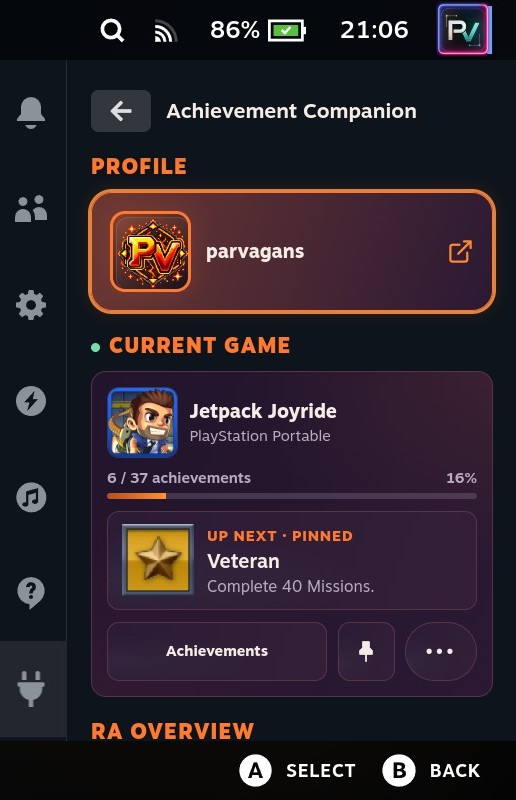
Have a happy Halloween, enjoy the treats, and may your next unlock be a good one! 🎃
Achievement Companion v0.38.2
Full Changelog: v0.38.1...v0.38.2
v0.38.2
RetroAchievements Architecture Overhaul
This release rebuilds how Achievement Companion retrieves, stores, and synchronizes RetroAchievements data. Existing features now share a persistent data foundation designed to reduce redundant requests, handle provider interruptions, and keep progress consistent across Quick Access, full-screen pages, and Steam integrations.
What's New
Unified caching and synchronization
- Replaced fragmented RetroAchievements data paths with shared canonical resources backed by persistent SQLite storage.
- Introduced resource-specific freshness policies so profile data, game progress, Community statistics, catalogues, and Rich Presence refresh independently.
- Concurrent consumers share in-flight requests instead of downloading the same data separately.
- Valid cached responses survive plugin restarts and remain available when a refresh fails.
Centralized request management
- Routed RetroAchievements requests through one scheduler with pacing, request priorities, bounded retries, and shared provider cooldowns.
- Manual retries follow the same scheduling and cooldown rules.
- Navigation and targeted updates reuse available data rather than triggering broad profile refreshes or repeated history imports.
Consistent and durable data
- Added publication ownership and revision tracking so delayed responses and database reads cannot overwrite newer progress.
- Derived presentations retain their source revisions, allowing re-entered pages to rebuild locally when canonical data changes while preserving open-page navigation.
- Completion-library refreshes assemble and validate the paginated collection before replacing the previous complete snapshot.
- Durable invalidation and shutdown handling preserve authorized work across consumer cancellation and asynchronous storage operations.
Incremental history and verified discovery
- Achievement history uses bounded, resumable imports with atomic checkpoints and incremental synchronization.
- Subset discovery retains verification checkpoints and established relationships through partial responses or interrupted work.
- Community resources update shared consumers independently and preserve valid statistics when optional requests fail.
- Added synchronization diagnostics, sanitized exports, and targeted recovery actions.
Independent Rich Presence synchronization
- Separated Current Game freshness from the general dashboard cache.
- Integrated game lifecycle events and bounded visible-session checks with the shared request infrastructure.
- Ordered launch verification and corroborated ROM-session evidence so delayed results cannot replace a newer session.
- Preserved recent-session evidence for Continue Playing while authoritative Recently Played data catches up.
Additional Improvements
- Preserved native controller focus across Community loading and ready states.
- Adjusted the full-screen RetroAchievements profile header to give account names sufficient space.
- Allowed long Quick Access game titles to wrap without a two-line cutoff.
- Added a green activity indicator beside Current Game when RetroAchievements Rich Presence reports active play.
The familiar Achievement Companion experience, supported by a shared, persistent, and more resilient RetroAchievements data architecture.
Achievement Companion v0.38.1
Full Changelog: v0.36.5...v0.38.1
v0.38.1
Up Next Across Game Mode
Up Next now connects Achievement Companion’s full-screen Game page with Quick Access and, for matched RetroAchievements shortcuts, Steam’s native game page. Search and display controls make it easier to find an achievement and return to your place.
What's New
Up Next Across Achievement Companion
- Achievement Companion’s full-screen Game Overview shows up to three recommendations. Open their details, jump to them in Achievements, or hide and restore suggestions.
- Quick Access dashboards now show game progress and a recommended achievement for the current or a recently played game. Open its details, skip it, or browse its achievement list without leaving Quick Access.
- Compact Game pages show up to three expandable recommendations alongside Achievements, Actions, Game Info, goal settings, and full-screen access.
- Hidden suggestions and RetroAchievements Beat or Master goals stay shared between Quick Access and the full-screen Game page. A full-screen achievement jump can reveal an Up Next choice without changing saved search or filters.

Up Next on Native Steam Game Pages
- Matched RetroAchievements shortcuts gain an Up Next tab between Activity and Your Stuff, with recommendations for the selected Beat or Master goal.
- Select a recommendation or an Activity unlock to find it in Steam’s native achievement list. Press X to skip a focused recommendation, or use Suggestions to restore hidden choices.
- Win Condition, Progression, and Missable labels appear on recommendations and in the native achievement list where available.


Achievement Browsing and Details
- Search achievement titles and descriptions, sort results, and choose Detailed or Compact rows in Quick Access and full-screen views. Full-screen game libraries also gain Sort & View.
- Quick Access achievements open in a shared details modal over the current screen. Closing it restores the originating list, filters, search, scroll position, and controller focus.
- Quick Access achievement lists show every matching result without paging controls.
Game-Page Badges
- Choose the new monochrome Minimal badge or the existing colorful Classic badge. Classic remains the default, and switching styles preserves saved Classic colors.
- Both styles support three sizes, six positions, controller activation, and Left/Right navigation between neighboring badges. Minimal includes a subtle loading animation.
Additional Improvements
- Quick Access profiles have clearer progress and artwork fallbacks; selecting the identity card opens the full-screen profile.
- Switching provider credentials clears account-specific data and prevents an earlier refresh from displaying results from the previous account.
- Failed loads surface a retryable error. Steam scans preserve earlier unlock history when an individual game refresh fails and update progress as games finish.
- RetroAchievements game titles omit the
~Homebrew~,~Unlicensed~,~Prototype~,~Demo~, and~Hack~catalog markers without changing game matching. - Selected theme colors carry through more dashboard, profile, history, settings, and controller-focus surfaces.
Find your next achievement wherever you open a game, then return to where you left off.
Achievement Companion v0.36.5
Full Changelog: v0.35.6...v0.36.5
v0.36.5
Full-Screen Game Experience Overhaul
A complete redesign of the full-screen game experience for Steam and RetroAchievements, built around personal accomplishments, achievement progression, and community insights.
What's New
Redesigned Game Overview
- New, non-scrollable dashboard optimized for Steam Deck.
- Improved progress tracking, game artwork, and latest achievement unlocks.
- Dedicated milestone presentations for Beaten, Mastered, and Perfected games.
Up Next — Achievement Recommendations
- Three suggested achievements based on game progression and available provider data.
- Community unlock percentages, rarity indicators, and achievement classifications.
- Hide unwanted suggestions and restore them anytime.
- Jump directly to recommended achievements or open their details.
RetroAchievements Goals
- Choose between Beat and Master as your personal objective.
- Set a global preference or override individual games.
- Goal-aware recommendations and completion milestones.
- Full support for Hardcore and Softcore accomplishments.
SteamHunters & Community Insights
- Improved achievement obtainability and completion statistics.
- SteamHunters points, community completion rates, and set information.
- Streamlined Game Info and access to detailed community statistics.
Steam Deck Navigation
- Improved controller navigation throughout the full-screen experience.
- Contextual achievement shortcuts.
- Organized Actions and Manage Suggestions menus.
- Consistent footer navigation and controller focus.
Additional Improvements
- Refined achievement presentation and information density.
- Preserved RetroAchievements prestige badges and milestone effects.
- Improved Steam hero artwork presentation.
- Theme-aware styling throughout the redesigned interface.
Achievement Companion's full-screen experience is now built to help you track what you've accomplished, discover what's next, and celebrate your achievements.
Achievement Companion v0.35.6
Full Changelog: v0.35.3...v0.35.6
v0.35.6
Achievement popups
- Refreshed Steam and RetroAchievements achievement popups with compact-panel styling and icons.
- Added separate Date and Time cards.
- Improved community stats, including RA’s gold/silver progress bar and separate SteamHunters percentage and player counts.
- Preserved popup dimensions with no scrolling.
Quick Access Menu
- Added an expandable Updates panel below What’s New, matching the existing QAM style, with automatic checks, update status, and check/install actions.
- Improved text and icon alignment on the GitHub and Ko-fi buttons.
Achievement Companion v0.35.3
Full Changelog: v0.31.3...v0.35.3
v.0.35.3
- Updates: Fixed update checks failing with HTTP 500 on some Steam Decks. If your current update check fails, download and install the v0.35.3 release ZIP once to restore future automatic updates.
- Profile: Reorganized Steam and RA account, progress, and recent activity views. RA systems and completion awards lead to matching Games filters; the RA avatar opens the account profile. Refined system and award cards and improved missing Steam game artwork.
- Games: Streamlined both providers around one search and filter toolbar, clearer rows, and Newest/Oldest ordering. RA system filtering sits with the other controls. Corrected text entry and added artwork fallbacks.
- Activity: Reworked unlock history and Analytics as LT/RT views, with filters, trends, streaks, calendar selection, and consistent Your Unlock and Community achievement details. Improved focus, scrolling, and viewport fit.
- Settings: Reorganized service settings and General controls, made setup guidance contextual, and aligned controls, typography, and focus styling. Existing account, data, badge, and update options remain available.
- Game pages: Updated RA badge refresh behavior and Community insights presentation, including rarity charts that follow the selected theme.
Achievement Companion v0.31.3
Full Changelog: v0.31.0...v0.31.3
v0.31.3
Game pages
- RetroAchievements game-page badges and details now refresh when you reopen a game page, including newly earned achievements.
- RetroAchievements game-page badges now stay visible while their data refreshes, without flashing a loading state.
Achievement Companion v0.31.0
Full Changelog: v0.30.0...v0.31.0
v0.31.0 Release Notes
Game pages
- RetroAchievements game pages now show original box art and game details in Steam’s Game Info tab, with collections kept below.
- RetroAchievements game-page badges and details now refresh expired game data instead of disappearing.
RetroAchievements data
- RetroAchievements progress now handles incomplete achievement counts and missing unlock dates without showing misleading totals or dates.
- Hardcore achievements now appear only as Hardcore unlocks, including those previously earned in Softcore.
- Mode-specific game and system progress now stays unavailable when RetroAchievements does not provide reliable counts.
Quick Access
- Achievement Companion’s trophy icon now stays visible when selected in Quick Access.
Achievement Companion v0.30.0
Full Changelog: v0.24.0...v0.30.0
Achievement Companion v0.30.0
Themes
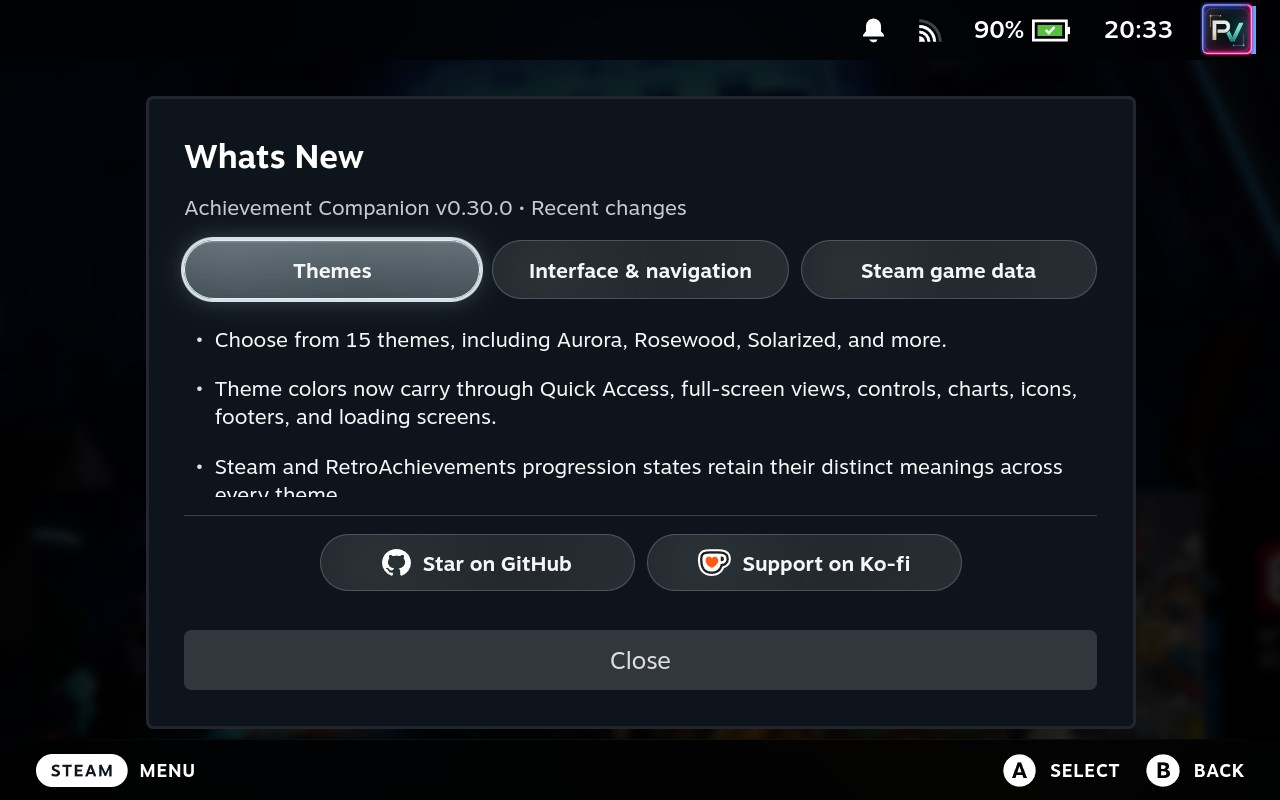
- Added 15 selectable themes: Arcade, Aurora, Blue (default), Carbon, Ember, Grove, Neon, Onyx, Paper, RA Classic, Rosewood, Solarized, Steam, Terminal, and Velvet.
- Theme colors now extend throughout Quick Access and full-screen views, including controls, focus states, activity charts, progress bars, icons, footers, and loading screens.
- Existing theme selections are preserved.
Interface and navigation
- Reorganized Plugin Settings into expandable sections with a seamless joined-card design, restored rounded corners when collapsed, a wider theme selector, and aligned game-page badge controls.
- Standardized Steam and RetroAchievements Quick Access activity-card heights and centered game names on both Quick Access game pages.
- RetroAchievements’ View Achievements action now opens the current game’s Quick Access achievement list directly, with the correct Back path.
- Site-rank and casual-rank arrows remain visible through unchanged or incomplete refreshes and update when the rank direction changes.
What’s New and support
- Added a categorized What’s New modal accessible from Quick Access.
- The modal remains within the Steam Deck viewport while longer release-note sections scroll independently.
- Added permanent Star on GitHub and Support on Ko-fi actions inside the modal and below What’s New in Quick Access.
Steam game data
- Steam game pages retain cached SteamHunters Community, DLC/Groups, points, rarity, and related details when an optional request fails or returns incomplete data.
- Game pages indicate when cached SteamHunters data covers a different achievement count from Steam’s current set.