Repository navigation
Documentation
- Start Fiji [1]
- Start the ImageJ Updater [Help>Update...]
- Click on Manage update sites
- Click on Add update site (see Figure 1)
- A New row is to be created at the bottom of the update sites list
- Type NeuroMol Lab in the Name column
- Type http://sites.imagej.net/Paucabar/ in the URL column
Please note that the Neurosphere assay plugin requires the ilastik and Morphology plugins. If you already have the plugins installed you can skip this step:
- Check the ilastik update site
- Check the Morphology update site
- Close the Manage update sites window
- Apply changes
- Restart Fiji
- Check if NeuroMol Lab appears now in the Plugins dropdown menu (note that the plugins from the update sites are placed at the bottom of the dropdown menu)
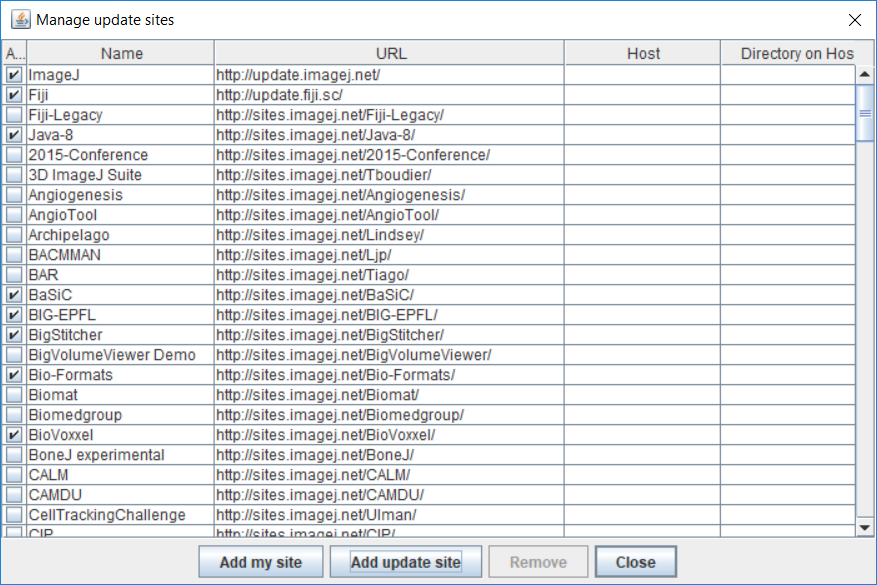
Figure 1. Manage update sites window. An update site is a web space used by the ImageJ Updater which enables users to share their macros, scripts and plugins. By adding an update site the macros, scripts and plugins maintained there will be installed and updated just like core ImageJ plugins.
- Schindelin J, Arganda-Carreras I, Frise E, Kaynig V, Longair M, Pietzsch T, Preibisch S, Rueden C, Saalfeld S, Schmid B, Tinevez JY, White DJ, Hartenstein V, Eliceiri K, Tomancak P, Cardona A.(2012). Fiji: an open-source platform for biological-image analysis. Nat Methods. doi: 10.1038/nmeth.2019.