Repository navigation
Releases
EasyPDM for FreeCAD 0.9.9

Added
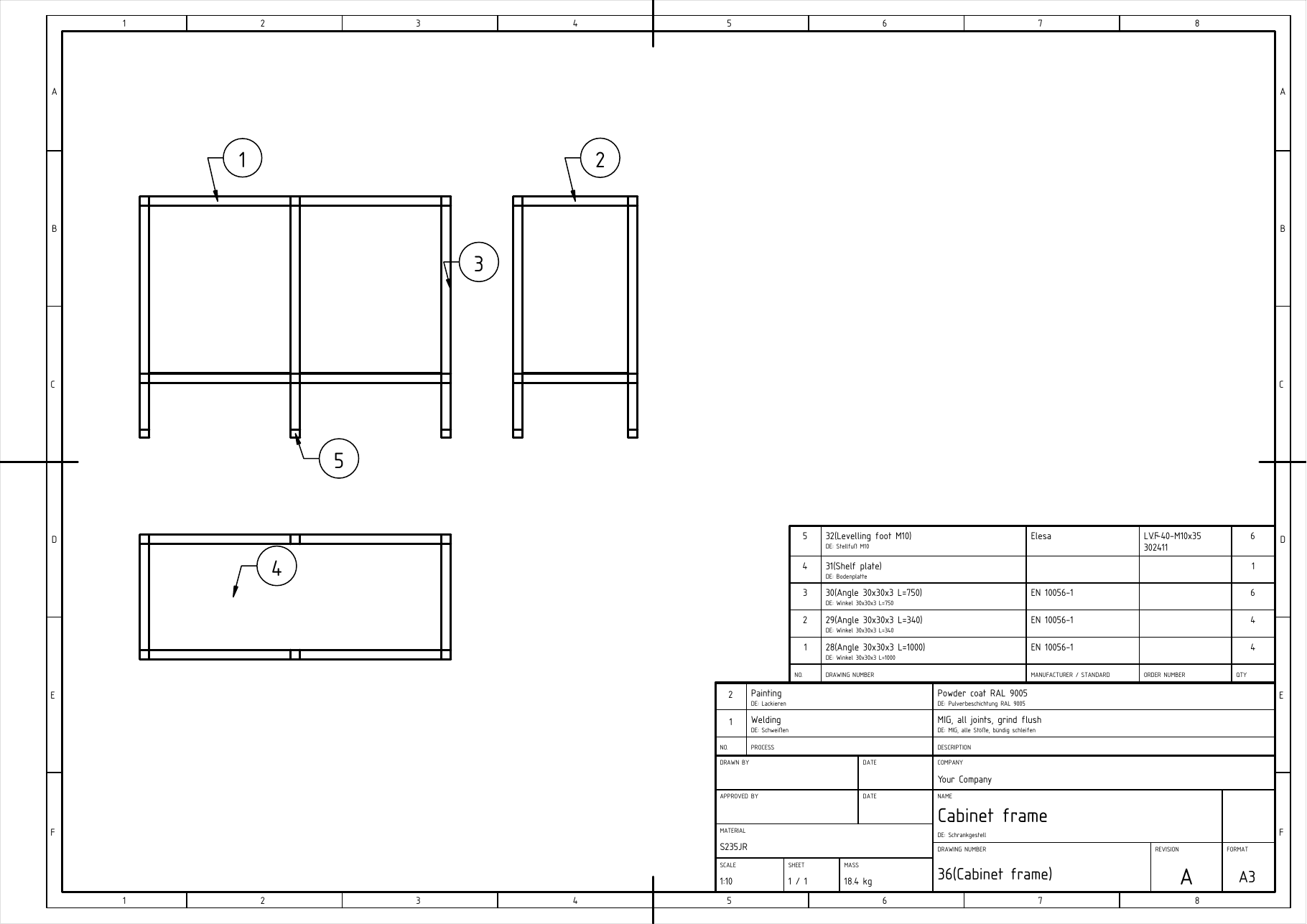
- Parts list on assembly drawings. On the first sheet of an assembly's drawing, Upload, Download and Refresh drawing sheet build a parts list above the processes table: number, drawing number, manufacturer / standard, order numbers and quantity of each direct component, with the name's translations under the drawing number in a multilingual project. The numbers are the components' positions in the assembly's structure in EasyPDM. The list is 156 mm wide, against the frame's right edge; a row grows when its text needs more lines, and when the list would reach the revisions table or the top of the frame it continues in a column to its left. Headers come in the project's main language. Needs EasyPDM 0.9.4 or later; an older server sends no parts list and the sheet stays as it was.
- Balloons numbered from the parts list. Each balloon on the drawing gets the number of the component its arrow points at, whatever was typed into it, so the drawing, the list and the structure in EasyPDM say the same. The component is found by following the arrow's tip into the model along the viewing direction, taking the one nearest the viewer, or the nearest one when the tip sits on an outline. A balloon pointing at something that is not on the list keeps its text.
- Numbers in the parts list, the processes table and the revisions table stand in line. Centred by TechDraw, single digits came out visibly staggered (a 4 further right than a 1); the add-on now centres them itself from the font's own measurements.
Fixed
- Refresh drawing sheet no longer says no page uses the EasyPDM sheet when the sheet is simply up to date. It now says the sheet is already up to date, and keeps the old message for a drawing that really has no EasyPDM sheet.
EasyPDM for FreeCAD 0.9.8
Changed
- An assembly's Assembly object takes the item's name too. Upload gave a part's body the record name (e.g.
37(Leg)), so it showed under that name when inserted into an assembly, but left an assembly's own Assembly object as "Assembly", so every sub-assembly looked the same in the parent's tree. The Assembly object of FreeCAD's Assembly workbench now gets the record name in the same way, without the revision; an assembly with no single top-level Assembly object is left as it is.
EasyPDM for FreeCAD 0.9.6
Changed
- A long name gets smaller lettering instead of running out of the title block. Each field of the EasyPDM sheet knows how much room its cell has; when Upload, Download or Refresh drawing sheet fills it in, the text is measured in the sheet's own font and, if it would not fit, set in a smaller size that does — the name, drawing number, company, material, people, dates, mass, scale, sheet and revision alike. It never goes below 40% of the field's size, so it stays readable; a text longer than that still runs over. Short values keep their usual size. Custom templates are left as they are unless their fields carry the same
data-fit-widthattribute.
EasyPDM for FreeCAD 0.9.5
Fixed
- The assembly comes back to the front after its last component. Since 0.9.4 each component's window opens while its form is filled in, but once the last one was done FreeCAD kept showing that part instead of the assembly whose form comes next. The window that was in front before (the assembly) is now brought back explicitly after every component, and after every picture taken for the upload.
EasyPDM for FreeCAD 0.9.4
Changed
- Each component of an assembly opens in FreeCAD while its form is filled in. Uploading an assembly asks in the browser for every new component in turn, but a component FreeCAD had loaded only through the assembly's links had no window, so it could not be looked at or measured until after its form was sent. Now its 3D view opens and comes to the front just before its form appears, and closes again once that component is done, with the assembly back in front; a part that already had a window of its own keeps it.
Fixed
- No leftover windows after uploading an assembly. The 3D windows opened just to take the components' pictures were meant to be closed again, but never were, so an assembly of fifty parts left fifty windows behind. They now close.
EasyPDM for FreeCAD 0.9.3
Fixed
- No more doubled, blurred lettering in the drawing PDF. The company, the name, the drawing number, the revision and the headers of the processes and revision tables were set in bold, but the sheet's font (osifont) has no bold face, so FreeCAD faked one when exporting the PDF, and viewers showed each of those words twice, slightly offset. The EasyPDM sheets now use the regular face throughout; the name, number and revision still stand out by their size. A drawing picks up the new sheet the next time Upload, Download or Refresh drawing sheet refreshes it; the PDF of an item already released keeps its look until its next revision. The SolidWorks sheet format is unchanged: its font has a real bold face.
EasyPDM for FreeCAD 0.9.2
Fixed
- The SCALE field of the EasyPDM drawing sheet follows the page's scale. FreeCAD fills a template's fields only once, when it is inserted, so changing Page > Scale left "1:1" in the title block until the next Upload, Download or Refresh drawing sheet. The field now changes with the page at once, also in a drawing that is not in EasyPDM yet; pages with other templates are left alone.
EasyPDM for FreeCAD 0.9.1
In short: EasyPDM for FreeCAD now keeps to the rules of FreeCAD's Addon Index. Nothing happens at FreeCAD start-up beyond registering the workbench (no secret-storage read, so no KWallet prompt when FreeCAD opens), the menu in every workbench touches FreeCAD's menu bar only while it is turned on, and the code passes the Index's security scan. Works with EasyPDM 0.9 servers, as 0.9.0 did; update through the Addon Manager.
Changed
- Nothing happens at FreeCAD start-up beyond registering the workbench. The add-on used to read the login token from the system's secret storage as FreeCAD started (to label the Log in / Log out button), which ran
secret-toolorsecurityand could make KWallet ask for its password before anyone clicked anything; the button now starts from what is known without it, and the token is read on the first click. - The menu in every workbench hooks into FreeCAD's menu bar only while it is turned on. With the option off (the default) the add-on no longer watches the menu bar or workbench changes at all; turning it on hooks in at once, turning it off takes the menu and the hooks away again.
- Qt comes through FreeCAD's own PySide wrapper, as FreeCAD's Addon Index asks, instead of importing PySide6 or PySide2 directly.
- Every request goes through one helper that opens only http and https addresses, so a mistyped or crafted server address cannot make the add-on read a
file://path. - The manifest has tags and a description that says what the add-on does, and the README's logo and links use full addresses, so they work in FreeCAD's Addon Manager too.
- CI runs the Bandit security scan with the settings of FreeCAD's Addon Report; the code is clean of findings, with each deliberate exception audited in a comment.
EasyPDM for FreeCAD 0.9.0
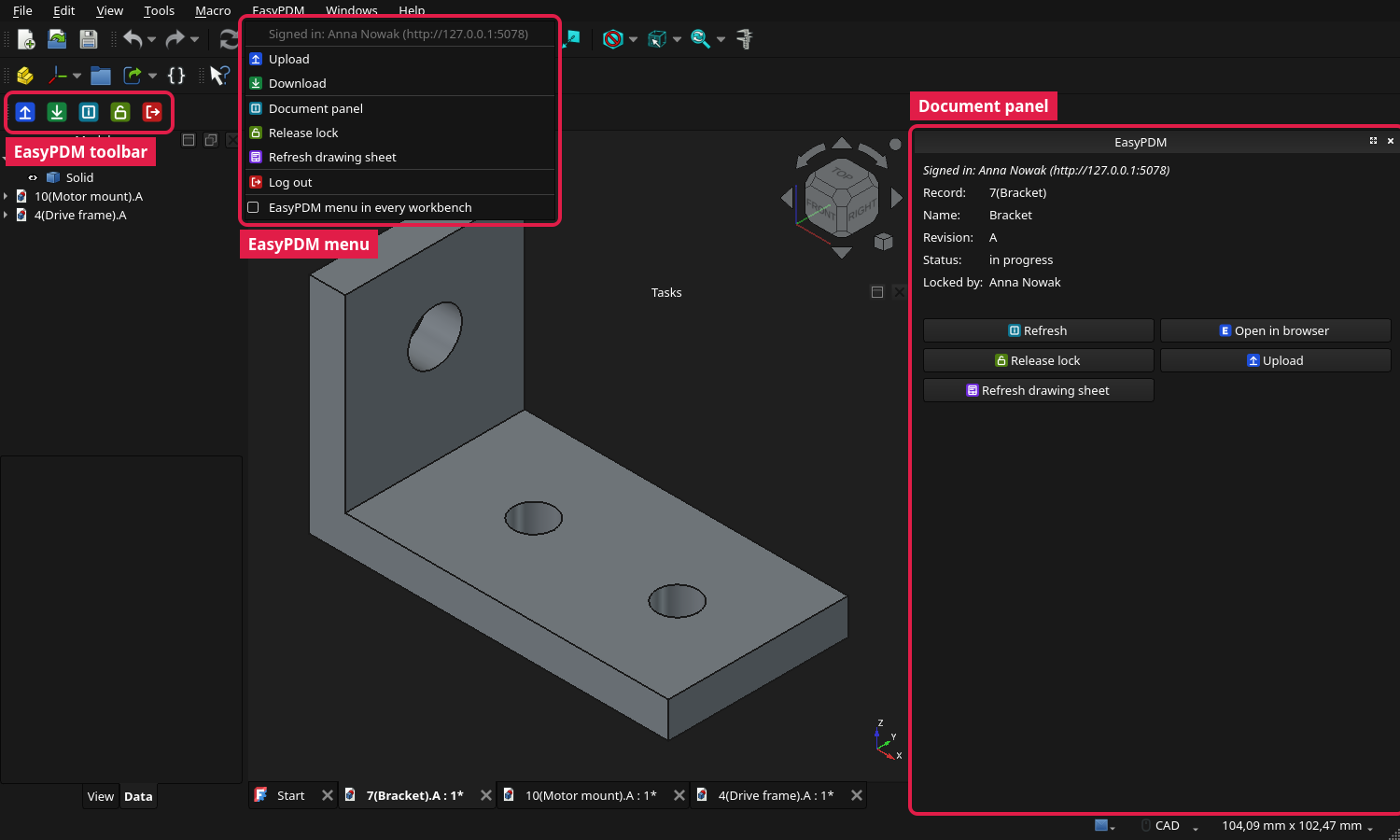
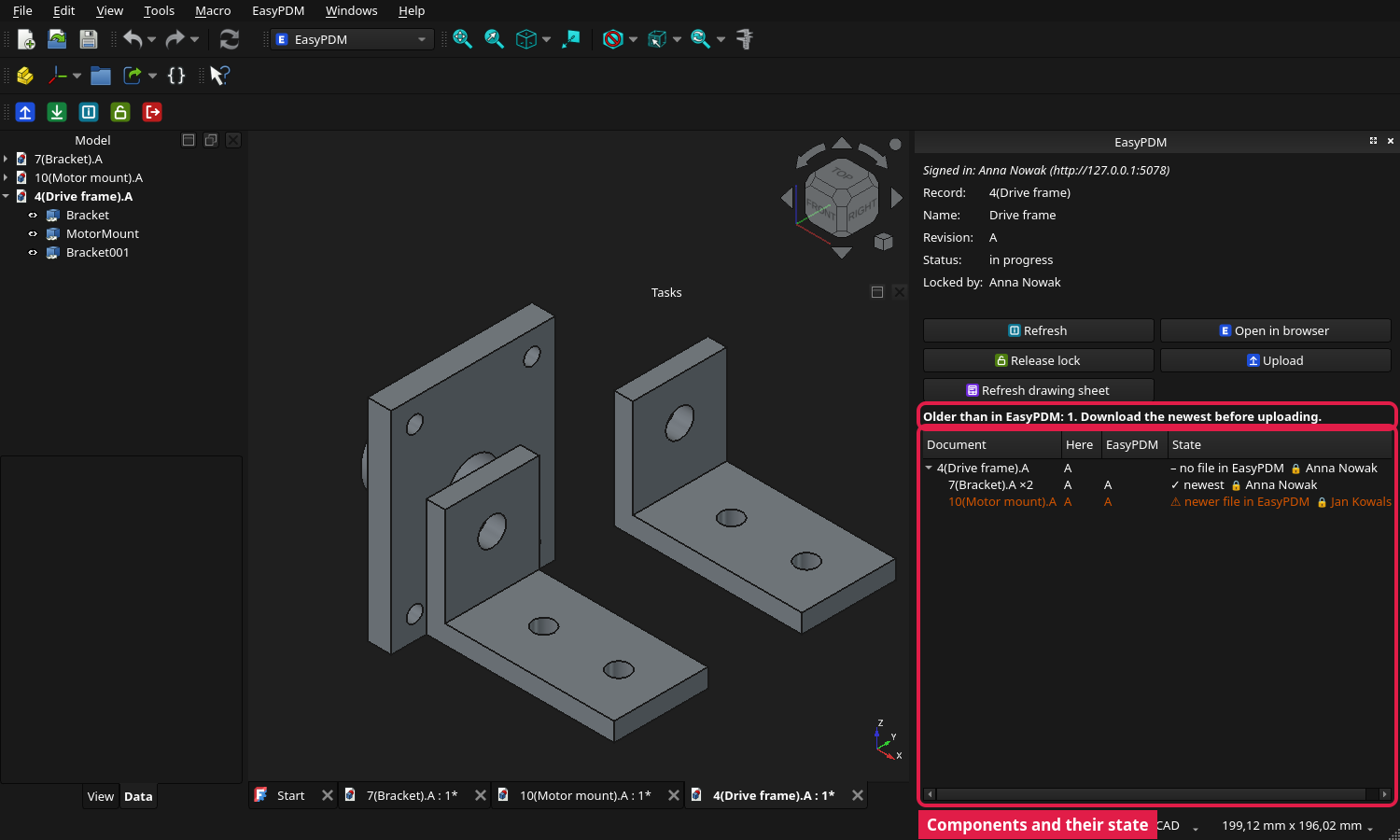
In short: the first release of EasyPDM for FreeCAD as a workbench of its own, in place of the macros. Upload, Download, Log in and Log out from the EasyPDM menu and toolbar; a document panel beside the model tree with the item's record, revision, status and lock, and for an assembly the tree of its components marked current or outdated; an Upload that refuses work built on outdated files; the login kept in the system's secret storage; English, Polish and German.
Step by step, with screenshots of where everything is: the wiki.
Install: Edit → Preferences → Addon Manager → Custom repositories, add https://github.com/pawelcel/EasyPDM-FreeCAD with branch main, then install EasyPDM in the Addon Manager and restart FreeCAD; or unpack the zip below into FreeCAD's Mod folder. Works with any EasyPDM server; signing in through the browser, "Open in browser" on the item itself and the outdated-component check need EasyPDM 0.9.
Added
- Document panel. EasyPDM → Document panel opens a dock beside the model tree showing the active document's item — record name, name, revision, status and who holds the lock — with buttons for Refresh, Open in browser (the item itself, on EasyPDM servers from 0.9), Lock, Release, Upload and Refresh drawing sheet. It follows the active document and asks the server only while it is open.
- Locking the active document's item, the same lock as in the browser; a refusal from the server (for example on a released item) is shown in words.
- Refresh drawing sheet fills the EasyPDM sheet with the item's current data without uploading the document.
- Edit → Preferences → EasyPDM: server address, download folder, the menu in every workbench, where the login is kept, and Log out.
- The EasyPDM menu shows who is signed in, and to which server, at its top.
- An icon for each command on the toolbar and in the menus.
- Which components are outdated. For an assembly, the document panel shows the tree of its components, each marked as the newest file in EasyPDM, changed here, not in EasyPDM yet, or with a newer file in EasyPDM (a new revision, or the same revision uploaded again), with who uploaded it and when, and who holds its lock. Upload writes a version stamp into each document it sends, so a file is recognised also after FreeCAD saves it again unchanged; files without one are recognised by their content. Needs an EasyPDM 0.9 server.
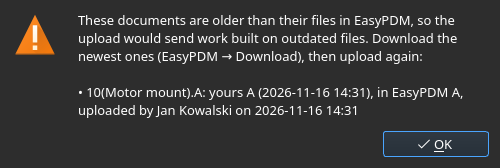
- Upload refuses work built on outdated files. When the document or one of its components is older than its file in EasyPDM, Upload stops before sending anything and lists them, so the newer files can be downloaded first instead of being overwritten or left out of the assembly.
- One button for the lock, one for the account. Lock for editing and Release lock are a single button in the toolbar, the menus and the panel, showing what a click does now and greyed out for a released or cancelled item or while someone else holds the lock; Log in and Log out are one button the same way.
Security
- The login token is kept in the system's secret storage. DPAPI on Windows, the keychain on macOS and the Secret Service (KWallet, GNOME Keyring…) through
secret-toolon Linux, per server, instead of FreeCAD's plain-text preferences. Without one it stays in the preferences, and the Report view says so once. A token left there by an earlier version is moved on first use, so nobody has to log in again.
Changed
- This repository is now the home of EasyPDM for FreeCAD. The add-on and the macros it runs moved here from
EasyPDM.FreeCad/in the EasyPDM repository, with their history, and this repository stopped being a generated copy: issues and changes belong here, and the add-on is released from here. It is laid out as FreeCAD's Addon Manager installs it (package.xml at the top, the code infreecad/EasyPDM/), so nothing has to be built. - The macros are no longer offered on their own; their code is now the add-on's modules.
upload.pyanddownload.pyhold what is particular to each,common.pywhat both used (settings, HTTP, login, translations), until now two copies of the same code; the drawing sheet issheet.py, whichtools/build_templates.pywrites instead of copying a block into both macros. Install the add-on instead of the macro files. - Translations are Qt
.ts/.qmfiles infreecad/EasyPDM/translations/, as in FreeCAD itself, instead of tables in the code, so a translator needs no Python and a new language needs no code change (tools/update_translations.py --add fr). Everything follows FreeCAD's language; the sign-in dialog and the command tooltips are now translated too. - Upload and Download no longer open a folder-and-account window on every run. Both use the download folder from Edit → Preferences → EasyPDM and ask for it once, with the system's folder picker, only while it is not set. Signing in and out and the server address belong to the menu and Preferences; when not signed in, Upload and Download start the same sign-in in the browser as EasyPDM → Log in, instead of the old user name and password window.