Repository navigation
Releases
EasyPDM for FreeCAD 0.9.0

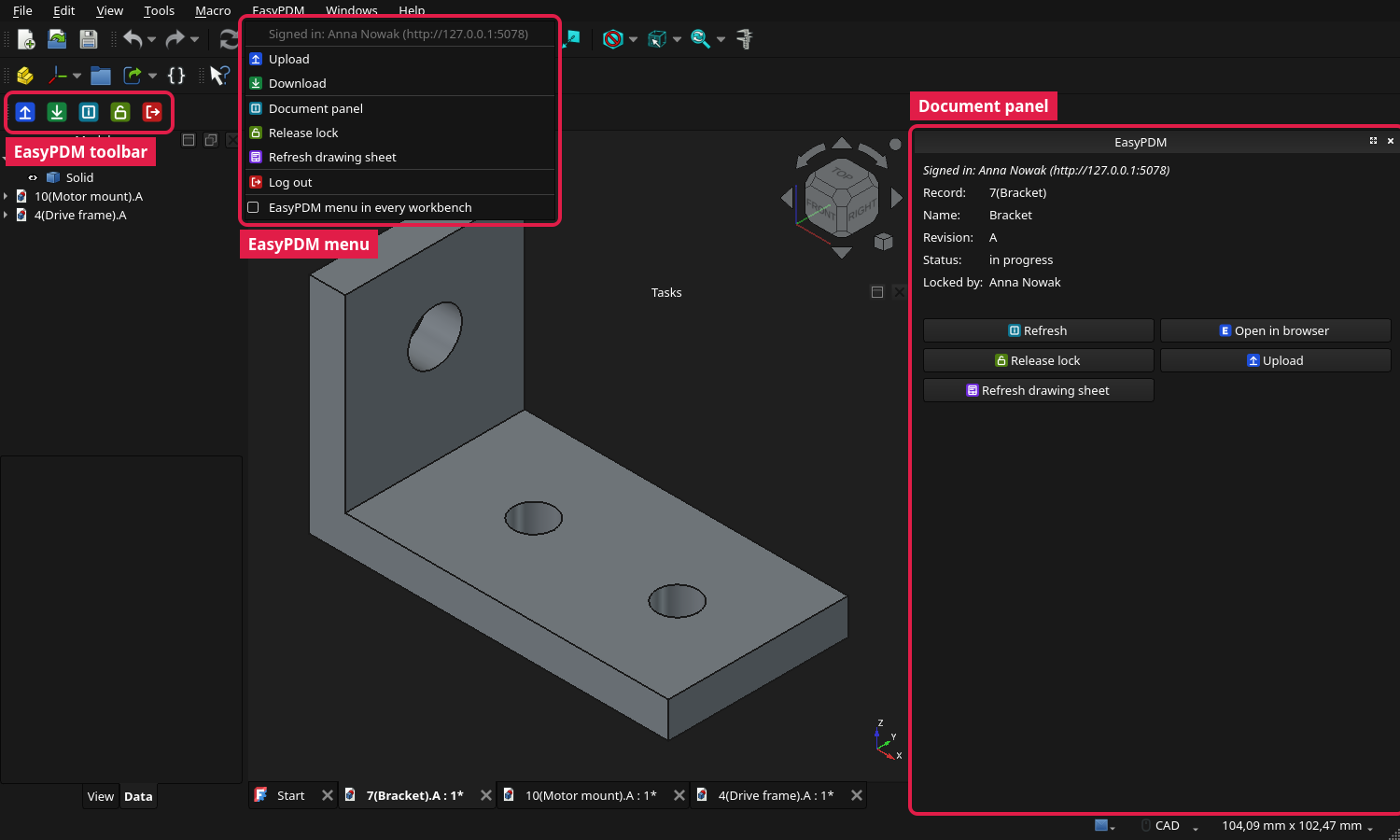
In short: the first release of EasyPDM for FreeCAD as a workbench of its own, in place of the macros. Upload, Download, Log in and Log out from the EasyPDM menu and toolbar; a document panel beside the model tree with the item's record, revision, status and lock, and for an assembly the tree of its components marked current or outdated; an Upload that refuses work built on outdated files; the login kept in the system's secret storage; English, Polish and German.
Step by step, with screenshots of where everything is: the wiki.
Install: Edit → Preferences → Addon Manager → Custom repositories, add https://github.com/pawelcel/EasyPDM-FreeCAD with branch main, then install EasyPDM in the Addon Manager and restart FreeCAD; or unpack the zip below into FreeCAD's Mod folder. Works with any EasyPDM server; signing in through the browser, "Open in browser" on the item itself and the outdated-component check need EasyPDM 0.9.
Added
- Document panel. EasyPDM → Document panel opens a dock beside the model tree showing the active document's item — record name, name, revision, status and who holds the lock — with buttons for Refresh, Open in browser (the item itself, on EasyPDM servers from 0.9), Lock, Release, Upload and Refresh drawing sheet. It follows the active document and asks the server only while it is open.
- Locking the active document's item, the same lock as in the browser; a refusal from the server (for example on a released item) is shown in words.
- Refresh drawing sheet fills the EasyPDM sheet with the item's current data without uploading the document.
- Edit → Preferences → EasyPDM: server address, download folder, the menu in every workbench, where the login is kept, and Log out.
- The EasyPDM menu shows who is signed in, and to which server, at its top.
- An icon for each command on the toolbar and in the menus.
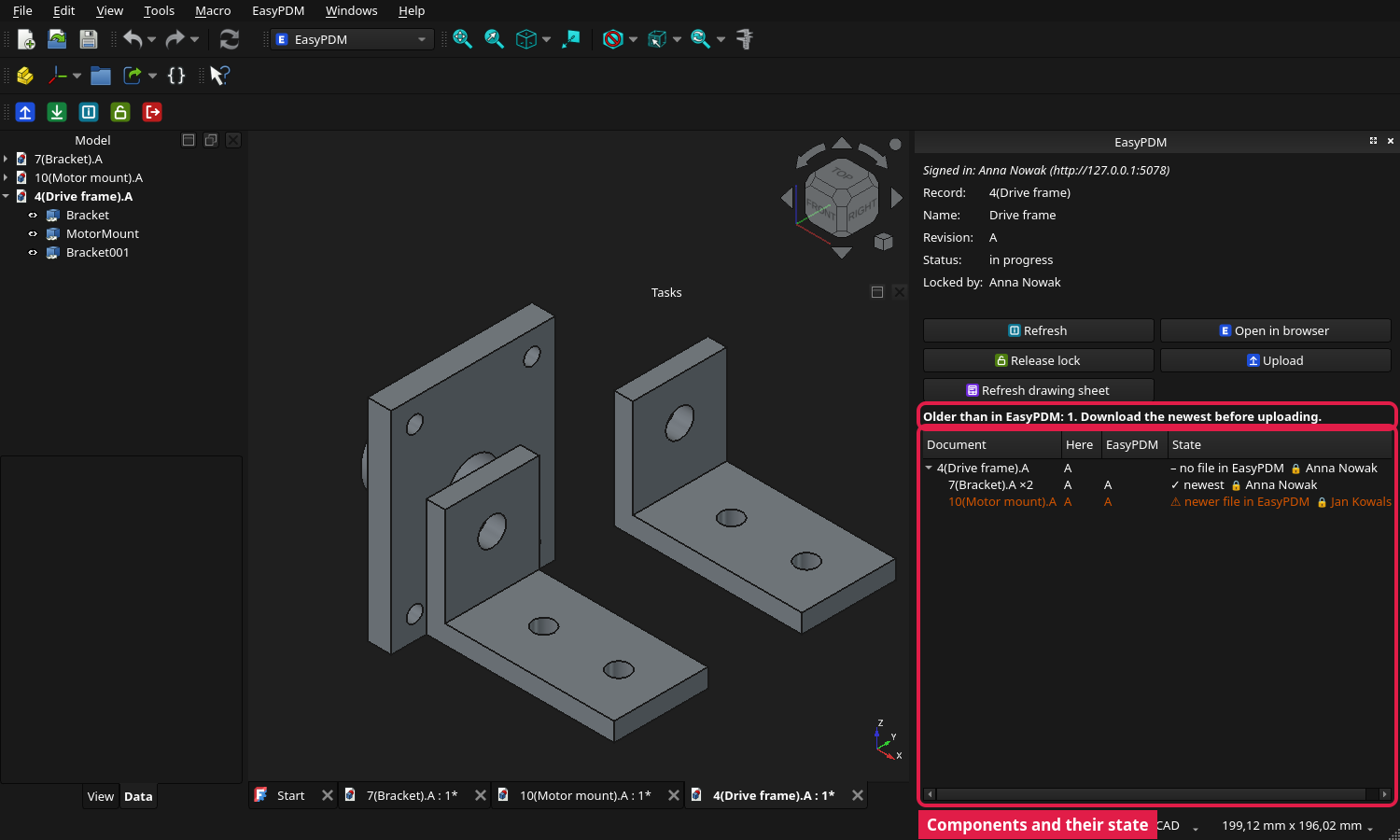
- Which components are outdated. For an assembly, the document panel shows the tree of its components, each marked as the newest file in EasyPDM, changed here, not in EasyPDM yet, or with a newer file in EasyPDM (a new revision, or the same revision uploaded again), with who uploaded it and when, and who holds its lock. Upload writes a version stamp into each document it sends, so a file is recognised also after FreeCAD saves it again unchanged; files without one are recognised by their content. Needs an EasyPDM 0.9 server.
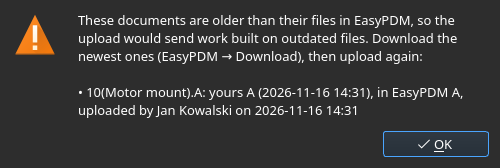
- Upload refuses work built on outdated files. When the document or one of its components is older than its file in EasyPDM, Upload stops before sending anything and lists them, so the newer files can be downloaded first instead of being overwritten or left out of the assembly.
- One button for the lock, one for the account. Lock for editing and Release lock are a single button in the toolbar, the menus and the panel, showing what a click does now and greyed out for a released or cancelled item or while someone else holds the lock; Log in and Log out are one button the same way.
Security
- The login token is kept in the system's secret storage. DPAPI on Windows, the keychain on macOS and the Secret Service (KWallet, GNOME Keyring…) through
secret-toolon Linux, per server, instead of FreeCAD's plain-text preferences. Without one it stays in the preferences, and the Report view says so once. A token left there by an earlier version is moved on first use, so nobody has to log in again.
Changed
- This repository is now the home of EasyPDM for FreeCAD. The add-on and the macros it runs moved here from
EasyPDM.FreeCad/in the EasyPDM repository, with their history, and this repository stopped being a generated copy: issues and changes belong here, and the add-on is released from here. It is laid out as FreeCAD's Addon Manager installs it (package.xml at the top, the code infreecad/EasyPDM/), so nothing has to be built. - The macros are no longer offered on their own; their code is now the add-on's modules.
upload.pyanddownload.pyhold what is particular to each,common.pywhat both used (settings, HTTP, login, translations), until now two copies of the same code; the drawing sheet issheet.py, whichtools/build_templates.pywrites instead of copying a block into both macros. Install the add-on instead of the macro files. - Translations are Qt
.ts/.qmfiles infreecad/EasyPDM/translations/, as in FreeCAD itself, instead of tables in the code, so a translator needs no Python and a new language needs no code change (tools/update_translations.py --add fr). Everything follows FreeCAD's language; the sign-in dialog and the command tooltips are now translated too. - Upload and Download no longer open a folder-and-account window on every run. Both use the download folder from Edit → Preferences → EasyPDM and ask for it once, with the system's folder picker, only while it is not set. Signing in and out and the server address belong to the menu and Preferences; when not signed in, Upload and Download start the same sign-in in the browser as EasyPDM → Log in, instead of the old user name and password window.