Repository navigation

In short: SolidWorks gets the same EasyPDM drawing sheet as FreeCAD — A3, A2 and A1 formats with the title block, processes and revision tables and the company logo filled in on upload. "Drawn by" and "approved by" now come from the server: whoever sends a drawing for review and whoever releases it are written into its PDF at that moment, for FreeCAD and SolidWorks alike. An administrator can limit which file types the server accepts and how large each may be, and an item's History shows who changed its name, properties and tags. Drawing sheets are complete for FreeCAD and SolidWorks; there is no Inventor version for now.
Added
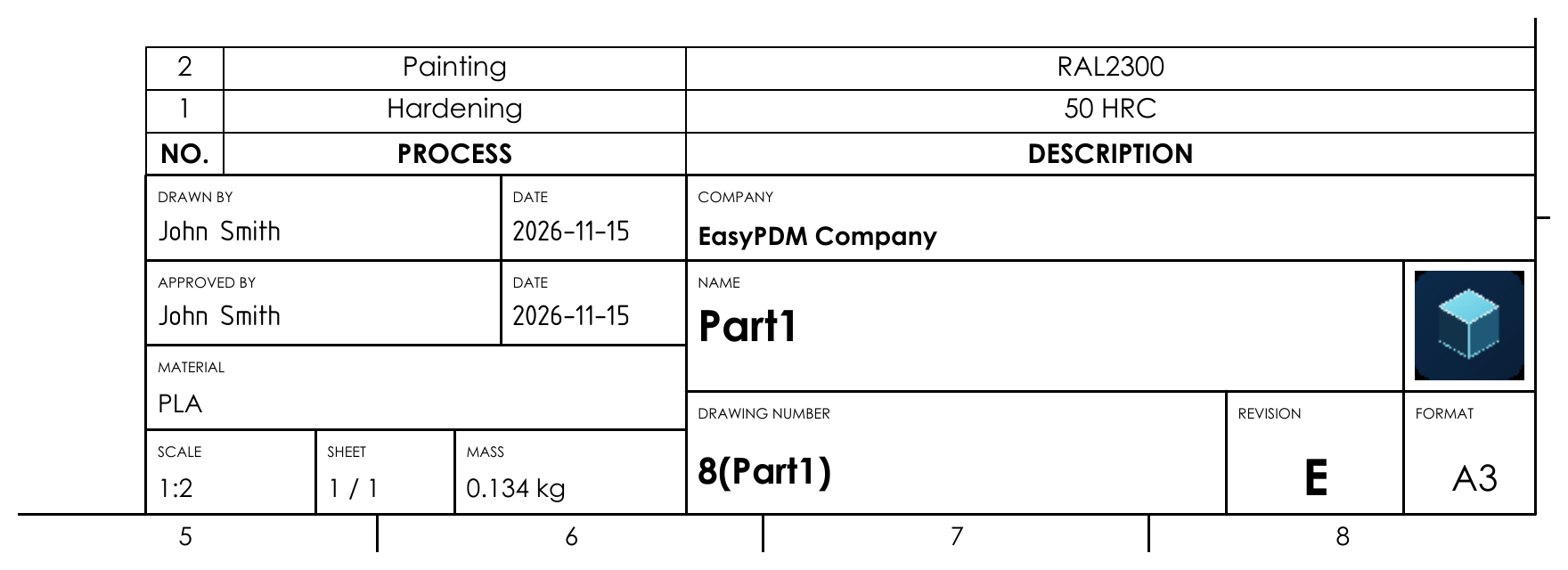
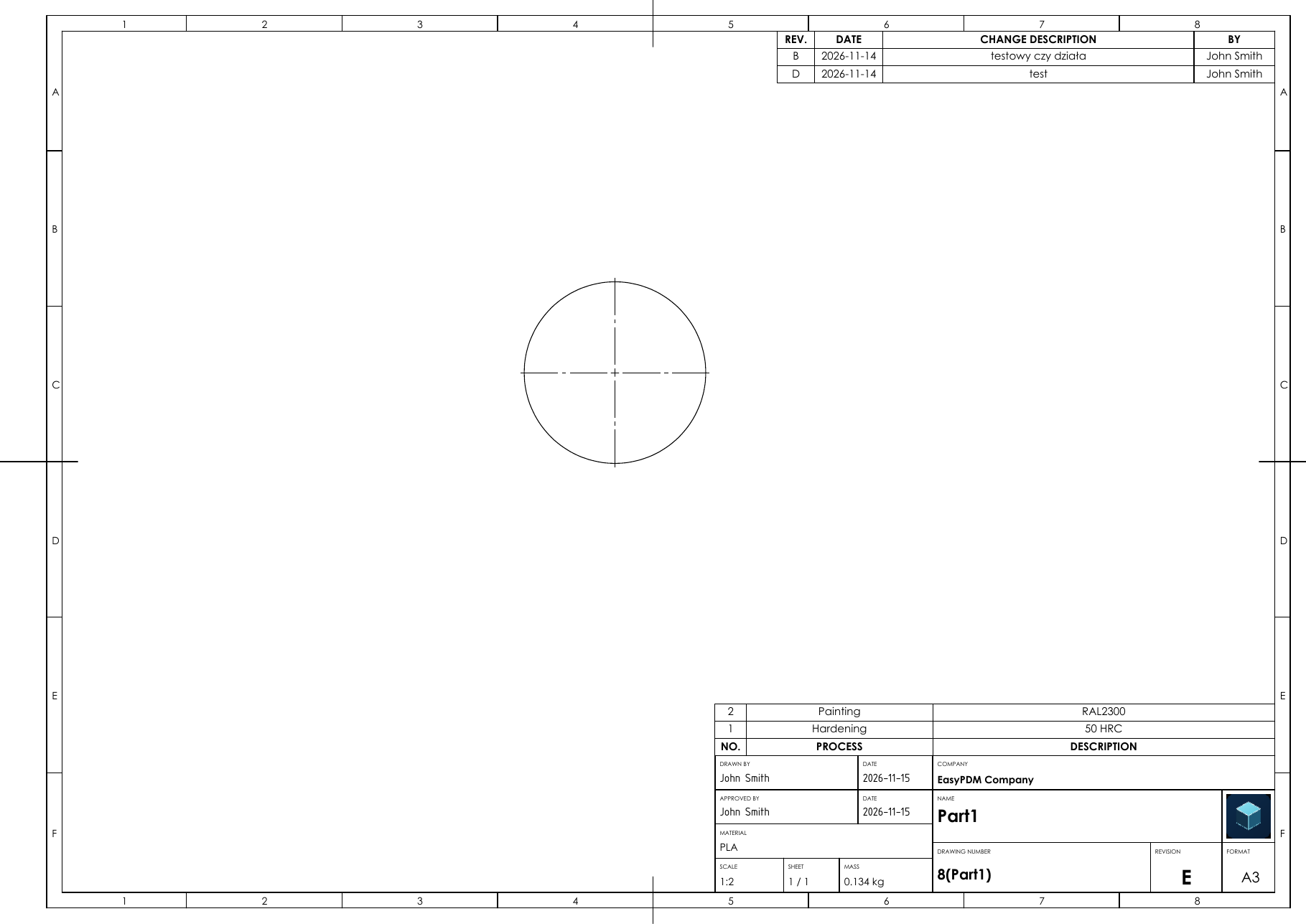
- Drawing sheets with a title block filled in from EasyPDM, in SolidWorks. A one-time setup macro, EasyPDMSheetFormat, draws the EasyPDM A3, A2 or A1 sheet format — the same frame, grid references and title block as in FreeCAD — and saves it as a sheet format and a drawing template. The SolidWorks Upload macro then fills in the title block of a drawing that uses it before saving and sending it: drawn by and approved by with dates, name with translations, drawing number, revision, material, mass, company, labels in the project's main language, a processes table above the title block, a revision table in the top-right corner and the company logo. Running Upload again replaces its own tables and logo and leaves the rest of the drawing alone. The finished sheet formats and drawing templates (A3, A2, A1) are attached to the release, so the setup macro is optional. That makes drawing sheets complete for FreeCAD and SolidWorks; there will be no Inventor version for now, as there is no Inventor licence to develop and test it on.
- Sending an item for review writes "drawn by" into its drawing PDF, and releasing it writes "approved by". Drawn by is whoever sends the current revision for review — the person who finished the drawing answers for it, not whoever exported it first — and approved by whoever releases it, each with the date of that moment. Neither is known when the drawing is uploaded, and a released item cannot be uploaded again, so the server writes them into the item's PDF at the status change, components moved along with an assembly included; the FreeCAD and SolidWorks Upload macros no longer fill in drawn by. Only a PDF the Upload macro exported from an EasyPDM A3, A2 or A1 sheet is touched (the macros now mark it as such); the stamped PDF replaces the original, whatever the fields showed is painted over, and any other PDF is left as it is. A PDF that cannot be stamped does not stop the status change.
- Allowed file types, each with its own size limit. Settings → File storage → Allowed file types lets an administrator list the extensions the server accepts, each with a limit in MB or none; with an empty list every file is accepted as before. Any other type is refused, and so is a file over its type's limit, in every place that stores a file — CAD macro uploads, attachments, project and client documents — and an oversized upload is stopped before it is written to disk. A button adds the types the CAD macros send, and the page warns when one of them is missing. The backup restore is not limited.
- An item's History now shows who changed its name, properties and tags, with the value before and after. Each write and its history row go in one statement or one transaction, so neither lands without the other. Only a real change is recorded: properties are compared as
jsonb(1.50 equals 1.5), so the mass and material a CAD macro sends on every save add nothing, and the price signature the server stamps (priceBy) is not a change of its own. Re-adding a tag the item has, removing one it lacks, removing a missing property or renaming to the same name add nothing either. An administrator deleting a tag from the whole database (Settings) leaves a "tag removed" line on every item that had it. Long values are cut at 60 characters in the panel. Properties appear under the names the item form uses (Material, Kind, Processes…), processes as what was added, changed or removed, and name translations as language codes with the names.
Changed
- The FORMAT field of the drawing title block lines up with the logo square above it and shows the sheet size larger. Its left edge moved 1 mm right, in line with the logo's, and "A3" / "A2" / "A1" is set at 5 mm instead of 3.5 so it fills the field; the REVISION field beside it is 1 mm wider. Applies to the FreeCAD templates and the SolidWorks sheet format alike; an existing drawing picks it up when FreeCAD Upload or Download refreshes its sheet, a SolidWorks sheet format when EasyPDMSheetFormat is run again.
- Settings → File storage is split into separate panels. Location, allowed file types, backup and restore, automatic backup and the danger zone each get their own panel instead of one long box, and the danger zone has a red outline; its description now names every category it can clear, processes and company included.
Fixed
- Uploading a part or assembly from SolidWorks or Inventor no longer replaces the drawing PDF. The macros asked whether to export a PDF for a part or assembly too, and a yes saved a picture of the 3D view into the item's PDF slot — the one that holds the drawing. A PDF is now exported only when a drawing is uploaded; the question is gone for parts and assemblies, and a PDF ticked in the browser form for them is skipped.
- The start-up migration lock is released by hand.
pg_advisory_lockbelongs to the database session, and a pooled connection keeps its session when it is closed: Npgsql resets it only when that connection is next rented. The lock therefore stayed held on an idle pooled connection, and the next start in the same process (or a second instance beside a running one) waited on it until the command timeout and failed.
Security
- Browser sessions are stored as a SHA-256 of their token, like CAD macro tokens. The
sessionstable held the cookie's token as it is, so anyone who could read the table — a backup copy, read-only database access, a dump — could sign in as every logged-in user. Migration 073 hashes existing sessions in place, so nobody is signed out.