Repository navigation
EasyPDM v0.9.0

In short: EasyPDM moves into the CAD programs themselves. FreeCAD gets an EasyPDM workbench, now in its own repository and released on its own (EasyPDM for FreeCAD 0.9.0), with a document panel that shows which components of an assembly are outdated and an Upload that refuses work built on them. SolidCraft gets Upload, Download, Log in and Log out in its Plugins menu, with assemblies of linked designs. Programs sign in by approving it in the browser instead of typing a password, and the server now remembers every CAD file version an item has had. SolidWorks gets an add-in, released on its own too (EasyPDM for SolidWorks 0.9.0): an EasyPDM tab and the same document panel and outdated-component check as FreeCAD.
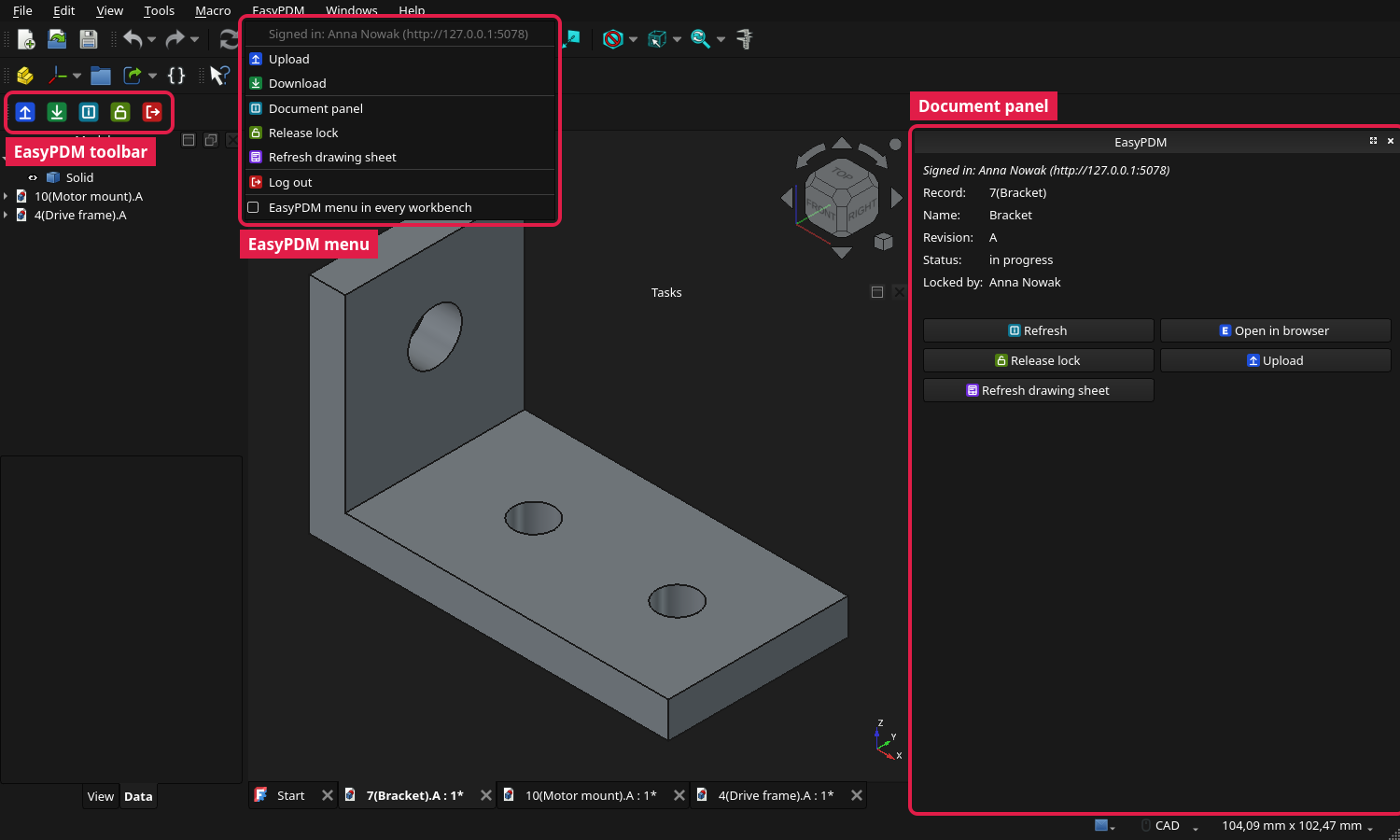
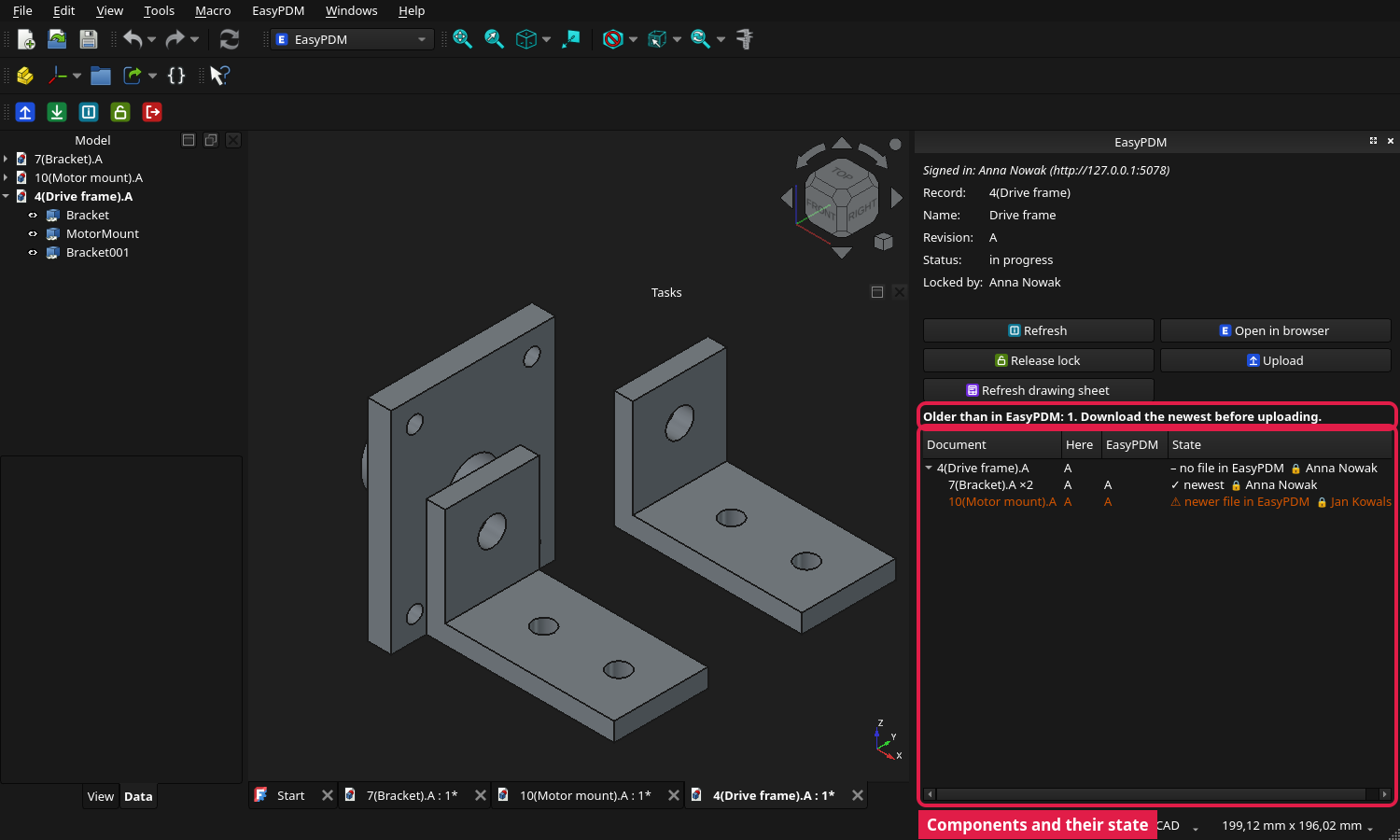
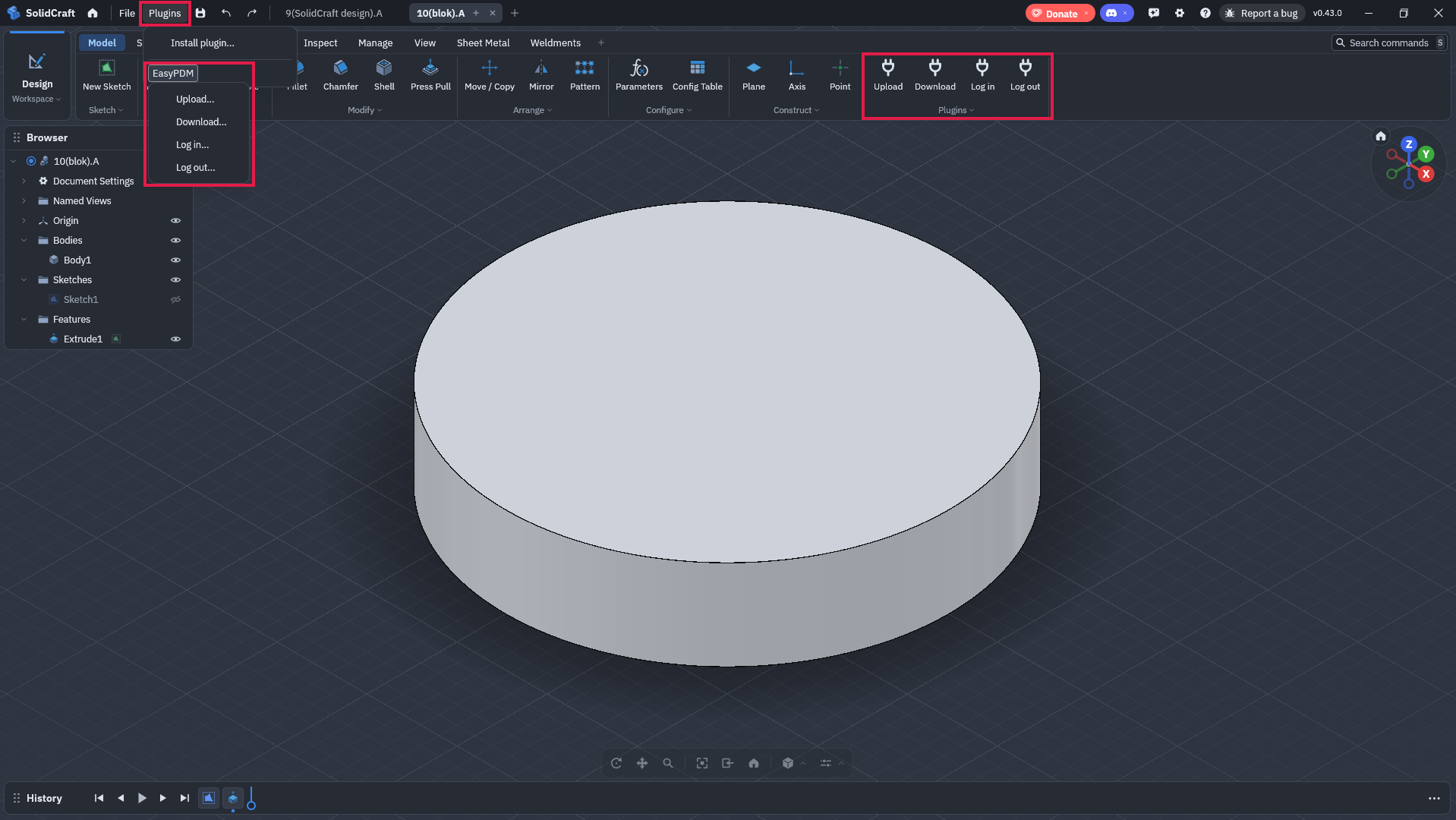
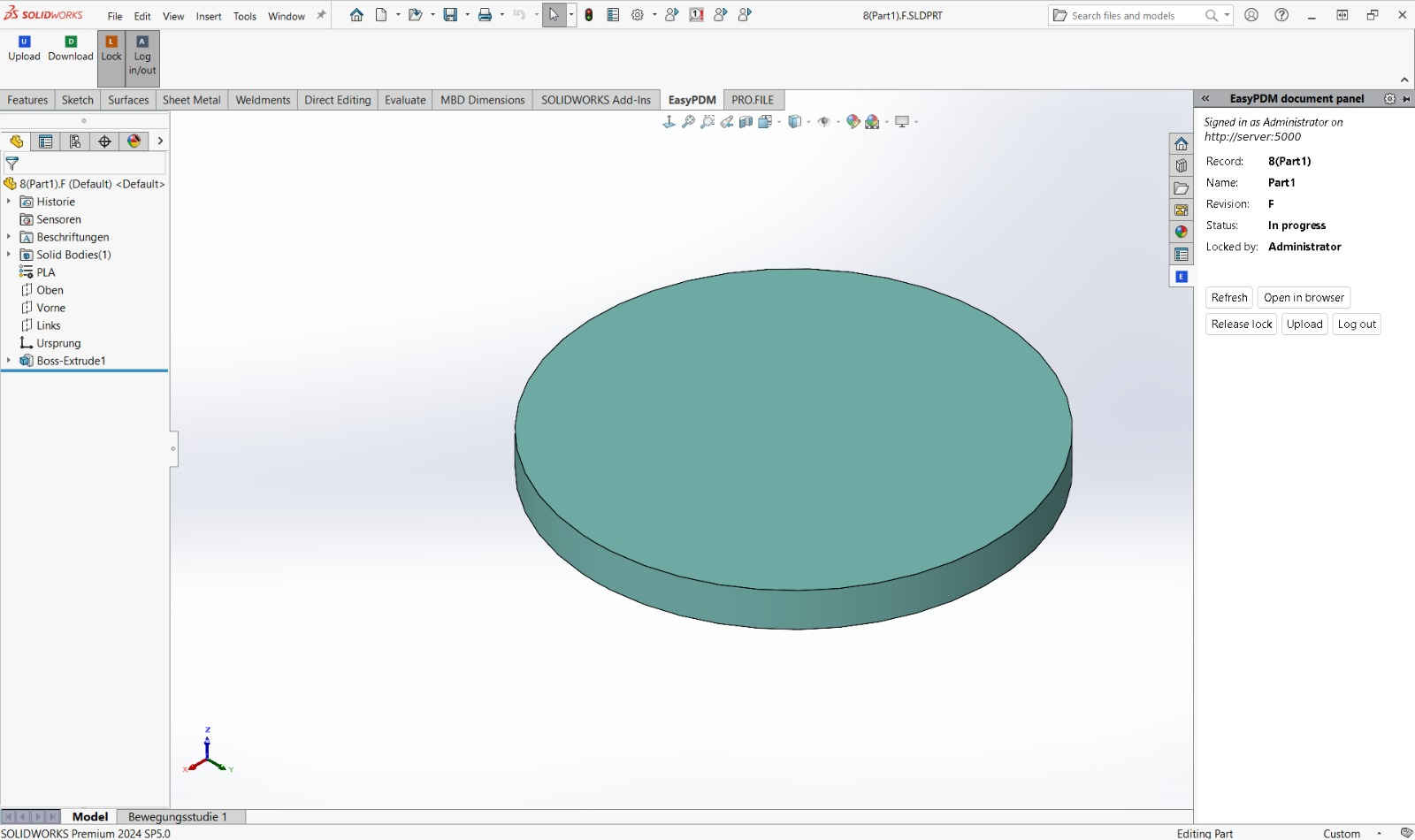
The FreeCAD add-on is released on its own: EasyPDM for FreeCAD 0.9.0, with a wiki showing where everything is. SolidCraft, installed step by step: SolidCraft on the wiki (the companion it needs is the EasyPDM_SolidCraft_Companion zip below); the other integrations: CAD Integrations. The SolidWorks add-in and its compiled macros come from EasyPDM for SolidWorks 0.9.0; the SolidWorks sheet formats and drawing templates (A3, A2, A1) are no longer attached to a release: take them from templates at that version.
Added
- SolidCraft integration: Upload, Download, Log in and Log out in SolidCraft's Plugins menu. Needs SolidCraft 0.43 or later (0.42 cannot grant a plugin the file access Upload needs). SolidCraft plugins run without network access, so the integration has two parts: an EasyPDM plugin that prepares each action in an outbox folder in Documents (the design as
.sc, a STEP and a request), and the new EasyPDM companion program on the same computer, which talks to the server the way the FreeCAD and SolidWorks macros do. A new design's item is created or picked in the browser through the same ticket flow; after its first upload the design remembers its item, and SolidCraft's part number and revision show the EasyPDM record name and revision. A released item gets a new revision only with a comment. The design goes up as<record name>.<revision>.scwith its STEP, a preview image and the mass. Download picks an item in the browser, saves its current.scin Documents/EasyPDM/designs with the item link written in, and opens it in the running SolidCraft when its control channel is on (Preferences > Assistant > Let AI agents connect).easypdm-companion setup-solidcraftprepares the plugin for the computer andeasypdm-companion autostartstarts the companion in the background at login, without a console window, reporting each outcome as a desktop notification; releases carry the companion for Windows and Linux as one self-contained program with the plugin package beside it. SolidCraft has no drawing workspace yet, so there is no title block or drawing PDF for it. - SolidCraft uploads and downloads show in the web app's transfer panel, file by file and as the assembly's tree, as FreeCAD's and SolidWorks' do.
- SolidCraft previews with a transparent background, and the browser brought to the front. The companion cuts the viewport's gradient out of SolidCraft's preview, so the item looks as one uploaded from FreeCAD on a light or dark theme; and when it hands a request to an EasyPDM tab already open, or opens one in a browser that is running, it brings the browser window up (KWin on KDE, also under Wayland; wmctrl or xdotool under X11; the window API on Windows).
- SolidCraft assemblies made of linked designs. Uploading an assembly first sends each design it links to as an item of its own — a new one is created or picked in the browser as a component, a released one is used as it is — then the assembly, whose BOM gets SolidCraft's quantities. The uploaded copy points at its components under their EasyPDM names, so Download brings the assembly and its linked designs into one folder and the links resolve, also when a component has moved on to a newer revision. Uploading the assembly again finds its components without the browser. Components inside a single design are not split into items.
- FreeCAD add-on: an EasyPDM workbench, in its own repository. Installed from pawelcel/EasyPDM-FreeCAD (Addon Manager custom repository, or the zip in its 0.9.0 release); its own changelog lists the details. Upload, Download, Log in and Log out from the EasyPDM workbench's menu and toolbar, and optionally from a menu in every workbench (off by default, as FreeCAD's Addon Index asks). EasyPDM for FreeCAD now lives and is released in pawelcel/EasyPDM-FreeCAD: add it under Edit → Preferences → Addon Manager → Custom repositories and install it from the Addon Manager. Its Upload and Download are the FreeCAD macros, unchanged; the macro files are no longer attached to EasyPDM releases, and running them on their own is no longer a supported way to install. Log in approves the sign-in in the browser (a password login is kept for servers older than 0.9). Menu texts follow FreeCAD's language (English, Polish, German).
- SolidWorks: an add-in with an EasyPDM tab, released on its own as EasyPDM for SolidWorks 0.9.0 from its own repository: Upload, Download, Lock and Log in/out on an EasyPDM tab in the CommandManager, and a document panel in the Task Pane with the item's record, revision, status and lock and, for an assembly, which components are outdated, with an Upload that refuses work built on them, as in FreeCAD. Log in is approved in the browser (
LoginInBrowserin the Upload macro), so the password never passes through SolidWorks. Without the add-in, the same commands can be put on toolbar buttons from the macros (Tools → Customize → Commands → Macro). - Inventor: log in through the browser. The Inventor Upload macro has the same
LoginInBrowserprocedure as the SolidWorks one, so Inventor can sign in without the password passing through it. - A link straight to an item.
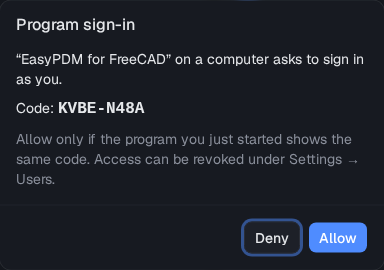
/?item=<id>opens that item in the whole-database view, also after the login screen; the FreeCAD add-on's "Open in browser" uses it. - Programs sign in by approval in the browser instead of a password. A program asks the server for a sign-in, opens EasyPDM in the browser, and the logged-in person sees which program asks and a code and allows or refuses it; the program then gets its own macro token, listed and revocable under Settings → Users like any macro login. The password never passes through the program. The EasyPDM companion uses it today; the FreeCAD and SolidWorks add-ins are meant to as well.
- The server knows every CAD file version an item has had. Each CAD file upload is recorded, also when a later upload of the same revision replaces the file, and
POST /api/items/cad-versionstells a CAD program whether its local copy of a component is the current file, an older one (with who uploaded the newer one and when) or one the server has never seen. CAD programs can stamp the file they send (contentVersion), so a file saved again unchanged is still recognised; files without a stamp are recognised by their content. The FreeCAD add-on uses it to show which components of an assembly are outdated and to refuse uploading work built on them.
Fixed
- The browser no longer shows the previous version after the server is updated. The page was sent without caching rules, so browsers kept the old one for hours on their own reckoning (seen as an "Open in browser" link from a CAD program landing on the start screen). The page is now checked on every load, while the bundle files, whose names change with every build, are kept for good.