Repository navigation
Releases
WallForge 0.8.0: GNOME, KDE, your own wallpapers

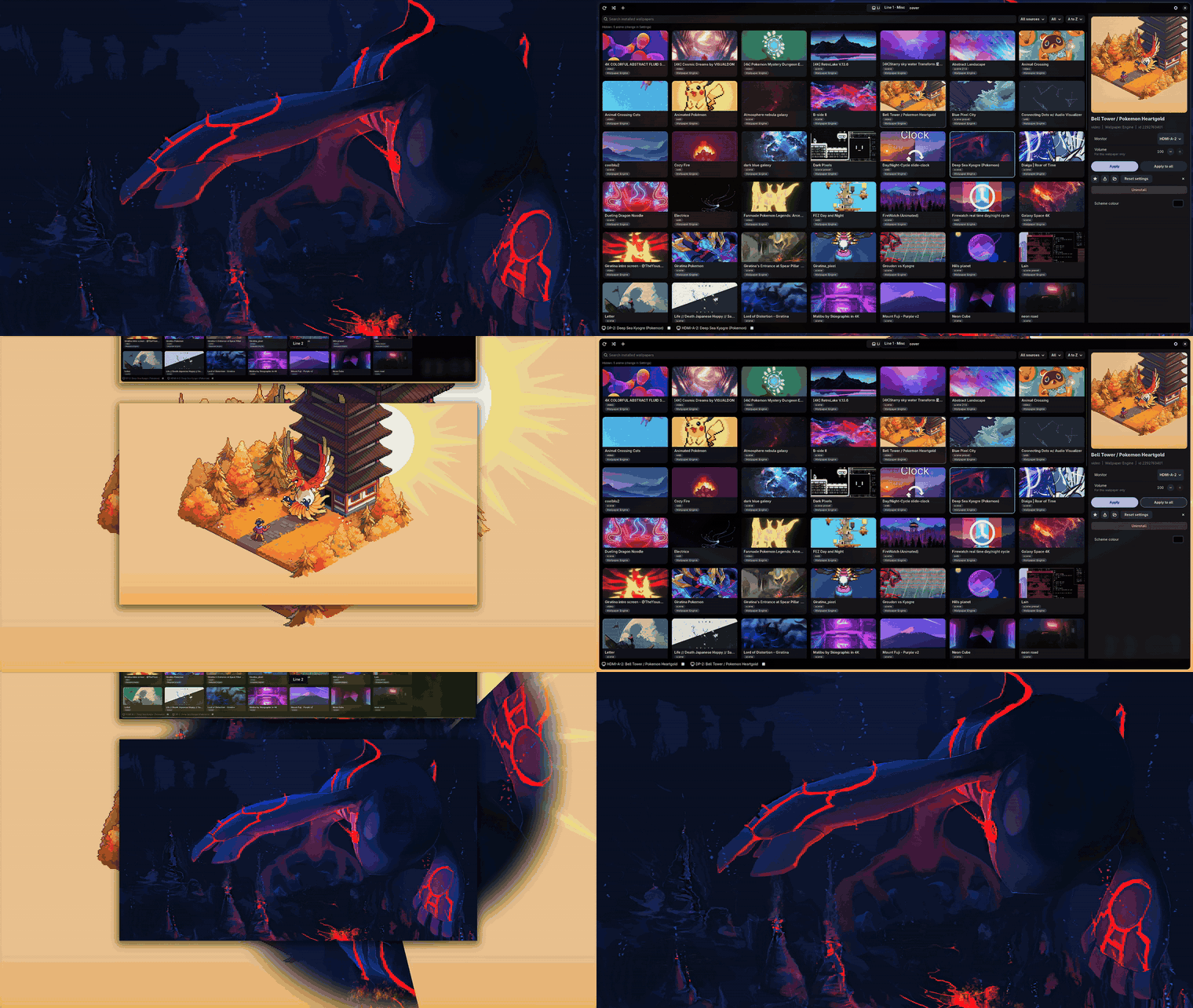
GNOME and KDE Plasma now work, plus your own videos and Lively Wallpaper packages, and free Wikimedia Commons videos in Discover.
Install on Arch / CachyOS: see the one-command install, or build from source on any Wayland desktop.
Found a bug, especially on GNOME or KDE? Please open an issue; I fix reported bugs quickly.
New
- GNOME 45+ support through a bundled GNOME Shell extension: the renderer runs as a hidden window (
--window,
chosen automatically on GNOME) and the extension shows it behind your windows, in the overview and in workspace
thumbnails. Settings > Setup has an "Install GNOME extension" button;install.shand the packages ship it too.
Tested on GNOME Shell 51 (video wallpapers); web wallpapers are not supported there yet. - Monitors are discovered through Mutter on GNOME, so the connector names match.
- KDE Plasma is documented as supported (tested on KWin 6.8). Correction: KWin has implemented
wlr-layer-shell
since Plasma 5.20, not 6.7 as 0.7.0's notes said. - Add your own wallpapers: the + button (or
wallforge --import FILE...) imports video files, images, a web
wallpaper folder or a Lively Wallpaper.zippackage into a local library next to your Workshop items. Videos
are linked, not copied (--copycopies). Lively zips are unpacked safely (no paths outside the folder, size cap). - Discover sources: a selector for Wallpaper Engine Workshop or Wikimedia Commons (free videos, public
domain / CC0 / CC BY / CC BY-SA only, with licence and author on the card and detail page, and an attribution line
saved in the project).wallforge --commonssearches from the terminal. - Source badges on every Discover and Library card (Wallpaper Engine, Lively, Local, Wikimedia), and a source
filter in the Library. - Uninstall for any installed wallpaper, with a confirmation, stopping it first if it is playing. Workshop items
open their Steam page to unsubscribe, since deleting the folder would just be re-downloaded.
Fixed
- Some scenes were drawn upside down (e.g. "Giratina's Entrance at Spear Pillar"): a layer that other objects
sample was drawn from its bottom-up render-target copy. - niri's blur/xray showed the preloaded next wallpaper instead of the visible one. The preloaded renderer now starts
--hidden(it loads and renders but presents nothing until it is switched to, still a ~28 ms switch), and the
wallpaper now sits on thebackgroundlayer by default, which is the layer niri's blur samples. - Window mode now renders at the monitor's size instead of the 1920x1048 work area, so the wallpaper is no longer
slightly stretched. Preloading is off in window mode.
WallForge 0.7.0

Install on Arch / CachyOS — see the one-command install, or build from source anywhere with a layer-shell Wayland compositor.
New
- Install with pacman: every release is built in an Arch container and published to a pacman repository on
GitHub Pages, sosudo pacman -Sy wallforgeinstalls and updates it. The AUR recipe is ready for when AUR
registration reopens. - Check my setup (Settings > Updates) and
wallforge --doctor: one read-only check of Wayland, GTK,
layer-shell, the renderer, Wallpaper Engine assets, the Workshop library, ffmpeg/VAAPI, WebKit, the config and the
last run's log, with what to fix. Works without a display; exits 1 on failures. - Copy diagnostics (Settings > Updates): version, GPU, the selected wallpaper's renderer report and its log, ready
to paste into an issue. tools/bench.sh <workshop-id>reproduces the README's performance table on your machine, against an idle baseline.
Changed
- Settings > Setup describes the app as it is: WallForge's own renderer plays video, scene and web wallpapers. The
linux-wallpaperengine row only appears when it is installed, as an optional fallback switch. Status icons render
on every icon theme, and paths are shown relative to your home folder.
Documentation
- README rebuilt: one-command install, demo animation, measured performance, FAQ, supported desktops, keyboard
shortcuts, roadmap. Two stale claims fixed. - New
docs/comparison.md,SECURITY.mdandCODE_OF_CONDUCT.md; issue forms ask for--doctorand Copy
diagnostics output. tools/ui_screenshots.shregenerates the README screenshots off-screen (GTK Broadway), without touching your
desktop or your wallpapers.
Full changelog: https://github.com/pgm1207/WallForge/blob/main/CHANGELOG.md
WallForge 0.6.0
WallForge 0.6.0
New
- Wallpaper rotation: Settings > Playback changes the wallpaper every N minutes, at random or in library order,
optionally only through favourites and optionally with a different wallpaper on each screen.Ctrl+Shift+Nrotates
immediately.
Performance and battery
- Render resolution (Settings > Effects and power): scene wallpapers can be drawn at 25–100% of the screen size
and upscaled with one linear blit. Videos and web wallpapers are unaffected. - Battery saving: while discharging, the frame rate is capped at 30 fps and the render scale at 75% (on by
default); optionally pause every wallpaper on battery and resume when you plug in. - Web wallpapers follow the reduced frame rate too.
Compatibility
- Audio-reactive wallpapers: the system's audio output is captured (PipeWire/PulseAudio monitor, no microphone)
and fed to theg_AudioSpectrumuniforms, so visualisers and spectrum effects move with your music. Capture starts
only when a scene's shaders ask for it and can be turned off in Settings. - Text layers: effect chains (glow, outline, shadow) now run on text, point sizes match the wallpapers' previews, date/time
formatpatterns are expanded (strftime,
{year}-style and Cafe-styledd MMM yyyy), and a custom font that cannot be found is named in the log instead of
silently falling back. - Effect chains that use copy passes (a pass with no material),
#requiremodule directives, engine buffers such as
_alias_lightCookie, or JSON with trailing commas now load instead of being skipped. The fluid-simulation Gengar
wallpaper renders its full effect stack. - Effects can now sample another layer's rendered image (
_rt_imageLayerComposite_*), including layers that are
hidden in the scene. Shadow Keep's moon and the pixel-cyberpunk xray scene render their missing content instead of
a blurry or black area.
Stability
- Crash watchdog: a renderer that dies unexpectedly is restarted. After three restarts in five minutes the screen
is left idle with a "stopped after repeated crashes" note in the playing bar, instead of a restart loop.
Documentation
- README: "Performance and battery" section; renderer README documents
--scale. .coderabbit.yamlso pull requests are reviewed by CodeRabbit with project-specific hints.
Verified
- Every installed scene wallpaper except one 3D scene starts cleanly with nothing skipped (76 of 77 in the test library).
- The renderer test suite (25 tests), the Python unit tests and lint are green in CI.
Full changelog: https://github.com/pgm1207/WallForge/blob/main/CHANGELOG.md
Wallforge 0.4.0
Wallforge 0.4.0: one native renderer for video and scene wallpapers
Self-contained. Wallforge's own Rust renderer (wallforge-render) now plays video and scene wallpapers. linux-wallpaperengine is no longer required (it stays an optional fallback).
- Scene wallpapers on the native renderer: layers, multi-pass effects, shader translation, sprite-sheet animation, your property edits and image slots. About 67 of 77 tested real scenes looked right in headless checks. Particles, text layers and a few effects are still missing, and 3D scenes are detected and refused.
- Auto scaling is the default: wallpapers fill the screen, ultrawide art is cropped to fit 16:9, portrait art stays whole. Fill, fit and stretch remain in Settings.
- Ultrawide wallpapers are allowed on 16:9 screens by default.
- Sharper palette and overview backdrop: Wallforge now gives Noctalia and other palette tools a screen-sized render of the wallpaper instead of the small preview.
- Fixes: scenes with unset image properties no longer fail with
open None; clearer banner while the renderer builds, and a hint when Rust is missing. - Video: VAAPI zero-copy decode, PipeWire audio, gapless loop (from 0.3.0).
Update: git installs update themselves (Restart now). Manual: git pull && cd render && cargo build --release.
Needs: Rust (cargo) and clang to build the renderer, ffmpeg, libva, and your own Wallpaper Engine assets for scenes.
Wallforge 0.3.0
Wallforge 0.3.0
New: native renderer (beta). wallforge-render is a small Rust renderer that plays video wallpapers without linux-wallpaperengine: VAAPI hardware decode, zero-copy GPU import, frame-callback pacing (stops decoding when hidden). Switch it on in Settings > Setup; scene wallpapers still use linux-wallpaperengine.
Measured on an RX 9070 XT (one wallpaper, 10 s average): 4K HEVC uses about 2.5% of one CPU core with hardware decode (50% with software), and GPU load stays around 6%.
install.shand the AUR recipe now build the renderer (needs Rust, ffmpeg, libva).- Git installs rebuild it automatically after an update.
- Discover hides the Girls tag along with Anime, same as the Library.
Not covered yet: audio in the native renderer, scene wallpapers.
Wallforge 0.2.0
Wallforge 0.2.0
A GTK4/libadwaita front end for Wallpaper Engine wallpapers on Linux (niri, Hyprland, Sway and others).
New
- Automatic updates (git installs): checks at start and every 6 hours, pulls in the background, verifies the new code loads, rolls back if not, then offers "Restart now". Switch it off in Settings > Updates.
- Setup assistant that fetches the Wallpaper Engine assets (pinned, SHA-256 verified DepotDownloader; no credentials handled).
- Palette backends: Noctalia, matugen, wallust, pywal or a custom command.
- Multi-compositor monitor detection, ultrawide and anime filters, autostart at login.
- Random wallpaper button, sort options, crash toast with a log view, new logo and shortcuts.
- AUR package recipe in
packaging/aur/(wallforge-git).
Install
git clone https://github.com/pgm1207/wallforge && cd wallforge && ./install.sh
Arch: cd packaging/aur && makepkg -si