Repository navigation
Releases
v1.8.0

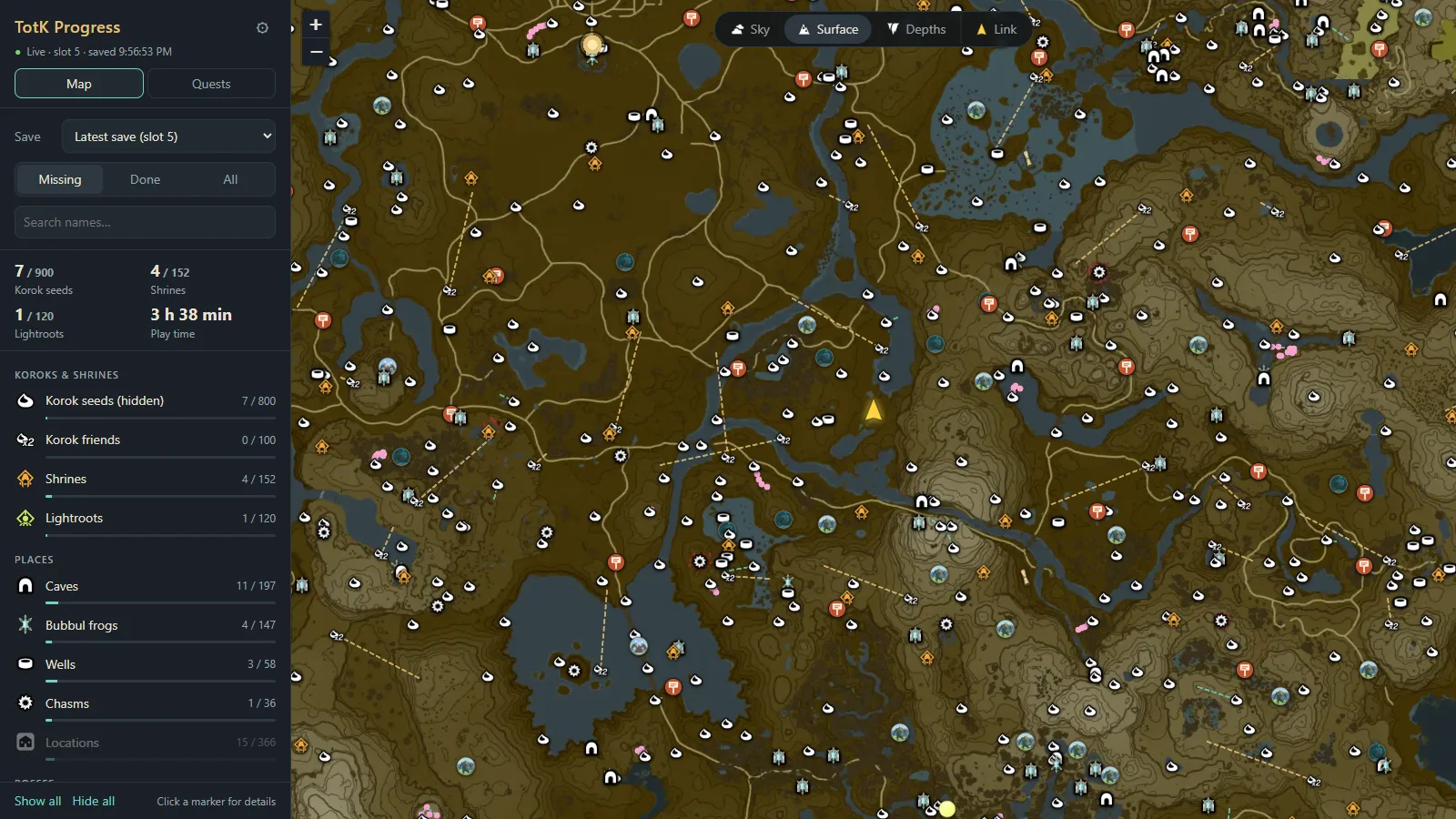
A companion map for TotK Recomp (the native PC port of Tears of the Kingdom). It reads your save while you play and shows what you still haven't found, plus every quest and where to start it. Everything is built from your own game files, and nothing is downloaded.
What's new in 1.8.0
- Outfits tab. Every armor piece in the game (135, in 52 sets) with its picture: whether you have it and how far you've upgraded it, the Great Fairy upgrade materials and rupees for each level with how many of each you're carrying, and where to get it: the shop and its price (rupees, or poes at the Bargainer statues) or the treasure chest it's in. Show on map marks the shop or chest and switches to the sky, surface or Depths as needed. Filters: Missing, Have, Upgrade, All. The armor and material names follow your game language; the tab's own labels and the set names are English for now.
- Map tiles no longer trigger download managers. With a download manager such as IDM installed, map tiles could pop up "download file" dialogs and never show on the map. They're now sent as images. Thanks to @eUnisk for finding and fixing it (#4).
The first start after updating rebuilds the map data from your game files (about a minute; the map pictures are kept).
Get started
You need TotK Recomp installed with your game files (tested with game versions 1.2.1 and 1.4.3).
Windows
- Download
TotKProgressMap.exebelow and put it anywhere (to update, replace the old exe). - Run it. Windows may say it's an unrecognized app. Click More info, then Run anyway (the exe isn't code-signed).
- Pick your TotK Recomp folder (the one with
totk.exe); it's usually found automatically. Then click Set up. The first setup takes about a minute.
Linux / Steam Deck (needs glibc 2.35 or later: Ubuntu 22.04, Debian 12, Fedora 36, SteamOS 3)
- Download
TotKProgressMap-linux-x86_64below. chmod +x TotKProgressMap-linux-x86_64, then run it (or double-click it). The setup page opens in your browser.- Pick your TotK Recomp folder and click Set up. Stop the app with ⚙ → Quit app.
FAQ
Is it safe for my save? The app only reads your save; it never writes to it or to the game. It goes online only to load the map library (Leaflet) from a CDN and, unless you turn it off, to check GitHub for a new version.
My antivirus complained. Unsigned apps made with PyInstaller, like this one, often trip a couple of the less common engines. Earlier versions showed 2 of 71 engines on VirusTotal (Bkav Pro and SecureAge, with generic labels), with every major engine reporting them clean. The source is all in this repository, and GitHub Actions builds both files from it.
Does it work with Ryujinx, yuzu or other emulators? Not yet. The map, the collectibles and the quests are built from TotK Recomp's game files.
How do I close it? On Windows, close the window; running the exe again brings it back to the front. On Linux, use ⚙ → Quit app.
Known limits
Tested on Windows with game versions 1.2.1 and 1.4.3. The Linux build passes an automatic start-up test but hasn't been tried by players yet. Please open an issue with your system, game version and language if something looks wrong.
SHA-256 of TotKProgressMap.exe: 346bd6e7739d98078d9f7a3259d7d618dafbbec85dd0ed674d97bc15f31283c5
SHA-256 of TotKProgressMap-linux-x86_64: ae3f7f94bb3d1ba51342af040ab8d69b0dc56786fd54d0d06629039bef5d17ca
Full Changelog: v1.7.0...v1.8.0
Contributors

Assets 4
v1.7.0: spoiler-free mode, new-version notice
A companion map for TotK Recomp (the native PC port of Tears of the Kingdom). It reads your save while you play and shows what you still haven't found, plus every quest and where to start it. Everything is built from your own game files, and nothing is downloaded.
What's new in 1.7.0
- Spoiler-free mode. Tick the box at the top of the map legend and everything you haven't found yet becomes a plain ?: no name, no chest contents, no Korok puzzle or route. Things you've found keep their icons and details. All the ? markers share one Undiscovered filter, so the filters and the search can't give away what each one is. It's off by default.
- New-version notice. The app now tells you when a newer version is out, with a link to download it. It asks GitHub for the latest release when it starts and every 12 hours; nothing is downloaded or installed, and nothing about you or your game is sent. Turn it off in ⚙ → Updates. (You'll see it from the next release on.)
Your map data is kept: no rebuild after updating.
Get started
You need TotK Recomp installed with your game files (tested with game versions 1.2.1 and 1.4.3).
Windows
- Download
TotKProgressMap.exebelow and put it anywhere (to update, replace the old exe). - Run it. Windows may say it's an unrecognized app. Click More info, then Run anyway (the exe isn't code-signed).
- Pick your TotK Recomp folder (the one with
totk.exe); it's usually found automatically. Then click Set up. The first setup takes about a minute.
Linux / Steam Deck (needs glibc 2.35 or later: Ubuntu 22.04, Debian 12, Fedora 36, SteamOS 3)
- Download
TotKProgressMap-linux-x86_64below. chmod +x TotKProgressMap-linux-x86_64, then run it (or double-click it). The setup page opens in your browser.- Pick your TotK Recomp folder and click Set up. Stop the app with ⚙ → Quit app.
FAQ
Is it safe for my save? The app only reads your save; it never writes to it or to the game. It goes online only to load the map library (Leaflet) from a CDN and, unless you turn it off, to check GitHub for a new version.
My antivirus complained. Unsigned apps made with PyInstaller, like this one, often trip a couple of the less common engines. Earlier versions showed 2 of 71 engines on VirusTotal (Bkav Pro and SecureAge, with generic labels), with every major engine reporting them clean. The source is all in this repository, and GitHub Actions builds both files from it.
Does it work with Ryujinx, yuzu or other emulators? Not yet. The map, the collectibles and the quests are built from TotK Recomp's game files.
How do I close it? On Windows, close the window; running the exe again brings it back to the front. On Linux, use ⚙ → Quit app.
Known limits
Tested on Windows with game versions 1.2.1 and 1.4.3. The Linux build passes an automatic start-up test but hasn't been tried by players yet. Please open an issue with your system, game version and language if something looks wrong.
SHA-256 of TotKProgressMap.exe: b4c623f3ee2e63586b6d2bc28c2e5b78a2d40d80445aa84ae18fd7350d99ab99
SHA-256 of TotKProgressMap-linux-x86_64: bd4b2bdf4088a70508fc68e0f47daa25a25047d560e44dd3295ec2c5b35d795e
Full Changelog: v1.6.0...v1.7.0
v1.6.0: chests, Dragon's Tears, towers, all languages, Linux
A companion map for TotK Recomp (the native PC port of Tears of the Kingdom). It reads your save while you play and shows what you still haven't found, plus every quest and where to start it. Everything is built from your own game files, and nothing is downloaded.
What's new in 1.6.0
- Chests. All 85 armor chests, named by the armor inside, and every other treasure chest (1,177, off by default; turn them on in the legend). Each popup says what's inside, and opened chests are ticked off.
- Dragon's Tears (12), Skyview Towers (15, activated or not) and Great Fairies (4, revived or not).
- Shrines you found but haven't finished get a small badge.
- Lynels (34). The game doesn't keep track of defeated Lynels because they come back after every Blood Moon, so they're shown as locations only.
- Every language the game has. Names, places, items and the full quest texts come from your game files in any of the game's 15 languages, and the app's own buttons are translated to match. It follows TotK Recomp's language by default; pick another in ⚙ → Language. The interface translations are drafts: corrections from native speakers are very welcome as pull requests.
- Linux build (
TotKProgressMap-linux-x86_64), for TotK Recomp on Linux and the Steam Deck (Desktop Mode). It shows the map in your browser. New, so please report anything odd. - Fixed: the phone QR code area showed up in Settings while sharing was off.
The first start after updating rebuilds the map data and icons from your game files (about 30 seconds; the map itself is kept).
Get started
You need TotK Recomp installed with your game files (tested with game versions 1.2.1 and 1.4.3).
Windows
- Download
TotKProgressMap.exebelow and put it anywhere. - Run it. Windows may say it's an unrecognized app. Click More info, then Run anyway (the exe isn't code-signed).
- Pick your TotK Recomp folder (the one with
totk.exe); it's usually found automatically. Then click Set up. The first setup takes about a minute.
Linux / Steam Deck (needs glibc 2.35 or later: Ubuntu 22.04, Debian 12, Fedora 36, SteamOS 3)
- Download
TotKProgressMap-linux-x86_64below. chmod +x TotKProgressMap-linux-x86_64, then run it (or double-click it). The setup page opens in your browser.- Pick your TotK Recomp folder and click Set up. Stop the app with ⚙ → Quit app.
FAQ
Is it safe for my save? The app only reads your save; it never writes to it or to the game. Its only internet use is loading the map library (Leaflet) from a CDN.
My antivirus complained. Unsigned apps made with PyInstaller, like this one, often trip a couple of the less common engines. The VirusTotal scan of this exe shows 2 of 71 engines (Bkav Pro and SecureAge, with generic labels), and every major engine reports it clean, including Microsoft Defender, Kaspersky, ESET, BitDefender, Avast, Norton, Malwarebytes and McAfee. The source is all in this repository, and GitHub Actions builds both files from it.
Does it work with Ryujinx, yuzu or other emulators? Not yet. The map, the collectibles and the quests are built from TotK Recomp's game files.
What do the quest statuses mean?
- Not started: unlocked. Talk to the quest giver (the blue ! on the map).
- Queued: the same character gives you an earlier quest of theirs first.
- Locked: the game hasn't unlocked it yet. The app names the quests it's waiting on.
How do I close it? On Windows, close the window; running the exe again brings it back to the front. On Linux, use ⚙ → Quit app.
Known limits
Tested on Windows with game versions 1.2.1 and 1.4.3, English game files, plus German and Japanese text. The Linux build passes an automatic start-up test but hasn't been tried by players yet. Please open an issue with your system, game version and language if something looks wrong.
SHA-256 of TotKProgressMap.exe: b756f4ecc87b39df0b6327a59c78952c9b0ddde3d9d1f5d771f1d4174acdddd8
v1.5.2
A companion map for TotK Recomp (the native PC port of Tears of the Kingdom). It reads your save while you play and shows what you still haven't found, plus every quest and where to start it. Everything is built from your own game files, and nothing is downloaded.
What's new in 1.5.2
- Smoother zooming with many categories on: about 3 times smoother with everything shown (30 instead of 11 frames per second). Markers no longer animate their size or use shadow effects; they look the same.
New in 1.5.1
- Phones start with their own, smaller legend (shrines, lightroots, caves, Bubbul frogs), separate from the PC.
- Fixed: on phones, the side panel had no way to close. Use the ×, tap the map beside it, or press Esc.
New in 1.5.0
- Open on your phone. Click the phone button at the bottom right of the map, choose Turn on, and scan the QR code. Phones and tablets on the same Wi-Fi or network as your PC get the same live map, quests and progress, read-only. They can't change settings or anything on your PC. Windows may ask once to allow the app on private networks.
- A lighter map at first. It starts with shrines, lightroots, caves, Bubbul frogs and the collectibles (about 455 markers instead of about 2,000). Turn on more in the legend, or click Show all.
- Your view is remembered. The legend, filters, layer and tab are saved by the app and kept after you close it.
- Fixed two brown squares on the sky map. Existing installs redraw the map once on the next start, which takes about 30 seconds.
Get started
You need TotK Recomp installed with your game files (tested with game versions 1.2.1 and 1.4.3).
- Download
TotKProgressMap.exebelow and put it anywhere. - Run it. Windows may say it's an unrecognized app. Click More info, then Run anyway (the exe isn't code-signed).
- Pick your TotK Recomp folder (the one with
totk.exe); it's usually found automatically. Then click Set up. The first setup takes about a minute.
FAQ
Is it safe for my save? The app only reads your save; it never writes to it or to the game. Its only internet use is loading the map library (Leaflet) from a CDN.
My antivirus complained. Unsigned apps made with PyInstaller, like this one, often trip a couple of the less common engines. The v1.4.0 scan showed 2 of 71 engines (Bkav Pro and SecureAge), and every major engine reported it clean. The source is all in this repository, and GitHub Actions builds the exe from it.
Does it work with Ryujinx, yuzu or other emulators? Not yet. The map, the collectibles and the quests are built from TotK Recomp's game files.
What do the quest statuses mean?
- Not started: unlocked. Talk to the quest giver (the blue ! on the map).
- Queued: the same character gives you an earlier quest of theirs first.
- Locked: the game hasn't unlocked it yet. The app names the quests it's waiting on.
How do I close it? Close the window. Running the exe again brings it back to the front.
Known limits
Tested with game versions 1.2.1 and 1.4.3, English game files. Please open an issue with your game version and language if something looks wrong.
SHA-256 of TotKProgressMap.exe: be54f2646c48f8e9d274006366598ba84ffb67e6f761863234019014392aa430
v1.5.1
A companion map for TotK Recomp (the native PC port of Tears of the Kingdom). It reads your save while you play and shows what you still haven't found, plus every quest and where to start it. Everything is built from your own game files, and nothing is downloaded.
What's new in 1.5.1
- Phones start with their own, smaller legend (shrines, lightroots, caves, Bubbul frogs), separate from the PC.
- Fixed: on phones, the side panel had no way to close. Use the ×, tap the map beside it, or press Esc.
New in 1.5.0
- Open on your phone. Click the phone button at the bottom right of the map, choose Turn on, and scan the QR code. Phones and tablets on the same Wi-Fi or network as your PC get the same live map, quests and progress, read-only. They can't change settings or anything on your PC. Windows may ask once to allow the app on private networks.
- A lighter map at first. It starts with shrines, lightroots, caves, Bubbul frogs and the collectibles (about 455 markers instead of about 2,000). Turn on more in the legend, or click Show all.
- Your view is remembered. The legend, filters, layer and tab are saved by the app and kept after you close it.
- Fixed two brown squares on the sky map. Existing installs redraw the map once on the next start, which takes about 30 seconds.
Get started
You need TotK Recomp installed with your game files (tested with v0.3.13, game version 1.2.1).
- Download
TotKProgressMap.exebelow and put it anywhere. - Run it. Windows may say it's an unrecognized app. Click More info, then Run anyway (the exe isn't code-signed).
- Pick your TotK Recomp folder (the one with
totk.exe); it's usually found automatically. Then click Set up. The first setup takes about a minute.
FAQ
Is it safe for my save? The app only reads your save; it never writes to it or to the game. Its only internet use is loading the map library (Leaflet) from a CDN.
My antivirus complained. Unsigned apps made with PyInstaller, like this one, often trip a couple of the less common engines. The v1.4.0 scan showed 2 of 71 engines (Bkav Pro and SecureAge), and every major engine reported it clean. The source is all in this repository, and GitHub Actions builds the exe from it.
Does it work with Ryujinx, yuzu or other emulators? Not yet. The map, the collectibles and the quests are built from TotK Recomp's game files.
What do the quest statuses mean?
- Not started: unlocked. Talk to the quest giver (the blue ! on the map).
- Queued: the same character gives you an earlier quest of theirs first.
- Locked: the game hasn't unlocked it yet. The app names the quests it's waiting on.
How do I close it? Close the window. Running the exe again brings it back to the front.
Known limits
Tested on one PC: TotK Recomp v0.3.13, game version 1.2.1, English game files. Please open an issue with your game version and language if something looks wrong.
SHA-256 of TotKProgressMap.exe: 890a4df561175fb077c24f28fc7514e5c0f526b6c55cc8a8b911b718bf8cb4d6
v1.5.0
A companion map for TotK Recomp (the native PC port of Tears of the Kingdom). It reads your save while you play and shows what you still haven't found, plus every quest and where to start it. Everything is built from your own game files, and nothing is downloaded.
What's new in 1.5.0
- Open on your phone. Click the phone button at the bottom right of the map, choose Turn on, and scan the QR code. Phones and tablets on the same Wi-Fi or network as your PC get the same live map, quests and progress, read-only. They can't change settings or anything on your PC. Windows may ask once to allow the app on private networks.
- A lighter map at first. It starts with shrines, lightroots, caves, Bubbul frogs and the collectibles (about 455 markers instead of about 2,000). Turn on more in the legend, or click Show all.
- Your view is remembered. The legend, filters, layer and tab are saved by the app and kept after you close it.
- Fixed two brown squares on the sky map. Existing installs redraw the map once on the next start, which takes about 30 seconds.
Get started
You need TotK Recomp installed with your game files (tested with v0.3.13, game version 1.2.1).
- Download
TotKProgressMap.exebelow and put it anywhere. - Run it. Windows may say it's an unrecognized app. Click More info, then Run anyway (the exe isn't code-signed).
- Pick your TotK Recomp folder (the one with
totk.exe); it's usually found automatically. Then click Set up. The first setup takes about a minute.
FAQ
Is it safe for my save? The app only reads your save; it never writes to it or to the game. Its only internet use is loading the map library (Leaflet) from a CDN.
My antivirus complained. Unsigned apps made with PyInstaller, like this one, often trip a couple of the less common engines. The v1.4.0 scan showed 2 of 71 engines (Bkav Pro and SecureAge), and every major engine reported it clean. The source is all in this repository, and GitHub Actions builds the exe from it.
Does it work with Ryujinx, yuzu or other emulators? Not yet. The map, the collectibles and the quests are built from TotK Recomp's game files.
What do the quest statuses mean?
- Not started: unlocked. Talk to the quest giver (the blue ! on the map).
- Queued: the same character gives you an earlier quest of theirs first.
- Locked: the game hasn't unlocked it yet. The app names the quests it's waiting on.
How do I close it? Close the window. Running the exe again brings it back to the front.
Known limits
Tested on one PC: TotK Recomp v0.3.13, game version 1.2.1, English game files. Please open an issue with your game version and language if something looks wrong.
SHA-256 of TotKProgressMap.exe: 35023a420085a39832ffbe0d1819bc4be750c173ef336a7b1015908adea8fdfa
v1.4.0
A companion map for TotK Recomp (the native PC port of Tears of the Kingdom). It reads your save while you play and shows what you still haven't found, plus every quest and where to start it.
What it shows
- Collectibles on the sky, surface and depths maps: 800 Korok seeds, with each puzzle's type and the route for flower trails, races and target landings; 100 Korok friends, with the route to their partner; 152 shrines, 120 lightroots, 147 Bubbul frogs, caves, wells and chasms; 366 places; bosses; Sage's Wills; old maps; Addison's signs; schema stones; Yiga schematics.
- All 253 quests, with their status, the current step's text and its destination, and a marker where each quest giver stands.
- Where Link was at your last save. The map updates by itself every time the game saves.
Get started
You need TotK Recomp installed with your game files (tested with v0.3.13, game version 1.2.1).
- Download
TotKProgressMap.exebelow and put it anywhere. - Run it. Windows may say it's an unrecognized app. Click More info, then Run anyway (the exe isn't code-signed).
- Pick your TotK Recomp folder (the one with
totk.exe); it's usually found automatically. Then click Set up. The first setup takes about a minute.
What's new in 1.4.0
- Everything comes from your own game files, and nothing is downloaded. That includes the Korok puzzle types and routes, which used to come from a third-party file.
- Added the places the game has no index for: the Bargainer Statues, Forge Constructs and the Smithing Construct.
- Added the 147th Bubbul frog, in the Ancient Zora Waterworks.
- Fixed black patches on the map at some zoom levels.
- Fixed: in ⚙ Settings, Save no longer rebuilds everything when the game folder hasn't changed.
FAQ
Is it safe for my save?
The app only reads your save; it never writes to it or to the game. Its only internet use is loading the map library (Leaflet) from a CDN.
Is the exe safe? My antivirus complained.
VirusTotal scan of this exe: 2 of 71 engines flag it (Bkav Pro and SecureAge, with generic labels). Every major engine reports it clean, including Microsoft Defender, Kaspersky, ESET, BitDefender, Avast, Norton, Malwarebytes and McAfee. Unsigned apps made with PyInstaller, like this one, often trip a couple of engines. The source is all in this repository, and GitHub Actions builds the exe from it.
Does it work with Ryujinx, yuzu or other emulators?
Not yet. The map, the collectibles and the quests are built from TotK Recomp's game files. So you need TotK Recomp installed, even if you only want the map.
Why don't you just ship the map?
The map images, icons and texts are Nintendo's. The app builds them on your PC from your own copy of the game, and the repository contains none of them.
What do the quest statuses mean?
- Not started: unlocked. Go talk to the quest giver (the blue ! on the map).
- Queued: unlocked, but the same character gives you an earlier quest of theirs first.
- Locked: the game hasn't unlocked it yet. The app names the quests it's waiting on.
How do I close it?
Close the window. Running the exe again while it's open brings the window back to the front.
Known limits
Tested on one PC: TotK Recomp v0.3.13, game version 1.2.1, English game files. Other versions and languages should work, because everything is read from the game files. If something looks wrong, please open an issue with your game version and language.
SHA-256 of TotKProgressMap.exe: 4e0924e3ca87fc69cbc525e034bc9e79c7b9759389f33ed85cd45090cd7bce63