Repository navigation
RestoreSafe 2.0.0

RestoreSafe 2.0 is a new major version: a Windows application instead of the console menu, differential backups, a checksum check of every restored file, and new ways to unlock your backups if you lose your password or your YubiKey.
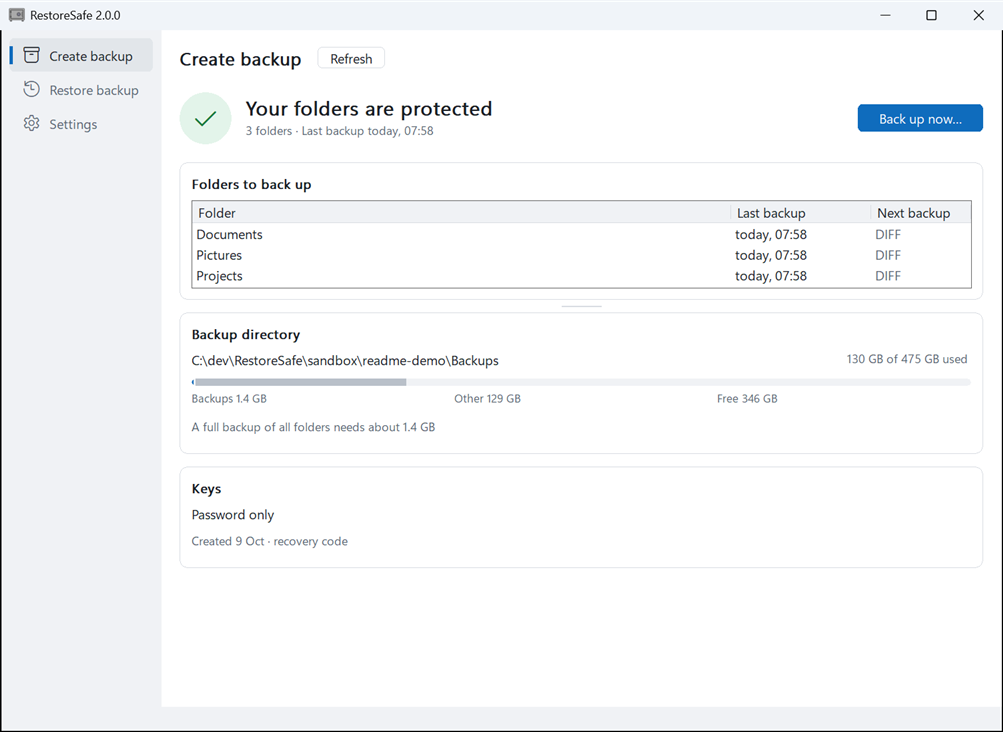
Highlights
- See at a glance whether your folders are protected. Create backup shows the state of every folder and what the next backup will do. Restore backup lists every backup run with its log. Settings shows your configuration and reloads it. Every backup, restore and verification shows its plan before it starts, then its progress with Cancel, then the result per folder.
- Differential backups. RestoreSafe decides per folder whether a full or a differential backup is due, and shows its choice before the backup starts. Full backup instead forces a full backup.
- Every restored file is checked. Each backup contains an encrypted list of its files with their SHA-256 checksums. Restore and verify check every file against it, so you get back exactly what you backed up, or a clear report of what is damaged.
- No lockout. Add a spare YubiKey and a recovery code. New keys + full backup… changes your password or replaces a lost YubiKey, and older backups keep opening with the old credentials.
- Keep your backups anywhere. File contents, names, folders, sizes and times are encrypted with AES-256-GCM. Any change to a backup file is detected, so an external drive, a NAS or any cloud storage can hold your backups without you having to trust it. See More than a copy of your files.
Also new: restore of file times and attributes, exclude patterns, a reminder when a backup is overdue, a startup check that reports incomplete or interrupted backups, and support for the keyboard, screen readers, display scaling and high contrast. Restoring to a network share is more than twice as fast.
Before you update from 1.x
- 2.0 cannot restore backups made by 1.x, and 1.x cannot restore 2.0 backups. Keep RestoreSafe 1.0.2 as long as you keep 1.x backups. 2.0 never changes or deletes them, and its startup check reminds you that they are there.
- Start from the new
config-SAMPLE.yaml. RestoreSafe 2.0 refuses settings it doesn't know. A 1.xconfig.yamlthat containsio_diagnosticsdoesn't load until you remove that line (log_level: "debug"now includes the I/O diagnostics). - Your first 2.0 backup creates new keys and a full backup of every folder.
The steps are in Updating from RestoreSafe 1.x to 2.0.
Download
- Download
RestoreSafe-2.0.0.zipbelow. - Extract it to any folder and rename
config-SAMPLE.yamltoconfig.yaml.
RestoreSafe is not signed with a paid code-signing certificate, so on first start Windows may show "Windows protected your PC" (SmartScreen, "unknown publisher"). Click More info, then Run anyway. Windows asks only on the first start of a downloaded version.
On Windows 11 with Smart App Control turned on, Windows may block RestoreSafe without offering Run anyway. Smart App Control allows only programs that are signed or known to Microsoft. To run RestoreSafe, turn it off in Windows Security → App & browser control → Smart App Control settings. On older Windows 11 versions it can only be turned on again by reinstalling Windows.
Optional, for checking that the download is unchanged: download SHA256SUMS.txt into the same folder as the ZIP and run this in PowerShell there. It prints True:
(Get-FileHash .\RestoreSafe-2.0.0.zip).Hash -eq (Get-Content .\SHA256SUMS.txt).Split(' ')[0]Requires Windows 64-bit; for a YubiKey, Windows 11 version 22H2 or later. Built with Go 1.27.2.
The full list of changes is in the CHANGELOG.