Repository navigation

QuickFaceBlur v1.0.0 — macOS & Windows Release
Blur every face in a group photo in 0.04s — 100% offline, zero cloud uploads.


1-Click Direct Downloads
| Platform | Direct Download | Size | Quick Install Guide |
|---|---|---|---|
| macOS (Apple Silicon M1–M4) | 📥 QuickFaceBlur_macOS_arm64_v1.0.0.dmg | 128 MB | Open .dmg and drag QuickFaceBlur.app to Applications |
| Windows 10 / 11 (Installer) | 📥 QuickFaceBlur_Setup_v1.0.0.exe | 111 MB | Run setup wizard (adds Desktop & Start Menu shortcuts) |
| Windows 10 / 11 (Portable) | 📥 QuickFaceBlur_Win11_Portable_v1.0.0.zip | 128 MB | Extract ZIP anywhere and run QuickFaceBlur.exe directly |
First-Launch Tip (Open-Source Community Builds):
- macOS: If Gatekeeper prompts on first launch, run
xattr -cr /Applications/QuickFaceBlur.appin Terminal or click Open Anyway in System Settings → Privacy & Security.- Windows: If SmartScreen appears, click More info → Run anyway.
Visual Showcase
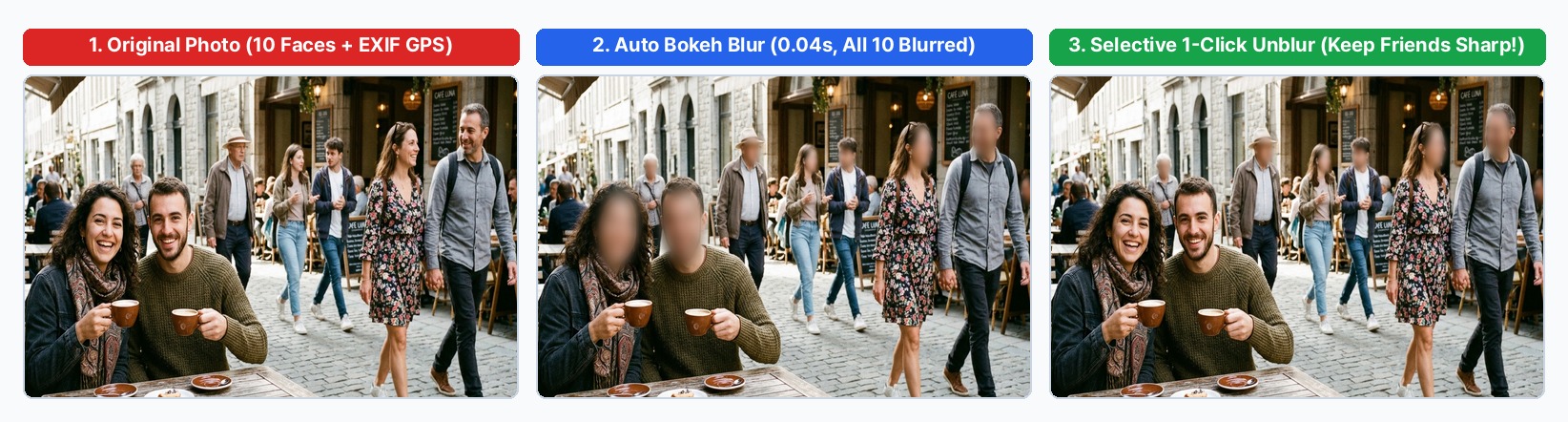
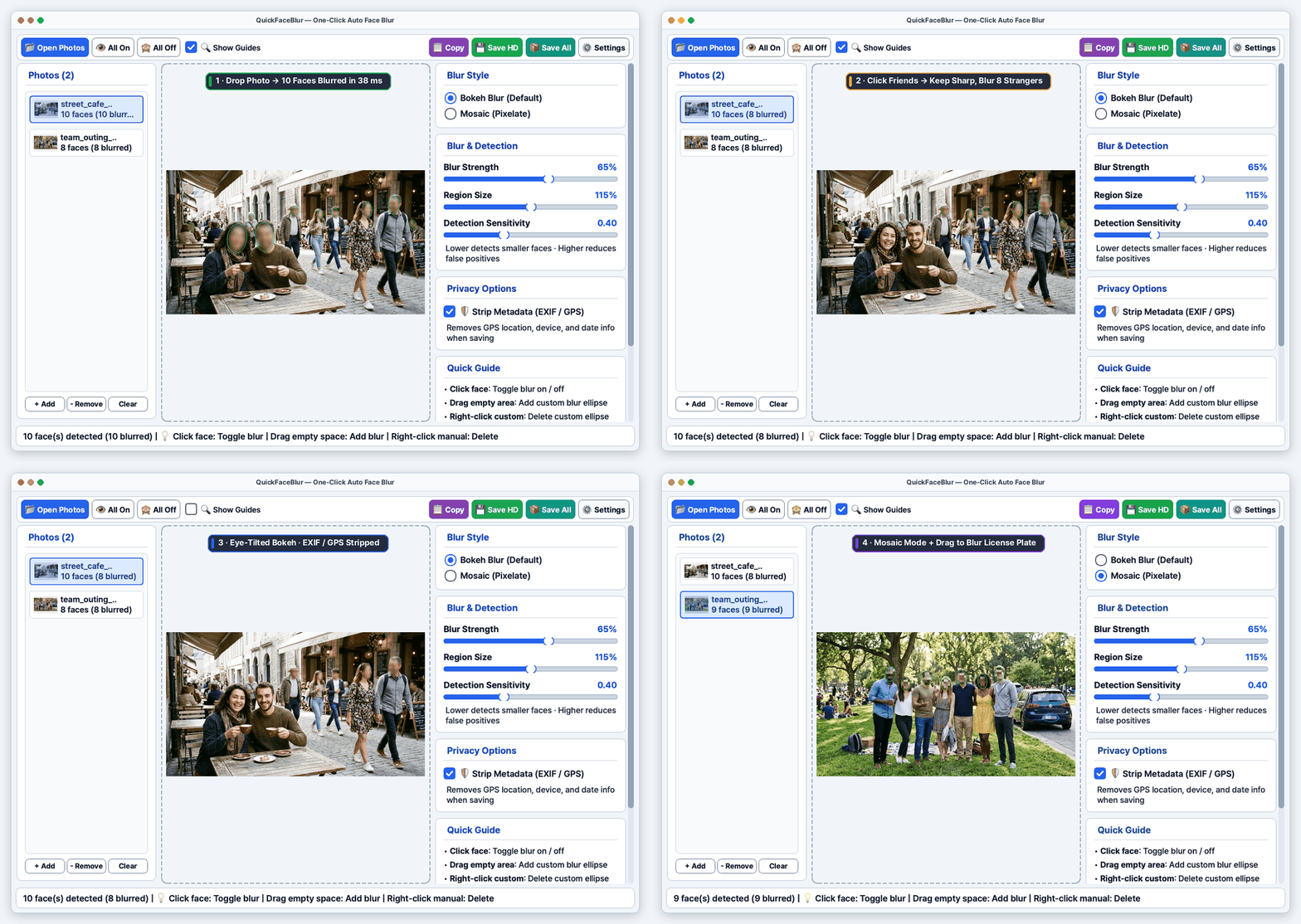
- 100% Offline Local AI (
SCRFD-2.5GF): Detects small, distant, and tilted faces in ~20–80 ms on standard laptop CPUs—zero server uploads. - Eye-Aligned Rotated Bokeh & Pixel Mosaic: Smooth Gaussian-feathered rotated ellipses aligned to eye tilt, plus classic Pixel Mosaic mode.
- 1-Click Selective Editing: Left-click any face to keep friends/family unblurred; drag empty space to blur license plates or badges; right-click custom ellipses to delete.
- Batch Processing &
Cmd+C/Ctrl+CCopy: Drop dozens of photos or folders, copy full-HD output directly to clipboard, or batch-save all at once. - EXIF & GPS Stripping: Removes GPS coordinates, device metadata, and timestamps automatically on save.
- 8 Languages Built-In: Auto-detects OS language (English default) with instant live switching in Settings (
⚙️) — English, Deutsch, 日本語, Français, Español, Tiếng Việt, ไทย, 한국어.
한국어 릴리스 안내 (v1.0.0)
외부 서버 업로드 없이 내 Mac / Windows PC에서 100% 오프라인 로컬 AI로 동작하는 원클릭 자동 얼굴 블러 데스크톱 앱 QuickFaceBlur v1.0.0 정식 릴리스입니다.
- 원클릭 바로 다운로드:
- macOS (Apple Silicon M1–M4): QuickFaceBlur_macOS_arm64_v1.0.0.dmg (최초 실행 시
시스템 설정 → 개인정보 보호 및 보안 → 없이 열기또는 터미널에서xattr -cr /Applications/QuickFaceBlur.app실행) - Windows 10 / 11 (설치형): QuickFaceBlur_Setup_v1.0.0.exe
- Windows 10 / 11 (무설치 포터블): QuickFaceBlur_Win11_Portable_v1.0.0.zip
- macOS (Apple Silicon M1–M4): QuickFaceBlur_macOS_arm64_v1.0.0.dmg (최초 실행 시
- 주요 기능: 0.04초 초고속 얼굴·측면 자동 검출, 눈 각도 기반 회전 타원 보케 블러 & 모자이크, 얼굴 클릭 On/Off 토글 및 번호판 드래그 수동 블러, 다중 사진 일괄 저장, 클립보드 고화질 복사, EXIF/GPS 위치정보 자동 삭제, 8개국어 실시간 전환 지원.
SHA-256 Checksums
112587de727d1db71f0aed926ad978655bee58df8865ce49e649d1966030b9e5  QuickFaceBlur_macOS_arm64_v1.0.0.dmg
d188ece10846adc5df561f3cfeff54f7f8c82851d1bec8e66d7fbcece5fe6926  QuickFaceBlur_Setup_v1.0.0.exe
b419f6b020b6eccc7ebefec9c71181b7e552045f18117b06087093917d0a0b03  QuickFaceBlur_Win11_Portable_v1.0.0.zip
License Notice
- Application source code: MIT License (
LICENSE) · PretrainedSCRFDweights: Non-Commercial Research / Personal Use Only (THIRD_PARTY_NOTICES.md) ·Pretendardfont: SIL OFL 1.1 ·PySide6: LGPLv3.