Repository navigation
CorkDeck 0.3

Play Windows PC games and your Steam library on a Nintendo Switch. CorkDeck is a homebrew application for the Switch's own system software (Atmosphère, Horizon OS) built on Wine, FEX and DXVK, with a controller-friendly interface in the spirit of the Steam Deck's game mode. It is a fork of Autorun (formerly Wine-NX); thank you to its author and contributors, whose work makes this possible.
0.3 is the second public version: a compatibility release. More games get as far as starting, the application stops touching the console's clocks, and the code and its tests were put in order.
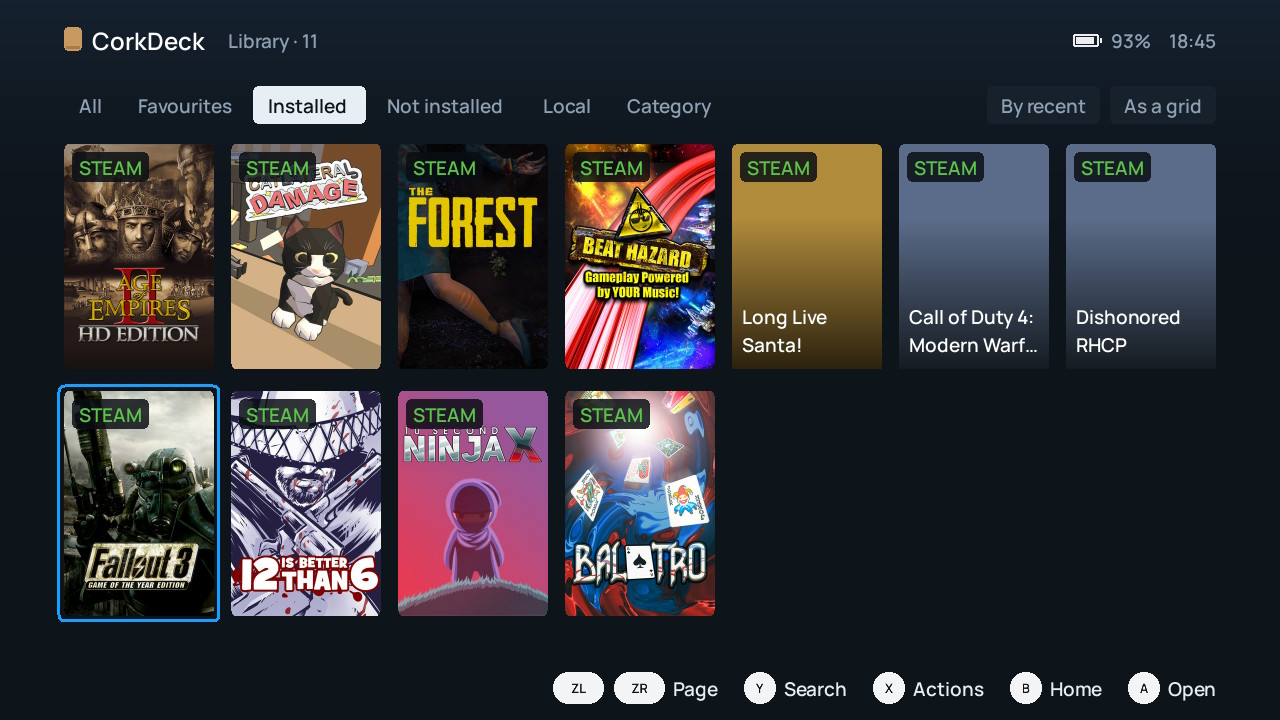
Download
CorkDeck-0.3.zip below is the package. The "Source code" archives are for developers.
SHA-256 of CorkDeck-0.3.zip: c71397adbce56da539a1e8bafd97c7c82c2f74caa3ea687be9a14548582c6481
Updating from 0.1 or 0.2
- Close CorkDeck: − → Power → Close CorkDeck.
- On the SD card, replace
switch/wine/wine-nx-runtime.nrowith the file of the same name from the ZIP. Nothing else has to be copied. - Start CorkDeck from its HOME entry. Your games, settings and Steam session stay as they were.
Do not rename or delete switch/wine for an update. If you used an overclocking profile in 0.2, open the Horizon OC overlay afterwards and check the section of the application CorkDeck: a profile 0.2 stored there may remain, and 0.3 no longer touches it. Maintenance → About CorkDeck shows the installed version.
New installation
- Extract the ZIP and copy the
switchfolder to the root of the SD card. If Autorun is already there, rename itsswitch/winefolder first: both use the same path. - Open the Homebrew Menu over a game (hold R while starting one) and start
wine-nx-runtime. - Follow First set-up. It adds CorkDeck to the HOME menu and downloads the Windows components (about 1 GB on the card).
Full guide: English · Русский. The same instructions are inside the ZIP. You need a Switch that runs homebrew under Atmosphère (emuMMC only), an SD card, Wi-Fi for the first set-up, and your own games. No games are included.
What changed since 0.2
Compatibility
- Missing libraries are found before a program starts: CorkDeck reads what the executable imports and names the DLLs that are absent, on the game's page and when Play is pressed.
- Microsoft Visual C++ 2015-2022 (MFC included) is downloaded from Microsoft, verified and added automatically. Existing files are never replaced.
- The local Steamworks library answers the way games built with Visual C++ call it, so games that read structures such as a Steam ID from it no longer crash at start.
- Every Steamworks interface family exists now (thirteen were added), so a game that imports one loads.
- The Steamworks library is inside the application and is written to the card by it; nothing has to be copied by hand.
- Windows picture codecs (PNG, JPEG, BMP, GIF and others) are registered, so games that load images through Direct3D helper libraries find them.
- The Windows components are one fixed set that this version was tested with, not whatever the upstream repository holds on the day of installation.
Shell
- Delete a game from the SD card from its page; saves in the user profile are kept.
- Storage: what each game and each unfinished download takes, and what is free.
- Unfinished downloads are listed after a restart, to continue or delete.
- The whole Steam account is listed (no longer cut at 256 games), and games with many packages open for installation.
- The installed version is shown in Maintenance → About CorkDeck.
- Long Russian sentences are no longer broken in the middle of a letter.
System
- CorkDeck does not change clocks or voltages. The per-game overclocking profiles of 0.2 are removed; overclocking is left to Horizon OC.
- Developer mode, off by default: without it only failures are logged, and the diagnostic pages are hidden.
- The Hekate boot entry is called CorkDeck.
Code and tests
- About 1900 lines of unreachable earlier screens and their unused translations are removed.
- The host test suite passes: 108 of 109 checks, one skipped because it needs a native AArch64 machine. In 0.2, 26 of them did not run.
The complete list: RELEASE-0.3 · по-русски.
What to expect
CorkDeck is experimental. This version was installed from its package on an empty folder on a console: First set-up, the download of the Windows components, a reboot through the CorkDeck boot entry, Steam sign-in and the installation of a game from Steam were gone through, and games were started. Gameplay was not systematically tested. Some games crash, a few older screens are in English only, only one redistributable is added automatically, and the application does not update itself. See compatibility and known limits.
Authorship
CorkDeck is made by Maj0ra'sMask (@plv890). Its code and documentation were written mainly by AI coding agents (OpenAI Codex / GPT and Anthropic Claude) under their direction and checked with host tests and on a real console. Autorun, Wine and all other components keep their own authors and licences; see CREDITS.
Not affiliated with Nintendo, Valve or the Autorun project. Please report CorkDeck problems in this repository's issues, not to Autorun.
