Repository navigation
Releases
Mala v2 Public Beta

Mala v2 · experimental beta for Hector 407
This draft contains Mala v2 USB installer and rollback have computer-only validation and have not had a physical Hector USB trial. Earlier public beta.6 USB testing and private v2 UI use are separate evidence.
Downloads and USB use
Use mala-hector-0.2.0-beta.1-usb-install.zip to install or update recognized public Mala beta.6. Keep the matching usb-rollback.zip and SHA256SUMS. The source archive is for developers.
The compact kits contain the same Mala runtime and required graphics. Documentation pictures are excluded from USB kits; the finished screenshot remains here on GitHub. If you already installed v0.2.0-beta.1 from today's release, this packaging cleanup needs no reinstall.
Extract the complete install ZIP directly onto a dedicated, single-partition FAT32 thumb drive so debug.sh and mala/ are at the root. An 8 GB drive is ample. Save wanted edits, stop playback, power Hector off, insert USB and power on. Firmware407 USB startup runs the kit automatically. Do not press the vendor Firmware Update button.
Keep USB/power connected through the automatic normal reboot and verification. Open Mala and confirm v0.2.0-beta.1, then remove the installer drive and leave it disconnected during normal use. On a computer, check MALA-RESULT.txt for INSTALLED AND VERIFIED. Normal installation needs no SSH or internet setup.
Recognized beta.6 updates replace Mala in place, keeping its URI, 58 ports and existing saved values. Replaced files are backed up before writes. The rollback kit removes Mala. It does not restore the beta.6 interface after a completed update. Interrupted recovery restores exact starting files. A completed-version downgrade requires a separate reviewed procedure.
Interface and defaults
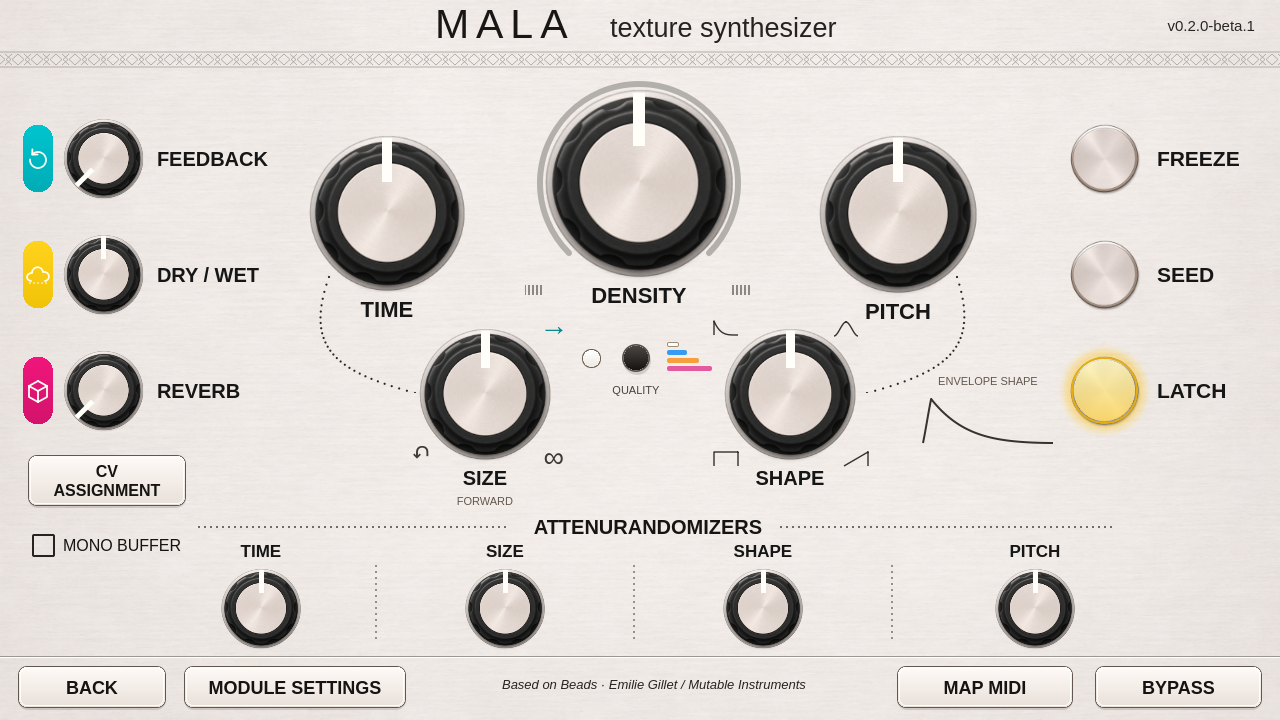
The silver interface adds vertical knob gestures, a four-mode quality menu/LED, active Shape envelope guide, yellow Freeze/Seed/Latch lights and centered Mono Buffer status. Fresh Feedback/Reverb start at 0%, Dry/Wet at 50%, and remaining knobs at noon. Density at noon stops automatic grains. Move Density away from center or use Seed to generate grains. Existing saved values and the accepted ARM DSP are retained.
Validation and limitations
The actual Qt5 UI/defaults, native DSP, guarded USB transactions, recovery and final archive/source checks passed on the computer. GitHub checks for this exact source commit passed. Unknown modified target files are refused before firmware writes.
The exact USB kit lacks a physical trial. Long-run audio, loaded-patch headroom, physical MIDI/CV, broad frozen-buffer recall and power-loss durability remain unqualified. Read validation and known limitations.
Credits and feedback
Original Beads design and DSP by Emilie Gillet / Mutable Instruments, with Frédéric Meslin / Fred's Lab and Oliver Rockstedt / sourcebox.de credited upstream. Mala's Hector adaptation, direction and physical testing by jahmontee / Poly Hector, with AI development assistance from OpenAI Codex for implementation, artwork, testing tools, documentation and packaging. Full credits and notices are included. This is an independent community project.
Issue reports, forks and pull requests are welcome. Include firmware/Mala/kit versions, steps and the USB result text. Keep private backups, keys and personal presets/recordings out of public reports.
Mala 0.1.0-beta.6 — Hector firmware 407
USB downloads
Community beta for willing testers. Based on the open-source Beads DSP
by Emilie Gillet / Mutable Instruments, adapted for Hector's patching environment.
Includes four recording qualities, Freeze and Seed, CV modulation, wavetable
synthesis, frozen-buffer patch storage, MIDI mapping, and the new footer: Back
left of Module Settings, module Bypass on the right.
Download the USB install ZIP, extract it to a dedicated FAT32 thumb drive,
and follow READ-ME-FIRST.txt. No SSH or network setup is required. Use the separate
USB rollback ZIP to restore your Hector's saved pre-installation files. This
uses automatic USB startup support; do not press the vendor Firmware Update button.
Keep the installer inserted through the automatic reboot. Once startup completes
and Mala opens, remove the installer USB and leave it disconnected for normal
use. No additional reboot is required. Check its MALA-RESULT.txt on a computer
for INSTALLED AND VERIFIED.
This initial installer accepts unmodified Hector firmware407. Beebo, other firmware,
older private Mala installs and other community UI modifications are refused.
Read the full known limitations and retain pre-beta patches.
The DSP binary and 58-port preset contract match the accepted private beta.5.
Native source/DSP, Qt5 UI, filesystem transaction and simulated USB-worker checks
pass. Public USB installation, automatic post-reboot verification, rollback and
both additional startup checks passed on one Hector, with owner-confirmed audio
and editor controls and normal stock audio after removal. That trial used a
pre-Mala firmware407 SD backup and existing internal preset/settings storage,
not a fresh vendor-download flash or factory reset. External MIDI/CV and detailed
frozen-buffer save/reload were not separately repeated in this public-kit trial.
Physical power-loss recovery and broad reliability/calibration claims are not
established. See validation and test scope for the exact evidence and remaining coverage.
Report reproducible issues using the repository's bug-report template. Source,
credits, license texts, build instructions and contribution guidance are included.
This is an independent community project, not an official vendor release.
Original Beads design and DSP: Emilie Gillet / Mutable Instruments. Hector
adaptation and project direction: jahmontee / Poly Hector, with OpenAI Codex
acknowledged for AI development assistance with implementation, testing tools,
documentation and packaging. Read the full credits and known limitations.