Repository navigation

Thank you for using Positron!
Downloads
Please review Positron's license agreement and privacy policy. Your acceptance of this license agreement and privacy policy is required as a condition to proceeding with your download or use of the software.
| Platform | Download |
|---|---|
| Windows 10, 11 x64 (system level install) | Positron-2026.11.1-4-Setup-x64.exe |
| Windows 10, 11 x64 (user level install) | Positron-2026.11.1-4-UserSetup-x64.exe |
| Windows 10, 11 arm64 (system level install) | Positron-2026.11.1-4-Setup-arm64.exe |
| Windows 10, 11 arm64 (user level install) | Positron-2026.11.1-4-UserSetup-arm64.exe |
| MacOS 11.0+ (arm64/Apple Silicon) | Positron-2026.11.1-4-arm64.dmg |
| MacOS 11.0+ (x64/Intel) | Positron-2026.11.1-4-x64.dmg |
| Debian-based Linux x64 (Ubuntu 22+) | Positron-2026.11.1-4-x64.deb |
| Debian-based Linux arm64 (Ubuntu 24+) | Positron-2026.11.1-4-arm64.deb |
| Red Hat-based Linux x64 (RHEL9) | Positron-2026.11.1-4-x64.rpm |
| Red Hat-based Linux arm64 (RHEL9) | Positron-2026.11.1-4-arm64.rpm |
| REH Linux x64 | positron-reh-linux-x64-2026.11.1-4.tar.gz |
| REH Linux arm64 | positron-reh-linux-arm64-2026.11.1-4.tar.gz |
| Installer Checksums | positron-2026.11.1-4-checksums.json |
Patch notes
The 2026.11.1 patch release (2026-11-09) fixes problems with Positron Server and Posit Workbench. File icons, color themes, and syntax highlighting load correctly again. On Workbench, Python sessions now start after you trust a folder that was untrusted. Posit Assistant on Workbench also shows your Microsoft Foundry models even when it starts before the Workbench extension.
Release highlights
Check out all the changes for this release.
Object Explorer
Our new Object Explorer is like the Data Explorer, but for data that is not rectangular, such as R lists, model fits, Python dicts, and JSON files. This was the most upvoted issue that we completed this release.
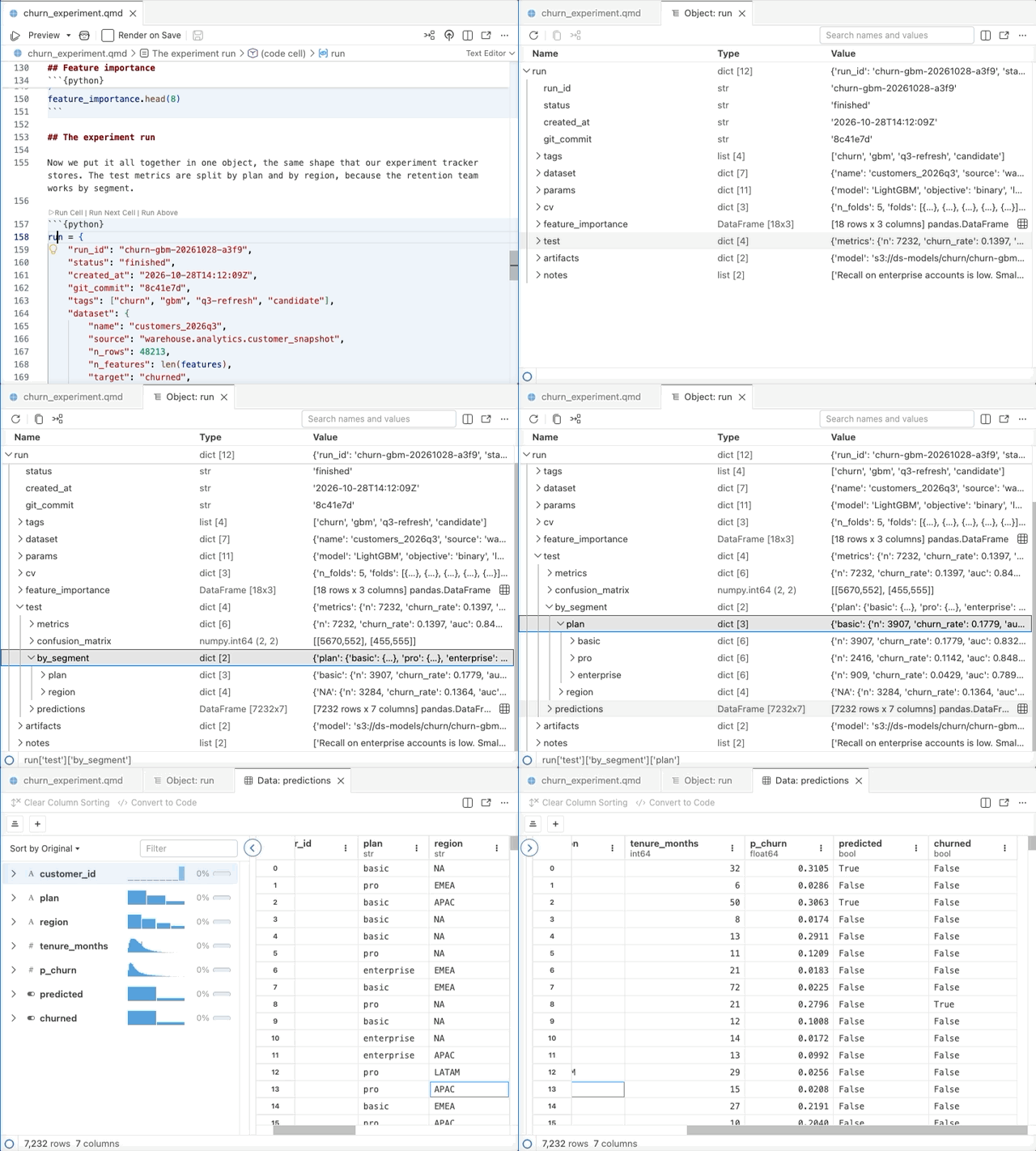
The Object Explorer shows your object as a tree with name, type, and value columns, and it opens large or deeply nested objects quickly. You can search across names and values, open a nested data frame in the Data Explorer, and copy the code that gets to any item, such as fit$coefficients[["wt"]]. When the variable changes, the Object Explorer updates.
To open the Object Explorer, run %view in Python or View() in R, or click the view button in the Variables pane. In the editor, you can also use the Open in Object Explorer code action on a variable. In Positron notebooks and Quarto documents, nested output shows as a small inline explorer. You can also open a JSON file in the Object Explorer, and generate code to import it into R or Python.
Interpreter selection
For Python, Positron now uses one ranked list to choose the interpreter to start for a project. The list starts with the environment that is active in the shell that launched Positron. Next come python.defaultInterpreterPath, the project environment such as .venv, the version in .python-version, and then other environments. A project environment starts before interpreter discovery finishes, so your console is ready sooner.
Positron also finds environments one level below the workspace root, such as at app/.venv. Base and externally managed installs, such as Homebrew Python, now only start when you select them.
The interpreter picker groups Python interpreters into project, global, base, and externally managed interpreters, with short labels such as "Python 3.12.4". It also tells you why it suggests an interpreter, for example because it was identified as the project environment. In a folder with no environment, the picker suggests Create Python Environment or Install Python. This release adds support for Python 3.15 and removes support for Python 3.9.
For R, the interpreter picker shows all R versions in one group, with your current R first. When you have more than one R version, Positron uses your current R by default, and R no longer starts automatically in a folder with no R files. Positron also finds Pixi R installations when you open a Pixi project.
More for Posit Assistant and other agents
Posit Assistant and other coding agents that use the Positron MCP server can now do more with Positron. Agents can read help pages and vignettes from your installed R and Python packages, so they can answer questions about packages that they do not know from their training data. They can also read the output of data apps that Positron runs, read Viewer output such as Plotly charts, and trace Snowflake data lineage. To learn more, read our recent blog post on how Posit Assistant can drive Positron.
Posit Assistant knows about the active Data Explorer, including its filters, sorting, and selection, and can run chunks and read inline output in Quarto documents. When Assistant runs code, it no longer moves your focus or replaces the tab that you have open. AI provider sign-in, including Posit AI Pass, now also lives in Posit Assistant.
For other coding agents, the Positron MCP server now starts through a launcher at a stable path, so your agent configuration keeps working after Positron upgrades. Positron MCP: Add to Coding Agent can now also set up OpenCode, Copilot CLI, and Kiro CLI. Fix and Explain on errors can send the error to a coding agent such as Claude Code, with the ai.errorActions.agent setting.
To try these features with Posit Assistant, enable the assistant.previewFeatures setting. For other coding agents, enable the experimental ai.mcp.enabled setting.
Data Connections
Data Connections now supports MotherDuck. Positron reads your access token from the motherduck_token environment variable, so you can browse your databases, preview tables in the Data Explorer, and generate connection code.
To keep the connections for one project out of your other workspaces, select This Workspace Only when you configure a connection. Group rows such as Tables and Views now show how many items they hold. Tables that you open from the Data Connections pane have a Refresh action in the Data Explorer toolbar. It shows changes made outside Positron and keeps your sort and filters. Scrolling and copying rows from PostgreSQL, Redshift, Snowflake, Databricks, and ODBC connections no longer repeats or skips rows. Snowflake NUMBER and DuckDB DECIMAL values are no longer rounded.
SQL files can now use a data connection for language features. Positron offers table and column completions from the connected database, warns about names that are not in its schema, and follows the SQL dialect of the driver. A status bar item shows the connection for the file. To try these new features, enable the sql.enabled setting.
A smaller, faster Positron
Positron is about 224 MB smaller on each platform, because its extensions now share one copy of the DuckDB library. The bundled Python kernel has about 1,900 fewer files, and Positron Server and Posit Workbench installs are smaller too. Fewer files help most when you install Positron on a network file system, where startup, upgrades, and antivirus scans can slow down with each file.
Positron also does less work in the background now. Interpreter discovery no longer runs again on every launch after a long break, and a project environment starts before discovery finishes. On Workbench, Positron stops trying to reconnect after your session exits, and checks your login less often.