Repository navigation
ChipWave Studio 0.2.20.0

Text that fits, and modulation you can see
0.2.20.0 fixes text that overlapped or was cut off, starting with the Arp card's header in the Rack, and makes the modulation markers on knobs easy to see in every theme and knob style. Songs open, play and render exactly as in 0.2.19.0. Help > Check for updates offers this version.
Download
- Windows:
ChipWave-0.2.20.0-setup-x64.exe(installer) or the portableChipWave-0.2.20.0-windows-x64.zip. The installer isn't code-signed, so SmartScreen may warn: click "More info", then "Run anyway". - macOS (universal, unsigned: Control-click > Open):
ChipWave-0.2.20.0-macos-universal.dmg(or the.zip) runs on Apple Silicon and Intel Macs with macOS 11 or later. It isn't notarised, so the first time, Control-click the app and choose Open, or runxattr -dr com.apple.quarantine /Applications/ChipWave.app. See MACOS.md. SHA256SUMS.txtlists the checksums of all eight files.
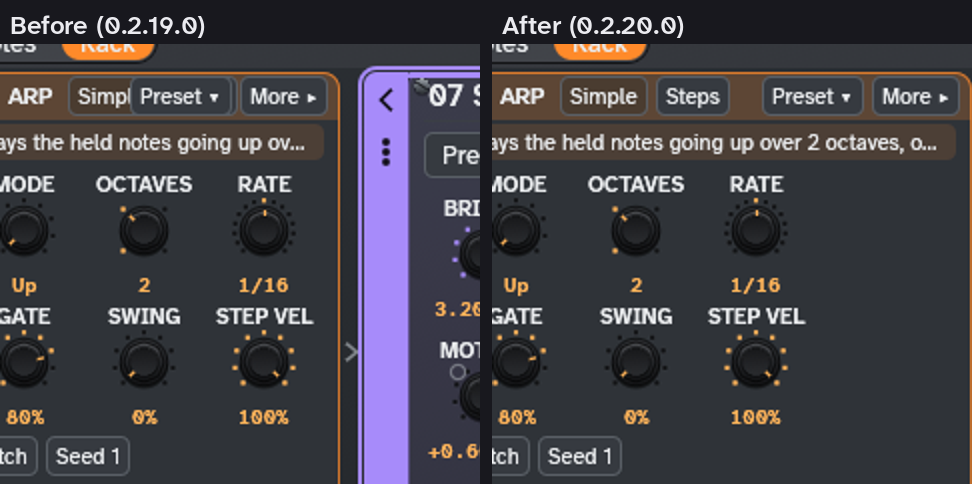
Fixed: the Arp card's header
In the Rack at 1366×768 and narrower, Simple and Steps were cut off under Preset ▾ and More. The card now measures its header in the real font, Text size and UI scale and is always at least that wide, so nothing overlaps and the text stays full size.
Fixed: text that fits everywhere else too
A new overlap check was run over every main view at 1366×768 and 1600×900, in the Slate and The Matrix themes:
- Timeline: markers on the same beat share one label (for example "Hook · Marker 9"), and marker and clip names end in "…" instead of being cut mid-letter.
- Arranger: the section role badge is measured, and the name stops before it.
- Clip launcher: long scene names end in "…".
- Automation lanes: scale labels no longer sit on top of each other or spill out of short lanes.
- Browser: the hint in an empty list sits at the top of the list, not under the Preview bar.
- FM: the algorithm's name is drawn on the picture only where it fits (the menu below always shows it).
- Instrument cards: choice rows are measured, so the lock button stays inside the card; a long choice ends in "…" with the full text on hover.
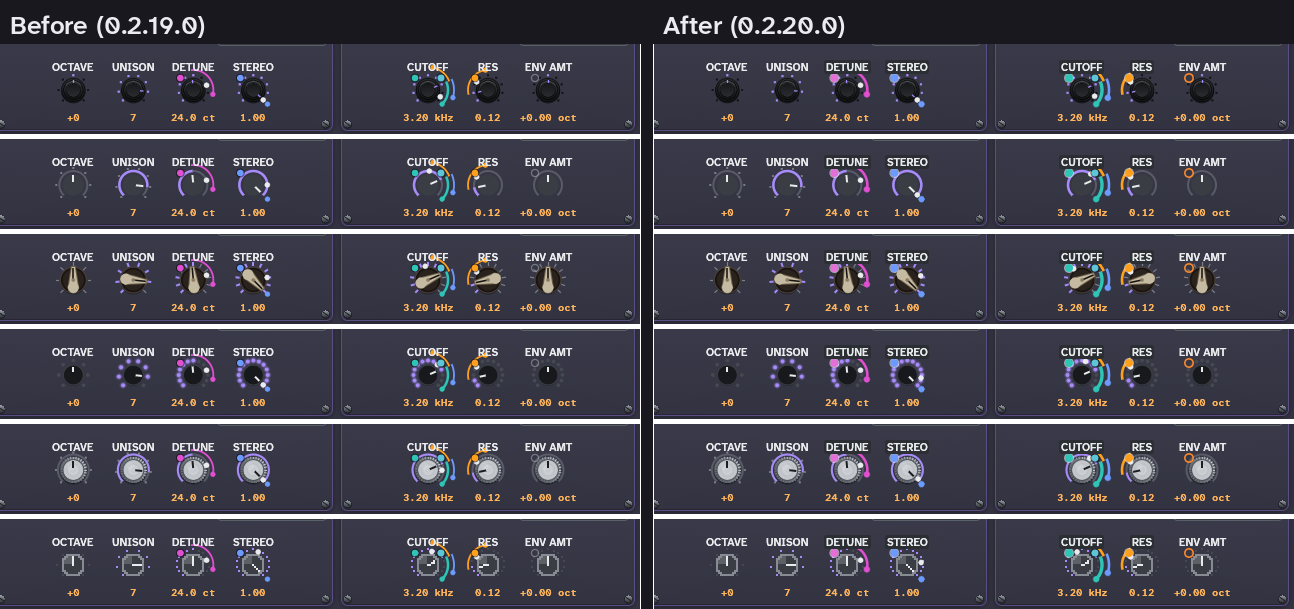
New: modulation markers you can see
- The M1–M8 badges and the slot dot on knobs use the theme's accent colour at a contrast of at least 4.5:1.
- The dot is filled once a modulation is assigned, and hollow when it isn't.
- The modulation rings are thicker and brighter in all six knob styles, and so are the depth bars in the Modulate view.
Manual updates
- The manual is for 0.2.20.0, with a "New in 0.2.20.0" box.
Before release, these checks were run twice on the release code (the merge into main): the automated test suite (1291 tests passed, 20 slow ones skipped, plus 3 more in a second suite); the 11 racks acceptance tests, 6 Rack tests, 10 piano-roll copy tests, 13 display tests, 7 Timeline drag tests and 49 Arp tests; rustfmt; clippy for the Linux and Windows targets; an icon check; and a render check. All 82 generator preset renders and all song render fingerprints are identical to 0.2.19.0. The overlap check and screenshots were run on Linux. The Windows installer's install, upgrade (including from 0.2.19.0) and uninstall checks passed under Wine. The macOS build passed its CI build, the launch smoke test on both halves of the universal binary, and the dmg check.
Full details are in the CHANGELOG.
Known limits
- Text cut at the edge of a scrolling area (the tracker's channels, the instrument card row) is left as is: scrolling shows it.
- With the Classic knob style the modulation dot can sit on the first ring; with Chicken-head it touches the knob rim.
- Testing: the Mac build was tested on CI only, not on a real Mac. This Windows installer was built and checked on Linux, not run on Windows before release. Please report anything odd in an issue.
Credits
- The overlap fixes, the overlap check and the modulation markers by Del (postmanpat).
The full list of the libraries and authors ChipWave builds on is in Help > About, the README and THIRD_PARTY_LICENSES.txt.