Repository navigation
Releases
GamePulse 0.4.29

GamePulse v0.4.29
- Fixes smaller-window resizing so GamePulse scales smoothly instead of jumping to oversized cards or pushing telemetry off-screen.
- Keeps Dashboard, Benchmark, and other image/preview-heavy pages stable and edge-to-edge when resized or maximized.
- Shortens the Dashboard texture-tuning next step while keeping the full guidance available on hover.
- Keeps the existing updater identity and installed-user update path unchanged; this release is dev-signed, so Windows SmartScreen or reputation prompts may still appear.
GamePulse 0.4.28
GamePulse v0.4.28
- Adds Crosshair Studio with built-in and custom presets, folders, monitor controls, and one saved global toggle binding.
- Keeps the crosshair disabled by default and external to games through a GamePulse-owned click-through window with no injection, graphics hooks, game memory, or game-file access.
- Unifies Dashboard, Overlay, and Crosshair Studio around one responsive editor, library, folder, color, and inspector system.
- Improves Driver Health and Latency with clearer readiness meters, review-first guidance, and readable compact layouts.
- Adds the approved V3 animated startup experience with an independent render path and reduced-motion fallback.
- Sharpens body copy, telemetry, actions, and shell headings with real static Inter font weights and grayscale title rendering.
- Cleans up Settings, Support, navigation, responsive page behavior, and first-run window sizing so the native UI stays sharp and edge-to-edge.
- Makes Fair-Play submissions more resilient to expired sign-in and legitimate imperfect capture evidence while preserving audit signals.
- Replaces V Rising with Palworld in the public leaderboard tracker.
- Keeps update/install compatibility; dev signing may trigger SmartScreen.
GamePulse 0.4.27
GamePulse 0.4.27
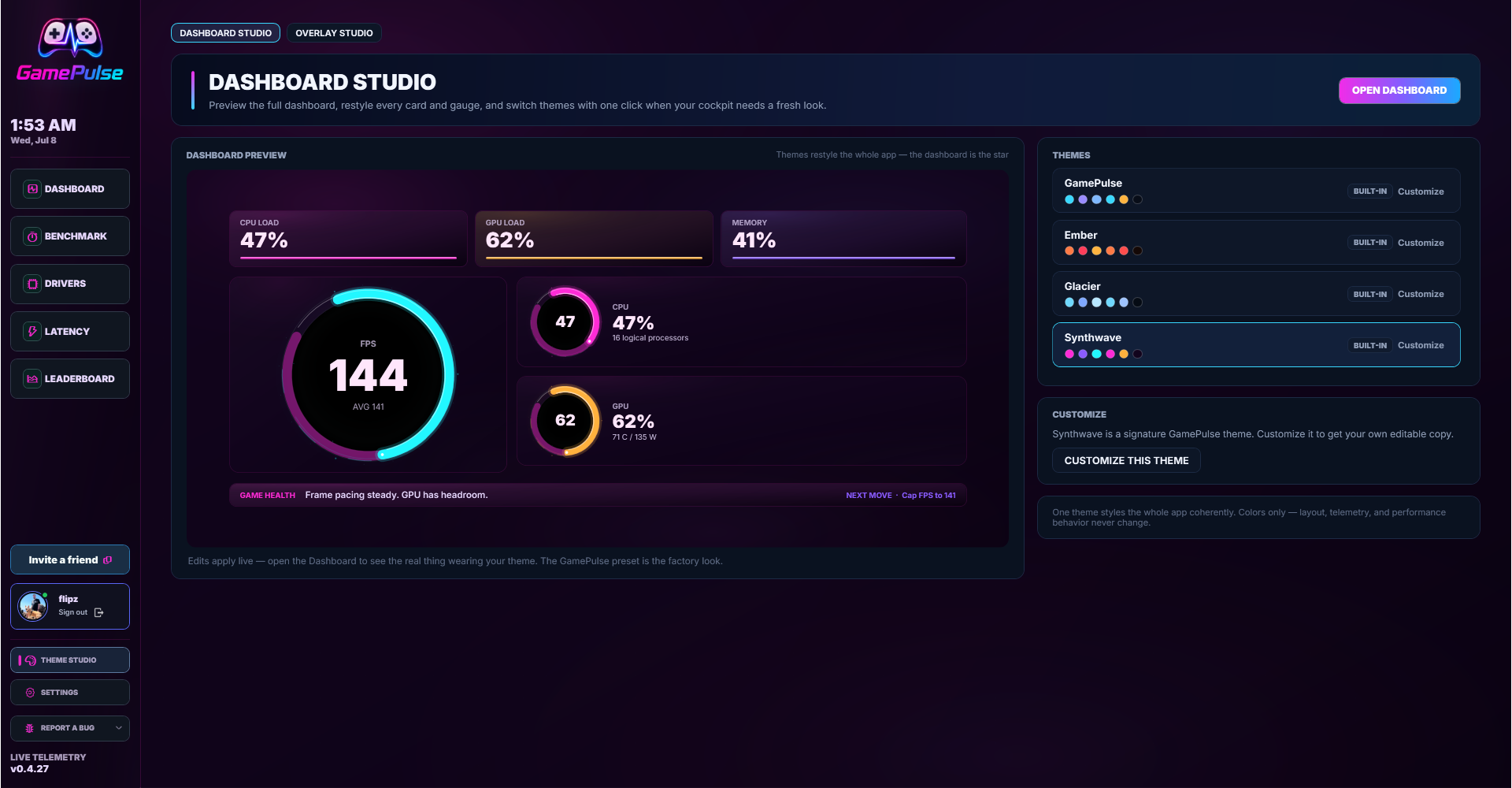
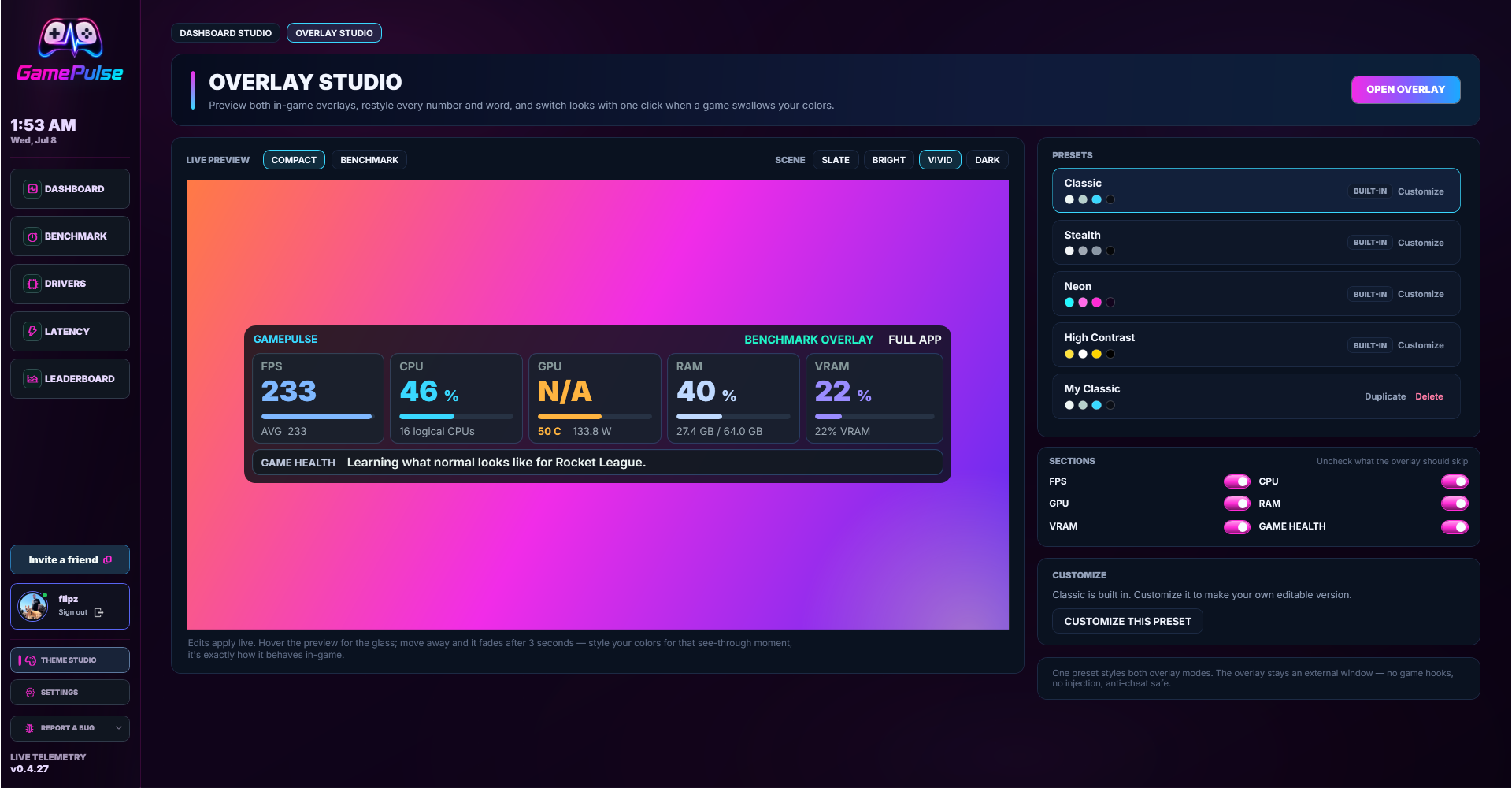
- Adds Theme Studio for app-wide Dashboard palette presets, including saved custom colors and instant preview updates.
- Adds Overlay Studio for Compact Mode styling controls so players can tune the compact readout without editing files.
- Groups Dashboard Studio and Overlay Studio into the customization flow while keeping existing Dashboard, Package, and Settings behavior intact.
- Improves theme switching so repeated palette changes persist cleanly without unnecessary settings churn.
- Tightens private feedback and score-submission ledger tables with explicit service-role-only database policies.
- Keeps the Driver Health, Latency controls, Fair-Play V2.1 leaderboard, Benchmark, updater, and PresentMon repair lines from previous releases.
- Keeps the anti-cheat boundary external: no overlays, hooks, injection, game memory, or game-file access.
- Public artifacts are dev-signed with the local development certificate, so SmartScreen/reputation prompts are expected.
GamePulse 0.4.26
GamePulse 0.4.26
- Upgrades the Driver Health Console with separated installable updates, attention items, real devices, and optional vendor tools.
- Adds clearer GPU, chipset, BIOS, network, audio, and input-driver guidance with vendor app/support actions where GamePulse can identify the right path.
- Makes NVIDIA online checks conservative: GamePulse ties version guidance to the detected product family and opens official NVIDIA guidance when it cannot prove compatibility.
- Expands the Latency page with Windows, input, display, network, service, overlay, and security checks that explain why each item matters.
- Adds explicit Apply and Revert actions for Game Mode, GameDVR, mouse acceleration, and transparency settings while restoring the original HKCU value or original absence.
- Fixes Game Mode and capture-tweak apply failures on fresh Windows profiles where the registry value has never existed.
- Keeps driver installs and latency tweaks player-controlled; GamePulse does not silently change drivers or Windows settings.
- Keeps the anti-cheat boundary external: no overlays, hooks, injection, game memory, or game file access.
- Public artifacts are dev-signed with the local development certificate, so SmartScreen/reputation prompts are expected.
GamePulse 0.4.25
GamePulse 0.4.25
- Ships Fair-Play V2.1 public leaderboard hardening for verified ranked boards.
- Adds server-issued one-use score tickets before public score submission.
- Blocks low-resolution, unfocused, idle, target-switch, and weak-evidence ranked runs.
- Sends menu-like or unusual sessions to review instead of public ranking.
- Hides legacy/unverified rows from default public leaderboards while keeping them stored.
- Keeps the anti-cheat boundary external: no overlays, hooks, injection, game memory, or game file access.
- Public artifacts are dev-signed with the local development certificate, so SmartScreen/reputation prompts are expected.
GamePulse 0.4.24
GamePulse 0.4.24
- Adds the Driver Health Console with clearer real-device buckets, driver freshness, and safer update guidance.
- Adds the Windows driver update-center flow for selectable driver offers.
- Redesigns the Latency page into a structured console with a pylon hero, readiness summary, attention rows, and aligned Windows checks.
- Fixes latency audit classification so GPU interrupt mode and default display composition report as ready when Windows exposes safe values.
- Adds the Microsoft Store prototype package lane while keeping the normal Friend Setup updater path available.
GamePulse 0.4.23
GamePulse 0.4.23
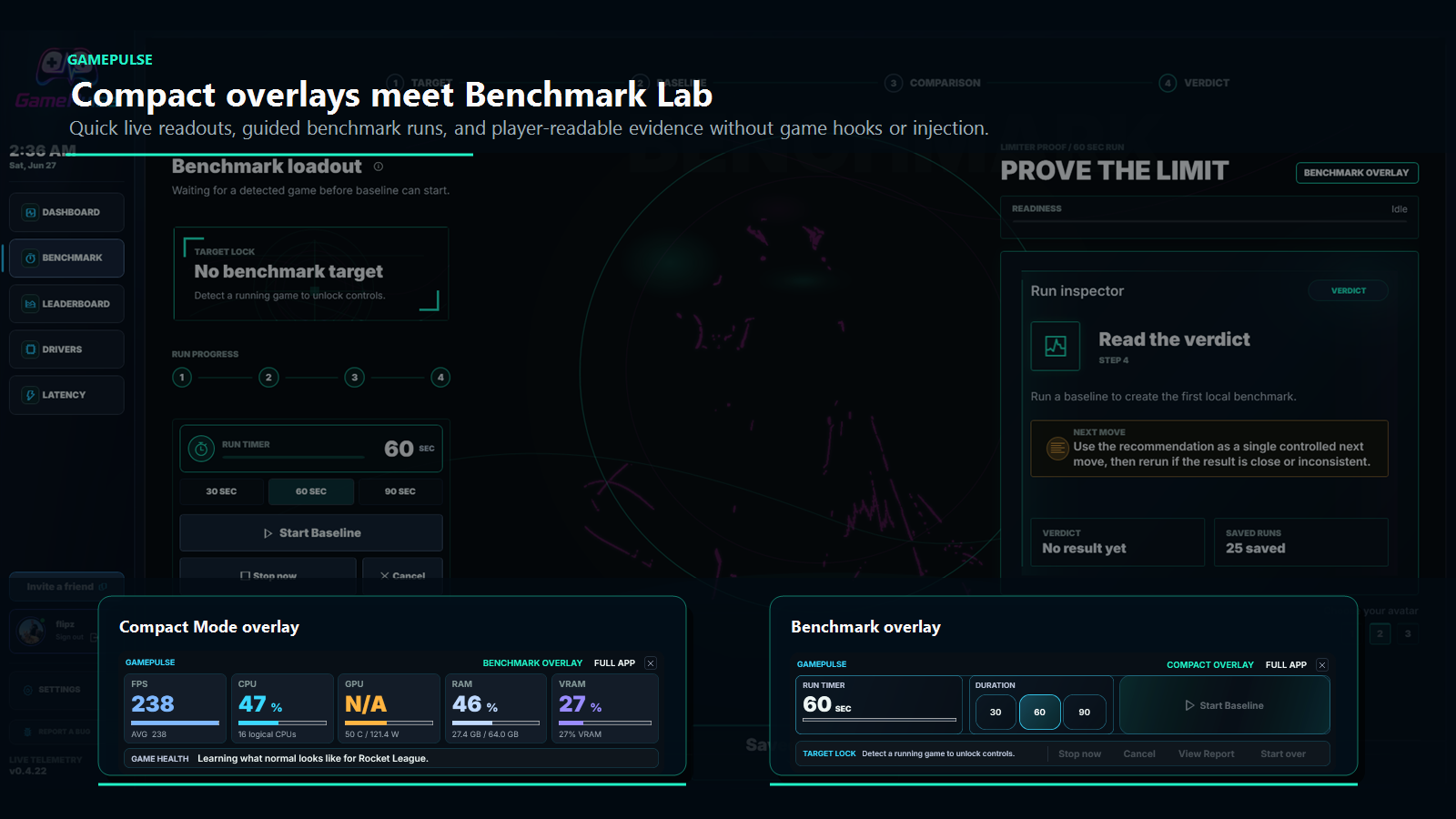
- Benchmark now waits for an active game target before naming or starting a run.
- Reduces false game matches from common background utility apps.
- Adds broader friendly title recognition for more current games.
- Compact Dashboard and Benchmark overlays have clearer labels, tighter controls, and a direct close affordance.
- Benchmark target text now matches Dashboard styling more closely.
- Includes the Benchmark Lab and universal GPU telemetry improvements from 0.4.22.
Install And Trust Notes
This is a dev-signed public release. The installer and updater artifacts are signed with the local GamePulse development certificate, not a production-trusted certificate, so Windows SmartScreen or reputation prompts are still expected.
GamePulse remains an external Windows performance companion. This release does not add an overlay, injection, graphics hook, game-memory access, debugger attach, kernel driver, or hidden capture behavior.
GamePulse 0.4.22
GamePulse 0.4.22
- New Benchmark Lab guides baseline and comparison runs in one clean flow.
- Benchmark saves one combined report with baseline and comparison side by side.
- View Report and Start New appear after comparison so the next step is clear.
- Added a 3-2-1 countdown before baseline and comparison captures start.
- Benchmark reports now explain sampled trends and longer-run needs more clearly.
- Universal GPU telemetry improves load, VRAM, temperature, and power support across more systems.
- GPU readouts are more reliable on supported hardware without requiring players to tune providers manually.
- Dashboard CPU/GPU readouts are smoother without hiding real telemetry changes.
- Game target and FPS-capture handling are stricter after close/reopen transitions.
- GamePulse now declares PerMonitorV2 DPI awareness for sharper multi-monitor scaling.
Benchmark Lab
The Benchmark page is now a guided settings-test workflow instead of a loose run logger. Start Baseline captures the current game scene, Start Comparison Run captures the changed setting, and the saved history entry is one combined report that compares both sides. This makes the page line up with how players actually test settings: capture the current setup, change one thing, then see whether FPS, lows, frame time, GPU busy time, and supporting telemetry moved.
The action area now follows the run state: Start Baseline, countdown, Running, Start Comparison Run, countdown, Running, then View Report or Start New. Stop cancels a countdown or active capture without saving a partial run. The report opens in-frame, and Start New resets the flow for another test.
Saved reports now put the baseline and comparison values side by side, including change values and status labels. Older baseline-only saved records still open, but new comparison tests save as one report instead of two separate history items.
Report copy was tightened throughout. Sampled telemetry is described as sampled telemetry, not as broken per-frame capture, and deep-low rows now tell players to run longer when 0.1% or 0.01% lows do not have enough frames to be meaningful.
The page also received smaller usability polish: a compact Benchmark loadout help popup, clearer comparison-change descriptions, smoother hero/avatar image transitions, centered status-pill text, a cleaner report header, and inline Delete -> Confirm behavior for saved reports.
Telemetry And Dashboard
This release starts the universal GPU telemetry path. GamePulse now reads more complete GPU load, VRAM, temperature, and power context on supported systems while keeping the technical details inside the app.
Dashboard CPU and GPU numbers now use a smoother visual channel, so the cockpit reads less twitchy while still following real telemetry. FPS capture, frame-time capture, and the native ABI remain external and anti-cheat conservative.
Benchmark and dashboard target identity handling were tightened around friendly names, stale targets, close/reopen transitions, and comparison validation. This reduces misleading reports when a game closes, restarts, or changes state.
Report Evidence
Benchmark reports now carry stronger evidence about what backed the verdict. Per-frame series data is used when a clean frame stream is available, sampled trends are shown when only telemetry ticks are available, and P95/frame-spread/deep-low copy reflects that source honestly.
Exports and saved report data keep clearer target identity, comparison method, frame-series, and evidence fields so local review is easier after a session.
Install And Trust Notes
This is a dev-signed public release. The installer and updater artifacts are signed with the local GamePulse development certificate, not a production-trusted certificate, so Windows SmartScreen or reputation prompts are still expected.
GamePulse remains an external Windows performance companion. This release does not add an overlay, injection, graphics hook, game-memory access, debugger attach, kernel driver, or hidden capture behavior.
GamePulse 0.4.21
GamePulse v0.4.21
v0.4.21 is a post-game FPS capture cleanup release. It reduces stale capture state after a game closes, so GamePulse is less likely to prompt for repair when the session is already over.
Download
- Recommended installer:
GamePulse-Friend-Setup-0.4.21.exe - Release page: GamePulse 0.4.21
Highlights
- Reduces unnecessary FPS capture repair prompts after a game closes.
- Clears stale capture targets when the active game has ended.
- Keeps new sessions from inheriting old capture state.
- Improves post-game session cleanup so stale FPS samples are not saved after exit.
- Adds regression coverage around game close, retargeting, repair restart, and session cleanup.
- Dev-signed release: SmartScreen / unknown-publisher prompts remain expected until production signing is added.
GamePulse 0.4.20
GamePulse 0.4.20
- Fixed an updater edge case where an older downloaded package could install before the newest release was shown.
- GamePulse now checks the public update feed even when a restart-ready update is already staged.
- Download and restart paths now choose the newest ready update so players avoid unnecessary multi-step updates.
- Added updater smoke coverage for stale pending packages and version selection.