Repository navigation
Home
Thank you for taking an interest in the PCNportal application :). I found it to be very meaningful to contribute to this project, and hope you will feel the same. I believe it will become a very useful tool to scientists and perhaps even clinicians in the future.
On this Wiki, I hope to explain how the PCNportal works and why it works this way. It is the product of over a year of group brainstorming and coding - which is a lot, but not that much for a professional software product. That means two things: many architectural decisions have been made for good reasons, although it may not seem obvious at first why, but: it is far from a finished product, so ideas are always welcome and bugs may always be present. In this guide, I therefore aim to elaborate on the state of the project - talking both about how the website is currently implemented and why it is implemented that way. I will also explain how a developer can develop and deploy it to web through the Donders Institute servers.
Below is an introduction to the application that might be nice to start with. Other pages will provide more in-depth information.
The website aims to make normative models available for anyone that is interested and has relevant neuroimaging data. Users should not need to know anything about code to apply normative modelling in their research and could be anyone from Professors to PhD students, or perhaps even clinicians in the future. To make this possible, we need several things: computation power, a normative modelling toolkit (guess which one) and corresponding pre-trained normative models. We also need an interface for the user to handle input of data and output of results. For the computation power, we are lucky to make use of the Donders Center for Cognitive Neuroimaging (DCCN) High Performance Cluster (HPC), that has plenty of processors for the amount of users that we expect to have in the foreseeable future. The toolkit requirement can be fulfilled with the PCNtoolkit. This toolkit solves all the complex mathematical problems when it comes to normative modelling and will be used to transfer pretrained normative models to the user's data. Our fellow lab members provide the pretrained models, allowing for a vast supply of sophisticated models for various data types on the app. Lastly, to handle input and output, and bring together user data with computation power and PCNtoolkit in an automated way, the PCNportal was built.
The app works as follows: the user submits data and modelling choices through an online website and sends them to the DCCN server for processing. Here, the data is preprocessed and submitted to the cluster for normative modelling in parallel with the chosen normative models. After the processing is done, the outcomes and error measures are stored in a public online server (SURFdrive, also hosted by the DCCN), and the user then receives an email with a link to download their results from this server.
The application consists of a client side and a server side (sometimes called frontend and backend respectively). Both sides of the project have different functions and their code is stored in different locations. Simplistically, the client side is the User Interface of the website and handles all interaction, while the server side does preprocessing and normative modelling. The two can communicate through SSH connections.
The shown network diagram approximately shows what part of the application we view as client side (blue), and what as server side (red):

More specifically, the client side is all of the Graphical User Interface (GUI): the buttons, colors, images, everything you can view on the website. It also contains all the required online programming libraries. These things have in common that they are static and need to be available quickly: we don't want to wait for a remote server to respond when clicking a button, we want it to respond instantly. Therefore, the client-side information is loaded in your web browser on your computer right now when visiting any website. For our project, this code is stored together in a sort of closed off environment called a Docker container located on the DCCN server. The environment is closed off for practical reasons like managing library installations, just like a virtual environment, but also for security: users of the website cannot get access to the Donders servers this way. However, our website itself does need access to the DCCN server to do the modelling, because all the hard work has to be done there. In theory, all code could be stored on the client side to run all computations there, but the resources of client-side computers are limited. That makes storing large data sets or performing extensive computations is very inefficient on the client-side, requiring us to connect to the DCCN.
From that point onwards is the server side. On the server side, we have Python scripts for preprocessing data, running normative models, and sending results back to the user. The server side code is stored on the DCCN servers (mind the language confusion: the client side code is also stored on a 'server'), mostly in the project drive. It has access to all the project-related files and to the Torque computation cluster to perform mass computation. Through the Docker container, the website can safely talk to the DCCN server with SSH to, for example, request information about models or send computation requests.
You can find more on this exact distinction here (read here or here), but you do not need to be an expert on this. For the time being, you can just think about the PCNportal project as consisting of two conceptually distinct parts that need to communicate with each other to succeed in modelling.
We have two versions of the website: one version is for local testing and one been successfully tested and deployed online through the DCCN servers. They have been set up in very similar ways, so that a test version can deployed with only minimal or no changes when a new version is ready.
The first testing version is developed on a local machine, like your laptop, and can be launched with the same code, commands and Docker container. The nice thing about a Docker container is that it should work the same on any computer system, no matter Mac, Windows or Linux, because the container itself is already a Linux environment of sorts. If you want to develop the website, you can make some changes to the client side code, launch a test version of your website on your local machine, and test it 'offline' from your own machine (meaning: only you can see it, and no other users). Once we're happy with testing, the Technical Group (TG) at the DCCN will able to deploy the official version. This version is hosted on the DCCN server and becomes the PCNportal website. It will be almost an exact copy of the testing website at that point, but the TG will use different network settings to make it work on the DCCN technical infrastructure. This version also uses different scripts (/scripts/ instead of /test_scripts/), so we can safely update and test our normative modelling scripts without ruining the functions of the deployed website!
Deployment on the DCCN means that the website is configured to connect to the internet and becomes accessible online, unlike our local test version. For this to work, the TG needs to configure our website in such a way that it can be hosted on the administrator side of the DCCN server in what is called the Docker Swarm. Some large benefits of the Docker Swarm are that unexpected crashes can be handled, and some security issues are taken care of. Despite how it's managed, the test version of the website functions exactly the same as the deployed website, but the process for deployment is slightly different.
Here, you can find the instructions for a demo run with PCNportal. I will provide instructions on how to run it, and what you might expect to happen.
Steps:
Go to https://pcnportal.dccn.nl/
Go to the ‘Compute here!’ tab on the right
Select the following parameters:
For Data Type, fill in “ThickAvg”
For Normative Model, fill in ‘BLR_lifespan_57K_82sites’
For ‘Upload test data’, upload the test data file: “fcon1000_te.csv”
For ‘Upload adaptation data’, upload the provided adaptation data [file] for transfer learning (https://github.com/predictive-clinical-neuroscience/PCNtoolkit-demo/blob/main/data/fcon1000_tr.csv): “fcon1000_tr.csv”
For ‘Email address for results’, enter an email address that you have access to, so you can view the results through your inbox.
Click submit.
After following the steps, it should look something like this (it might take some time for the submission message to be shown below):
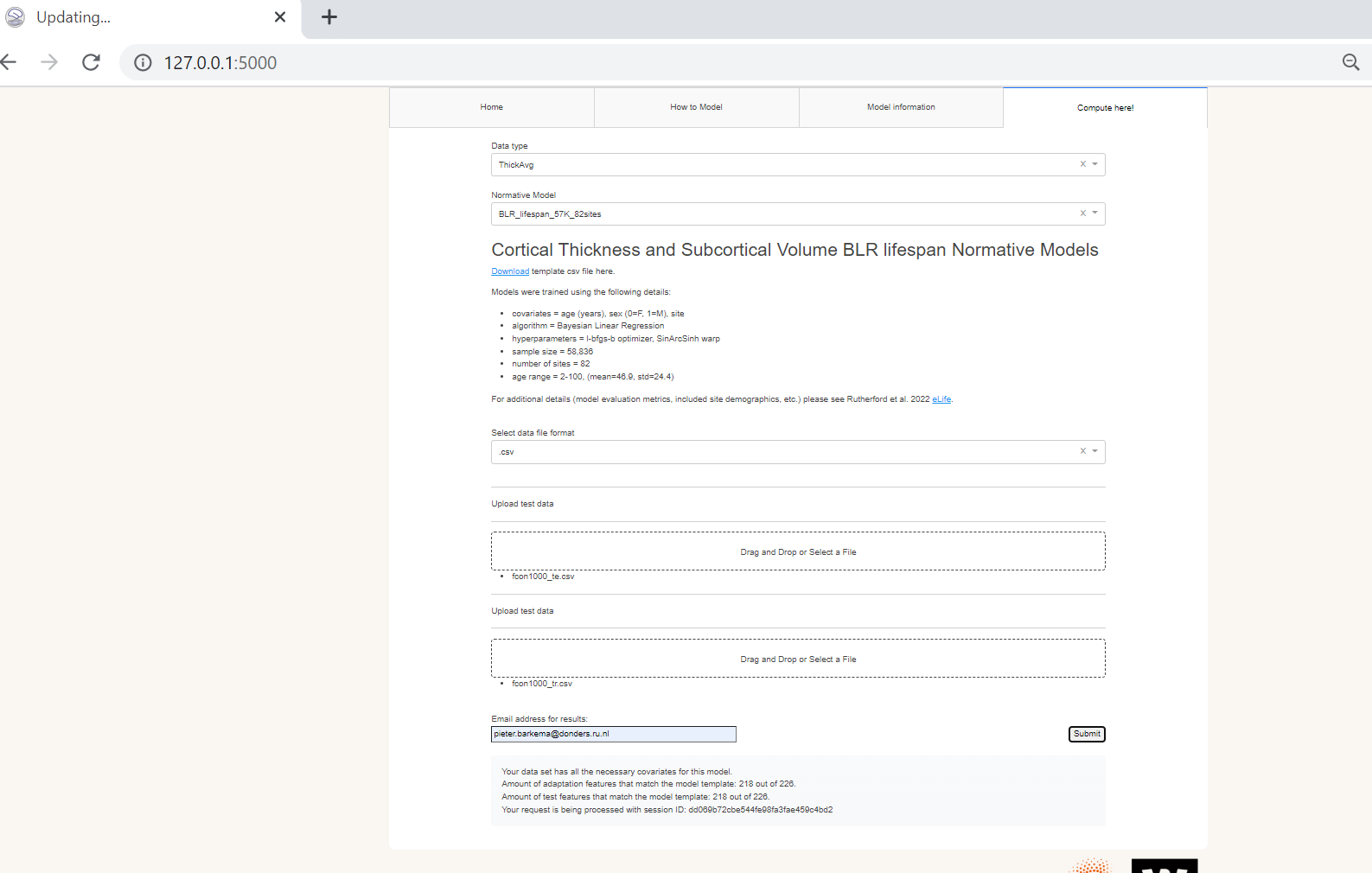
What should happen now? Within a few minutes (but no more than 30 minutes) you should receive an email with a link to SURFdrive, where your results should be stored. If you can view and download your z-scores and related error measures, then the pipeline has succeeded. Well done! Have a read how you can use your results to learn more about the brain in Rutherford et al. (2023).
In the following pages, we will explore in-depth how the client side and server side function, and how we manage development with GitHub. I will also provide a brief demo for you to test the website, and describe the future goals we currently have for this project.