Repository navigation
Sozo v3.2.0

Sozo v3.2.0 is the biggest update Sozo has had.
It adds light novels with a proper reader, profiles for everyone in the house, and extensions that load.
It also adds a new first-run setup, achievements, home-screen widgets, Trakt, Jellyfin, and a rebuilt player.


284novel sources in one repository(~313 across 9 recommended repos) |
16novel languages |
4household profileswith PINs and a kids mode |
14app languages |
6platforms |
📚 Light novels
In earlier versions you could find a novel in Sozo but you couldn't read it. v3.2.0 adds a full novel ecosystem: sources that load chapters, and a reader built for long reading sessions.
The reader
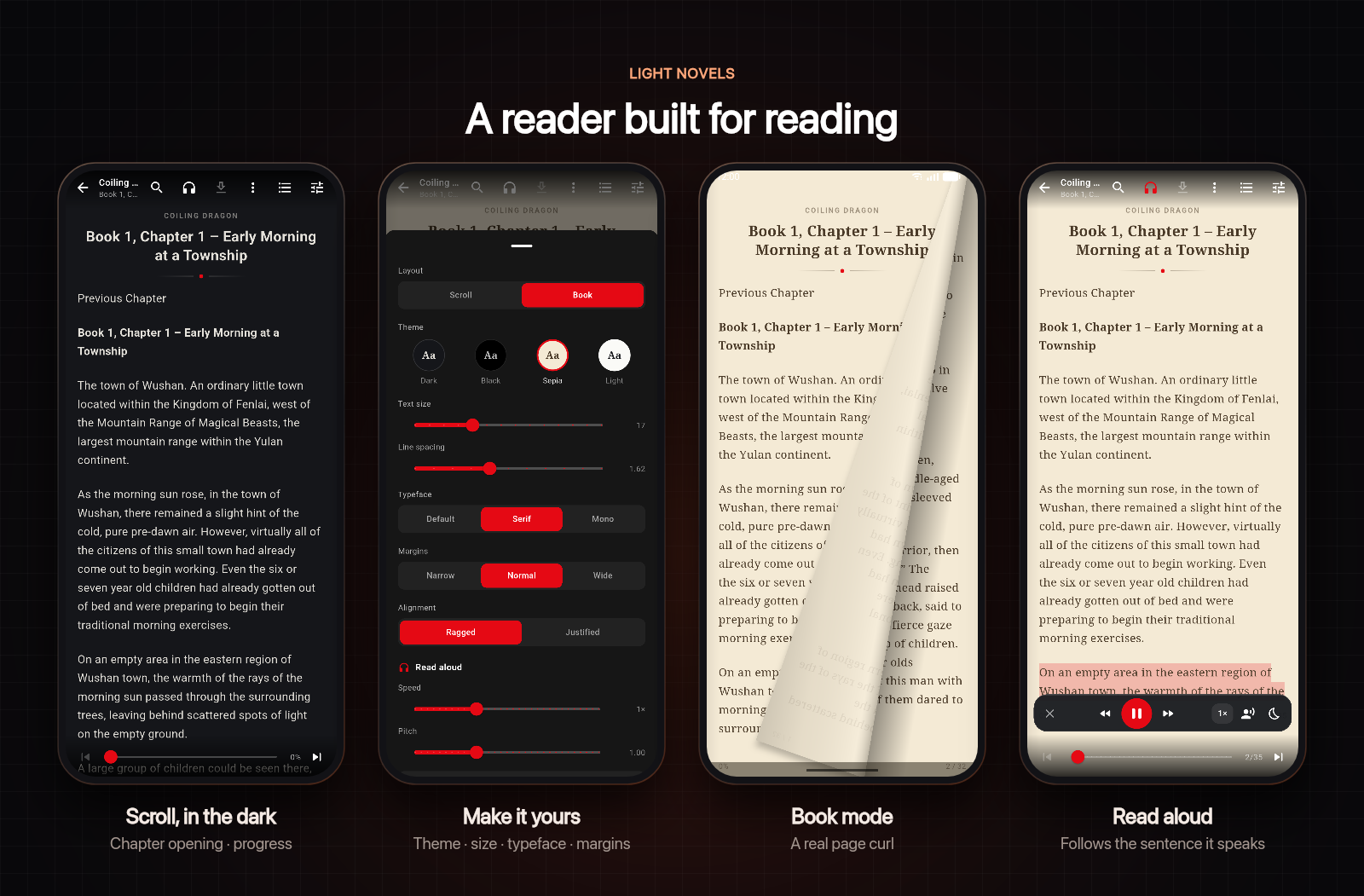
| 📖 Two layouts | Scroll, or Book: the chapter is split into real pages and you turn them with a page curl. Swipe, tap the edge of the screen or use the keyboard. Book mode continues into the next chapter, and you keep your place when you change the font or size. |
| 🎨 Four paper themes | Dark, Black, Sepia and Light. |
| 🔠 Your typography | Text size 13–26, line spacing 1.2–2.2, typeface (Default, Serif or Mono), margins (Narrow, Normal or Wide), ragged or justified text, and brightness. Every setting is saved. |
| 🎧 Read aloud | Sozo reads the chapter sentence by sentence and highlights the sentence it is on. You can skip back or forward a sentence and set the speed (0.5–2×), pitch and voice. A sleep timer stops it after 15, 30, 45 or 60 minutes, or at the end of the chapter. It can continue into the next chapter, and the language is detected from the text. |
| 🖍️ Highlights and notes | Select text, then choose Highlight. There are 4 colours and you can add an optional note. All your highlights are in one list that jumps back to each one, and clearing history doesn't delete them. |
| 🔎 Find in chapter | Shows how many matches there are and moves between them. The search carries over into the next chapter. |
| 📑 Chapter list | Grouped by volume, with a "Find a chapter…" search, multi-select, Download and Mark read. |
| 💾 Offline and EPUB | Download chapters with their images and read them offline. Export any downloaded novel as an EPUB. |
| 🔄 Progress everywhere | Your position is saved and shows in Continue Reading. Finished chapters are sent to AniList, count towards the "Page turner" achievement, and show as read (not watched) in your friends' feed. |
| ⚡ Smooth | The next chapter is fetched in advance at 70%. If a site is rate-limiting, the reader waits instead of showing an error. |
The sources: LNReader and Mangayomi, in one app
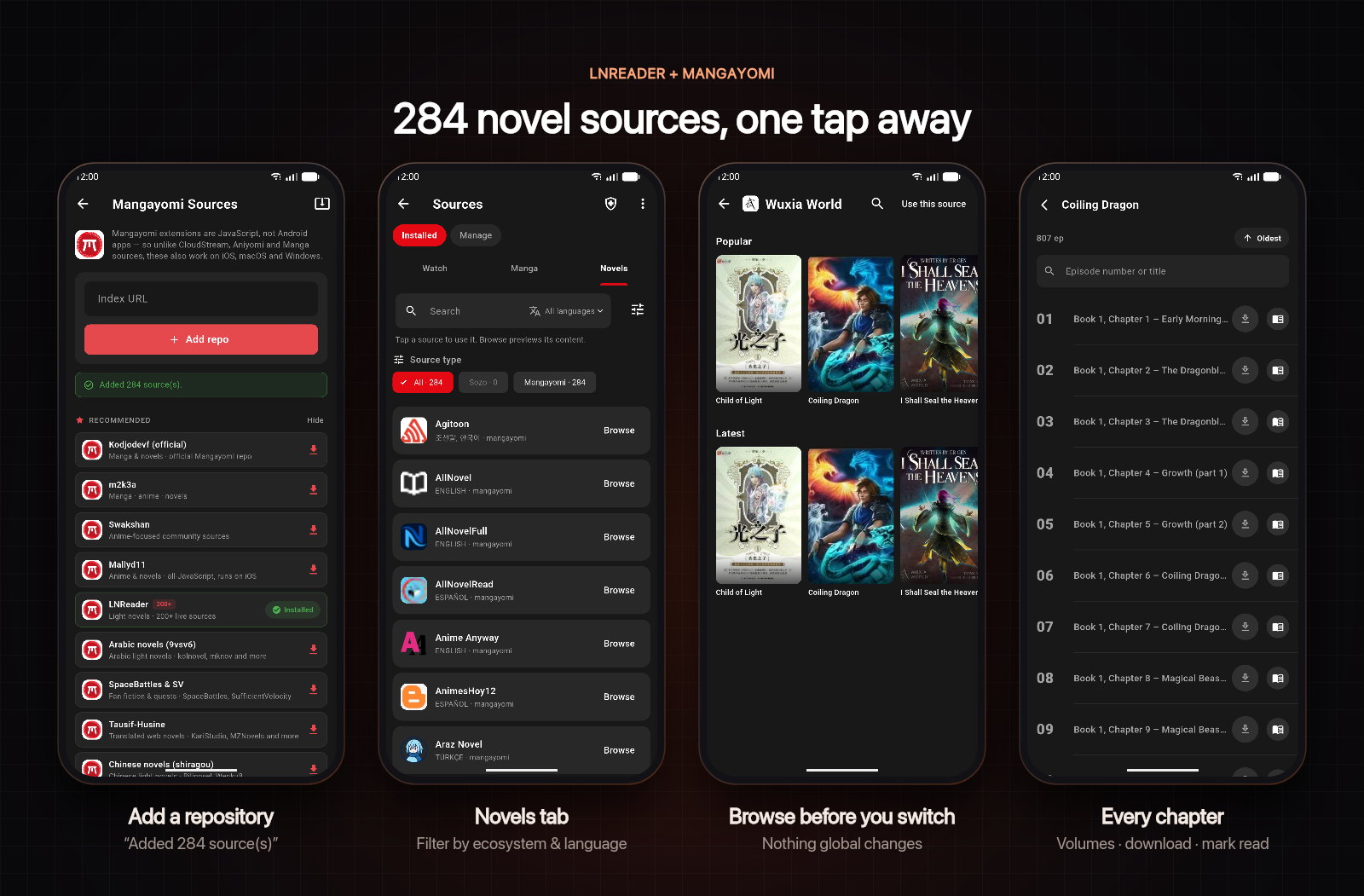
Sozo now runs LNReader plugins, the plugin format of the LNReader novel app, alongside Mangayomi novel extensions. Both run inside one JavaScript runtime, so the rest of the app treats them the same: search, home, details, chapters, the reader, downloads and EPUB export.
- The official LNReader repository adds 284 sources in one tap, in 16 languages: English 157, Russian 21, Arabic 17, French 17, Spanish 16, Turkish 14, Portuguese 11, Indonesian 9, Chinese 7, and more.
- Tested before shipping. 140 of the official plugins were checked on 2026-09-24 and work end to end (list, search, details, chapter text). About 30 more are behind Cloudflare, and Sozo solves the challenge for you. 28 upstream plugins that were broken are fixed inside the app (Ranobes, Kakuyomu, Genesis, Chrysanthemum Garden, 69shu and others).
- Works on iOS as well. The plugins are plain JavaScript, so they run on Android, iOS, macOS and Windows.
- Per-source settings, such as the site's domain or hiding locked chapters.
Recommended novel repositories
| Repository | What's in it |
|---|---|
| LNReader (official) | 284 plugins: Royal Road, Scribble Hub, Webnovel, Wuxia World, Novel Updates, NovelFire, NovelBin, Ranobes, Archive of Our Own, Baka-Tsuki, Re:Library, WTR-LAB, LightNovelWorld, Foxaholic… |
| m2k3a | RoyalRoad, Anna's Archive, Novel Updates, NovelFire, bookReadFree, ملوك الروايات |
| Mallyd11 | Novelbuddy, NovelFire, bookReadFree, J-Garden (all JavaScript, so they work on iOS) |
| Arabic novels (9vsv6) | kolnovel, mknov, markazriwayat, cenele |
| Chinese novels (shiragou) | 哔哩轻小说 Bilinovel, 轻小说文库 Wenku8 |
| SpaceBattles & SV | SpaceBattles, SufficientVelocity |
| Tausif-Husine | Kari Studio, MZNovels, DarkStar, Leaf Studio and more |
| Dakrataz | No Bad Novel, Boti Translation |
| The Wandering Inn | wanderinginn.com |
How to start reading, in 30 seconds
- Profile → Sources → Novels → Add source.
- Tap LNReader under Recommended. You'll see "Added 284 source(s)".
- Tap Browse on any source to look at its catalogue without switching to it, then tap Use this source.
- Or, in Novels mode, open a light novel from AniList and tap Find a source. Sozo searches only your novel sources.
🏠 Watch · Manga · Novels
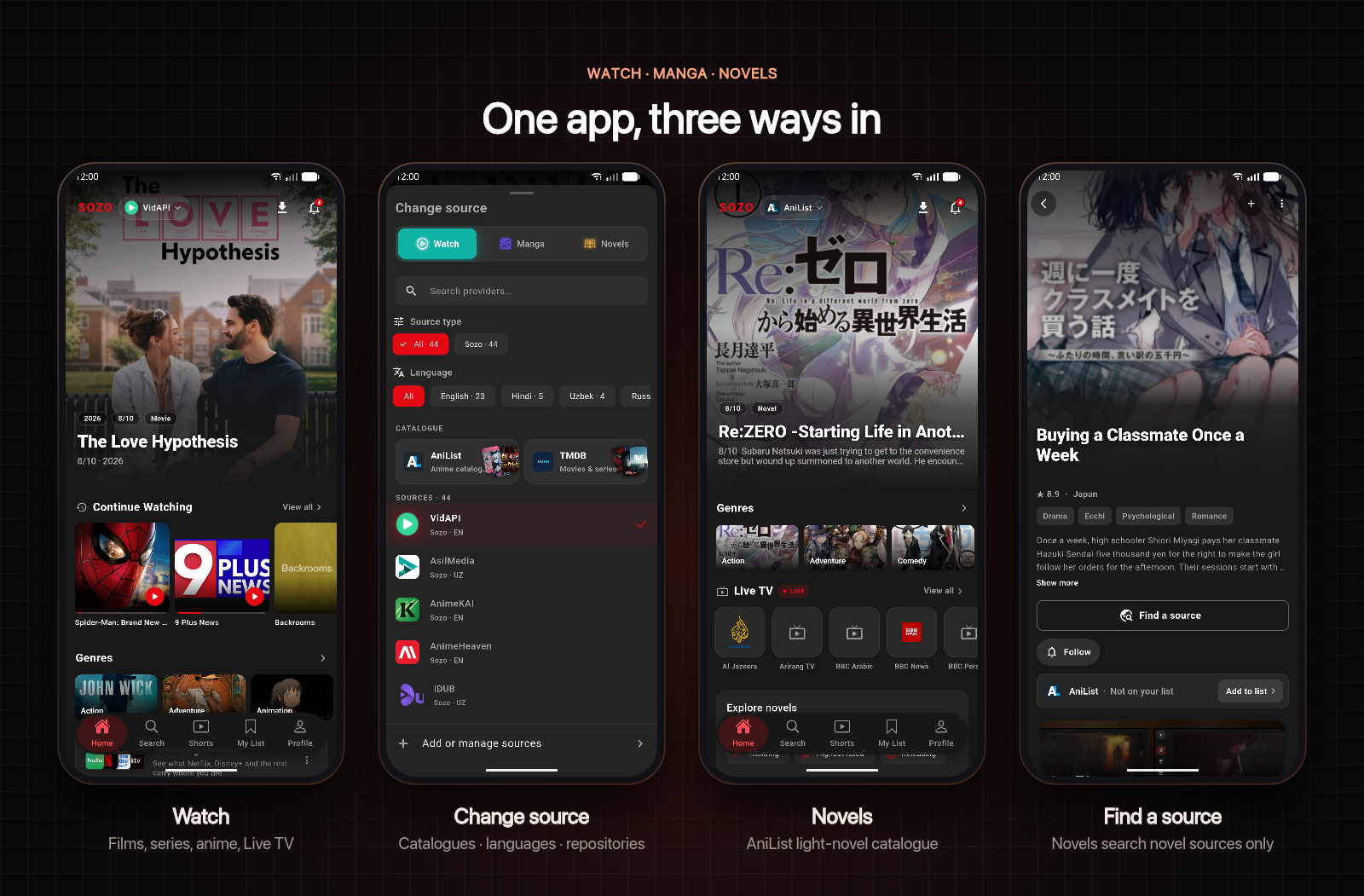
- Three modes, and each remembers its source. Watch (teal), Manga (violet) and Novels (amber) are one segmented control. Switching between them plays a short transition. When you come back to a mode, it's on the source you left it on.
- AniList or TMDB as your Home. You can use the whole AniList or TMDB catalogue as your Home. When you open a title, Sozo finds a source for it, and the page shows where it's playing from: "AniList › AnimeHeaven · Change".
- Sources hub (Watch, Manga and Novels tabs). You can browse any source without changing the one you use. Each source has a health badge (Down or Cloudflare). Check sources tests all of them from your own device, and you can filter by ecosystem, repository and language.
- A better Home. A card for what's airing next, with a live countdown. Streaming services, showing what Netflix, Disney+ and the rest carry in your country. Picked for you. A full Genres page. A Live TV rail. Customize Home, to reorder or hide sections.
- Better detail pages. A split-flap countdown to the next episode. AniList, MyAnimeList and Trakt rows with − / + buttons. A spoiler-free recap of the story so far. A Try another source grid that shows how well each result matches and has a "Wrong title?" option. A muted trailer behind the poster. A Relations tab.
👨👩👧 A home for the whole household
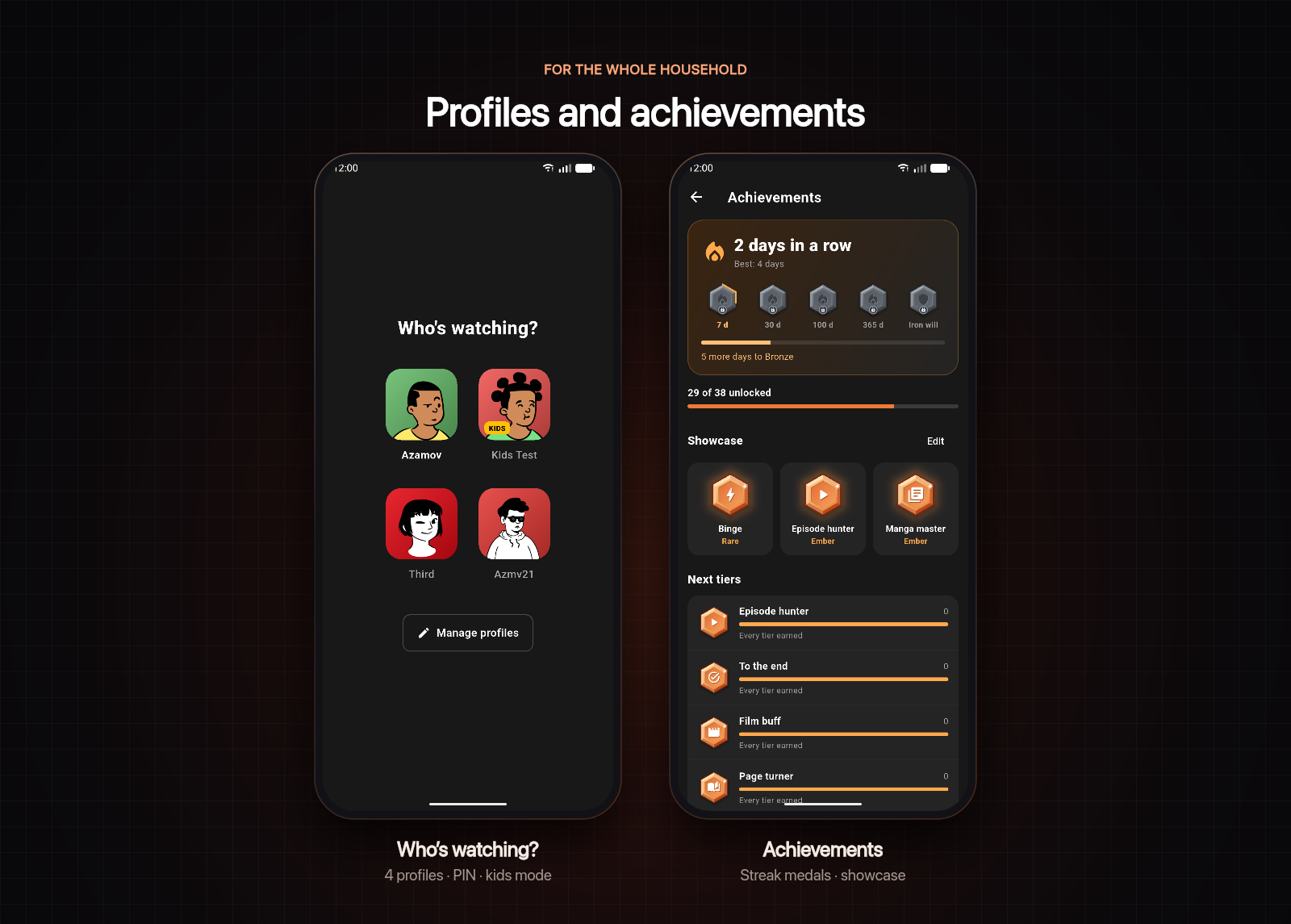
- Up to 4 profiles and a "Who's watching?" screen when the app opens. There are 40 illustrated avatars, an optional 4-digit PIN, and a kids mode (18+ always off, no social features). Each profile has its own history, lists, Home layout, stats and follows.
- Achievements. Hexagonal medals in bronze, silver, gold and ember, and streak flames at 7, 30, 100 and 365 days. Tilt a medal with your finger or by tilting the phone, and double-tap to flip it like a coin. Pick up to 6 medals to show on your profile.
- Friends. Search for people and send friend requests. There's an activity feed and public profiles at
sozo.azamov.me/u/<name>. Sharing is off by default. Incognito viewing and your private list are never shared. - Help & Support inside the app. Open a ticket, attach up to 5 screenshots and optional diagnostics (you see the diagnostics before they're sent), and get the reply as a notification.
🚀 New first-run setup
The sign-in wall has been replaced by a 10-step setup:
- Welcome
- Language
- What you enjoy (Anime, Movies & Series, Manga, Novels)
- Genres
- Account (Google, email, or guest. On a TV this step shows a QR code to scan with your phone)
- Import your AniList or MyAnimeList list
- Notifications
- Badges
- Home-screen widgets
- Done, with confetti
If the app closes during setup, you come back to the same step. The setup works with a TV remote and a keyboard, and supports right-to-left languages. The new splash screen draws the Sozo dragon mark with a pen, fills it in, and then the dragon stamps its foot. That's the animation in the banner above. It takes about 3 seconds instead of 4.3.
▶️ Player
- Quality control. Set a preferred quality (Auto up to 2160p, or Data saver). Sozo remembers what you pick for each title, and switching quality is instant. DASH streams now have manual quality too.
- Seek-bar previews. Frame thumbnails while you drag, generated in the background and saved per episode. Swipe-to-seek now moves at a steady speed and can be cancelled.
- Up next card with a countdown. The next episode is prepared at 80%.
- Subtitles. Subtitle tracks inside MKV and HLS streams, subtitle files from your device, a size stepper, your choice remembered for each title, and a second subtitle track. Subtitles are auto-translated, using a published translation when one exists.
- Picture. Picture profiles (Natural, Cinema, Night, Anime) and Anime4K upscaling (Sharpen, De-blur, Denoise).
- Picture-in-picture on iOS, a mini-player on desktop, ClearKey and Widevine DRM, and live channels that behave like broadcasts.
- Error screens suggest this title's other servers first, can solve Cloudflare challenges on the stream host, and link to support.
🧩 Extensions that load
- Manga extensions are fixed at the cause. Brotli and Zstd support was missing, and 19 of 40 extensions we sampled needed it: MangaDex, Weeb Central, Asura Scans, MangaFire and Manganato all failed on their first request. extensions-lib is now 1.6.
- Aniyomi: hoster support (lib-16), so hoster names like "Filemoon · 1080p" now show, extension settings screens open, and AniSkip works.
- CloudStream 4.8. This version is needed by 60 of 100 plugins. We also fixed a resolver problem that made 24 of 82 plugins load for 60 seconds and then report "no mirrors". Interceptors and DRM links now work the way they do in CloudStream's own player.
- Jellyfin is a new source type: your own server, with progress synced back to it.
- DNS over HTTPS: Cloudflare, Google, AdGuard, Quad9 or Mullvad. This helps when your internet provider blocks a site. It is not a VPN.
- Your backup now includes your repositories and sources. Extension APKs are checked against the repository's signing key before they load.
🔔 Stay on top of what you follow
- Follow a title to get rich notifications (with the poster and Watch and Mark seen buttons), a New releases feed, quiet hours, and a choice of how often to check.
- Auto-download new episodes of what you follow: Wi-Fi only by default, with a storage limit, and it can remove episodes you've watched.
- Android home-screen widgets: Continue (2×2), Continue + next episode (4×2) and Streak (2×2).
🔗 Trackers and connections
- Trakt: sign in with a device code, automatic scrobbling, and a Trakt hub with 7 tabs.
- MyAnimeList tracking, alongside AniList. Import your list from either. Failed updates are retried automatically for up to 30 days.
- Discord Rich Presence: shows what you're watching on Discord. Off until you turn it on.
🖥️ Desktop and platforms
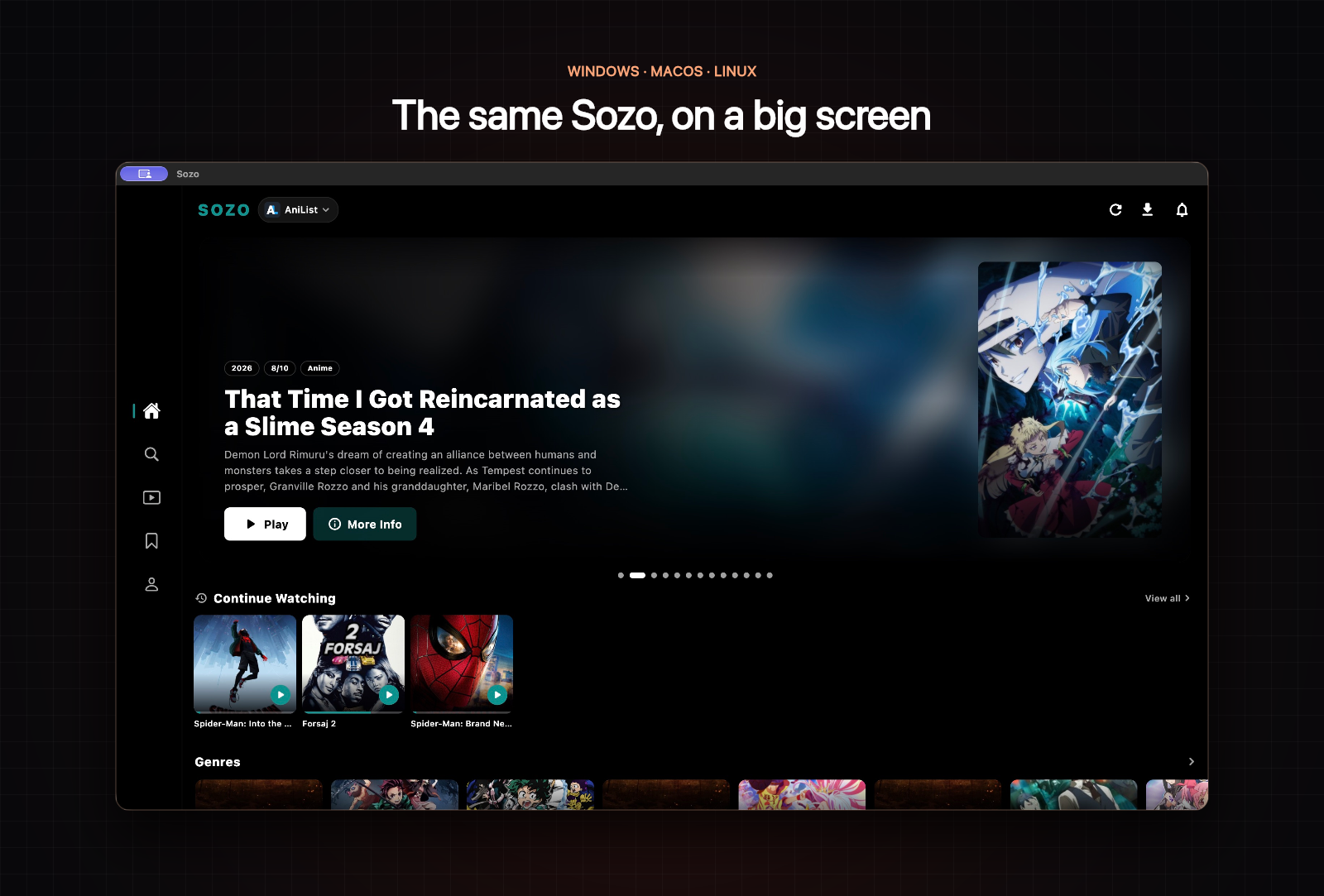
- Windows, macOS and Linux builds, alongside Android and iOS. On desktop, Sozo remembers the window size and position, has a navigation rail on wide windows, full keyboard shortcuts, and handles
sozo://links. You can open a video file with Sozo. - iOS 15+ and macOS 12+ are now the minimum versions.
- On Android, JavaScript extensions and torrents now work on 16 KB-page devices (Android 15+).
🌍 Languages, privacy and security
- 14 languages, adding 廣東話 Cantonese, Kurdish (Kurmanji and Sorani, right to left), Arabic, German, Dutch, Spanish, Portuguese, French, Turkish and Indonesian. The language picker is now a full page.
- Material You: the accent colour can follow your wallpaper. You can also set the date format, and there's one 18+ switch that covers every source.
- Secrets are stored in the platform keystore: your session, AniList and MAL tokens, and the private list. App lock now sits above everything, so a link or a notification can't get past it. Incognito no longer records anything.
⚡ Performance and bug fixes
- Swiping between source tabs no longer re-filters and re-sorts every source on every frame.
- The source switcher sheet fits its list: a few sources give a short sheet, and hundreds fill the screen with a scroll bar.
- Images decode at the size they're shown (banners used to decode at 35 MB).
- Searching all sources is capped at 60 sources, ordered by health, and merges results so the screen doesn't freeze.
- A failed token refresh while offline no longer signs you out and wipes your history, lists and streak.
- A corrupt local database is backed up and recovered instead of being cut short.
- History now keeps 1,500 entries (it was 50).
- The first video frame is no longer black until you seek.
- Errors are no longer printed twice.
- Many layout fixes for large text and small screens.
⬇ Download
| Platform | File |
|---|---|
| 🟢 Android (most phones) | Sozo-v3.2.0-arm64-v8a.apk |
| 🟡 Android (older 32-bit phones) | Sozo-v3.2.0-armeabi-v7a.apk |
| 🔵 Android (if you're not sure) | Sozo-v3.2.0-universal.apk: works on every device, but it's larger |
| ⚪ Android (x86_64 / emulators) | Sozo-v3.2.0-x86_64.apk |
| 🪟 Windows | Sozo-v3.2.0-Windows-Setup.exe, or Windows-portable.zip if you don't want to install |
| 🍎 macOS 12+ | Sozo-v3.2.0-macOS.dmg |
| 🐧 Linux x64 | Sozo-v3.2.0-Linux-x64.tar.gz (includes a .desktop file and an icon) |
| 📱 iOS 15+ | Sozo-v3.2.0-iOS.ipa: install it with AltStore, SideStore or Sideloadly |
📺 Android TV: the TV build will be published separately.
🔐 To check a download, compare it with Sozo-v3.2.0-SHA256SUMS.txt.
🍎 macOS says the app is "damaged" or won't open
The DMG isn't signed with an Apple certificate. Run this once in Terminal:
xattr -dr com.apple.quarantine /Applications/Sozo.app
Or in Applications, right-click Sozo.app → Open → Open.
💬 Join the community





- 📣 Telegram: @sozoapp for new versions, new sources and announcements first.
- 🎧 Discord: discord.gg/n22URhYvMR to suggest ideas, report bugs and chat with other users.
- 🛟 In the app: Profile → Help & Support. Your ticket goes straight to the developer, and the reply arrives as a notification.
- 🐛 On GitHub: a source isn't working · bug report · feature request
- ⭐ If Sozo is useful to you, star the repo. That helps the project more than anything else.
🇺🇿 O'zbekcha qisqacha
Sozo v3.2.0: shu paytgacha bo'lgan eng katta yangilanish.
- 📚 Light novellar. LNReader va Mangayomi manbalari qo'shildi: bitta bosishda 284 ta manba (16 til). Reader'da Scroll va Book rejimi (sahifa varaqlanadi), 4 xil mavzu (Dark, Black, Sepia, Light), shrift, o'lcham, qator oralig'i va chetlar sozlanadi. Ovozli o'qish (uyqu taymeri bilan), highlight va eslatmalar, bob ichida qidirish, oflayn yuklab olish va EPUB eksport bor.
Qanday boshlash kerak: Profile → Sources → Novels → Add source → LNReader. - 🏠 Watch · Manga · Novels. Har bir rejim o'z manbasini eslab qoladi. AniList yoki TMDB katalogini bosh sahifa qilib qo'yish mumkin. Yangi Sources hub: manbani almashtirmasdan ko'rib chiqasiz, manbalarning holati ko'rinadi, Check sources bor.
- 👨👩👧 4 tagacha profil. "Who's watching?" ekrani, 40 ta avatar, PIN va bolalar rejimi. Yutuqlar (medallar va streak), do'stlar va ilova ichida yordam markazi.
- 🚀 Yangi 10 bosqichli sozlash (TV'da QR kod orqali kirish) va yangi splash: ajdarho belgisi qalam bilan chiziladi, bo'yaladi va ajdarho oyog'ini urib qo'yadi.
▶️ Pleer. Sifatni boshqarish, seek-bar oldindan ko'rish rasmlari, Up next, subtitrlar (fayldan yuklash, avtomatik tarjima), Anime4K, iOS'da PiP, desktop'da mini-pleer.- 🧩 Kengaytmalar endi ishlaydi. Manga (Brotli/Zstd), Aniyomi, CloudStream 4.8, Jellyfin va DNS over HTTPS.
- 🔔 Kuzatish va boy bildirishnomalar, avtomatik yuklab olish, Android widgetlari. Trakt, MyAnimeList, Discord.
- 🖥️ Windows, macOS va Linux. 14 ta til.
Yangiliklarni birinchi bo'lib bilish uchun Telegram'ga qo'shiling: @sozoapp · Fikr va xatolar uchun: Discord
Full list of changes: v3.1.0...v3.2.0