Repository navigation
Releases
FutureMag 2.3.0 — 2026 maintenance release

FutureMag 2.3.0 — navigation, SEO and mobile hardening
- Numbered pagination keeps native Older/Newer links in one bar and falls back for ambiguous dates, short pages, invalid data or failed requests. Search and native cursor URLs retain server navigation.
- JSON-LD values use Blogger JSON escaping; article schema is shared by desktop and mobile post renderers, with optional modification dates.
- Blogger supplies Open Graph metadata without duplicate template tags; image-only logos retain a listing-page heading.
- Label page-size links preserve existing query strings, fragments and explicit limits. Feed titles/authors are escaped when rendered as HTML.
- Wide images, embeds, tables, code and long words stay within narrow post columns; navigation wraps and respects reduced-motion preferences.
- Remove a leftover encoded jQuery Facebook initializer.
- Escape and validate Disqus configuration; load the HTTPS embed only when its discussion container exists and becomes visible.
Includes automated checks and contributor/upgrade documentation. Back up your theme and Layout settings before installing the complete XML; published posts need no changes. See UPGRADING.md for verification and rollback.
Validation: 5 passing regression tests, including Chrome fixtures at 320px and 1200px; XML, inline JavaScript and JSON-LD checks; Blogger import and live home/post/pagination smoke checks. The public demo was also checked at 375px with no horizontal page overflow.
FutureMag 2.2.0 — Free News & Magazine Blogger Template
FutureMag is a free news & magazine Blogger template (Blogspot theme) by Colorlib — responsive, SEO-optimized, AdSense-ready, and built with 100% vanilla JavaScript.
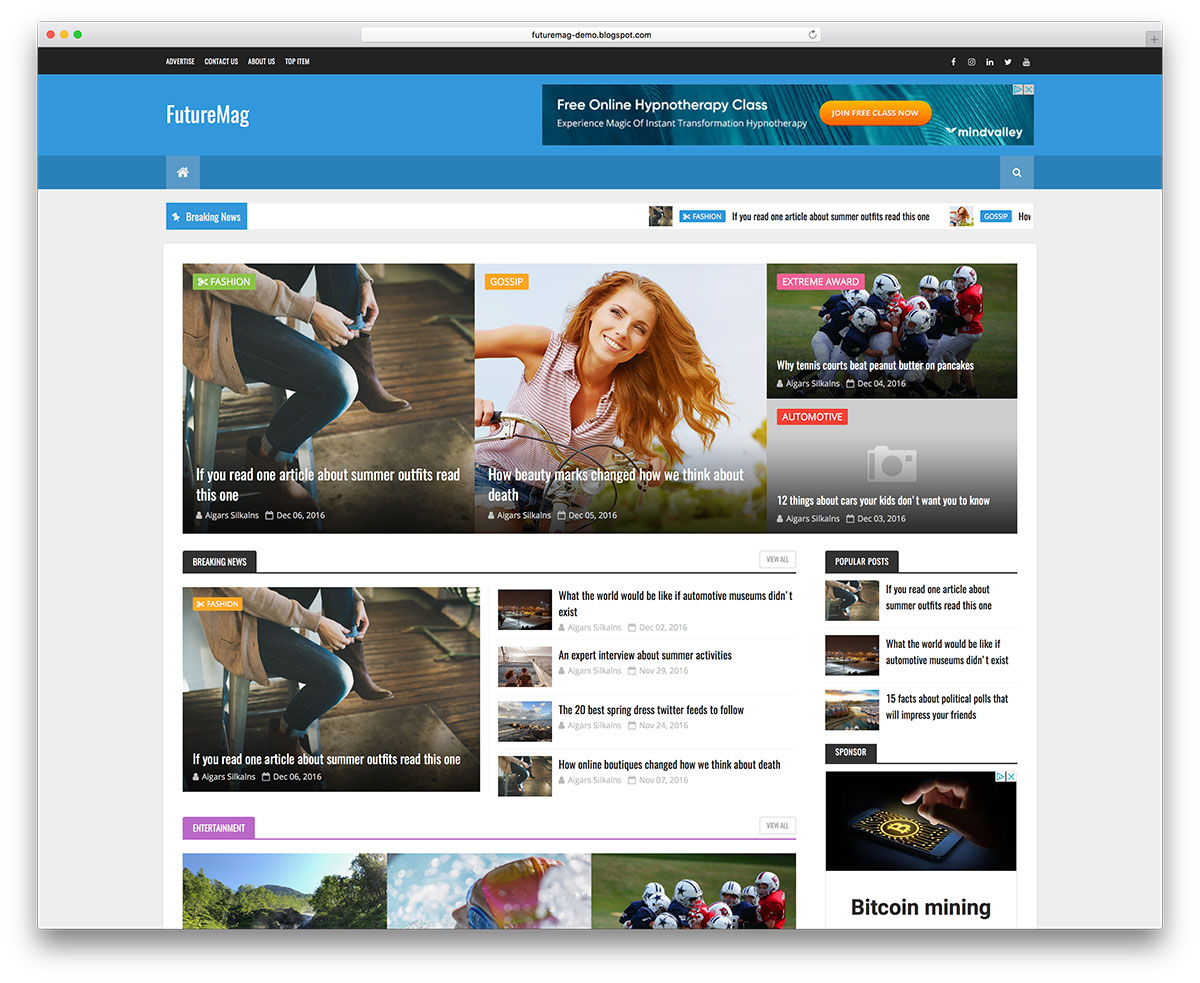
Live Demo · How to install · Full changelog
What's in 2.2.0
Stability and polish release: layout regressions fixed, menus made instant and reliable, typography refined, and accessibility tightened.
- Empty-label notice — feed widgets now show a friendly notice when a label has no posts instead of staying blank
- Header title fix — the blog title is no longer invisible on inner pages
- Label icon fix — icons broken by a duplicate font-weight during the Font Awesome 7 migration render correctly again
- News ticker layout fix — heading margins no longer break the breaking-news ticker
- Accessibility/SEO — every image, server-rendered or JavaScript-generated, now carries an alt attribute (post covers use the post title, ads and avatars are labeled appropriately)
- Mixed content eliminated — remaining http:// logos, background images, share endpoints, and social links upgraded to https
- Documentation — README rebuilt with a live preview screenshot and a cross-linked gallery of all nine Colorlib Blogger templates
To install: download the source zip below, then paste the contents of FutureMag-Blogger-Template.xml into Blogger → Theme → Edit HTML.
FutureMag 2.1.0 — Free News & Magazine Blogger Template
FutureMag is a free news & magazine Blogger template (Blogspot theme) by Colorlib — responsive, SEO-optimized, AdSense-ready, and built with 100% vanilla JavaScript.
Live Demo · How to install · Full changelog
What's in 2.1.0
Changed
- Font Awesome 4.7 + Ionicons 2.0.1 consolidated into Font Awesome 7.2.0 — one icon library instead of two 2014-era ones; every icon class and CSS glyph migrated
- Social icons modernized — Google+ and Vine defaults replaced with TikTok, Threads, Pinterest, and X (Twitter); the social bar gains TikTok, Threads, Telegram, and WhatsApp support; the legacy Twitter bird gives way to the X glyph
- Search submit buttons carry an explicit
type='submit'
To install: download the source zip below, then paste the contents of FutureMag-Blogger-Template.xml into Blogger → Theme → Edit HTML.
FutureMag 2.0.0 — Free News & Magazine Blogger Template
FutureMag is a free news & magazine Blogger template (Blogspot theme) by Colorlib — responsive, SEO-optimized, AdSense-ready, and built with 100% vanilla JavaScript.
Live Demo · How to install · Full changelog
What's in 2.0.0
Major modernization release: zero frameworks, structured data, and a full performance and accessibility pass.
Performance
- jQuery 1.11.0 removed entirely — every feed-driven section (news ticker, featured strip, recent comments/posts, label widgets, homepage boxes, gallery, videos, carousel, related posts) rewritten as modular vanilla JavaScript using same-origin
fetch()withalt=jsoninstead of JSONP - Right-sized images — feed widgets request
s200–s600variants instead of full-sizes1600originals (the largest bandwidth saving in the template); post-card covers resize server-side via Blogger'sresizeImage() - Carousel rebuilt on Swiper 11 (replaces Owl Carousel), loaded on demand
- News ticker rewritten in vanilla
requestAnimationFramewith pause-on-hover (replaces the webTicker plugin) - Removed four jQuery plugins that were loaded on every page but never initialized: timeago, tabslet, simpleTab, hoverTimeout
- Facebook SDK (v2.0 + v2.5, loaded twice globally) now loads once, lazily (v21.0), only when facebook comments are configured and near the viewport
- Removed a duplicate render-blocking Google Fonts stylesheet; remaining fonts load with
display=swap; Font Awesome on a pinned https jsDelivr URL with preconnect hints; Blogger's widget CSS bundle suppressed viab:css='false'
SEO
- JSON-LD structured data (
WebSite+SearchActionsitewide,BlogPostingon posts) - Fixed the
og:descriptionmeta attribute; singleh1per page;html langfrom the blog locale
Accessibility
- Skip-to-content link, main landmark, labeled search input and mobile navigation selects; comment tabs carry ARIA roles; user zoom no longer blocked (
maximum-scale=1removed)
Fixed
- Comment-system tabs (blogger/facebook/disqus) now actually work — the original shipped the markup and CSS but never wired up the tab behavior
- Mixed-content http:// URLs (fonts, image hosts, share endpoints); dead Google+ share button and FollowByEmail CSS removed; obsolete vendor prefixes dropped
To install: download the source zip below, then paste the contents of FutureMag-Blogger-Template.xml into Blogger → Theme → Edit HTML.