Repository navigation
Pictures and Documents
SLM can remember screenshots, photos and PDFs and find them later by describing what they show: "the slide with the quarterly numbers", "the error dialog from the deploy". A picture model (Google's EmbeddingGemma 2) runs on your computer, OCR reads the text inside pictures, and each PDF page is indexed by both its picture and its text. No generative model looks at your files. The feature is off until you turn it on, and turning it on does not touch your existing memories or their embeddings: pictures and pages are added next to them, in their own database.
Text keeps its own model, so turning this on never changes how your text is searched (Embedding Models).
Turn it on in the dashboard (Documents & Images), in the npm installer or upgrader, or with slm media enable. The first time, it downloads about 1.5 GB of models and tools into SLM's own folder.
| Memory (RAM) | 16 GB minimum. Computers sold as 16 GB report a little less, so the check passes from 15 GiB. |
| Disk | About 1.5 GB for the models, plus what you save (up to 2 GB per profile). |
| Systems | macOS on Apple Silicon, Windows x64, Linux x86_64 and Linux ARM64 (aarch64) with a glibc such as Debian, Ubuntu or Fedora. Python 3.12, 3.13 or 3.14. |
| Not supported | Windows on ARM and Intel Macs. Text memory works there as before. |
Below 16 GB the switch is refused with the reason, because the picture model and a large PDF together can push a smaller machine into swapping. Your text memories keep working. If you accept that risk, set SLM_MEDIA_ALLOW_LOW_RAM=1 in the environment SLM starts from and turn the feature on again; SLM logs a warning each time.
flowchart TD
    IN["Picture arrives<br/>file, link, pasted data or upload"] --> K["Check type from file bytes<br/>PNG, JPEG, GIF or WebP"]
    K --> D{"Already saved?<br/>Library under 2 GB?"}
    D -->|"same picture"| R1["Receipt: duplicate"]
    D -->|"library full"| R2["Refused: library is full"]
    D -->|"new"| WK["Wait for the picture worker<br/>90 s local, 20 s web app"]
    WK -->|"still starting"| R3["Receipt: warming, try again"]
    WK --> PR["Re-encode and strip metadata<br/>thumbnail, near-duplicate hash"]
    PR --> OC["Read text in the picture (OCR)<br/>secrets always redacted"]
    OC --> EM["Embed the picture<br/>local image model"]
    EM --> SV["Save the memory<br/>your words + text in image"]
    SV --> IX["Store picture record and vector<br/>media.db"]
    IX --> R4["Receipt: stored"]
    classDef out fill:#FFF4E0,stroke:#C27A00,color:#1F2340
    class R1,R2,R3,R4 out
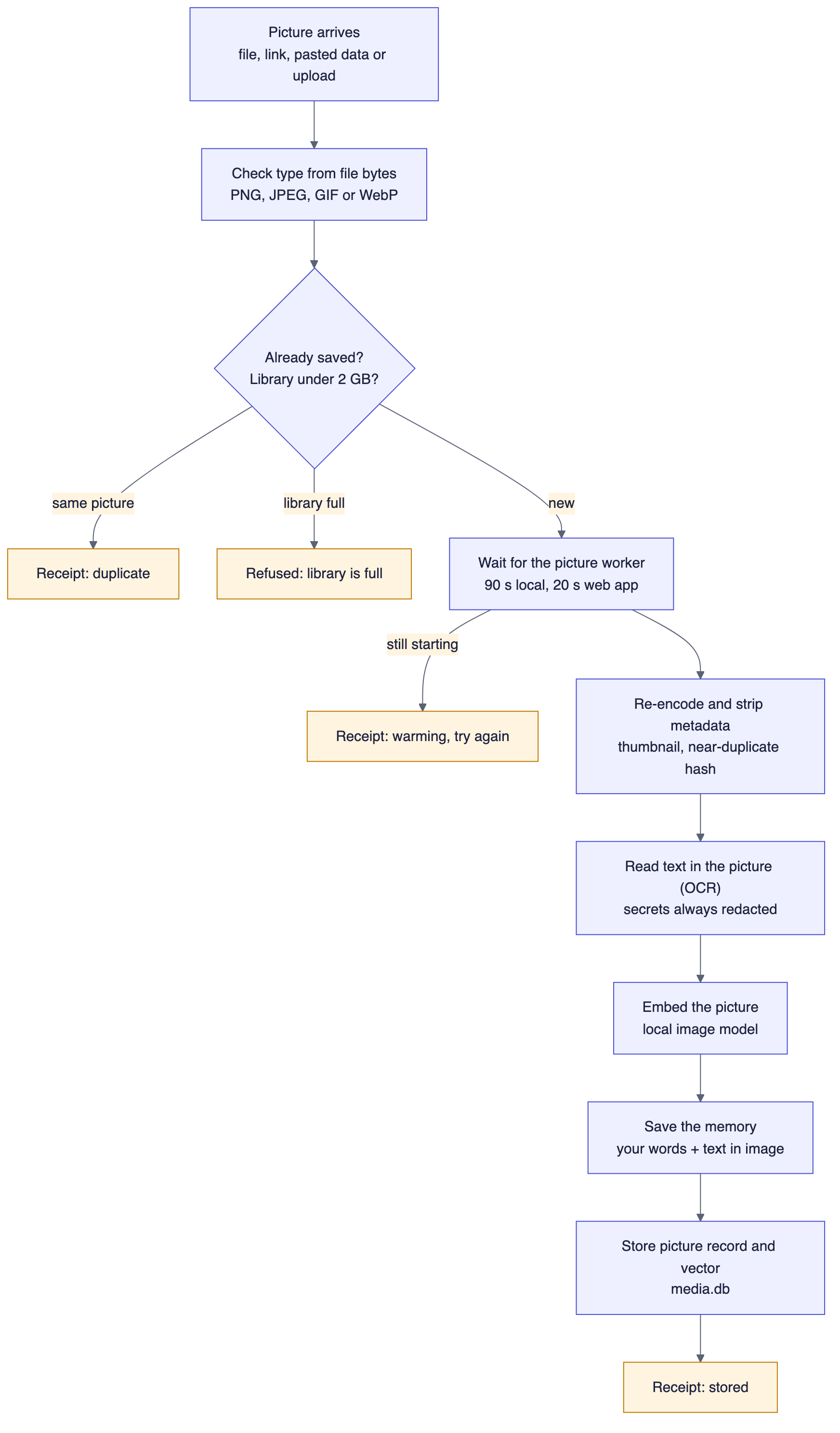
Code: media/ingest.py (remember_media), runtimes/worker_client.py, runtimes/media_image_ops.py, runtimes/multimodal_worker.py, media/store.py, mcp/tools_media.py.
Five callers reach this path: a local agent through the remember_media tool, a web app through Web access, a dashboard upload, an upload link and a connected folder. They share the same checks and differ only in limits. The type is decided from the file's first bytes, never from its name. The picture is re-encoded, which strips its metadata, and a thumbnail and a near-duplicate hash are made. Why re-encode: location and device details in a photo's metadata are never read or kept, so they cannot leak later. A GIF is stored as its first frame.
OCR runs on this computer. Turning images and documents on installs RapidOCR with the other picture packages. On a Mac, OCR tries Apple Vision first and RapidOCR when Vision is missing or finds no text. On other systems it uses RapidOCR, with the models bundled in that package. If the package cannot be imported, or those models are missing, OCR is skipped and the picture is still saved. Text read from a picture is treated as derived text, so credentials in it are always redacted before it is saved. The memory is then your own words plus the text found in the picture, or a short "image without text" label if there was none.
A first save can find the picture worker still loading its model. A local caller waits up to 90 seconds and a web app up to 20, because a web app's call has a 25-second budget. If the worker is still not ready the receipt says warming and you retry in a minute. The same picture saved twice returns duplicate; a picture within 4 bits of an existing one's hash is saved and flagged as a near duplicate, not refused.
flowchart TD
    SUB["Submit PDF<br/>check it is a PDF, 100 MB cap"] --> Q["Document row: processing<br/>job: queued"]
    Q --> CL["Job service claims the job<br/>lease 300 s"]
    CL --> PA["Parser child process reads one page at a time"]
    PA --> TX{"Page has a text layer?<br/>20 or more characters"}
    TX -->|"yes"| T1["Use the text, redact secrets"]
    TX -->|"no"| T2["Render the page and read it (OCR)"]
    T1 --> PM["Split into parts of up to 24,000 characters<br/>save one memory per part"]
    T2 --> PM
    PM --> IX["Embed the page picture<br/>record the page"]
    IX --> CP{"Checkpoint after each page"}
    CP -->|"more pages"| PA
    CP -->|"over the limit"| FL["Failed with a plain reason"]
    CP -->|"document removed"| CX["Cancelled, saved pages hidden"]
    CP -->|"last page done"| DM["Save one memory for the document<br/>title + your words"]
    DM --> RD["Document: ready, job: done"]
    classDef out fill:#FFF4E0,stroke:#C27A00,color:#1F2340
    class FL,CX,RD out

Code: documents/submit.py, documents/runner.py (DocumentJobService), documents/pipeline.py (JobRunner), documents/parse_proc.py, runtimes/pdf_parse.py, documents/chunking.py.
A PDF is queued, not processed inside your call, so a 300-page document does not hold anything up. A background job reads it one page at a time in a child process, using the text layer when a page has one (20 or more non-space characters) and OCR on the rendered page when it does not. Each page becomes one or more memories, and the document gets one memory of its own with its title and your words. After every page the job checks whether to stop: if the daemon is shutting down it releases the job to resume later, if you removed the document it hides what was saved, and it yields briefly so a recall is never starved. Because pages already recorded are skipped on restart, an interrupted job resumes and never saves a page twice.
A PDF that cannot finish is marked failed with a plain-language reason: password-protected, too many pages, a page that took too long, or the reader hit its memory limit. Pages read before it stopped stay in your memory, and removing the document hides them too. Dropping the same file again retries it.
| What | Limit |
|---|---|
| Picture formats | PNG, JPEG, GIF (first frame) and WebP |
| One picture | 25 MB from a file, the dashboard or an upload link; 8 MB as pasted data in a tool call; 512 KB from a web app's pasted data |
| One PDF | 100 MB (change with SLM_DOC_MAX_MB); 25 MB as pasted data in a tool call |
| PDF pages | 500 (SLM_DOC_MAX_PAGES). A longer PDF is refused as a whole, not cut short. |
| Reading a PDF | 30 seconds per page and 20 minutes per document; the reader is stopped past 1.6 GB of memory |
| Text kept per page | 1,000,000 characters; each memory part holds up to 24,000 |
| Picture and text reader memory | Checked twice a second while a request runs: past 4.5 GB the reader is stopped, that request fails with a plain message, and the next one starts a fresh reader. On Linux the reader also starts with a hard limit above that. Text over 8,000 characters, a picture file over 25 MB or a picture with more than 50 million pixels is refused before it is sent |
| Library | 2 GB of pictures and PDFs per profile |
A connected folder (or an Obsidian vault) is read, never written. You pick a folder, SLM shows a preview of what it would read, and nothing is saved until you confirm. The scanner then mirrors Markdown, text, PDFs and pictures into memory, and rescans every 15 minutes or when files change.
flowchart TD
    ST["Scan starts<br/>every 15 min, or when files change"] --> RM{"Web access set up?"}
    RM -->|"yes"| PA["Source paused<br/>nothing is read"]
    RM -->|"no"| WK["Walk the folder<br/>ignore rules, up to 50,000 files"]
    WK --> GD{"Folder reachable and<br/>same disk?"}
    GD -->|"no"| OF["Source offline<br/>nothing is hidden or erased"]
    GD -->|"yes"| HS["Wait 2 s for files to settle<br/>then hash each file"]
    HS --> CL{"Compare with last scan"}
    CL -->|"same hash"| UN["Unchanged"]
    CL -->|"same hash, new path"| MV["Moved: repoint the record"]
    CL -->|"credential-like text"| QU["Quarantined, not saved"]
    CL -->|"new or edited"| SV["Save as memory, picture or PDF<br/>hide the old version"]
    CL -->|"missing from disk"| TB["Tombstone: memories hidden"]
    TB -->|"after 7 days"| ER["Erased for good"]
    classDef out fill:#FFF4E0,stroke:#C27A00,color:#1F2340
    class PA,OF,QU,ER out
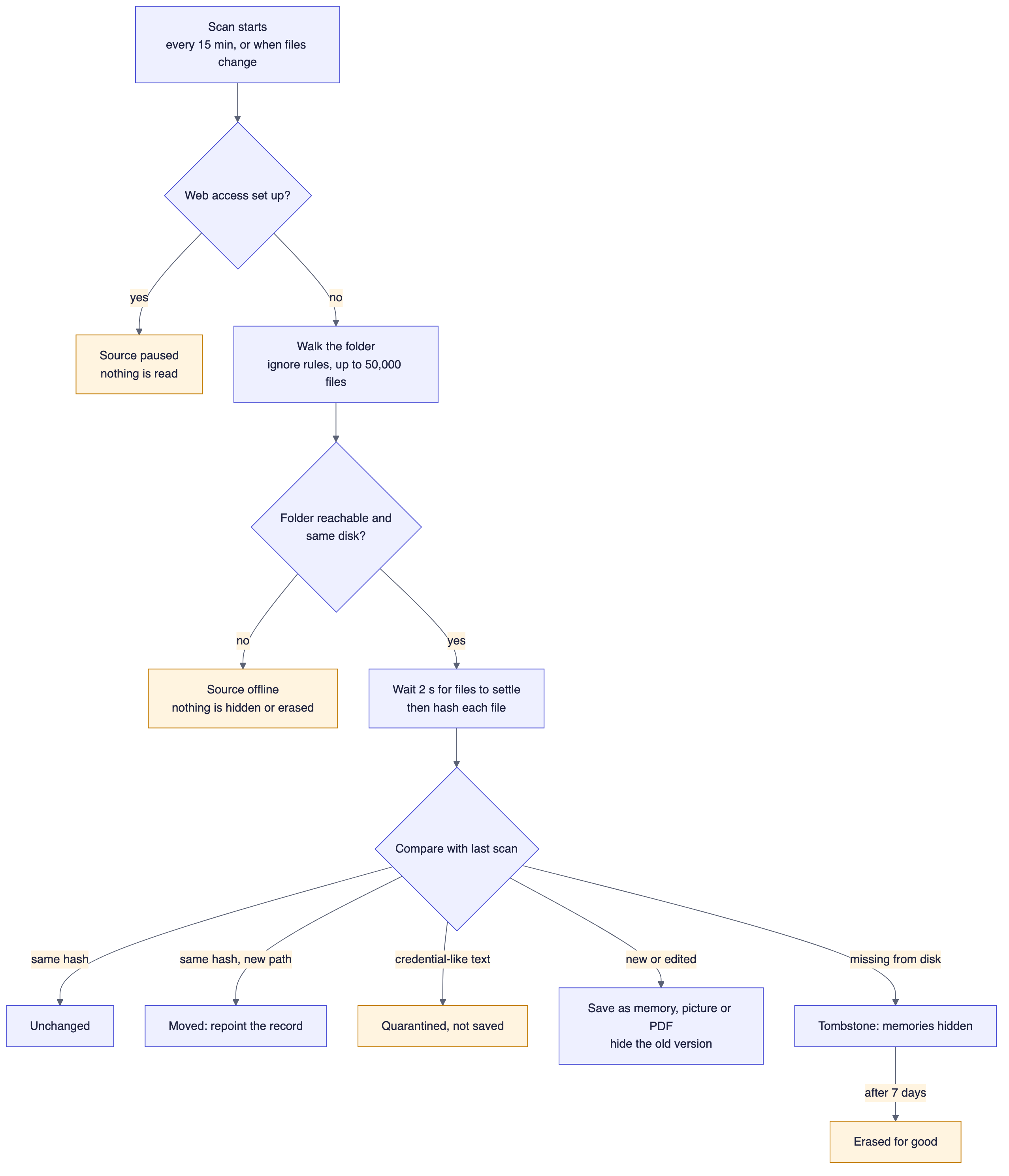
Code: sources/reconcile.py (scan_source), sources/scanner.py (SourceScanService), sources/ingest.py, sources/retire.py, sources/api.py, sources/ignore.py.
Several of these behaviours exist to protect you. An unreachable drive, a different disk or an empty folder marks the source offline and hides nothing, so unplugging a drive cannot wipe your memories. A text file that looks like it contains a credential in its first 256 KiB is quarantined instead of saved, until you release it. A file that disappears is hidden at once and erased for good only after 7 days; a replaced version is hidden at once and erased after 7 days too. Cloud-only placeholder files are never read. A folder holds up to 50,000 files, and text up to 5 MiB, PDFs up to 50 MiB and pictures up to 25 MiB each.
Folders and Web access do not run together. While Web access is set up, every folder source is paused and a new one cannot be connected, and remote apps can never see folder content. Files found while pictures and documents were off are listed as skipped and are read on the next scan once the feature is ready.
Removing a source hides everything it gave by default. slm sources remove ID --purge erases it through the same GDPR erasure path as a normal forget, and fails loudly with erasure_incomplete rather than claiming success if any copy remains.
A web app connected through Web Access never sees folder content, and it sees a picture only when three things hold: the picture was vetted as safe to share (its OCR text contained no secrets and no personal data), the app has the media permission, and the picture is in the app's one bound profile. A remote app gets the thumbnail, not the original.
A web app can save a picture or PDF in two ways. ChatGPT can hand over an attached file, which your computer downloads only from ChatGPT's own file hosts plus any host you add to SLM_MEDIA_URL_HOSTS. Any app can ask for a one-time upload link; see Web Access and Connected Apps. Saving remotely needs the media permission and a write key.
| Command | What it does |
|---|---|
slm media enable |
Shows the download size and a disk check, then asks; --yes skips the question |
slm media status |
What is on and how set-up is going |
slm media disable |
Turns it off; memories are kept (--remove-files also deletes the downloaded models) |
slm media gc |
Reports picture records whose memory is gone, files with no record and pictures not yet linked; --apply fixes them. It never deletes a memory and only touches stored picture files |
slm media repair |
Re-reads kept pictures into the current picture index, after a model change or a "can't be found by what it shows yet" message; --dry-run only counts them |
slm sources add PATH |
Connects a folder or Obsidian vault after a preview and your confirmation |
slm sources list, report, rescan, remove
|
Manage connected folders |
After enable, restart SLM (slm restart, or the dashboard button) so the picture worker starts. enable also starts SLM if it is not running.
slm gdpr export adds a media section with records only: type, size, dimensions, capture time, scope and state for each picture, document and folder. It carries no picture or document bytes and no thumbnails. The memory export carries the text of pictures, pages and folder files as ordinary memories with a source field. Removing a document hides its pages, and a hard removal erases them through the GDPR path. Cloud backups never include media-*.db, so pictures and documents stay on this computer.
SuperLocalMemory: governed, local-first memory for AI agents. Home · Installation · Architecture · Privacy and Data Flow · CLI · MCP tools · FAQ
Part of Qualixar | Created by Varun Pratap Bhardwaj | GitHub · CHANGELOG
Platform boundary: Apple Silicon macOS, 64-bit Windows and 64-bit Linux. Linux covers x86_64 and ARM64. Intel Mac, 32-bit Windows and Windows on ARM are not supported.
SuperLocalMemory
Start here
How memory works
- Architecture
- How Remember Works
- How Recall Works
- Retrieval Score Contract
- Answer Check
- Memory Kinds
- Modes Explained
- Profiles
- Auto-Memory
- Active Memory
The living system
Governance and trust
- Governance
- Security, Company Mode and Teams
- Privacy and Data Flow
- GDPR
- Compliance
- Backup and Restore
- Cloud Backup
Beyond text
Connected systems
- Bots That Talk (SLM-Mesh)
- Connect Web Apps (steps)
- Web Access and Connected Apps
- Bounded Loops
- Framework Adapters
- Optimize
Operate and reference
- Dashboard Tour
- Configuration
- Embedding Models
- CLI Reference
- MCP Tools
- Capabilities and Operations
- Troubleshooting
- FAQ
Research
Archive