Repository navigation
Releases
Claude Usage Widget v2.0.2 (Windows)

A small fix for the taskbar strip's color.
What's fixed
- The strip matches a taskbar with a grain texture. On some wallpapers and accent colors the taskbar has a fine grain, so no one color fills the area beside the strip. Version 2.0.1 then did not trust any color it read, and the strip could keep a wrong color from sign-in (for example dark blue on a brown taskbar). Now the strip takes the middle color of the area and ignores the grain's small changes.
Install
- Download
ClaudeUsageWidget-v2.0.2-Setup.exebelow and run it. It installs for your Windows user only, with no admin prompt. - New install only: load the extension once. Open
chrome://extensions(oredge://extensions), turn on Developer mode, click Load unpacked, and select theextensionfolder in the install folder. - Start Claude Usage Widget from the Start Menu.
Upgrading from 2.0.0 or 2.0.1: run the setup. The extension did not change, so you do not need to reload it.
SHA-256 of the setup file: 466E6A746AF593F7834DDA16BB6827D5E5470C40E45C2DDA6B012E0DC379CD3C
Unofficial. Not affiliated with Anthropic. It reads the same internal endpoint as the claude.ai settings page, which can change without notice.
Claude Usage Widget v2.0.1 (Windows)
A bug-fix release for the taskbar strip and the usage panel.
What's fixed
- The strip matches the taskbar color. It reads the taskbar color again every 2 seconds, so it follows a new wallpaper, accent color or transparency setting. Before, it kept the color the taskbar had at sign-in, which could be the wrong color.
- The strip stays visible while the Start menu is open. The same applies to search and the notification center.
- A click on the taskbar no longer hides the strip. Before, it disappeared for up to 3 seconds and then came back.
- "This week by day" keeps its data after a restart. The history now lives in
history.jsonnext tousage_data.json, and the receiver records it too, also while the widget is closed. The history from the older place (%LOCALAPPDATA%\claude-usage-widget\) is merged in on the first start. - The reset day no longer flips between "until Mon" and "until Tue". The panel shows the last minute of the week, for example
Mon 23:59. - The widget starts again on its own when Windows Explorer restarts.
- The strip's tooltip no longer covers the panel when you click the strip.
Install
- Download
ClaudeUsageWidget-v2.0.1-Setup.exebelow and run it. It installs for your Windows user only, with no admin prompt. - New install only: load the extension once. Open
chrome://extensions(oredge://extensions), turn on Developer mode, click Load unpacked, and select theextensionfolder in the install folder. - Start Claude Usage Widget from the Start Menu.
Upgrading from 2.0.0: run the setup. The extension did not change, so you do not need to reload it.
SHA-256 of the setup file: B9FB458C899ECB8710D916A7D6543AEEE2BBF0022D00A2A825BEA20895E9B175
Unofficial. Not affiliated with Anthropic. It reads the same internal endpoint as the claude.ai settings page, which can change without notice.
Claude Usage Widget v2.0.0 (Windows)
A full redesign: a small strip on the Windows taskbar and a usage panel that opens when you click it.
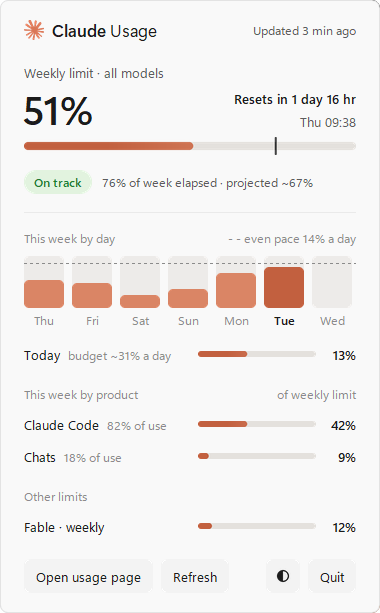
What's new
- Taskbar strip:
51% until Tue, with a bar and a mark for how much of the week has gone. - Usage panel: weekly limit, reset time, and your pace (On track, Tight or Over pace) with a projection for the end of the week.
- This week by day: a column for each day, with a dashed even-pace line.
- Today's budget: the limit that is left, spread over the days that are left. The bar turns red when you go over.
- This week by product: how much of the weekly limit Claude Code and Chats used.
- Other limits: the weekly Fable limit and extra usage.
- Theme: same as Windows, light or dark (the button next to Quit).
- Tooltips on the strip, the weekly bar, each day and the Today row.
- Motion: the panel slides in, bars fill and numbers count up. Off when Windows animation effects are off.
- Refresh button: asks the browser extension for new data within 30 seconds.
- The receiver now takes port 8765 for itself, so another local server can no longer take the extension's data without an error.
Install
- Download
ClaudeUsageWidget-v2.0.0-Setup.exebelow and run it. It installs for your Windows user only, with no admin prompt. - Load the extension once: open
chrome://extensions(oredge://extensions), turn on Developer mode, click Load unpacked, and select theextensionfolder in the install folder. The Start Menu has a Chrome extension folder shortcut to it. - Start Claude Usage Widget from the Start Menu. Click the strip to open the panel.
Upgrading from 1.0.0: after the install, open chrome://extensions and click reload on the Claude Usage Widget extension, so Chrome runs the new extension code.
SHA-256 of the setup file: ECB3B4731FB1DB9FBE11C131DF0C94DF166EE24FDDE8081C4B643554E7F33D8C
Unofficial. Not affiliated with Anthropic. It reads the same internal endpoint as the claude.ai settings page, which can change without notice.