Repository navigation
Releases
Limita 0.25.0

What's new
On Windows, everything 0.24.0 brought to the Mac.
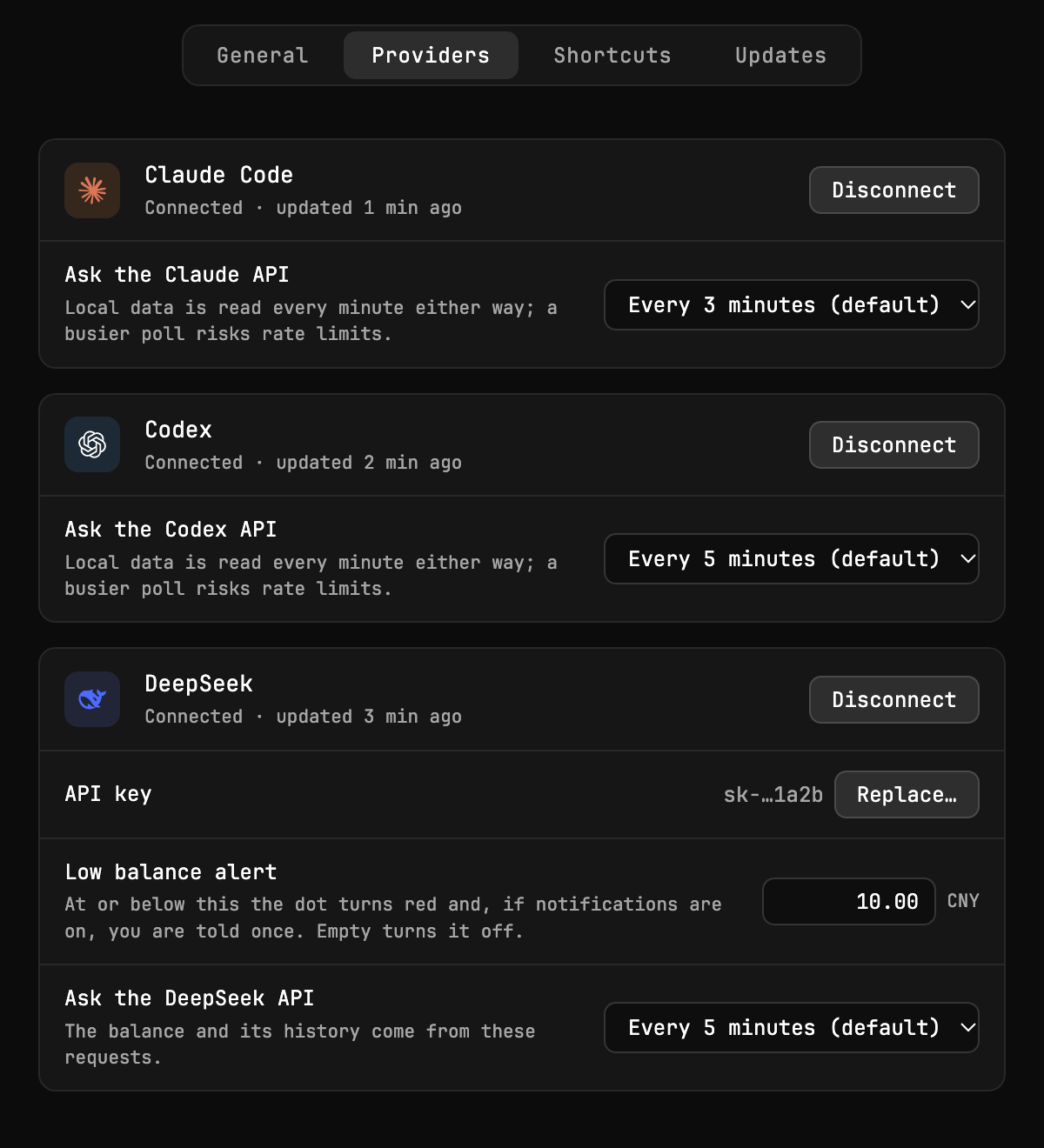
- DeepSeek as a third provider. Connect it with an API key in Settings → Providers and it gets a column of its own: how much of your last top-up is left, how long it lasts at your pace, what you spent today and this month. The key is kept in the Windows Credential Manager, checked with DeepSeek before it is stored and removed when you disconnect. Set a low-balance alert and Limita shows a notification once when the balance drops to it.
- A Settings window with General, Providers, Shortcuts and Updates. Open it from the tray menu, the new ⚙ button in the dashboard, or the DeepSeek row of the connect prompt.
- A shorter tray menu: Show Limits, Refresh, Settings… and Quit. The hover pill, the floating window, notifications, connecting providers and Launch at Login moved to Settings.
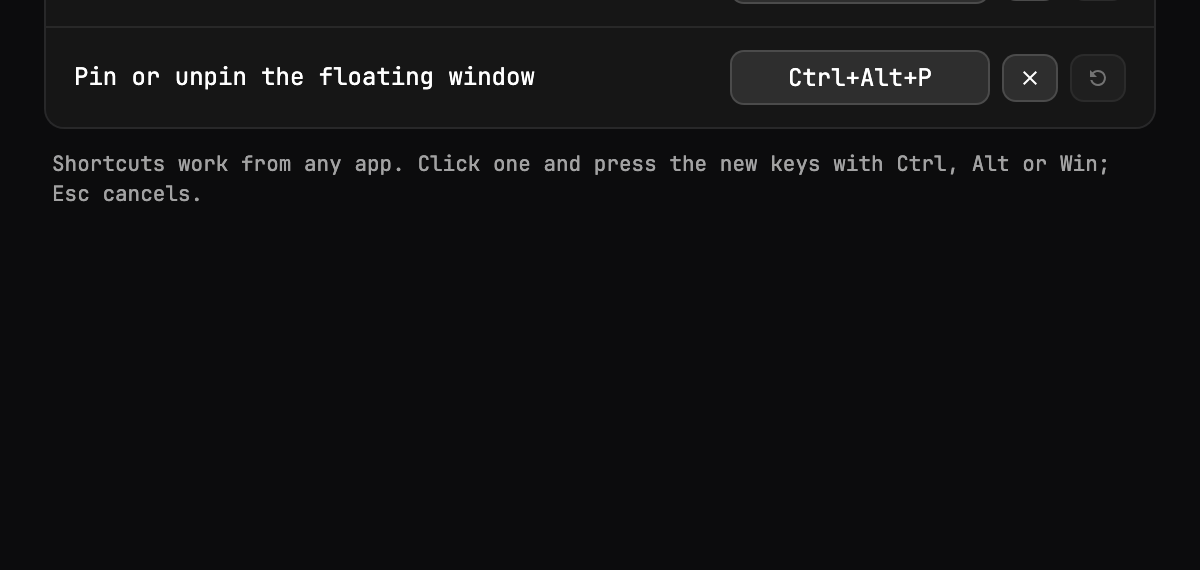
- Your own shortcuts. Ctrl+Alt+L, Ctrl+Alt+H and Ctrl+Alt+P can be changed or turned off in Settings → Shortcuts; if another app already holds a key, Settings says so.
- How often each service is asked, from every minute to every 30 minutes, in Settings → Providers.
- Update checks can be turned off, with Check Now and the result of the last check in Settings → Updates.
On both: the "Limita x.y.z is out" announcement in the dashboard header no longer runs over the peak-hours badge when two or three columns are shown. The badge steps aside only while the two would touch.
If you run Limita 0.13.0 or later, it offers this update itself. Older versions can't update themselves: install this one by hand.
Install on macOS
- Download
Limita-0.25.0.dmg, open it and drag Limita into Applications, replacing the old version. Quit the running copy first: right-click the menu-bar icon → Quit Limita. - The app is not notarized, so macOS blocks the first launch. On macOS 14, right-click Limita → Open → Open. On macOS 15 or later, open Limita once, close the warning, then click System Settings → Privacy & Security → Open Anyway. If there is no such button or macOS says Limita is damaged, run
xattr -dr com.apple.quarantine /Applications/Limita.appin Terminal and open it again. The last resort,sudo spctl --master-disable, turns the check off for every app; see the README before using it. - When macOS asks to let Limita read
Claude Code-credentials, choose Always Allow. macOS asks again after each update, as it does after a manual reinstall, and the same goes for Limita's own DeepSeek key once you have connected DeepSeek.
Limita-0.25.0.dmg.sig is the update signature the app uses; you don't need to download it.
Install on Windows
- Download
Limita_0.25.0_x64-setup.exe(attached in about 12 minutes) and run it. It installs for your user only, no administrator rights needed. - The installer is not signed yet, so SmartScreen warns about it: choose More info → Run anyway.
- Limita starts in the tray. If Windows tucks the icon under ^, drag it onto the taskbar to keep it in sight.
Limita 0.24.1
What's new
- Update checks no longer fail with "GitHub answered 403" (macOS). Limita asked GitHub's API for new versions, which allows only 60 requests an hour per network address without a login. On a VPN or a shared office network that ran out, and Settings → Updates showed the error. The Mac app now finds new releases on github.com itself, the way the Windows app already does, and if GitHub still asks it to slow down, it says so plainly and tries again later.
Limita 0.24.0 still uses the API, so it may take up to an hour on a busy network before it offers this update; Check Now in Settings → Updates tries again. Everything from 0.24.0 (DeepSeek, the Settings window, the shorter menu) is in the 0.24.0 notes. The Windows app has no changes besides the version number.
If you run Limita 0.13.0 or later, it offers this update itself. Older versions can't update themselves: install this one by hand.
Install on macOS
- Download
Limita-0.24.1.dmg, open it and drag Limita into Applications, replacing the old version. Quit the running copy first: right-click the menu-bar icon → Quit Limita. - The app is not notarized, so macOS blocks the first launch. On macOS 14, right-click Limita → Open → Open. On macOS 15 or later, open Limita once, close the warning, then click System Settings → Privacy & Security → Open Anyway. If there is no such button or macOS says Limita is damaged, run
xattr -dr com.apple.quarantine /Applications/Limita.appin Terminal and open it again. The last resort,sudo spctl --master-disable, turns the check off for every app; see the README before using it. - When macOS asks to let Limita read
Claude Code-credentials, choose Always Allow. macOS asks again after each update, as it does after a manual reinstall, and the same goes for Limita's own DeepSeek key once you have connected DeepSeek.
Limita-0.24.1.dmg.sig is the update signature the app uses; you don't need to download it.
Install on Windows
- Download
Limita_0.24.1_x64-setup.exe(attached in about 12 minutes) and run it. It installs for your user only, no administrator rights needed. - The installer is not signed yet, so SmartScreen warns about it: choose More info → Run anyway.
- Limita starts in the tray. If Windows tucks the icon under ^, drag it onto the taskbar to keep it in sight.
Limita 0.24.0
What's new
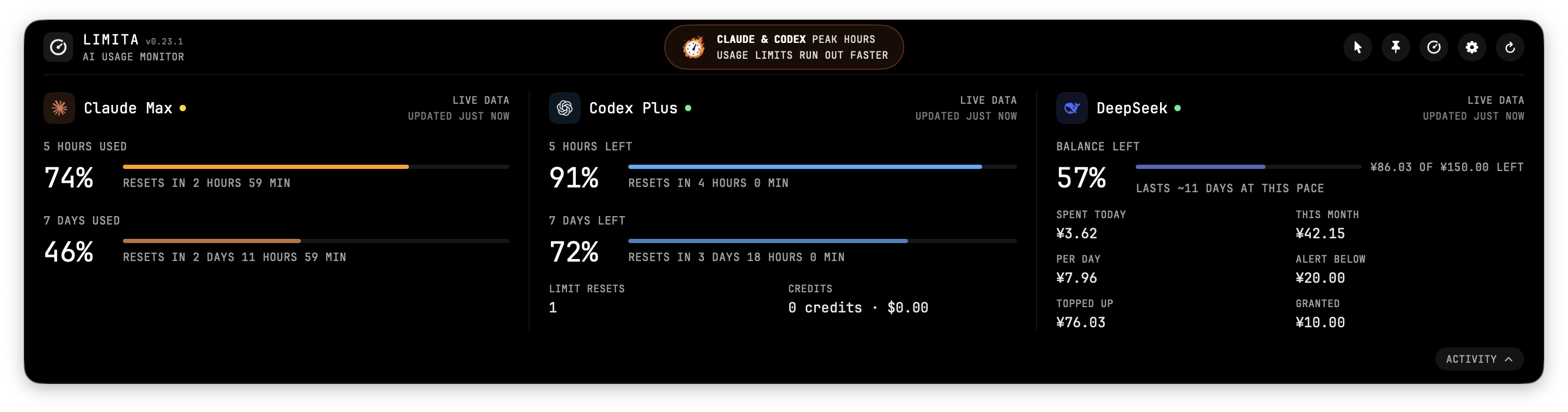
- DeepSeek (macOS). DeepSeek is a third provider next to Claude Code and Codex. Connect it with an API key in Settings → Providers: Limita checks the key with DeepSeek, then keeps it in your Keychain. DeepSeek bills from a prepaid balance and reports nothing else, so Limita keeps its own history of the balance and shows how much of your last top-up is left, how many days it lasts at your pace, what you spent today and this month, and the average per day (after a day of history). The balance is shown in the currency DeepSeek reports, with no conversion. Set a low balance alert and the dot turns red at it, with one notification per drop and another if DeepSeek starts rejecting calls. The hover pill and the iTerm2 plugin show the balance too. See DeepSeek in the README.
- Settings (macOS). Everything you can change is now in one window: General (hover pill, floating window, menu-bar icon, notifications), Providers (connect and disconnect each service, and how often its API is asked, from 1 to 30 minutes), Shortcuts (change or turn off ⌃⌥L, ⌃⌥H and ⌃⌥P; Limita says if another app already uses a combination) and Updates (turn off the automatic check, or check now). Open it with Settings… in the menu (⌘,) or the new ⚙ button in the dashboard.
- A shorter menu (macOS). Right-clicking the menu-bar icon now offers Show Limits, Refresh, Settings… and Quit.
- The peak-hours badge is centred on the dashboard again, on macOS and Windows. With DeepSeek connected, which has no peak hours, it names the services in peak hours, e.g. "CLAUDE & CODEX PEAK HOURS".
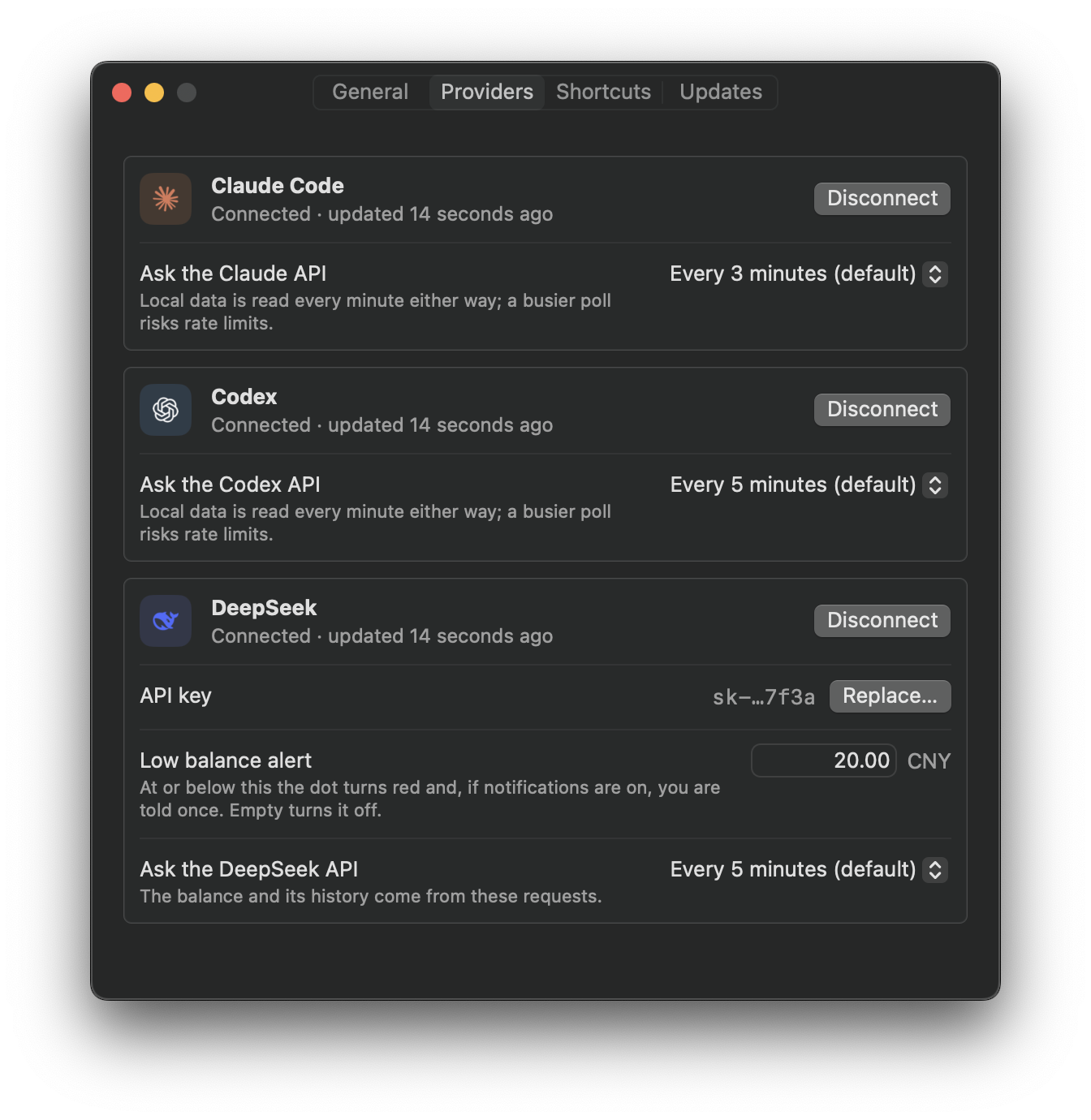
DeepSeek and the Settings window are macOS only for now; the Windows app is unchanged apart from the badge. If you use the iTerm2 plugin, download the new limita.py below to see the DeepSeek balance in the status bar.
If you run Limita 0.13.0 or later, it offers this update itself. Older versions can't update themselves: install this one by hand.
Install on macOS
- Download
Limita-0.24.0.dmg, open it and drag Limita into Applications, replacing the old version. Quit the running copy first: right-click the menu-bar icon → Quit Limita. - The app is not notarized, so macOS blocks the first launch. On macOS 14, right-click Limita → Open → Open. On macOS 15 or later, open Limita once, close the warning, then click System Settings → Privacy & Security → Open Anyway. If there is no such button or macOS says Limita is damaged, run
xattr -dr com.apple.quarantine /Applications/Limita.appin Terminal and open it again. The last resort,sudo spctl --master-disable, turns the check off for every app; see the README before using it. - When macOS asks to let Limita read
Claude Code-credentials, choose Always Allow. macOS asks again after each update, as it does after a manual reinstall, and the same goes for Limita's own DeepSeek key once you have connected DeepSeek.
Limita-0.24.0.dmg.sig is the update signature the app uses; you don't need to download it.
Install on Windows
- Download
Limita_0.24.0_x64-setup.exe(attached in about 12 minutes) and run it. It installs for your user only, no administrator rights needed. - The installer is not signed yet, so SmartScreen warns about it: choose More info → Run anyway.
- Limita starts in the tray. If Windows tucks the icon under ^, drag it onto the taskbar to keep it in sight.
Limita 0.23.1
What's new
- Limita for macOS uses far less memory. After a day it could hold 850 MB or more and briefly reach 3 GB. Two causes are fixed: the burning-gauge animation of the prime-time badge kept a full copy of its sprite sheet per frame, and the activity panel's scan of your Claude Code and Codex logs kept every parsed line in memory until it finished. Limita now stays around 60 MB. The Windows app was not affected.
If you run Limita 0.13.0 or later, it offers this update itself. Older versions can't update themselves: install this one by hand.
Install on macOS
- Download
Limita-0.23.1.dmg, open it and drag Limita into Applications, replacing the old version. Quit the running copy first: right-click the menu-bar icon → Quit Limita. - The app is not notarized, so macOS blocks the first launch. On macOS 14, right-click Limita → Open → Open. On macOS 15 or later, open Limita once, close the warning, then click System Settings → Privacy & Security → Open Anyway. If there is no such button or macOS says Limita is damaged, run
xattr -dr com.apple.quarantine /Applications/Limita.appin Terminal and open it again. The last resort,sudo spctl --master-disable, turns the check off for every app; see the README before using it. - When macOS asks to let Limita read
Claude Code-credentials, choose Always Allow. macOS asks again after each update, as it does after a manual reinstall.
Limita-0.23.1.dmg.sig is the update signature the app uses; you don't need to download it.
Install on Windows
- Download
Limita_0.23.1_x64-setup.exe(attached in about 12 minutes) and run it. It installs for your user only, no administrator rights needed. - The installer is not signed yet, so SmartScreen warns about it: choose More info → Run anyway.
- Limita starts in the tray. If Windows tucks the icon under ^, drag it onto the taskbar to keep it in sight.
Limita 0.23.0
What's new
- Codex Free shows its limit. Free has no 5-hour or weekly limit, only one for 30 days, and Limita used to show "Codex app-server returned no limit windows" instead. Now the Codex column has a 30 DAYS meter with what is left and when it resets, the 5-hour meter shows no limit, and the menu-bar pill and the iTerm2 status bar read 30d.
If you run Limita 0.13.0 or later, it offers this update itself. Older versions can't update themselves: install this one by hand.
Install on macOS
- Download
Limita-0.23.0.dmg, open it and drag Limita into Applications, replacing the old version. Quit the running copy first: right-click the menu-bar icon → Quit Limita. - The app is not notarized, so macOS blocks the first launch. On macOS 14, right-click Limita → Open → Open. On macOS 15 or later, open Limita once, close the warning, then click System Settings → Privacy & Security → Open Anyway. If there is no such button or macOS says Limita is damaged, run
xattr -dr com.apple.quarantine /Applications/Limita.appin Terminal and open it again. The last resort,sudo spctl --master-disable, turns the check off for every app; see the README before using it. - When macOS asks to let Limita read
Claude Code-credentials, choose Always Allow. macOS asks again after each update, as it does after a manual reinstall.
Limita-0.23.0.dmg.sig is the update signature the app uses; you don't need to download it.
Install on Windows
- Download
Limita_0.23.0_x64-setup.exe(attached in about 12 minutes) and run it. It installs for your user only, no administrator rights needed. - The installer is not signed yet, so SmartScreen warns about it: choose More info → Run anyway.
- Limita starts in the tray. If Windows tucks the icon under ^, drag it onto the taskbar to keep it in sight.
Limita 0.22.0
What's new
- Exact Codex Pro tier. Codex columns now read Pro 100, Pro 200 or Pro 500. Pro 500 also gets the unlimited 5-hour meter, like the other Pro tiers.
- Cloud credits expire. The row now says EXPIRES IN 4 DAYS 19 HOURS or EXPIRES ON NOV 5 instead of "resets", because these credits end rather than renew. With all of them spent it says when the row DISAPPEARS, and the row goes away on that date.
- Shorter reset lines. Lines such as RESET FOR EVERYONE · 5 HOURS AGO now stay for 48 hours instead of a week. A banked reset still stays for as long as it can be applied.
If you run Limita 0.13.0 or later, it offers this update itself. Older versions can't update themselves: install this one by hand.
Install on macOS
- Download
Limita-0.22.0.dmg, open it and drag Limita into Applications, replacing the old version. Quit the running copy first: right-click the menu-bar icon → Quit Limita. - The app is not notarized, so macOS blocks the first launch. On macOS 14, right-click Limita → Open → Open. On macOS 15 or later, open Limita once, close the warning, then click System Settings → Privacy & Security → Open Anyway. If there is no such button or macOS says Limita is damaged, run
xattr -dr com.apple.quarantine /Applications/Limita.appin Terminal and open it again. The last resort,sudo spctl --master-disable, turns the check off for every app; see the README before using it. - When macOS asks to let Limita read
Claude Code-credentials, choose Always Allow. macOS asks again after each update, as it does after a manual reinstall.
Limita-0.22.0.dmg.sig is the update signature the app uses; you don't need to download it.
Install on Windows
- Download
Limita_0.22.0_x64-setup.exe(attached in about 12 minutes) and run it. It installs for your user only, no administrator rights needed. - The installer is not signed yet, so SmartScreen warns about it: choose More info → Run anyway.
- Limita starts in the tray. If Windows tucks the icon under ^, drag it onto the taskbar to keep it in sight.
Limita 0.21.0
What's new
- Current plan names. Claude's Max 5x now shows as Max and Max 20x as Ultra, following Anthropic's rename. Codex columns now carry the plan too, e.g. Codex Plus or Codex Pro 100, and on Windows both services show it for the first time. Pro 200 and Pro 500 both read Pro: the Codex CLI does not tell them apart.
- Unlimited 5-hour meter. A plan without a 5-hour limit, such as a verified Claude Ultra or any Codex Pro, gets a glowing purple bar with an infinity sign and UNLIMITED instead of a percentage. The weekly limit still applies and stays in its own meter. An Ultra account awaiting verification keeps its temporary 5-hour limit, and Limita shows it as usual.
- Fold it away. On macOS the unlimited 5-hour meter folds into a capsule, like the Fable and credit meters.
If you run Limita 0.13.0 or later, it offers this update itself. Older versions can't update themselves: install this one by hand.
Install on macOS
- Download
Limita-0.21.0.dmg, open it and drag Limita into Applications, replacing the old version. Quit the running copy first: right-click the menu-bar icon → Quit Limita. - The app is not notarized, so macOS blocks the first launch. On macOS 14, right-click Limita → Open → Open. On macOS 15 or later, open Limita once, close the warning, then click System Settings → Privacy & Security → Open Anyway. If there is no such button or macOS says Limita is damaged, run
xattr -dr com.apple.quarantine /Applications/Limita.appin Terminal and open it again. The last resort,sudo spctl --master-disable, turns the check off for every app; see the README before using it. - When macOS asks to let Limita read
Claude Code-credentials, choose Always Allow. macOS asks again after each update, as it does after a manual reinstall.
Limita-0.21.0.dmg.sig is the update signature the app uses; you don't need to download it.
Install on Windows
- Download
Limita_0.21.0_x64-setup.exe(attached in about 12 minutes) and run it. It installs for your user only, no administrator rights needed. - The installer is not signed yet, so SmartScreen warns about it: choose More info → Run anyway.
- Limita starts in the tray. If Windows tucks the icon under ^, drag it onto the taskbar to keep it in sight.
Limita 0.20.0
What's new
- Floating window. Pin the dashboard as a window that stays on top wherever you put it: press ⌃⌥P (Ctrl+Alt+P on Windows), click the new pin button in the dashboard header, or choose Floating Window in the menu. While pinned, it no longer closes on a click elsewhere or a desktop switch, never takes keyboard focus from the app you type in, and on macOS shows on every desktop. Drag it anywhere; it opens there again, also after a restart. ⌃⌥L and the menu-bar or tray icon hide and show it in place; press ⌃⌥P again to put the dashboard back under the menu bar or next to the tray.
- No more
default.profrawfiles on macOS. Every macOS release so far was built with code coverage on, so each run of Limita as Claude Code's status line left adefault.profrawfile in the project folder. Release builds no longer do. Files left by older versions can be deleted.
If you run Limita 0.13.0 or later, it offers this update itself. Older versions can't update themselves: install this one by hand.
Install on macOS
- Download
Limita-0.20.0.dmg, open it and drag Limita into Applications, replacing the old version. Quit the running copy first: right-click the menu-bar icon → Quit Limita. - The app is not notarized, so macOS blocks the first launch. On macOS 14, right-click Limita → Open → Open. On macOS 15 or later, open Limita once, close the warning, then click System Settings → Privacy & Security → Open Anyway. If there is no such button or macOS says Limita is damaged, run
xattr -dr com.apple.quarantine /Applications/Limita.appin Terminal and open it again. The last resort,sudo spctl --master-disable, turns the check off for every app; see the README before using it. - When macOS asks to let Limita read
Claude Code-credentials, choose Always Allow. macOS asks again after each update, as it does after a manual reinstall.
Limita-0.20.0.dmg.sig is the update signature the app uses; you don't need to download it.
Install on Windows
- Download
Limita_0.20.0_x64-setup.exe(attached in about 12 minutes) and run it. It installs for your user only, no administrator rights needed. - The installer is not signed yet, so SmartScreen warns about it: choose More info → Run anyway.
- Limita starts in the tray. If Windows tucks the icon under ^, drag it onto the taskbar to keep it in sight.
Limita 0.19.0
What's new
- Limit resets on Windows. The Windows app now has the reset tracker that came to macOS in 0.18.0. Each column says when the service last reset limits for everyone, e.g. RESET FOR EVERYONE · 5 HOURS AGO, or BANKED RESET · USE BY OCT 22 for a reset you apply yourself; click the line for the announcement, or the credit under it for the tracker. Limita also notices when your own weekly limit starts over early, and when Codex gives you a new limit reset to redeem. New resets come as a Windows notification; Reset Notifications in the tray menu turns them off. Global resets come from codex-reset.com and claude-resets.com.
- New screenshots in the README, taken as window screenshots with the system shadow.
- The macOS app is unchanged from 0.18.0; it gets the new version number because both apps share one.
If you run Limita 0.13.0 or later, it offers this update itself. Older versions can't update themselves: install this one by hand.
Install on macOS
- Download
Limita-0.19.0.dmg, open it and drag Limita into Applications, replacing the old version. Quit the running copy first: right-click the menu-bar icon → Quit Limita. - The app is not notarized. On the first launch, right-click Limita → Open → Open, or use System Settings → Privacy & Security → Open Anyway.
- When macOS asks to let Limita read
Claude Code-credentials, choose Always Allow. macOS asks again after each update, as it does after a manual reinstall.
Limita-0.19.0.dmg.sig is the update signature the app uses; you don't need to download it.
Install on Windows
- Download
Limita_0.19.0_x64-setup.exe(attached in about 12 minutes) and run it. It installs for your user only, no administrator rights needed. - The installer is not signed yet, so SmartScreen warns about it: choose More info → Run anyway.
- Limita starts in the tray. If Windows tucks the icon under ^, drag it onto the taskbar to keep it in sight.
Limita 0.18.0
What's new
- Limit resets (macOS). Each column shows the latest reset for its service, e.g. RESET FOR EVERYONE · 5 HOURS AGO, or BANKED RESET · USE BY NOV 20 for a reset you apply yourself. Click the line to open the announcement. Resets for everyone come from codex-reset.com and claude-resets.com, credited under each line.
- Your own resets. Limita also notices when your weekly limit starts over early, and when Codex gives you a new limit reset to redeem.
- Notifications. New resets come as a macOS notification; clicking one opens the dashboard. macOS asks for permission the first time there is something to announce. Reset Notifications in the menu turns them off. Nothing old is announced on the first launch.
If you run Limita 0.13.0 or later, it offers this update itself. Older versions can't update themselves: install this one by hand.
Install on macOS
- Download
Limita-0.18.0.dmg, open it and drag Limita into Applications, replacing the old version. Quit the running copy first: right-click the menu-bar icon → Quit Limita. - The app is not notarized. On the first launch, right-click Limita → Open → Open, or use System Settings → Privacy & Security → Open Anyway.
- When macOS asks to let Limita read
Claude Code-credentials, choose Always Allow. macOS asks again after each update, as it does after a manual reinstall.
Limita-0.18.0.dmg.sig is the update signature the app uses; you don't need to download it.
Install on Windows
- Download
Limita_0.18.0_x64-setup.exe(attached in about 12 minutes) and run it. It installs for your user only, no administrator rights needed. - The installer is not signed yet, so SmartScreen warns about it: choose More info → Run anyway.
- Limita starts in the tray. If Windows tucks the icon under ^, drag it onto the taskbar to keep it in sight.