Repository navigation
Releases
Logpile v1.3.98 — In-App Uninstall, 25-Scanner Cleanup & Security Hardening

What's New in v1.3.98
- In-App Game Uninstaller & Save Backup Archiving: Added Uninstall Game... in Game Details (
⋯menu) supporting Steam (steam://uninstall/<id>), native WindowsUninstallString/unins000.exe(with UAC support and automatic post-uninstall cleanup), and confirmed folder deletion for portable/custom games. Games with local save-game ZIP backups let you archive them tologpile_data/archived_saves/(accessible in Settings → Open Archived Saves). - All-25-Scanner Uninstall Reconciliation: Rescanning now cleans up uninstalled games across all 25 scanners—removing standalone-only entries, moving storefront titles to Ready to Install, and protecting unmounted/offline drives.
- Auto-Launch
.exe& UAC Handling: Clicking Play on an installed Standalone/Custom game with an unmapped.exeautomatically finds, saves, and launches it—with automatic Windows UAC retry and a Run as Administrator option. - Live Steam
steamapps/Watcher: Watches Steam library manifests so Steam Move install folder, installs, and uninstalls sync automatically without a full 25-scanner rescan. - Automatic Duplicate Consolidation: Merges duplicate cards sharing the same store ID or install path across all platforms on startup and after scans.
- Faster Low-End PC Scans: Caches unchanged folder sizes on rescan, runs
autoResolveMissingArtwork()non-blocking, and moves Xbox/system spec PowerShell calls async. - Security & License Hardening: Encrypts SteamGridDB & IGDB API keys at rest via Windows DPAPI (
safeStorage), enablessandbox: trueon all Electron windows, sanitizes custom CSS, hardens installer commands, and bundlesTHIRD_PARTY_LICENSES.txtfor Intel PresentMon.
Windows SmartScreen Note: The installer is currently unsigned, so Windows Defender SmartScreen may show "Windows protected your PC" on first run—click More info → Run anyway.
Logpile v1.3.97 — Full-Page Brag Snap Consolidation, Game Dossier Fixes

What's Changed in v1.3.97
Full-Page Brag Snap Consolidation & Game Dossier Fixes
- Game Dossier Full-Page Snapshot Fix: Enforced instant scrolling, synchronous DOM reflows, and dynamic slice accumulation so Full View (Whole Page PNG) captures the entire Game Dossier from Hero Stage through Overview specs without duplicating the hero banner.
- Unified Brag Capture Controls: Removed duplicate
Snap Hero,Snap Theme, andSnap Theme View (PNG)buttons across the titlebar and Game Dossier action row, consolidating capture actions into the single Brag dropdown menu and aligning gamepad navigation indices. - Scoped Full View Captures: Restricted Full View (Whole Page PNG) strictly to finite, non-virtualized views (Game Dossier, Dashboard, Today's Pick, plus Settings via its built-in snapshot tool) while keeping Visible Window (PNG) and Showcase Collages (4K) on Library grid views.
- Installer Naming Alignment: Standardized NSIS installer artifact naming (
Logpile.Setup.1.3.97.exe) to matchlatest.ymlmetadata and release links. - Automated itch.io Sync: Added automated itch.io Butler deployment step to publish updates to itch channels (
windows-installerandwindows-portable) alongside GitHub releases.
Full Changelog: v1.3.96...v1.3.97
Logpile v1.3.96 — Epic Games v2 Migration, Native Netmarble & NetEase Support, Storefront Filter Fixes
What's Changed in v1.3.96
🎮 Storefront & Launcher Scanners
- Epic Games Dual Architecture (v1 + v2): Added dual-engine scanning support for both legacy Epic v1 manifests (
C:\ProgramData\Epic\EpicGamesLauncher\Data\Manifests\*.item) and modern Epic v2 installations (%LOCALAPPDATA%\com.epicgames.eglv2\installations.jsonl). Ensures no installed games disappear during Epic Launcher migrations. - Native Netmarble PC Launcher Support: Directly reads Netmarble's launcher configuration (
%APPDATA%\Netmarble Launcher\config.json) and Windows registry entries. Reliably detects titles like Tower of God: NEW WORLD and Game of Thrones: Kingsroad, preserving custom install folders and artwork. - Native NetEase / LoadingBay Scanner: Added direct registry indexing for LoadingBay games (
HKCU\SOFTWARE\LoadingBay\LoadingBayInstaller\game\*) such as Identity V and Once Human, launching directly through nativeloadingbay://URIs. - Scanner Exclusion Hardening:
- Corrected launcher filter so the
LoadingBayclient executable itself is no longer added as a game. - Added
Rockstar Games SDKand background redistributables to the exclusion list to prevent non-game packages from appearing in libraries.
- Corrected launcher filter so the
- EA App Formatting Fix: Corrected title registration anomalies (e.g.,
UNRAVELT twois now cleanly formatted asUnravel Two).
🔍 UI & Library Filtering
- Storefront Filter Isolation in Installed View: When browsing the Installed workspace view, selecting a specific storefront filter (e.g. Epic Games, Steam, GOG) now strictly displays games where that specific store copy is installed, preventing uninstalled duplicates owned on other platforms from leaking into the list.
🧪 Quality & Tests
- 14/14 automated platform scanner tests passing in
tests/scanners.test.cjs. - Live multi-drive verification tested across drives
C:,E:,F:,H:,I:, andK:.
Downloads & Verification
| File | Type | Size | SHA-256 Checksum |
|---|---|---|---|
Logpile Setup 1.3.96.exe |
Windows Installer | ~168.6 MB | 1F20375B59A19A529B3CCAB7B1A5626C4B114568BE9FF98EE6DE9835E6E82EE3 |
Logpile-1.3.96-win.zip |
Portable Archive | ~207.0 MB | 656F7E0584A0DD2F2F72E1D1E4BC79D4966EDDBAA7C18ACF2A45DA3943873F69 |
Logpile-v1.3.96-Portable.zip |
Portable (Alt Name) | ~207.0 MB | 656F7E0584A0DD2F2F72E1D1E4BC79D4966EDDBAA7C18ACF2A45DA3943873F69 |
Logpile v1.3.95 — 22+ PC Store Scanners & Duplicate Installs Advisor
What's New in v1.3.95
- 22+ PC Store & Launcher Scanners: Added independent scanning for itch.io, Battle.net, Riot Games, Rockstar Games, CD Projekt REDlauncher, Humble App, HoYoPlay, Legacy Games, Wargaming, Netmarble, NetEase, Gaijin, Nexon, Kuro Games, Roblox, and standalone PC clients, alongside Steam, Epic Games, GOG, Xbox, EA Games (merged with Origin), Ubisoft, and Amazon Games.
- Custom Game Scan Folders: Add any local folder in Settings to scan portable or manually installed games.
- Unified Deduplication & Duplicate Installs Advisor: Merges cross-store editions (including GTA V Legacy / Enhanced / Premium Edition) and shows a Duplicate Installs & Storage Saver card in the Dashboard when the same game is installed on 2+ stores, suggesting which copy to keep vs. uninstall and how much disk space you can reclaim.
- Store Filter Placement Setting: Switch in Settings → General between Sidebar Groups (Main Stores + collapsible Publisher Launchers) and Library Filter Bar (a compact Store dropdown next to Genres).
- Fixes: Fixed the broken README
.zipdownload link and Vite dev-mode ESM import.
Full Changelog: v1.3.9...v1.3.95
Logpile v1.3.9: Big Picture Console Mode (5 Theme Worlds), Full Controller Navigation, Virtual Couch Keyboard & Voice Assistant
Logpile v1.3.9 - Release Notes
Logpile v1.3.9 introduces Big Picture Console Mode with five genre-built layouts (one for each core theme), end-to-end gamepad navigation across Desktop and Console views, hardware-adaptive controller prompts, an on-screen couch keyboard, and push-to-talk Voice Assistant controls.
What's New in v1.3.9
1. Big Picture Console Mode: 5 Distinct Theme Worlds
Toggle Console Mode anytime via F11, Ctrl+Shift+F, or the header Console Mode button (F11 shortcut and Esc behavior are configurable in Settings). Each built-in theme renders its own layout and its own Today's Pick reveal instead of a recolored copy:
- Cinematic: Full-bleed IMAX screening room hero with lower-left gold marquee, bottom title counter, and a centered Today's Pick card with an internal
16:9reel. - Playful: 3-slot wrap-around
16:9landscape tile carousel over a dotted charcoal canvas with unobstructed artwork and a floating Surprise Capsule for Daily Pick. - Atmospheric: Survival-horror save-room view with
16:9landscape artwork behind drifting mist, a 5-row sliding vertical Case Ledger (Up/Down), right-side case details, and an Analog Signal Receiver +16:9Signal Monitor for Daily Pick. - Kinetic: Dark asphalt motorsport HUD featuring a
-8degdiagonal artwork split, speed-streak transitions, a 3-cell telemetry strip (HRS_LOGGED,EST_RUN,DRIVE_STATE), bounded 5-slot slanted Track Strip, and a 5-light Starting-Grid Gantry for Daily Pick. - Competitive: 3-zone tactical match lobby with a 6-row left Roster Queue (storefront tags and status LEDs), corner-reticle showcase framing, bottom-right
DEPLOY NOW/QUEUE INSTALLpanel, and a Matchmaking Queue Scanner (MATCH FOUND) for Daily Pick.
2. Full Controller Navigation & Hardware-Adaptive Glyphs
- Complete Navigation Coverage: Navigate the Desktop library, Sanctuary Spotlight, sidebar, top bar, Settings modal (all tabs), and Game Dossier screens by gamepad, with wrap-around list stepping in Console Mode and
LT/RTtrigger support. - Auto-Detected Controller Prompts: Dynamically displays matching Xbox, PlayStation (
✕,○,▢,△,L1/R1/L2/R2), or Nintendo Switch button glyphs based on the connected controller, with manual override in Settings. - Uninstalled Title Triggers in Console Mode: Uninstalled games route
(A)and primary action triggers directly through theirinstallUri(DOWNLOAD NOW,DOWNLOAD,RETRIEVE,PIT INSTALL,QUEUE INSTALL). - Multimodal Input: Switch freely between gamepad, mouse, physical keyboard, and touch without locking out other inputs.
3. Console Telemetry Ribbon & On-Screen Couch Keyboard
- Top Telemetry Ribbon: Shows the Console category strip (
Installed,Favorites,All Games,Today's Pick/Daily Pick,Search,AI Assistant) viaLB/RBor click, active search filter pill with one-click clear, connected controller/PC indicator, smart laptop/handheld battery status (auto-hidden on AC desktop PCs), 12-hour clock, Settings shortcut (Start), and Return to Desktop. - On-Screen Virtual Keyboard (OSK): Search games using D-pad, mouse, or touch with live match counts, one-click clear, and simultaneous physical keyboard typing (
Esc/Enter/ direct keystrokes).
4. Voice-First Console Companion & Visibility Toggle
- Push-to-Talk & Spoken Replies: In Console Mode, press
[R3](or click the Voice orb) to dictate prompts, stream recognized speech into chat, hear TTS replies, navigate quick chips with the D-pad, or open the On-Screen Keyboard. - Theme-Matched Voice HUD: Scoped styling adapts the Voice banner, orb, and chips to all 5 themes.
- Master Visibility Toggle: Added Enable Local Gaming AI in Settings so users who don't attach a local model can hide assistant buttons and tabs cleanly across Desktop and Console modes.
5. Optional Console Audio, Escape Controls & Desktop Fixes
- Tactile Controller Navigation Audio: Zero-file Web Audio synthesized navigation ticks, confirm chimes, and back clicks (muted by default; toggle in Settings).
- Escape Key Behavior Setting: Optional Allow Escape key to exit Console Mode toggle in Settings (disabled by default so
Escacts strictly as Back inside Console dialogs and search). - Desktop Mode Today's Pick Fix: Restored the side-by-side 2-column layout across all 5 Desktop themes with viewport-responsive padding so the page fits cleanly without vertical scrolling, and aligned action buttons evenly.
- Dossier Styling Cleanup: Normalized Game Dossier save-backup and launch-argument panels into theme-consistent classes.
Full Changelog: v1.3.7...v1.3.9
Logpile v1.3.7: Custom CSS Studio, 8 Bundled Themes, Full-Page Settings Snap, and 4K UHD Showcase Engine
Logpile v1.3.7 — Release Notes
Logpile v1.3.7 expands visual personalization and capture capabilities across your gaming sanctuary. This release introduces a live Custom CSS Theme Studio with instant natural-language synthesis, 8 pre-bundled community theme presets, seamless full-page continuous settings snapshots, and high-DPI 4K widescreen showcase collage exports.
What's New in v1.3.7
1. Live Custom CSS Theme Studio & Synthesizer
Fine-tune your sanctuary aesthetics down to the exact CSS selector with live style injection:
- Instant Hot-Reloading: Injects live CSS targeting cards, buttons, status bars, dossiers, and accents with zero restart required.
- Natural-Language Theme Synthesizer: Type descriptive aesthetic prompts (e.g. "Gothic Vampire with crimson glass cards", "Cyberpunk neon gold") with a 0ms offline keyword synthesis fallback.
- 8 Inspiration Presets: One-click presets for Gothic Obsidian, Cyber 2077, Nordic Frost, Synthwave Outrun, Emerald Temple, OLED Noir, Imperial Gold, and Matrix Operator.
- Integrated Monospace Editor: Features quick target selector references and 1-click
.cssfile import and export with local storage persistence.
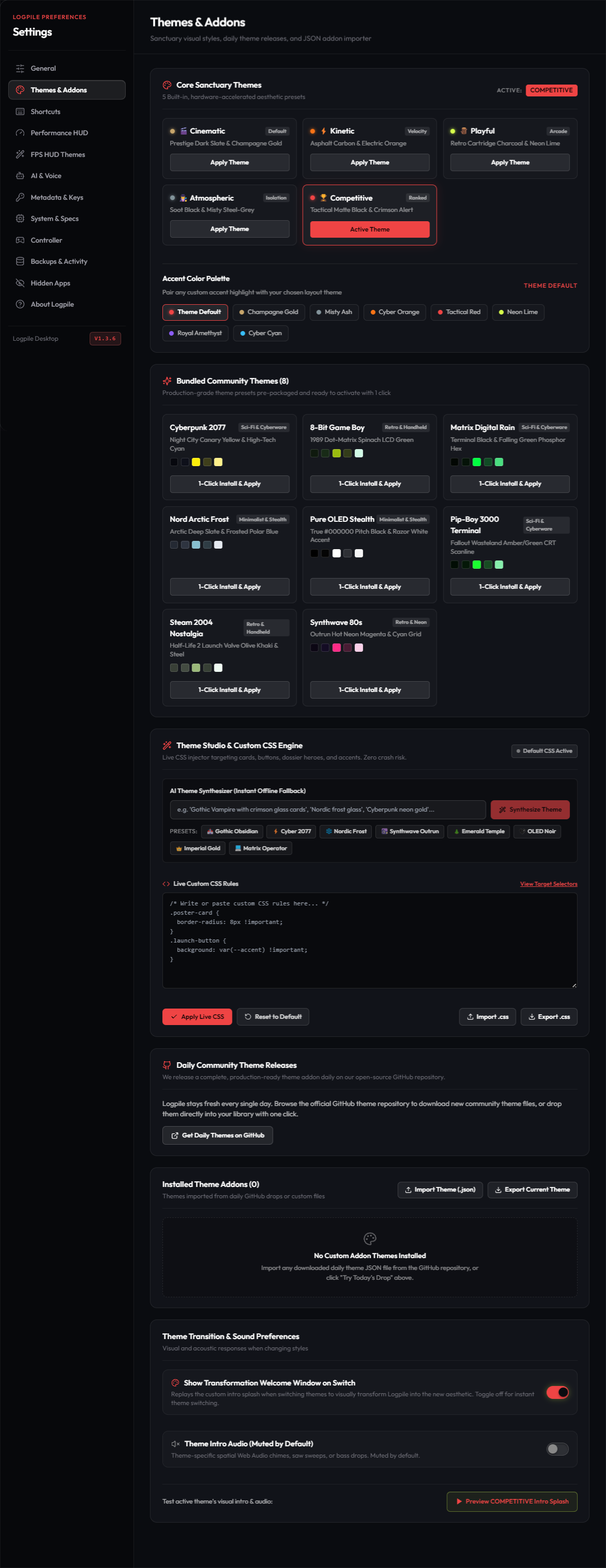
2. 8 Bundled Community Themes
Pre-packaged production-grade theme addons ready to install and activate in one click:
- Cyberpunk 2077: Night City canary yellow, high-tech cyan, and dark carbon cards.
- 8-Bit Game Boy: 1989 dot-matrix spinach LCD green with retro arcade framing.
- Matrix Digital Rain: Terminal phosphor green over pitch-black OLED background.
- Nord Arctic Frost: Arctic deep slate and frosted polar blue styling.
- Pure OLED Stealth: True #000000 pitch-black cards with razor-sharp white accents.
- Pip-Boy 3000 Terminal: Fallout wasteland amber and green scanline styling.
- Steam 2004 Nostalgia: Half-Life 2 launch valve olive khaki and brushed steel.
- Synthwave 80s: Outrun hot neon magenta and cyan grid aesthetic.
3. Continuous Full-Page Settings Snapshot
Capture the entire scrollable Settings modal from top to bottom into a single high-resolution vertical PNG:
- Zero Seams & Zero Shadow Cuts: Uses 1:1 native pixel stitching with unified solid backgrounds, preventing drop-shadow bleed and gradient breaks across card boundaries.
- Complete Sidebar Preservation: Keeps the left navigation intact (all 12 tabs and version tag) with no text truncation.
- Clean Output: Automatically hides scrollbars and header action buttons during capture.
- Auto-Save & Clipboard: Saves directly to your local
Captures/folder and copies the image straight to your Windows clipboard.
4. 4K Ultra-Wide Brag Showcase Collage Engine
Generate balanced, publication-grade 4K gallery posters (3840 × 6172) of your game library:
- Title Wrapping: Multi-line game title wrapping with adaptive font sizing to completely eliminate cutoffs and ellipses.
- Dynamic Grid Scaling: Automatically scales columns (10–14 cols for large libraries) to create widescreen posters rather than vertical strips.
- Theme-Variable Color Accuracy: Native palette resolution supporting all 5 core sanctuary themes (Cinematic, Atmospheric, Competitive, Kinetic, Playful) and 7 accent palettes.
- High-DPI Aspect-Fill Scaling: Bicubic scaling with center cropping for crisp artwork reproduction.
1. Cinematic Theme (Amber & Gold)
2. Atmospheric Theme (Mystic Purple & Obsidian)
3. Competitive Theme (High-Contrast Crimson & Carbon)
4. Kinetic Theme (Electrifying Neon Orange & Steel)
5. Playful Theme (Vibrant Emerald & Mint)
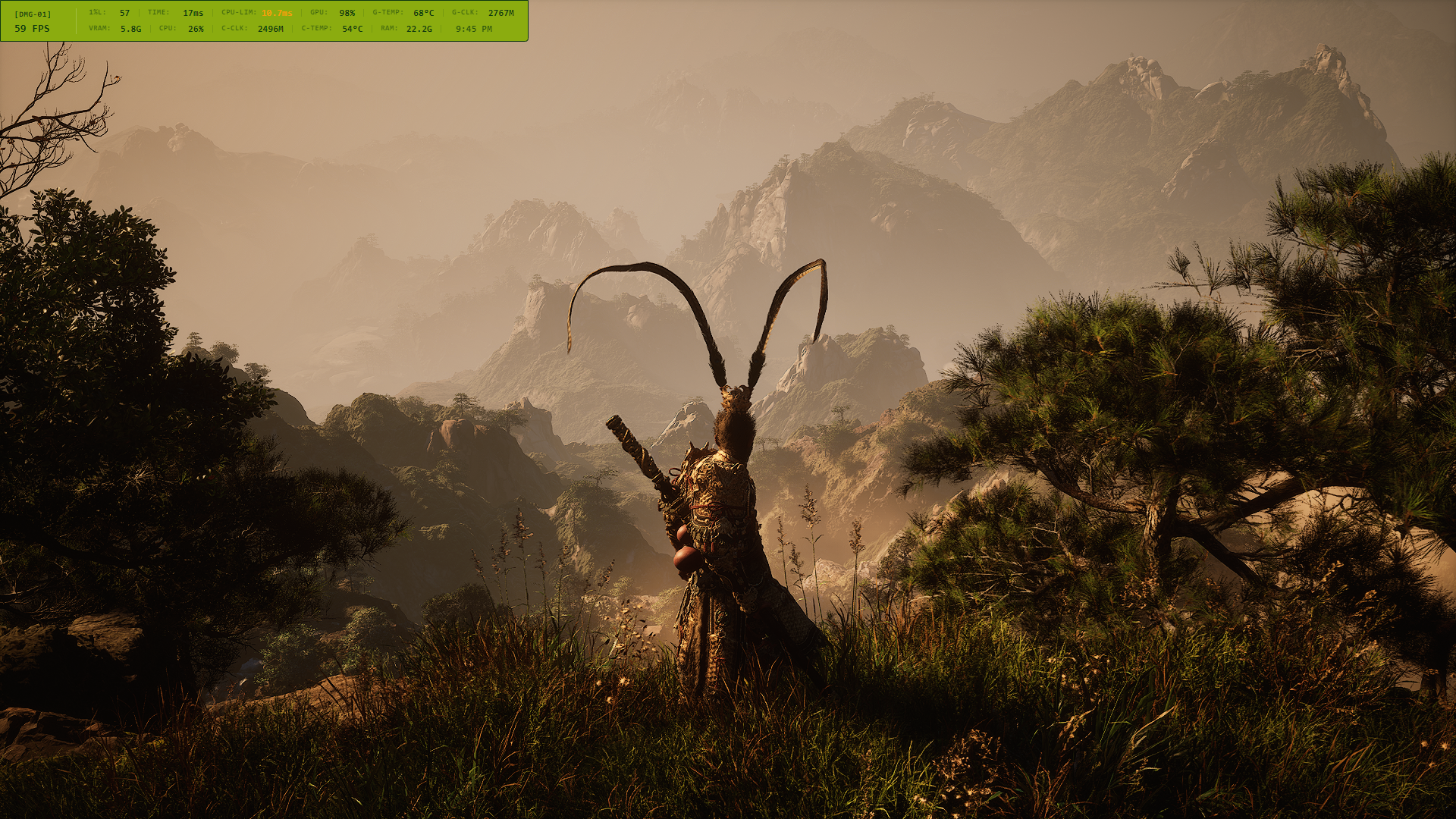
5. In-Game Performance HUD & Telemetry Polish
Real-time Intel PresentMon graphics telemetry overlay:
- Live Bottleneck Indicators: Direct frame time velocity and low-latency
CPU-LIMindicators to track whether the CPU or GPU is capping performance. - Themed HUD Styles: Verified live in AAA titles (Black Myth: Wukong), including the retro Game Boy
[DMG-01]green LCD display. - Thermal & Clock Monitoring: Live GPU/CPU utilization, clocks, temperatures, VRAM, system RAM, and true 1% lows across DirectX 11/12 and Vulkan titles.
- Zero Idle Draw: 0.0% background GPU draw when minimized or sitting idle.
6. UI Polish & Layout Fixes
- Fixed text truncation and card cutoffs across high-DPI scaling and compact displays.
- Streamlined Welcome Screen with theme-specific brand marks and spatial Web Audio integration.
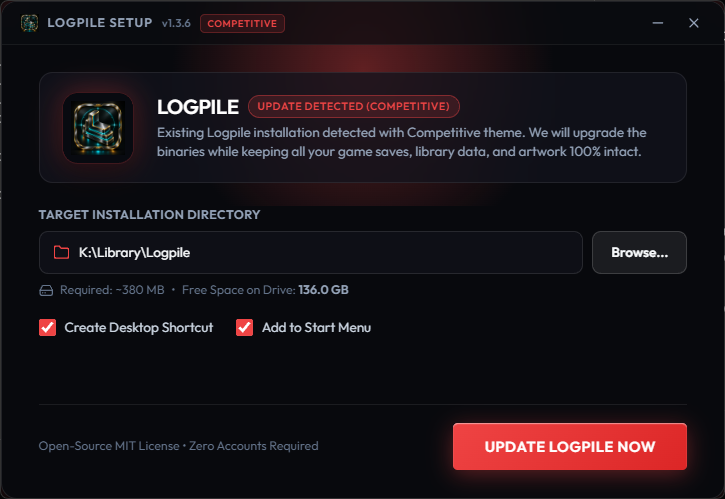
7. Modern Setup & In-Place Upgrade Experience
- Smart Directory Detection: Recognizes existing Logpile installations and upgrades binaries in-place while keeping all game saves, databases, and artwork caches 100% intact.
- Customizable Target Paths: Install to any internal drive or portable SSD without registry lock-in or forced administrative permission hoops.
Installation & Downloads
- Windows Installer:
Logpile.Setup.1.3.7.exe - Portable (.zip):
Logpile-1.3.7-win.zip
Extract or run the installer on any internal drive or external SSD. All database, settings, and cache files remain 100% offline and self-contained in logpile_data/.
Recommended Offline AI Models (Optional)
To use local offline AI guidance and natural language search, drop a supported .gguf model into your local /models directory.
Recommended Local Models (GGUF)
Logpile runs local GGUF models via node-llama-cpp for conversational backlog guidance, custom HUD/CSS theme synthesis, and offline chat. Download any .gguf file and drop it into your /models folder.
The picks below are abliterated/uncensored builds so mature game titles, horror themes, and lore don't trigger false refusals. Every repo works on both CPU and GPU systems. Pick the quantization file (Q4_K_M, Q6_K, Q8_0, etc.) that matches your hardware while leaving 1 to 1.5 GB free for Windows and context cache.
| System / VRAM | Best Pick | Quant File | Approx. Size |
|---|---|---|---|
| CPU Only (8-16 GB RAM) | Qwen3.5-2B EmperoAI Distill | Q4_K_M or Q5_K_M |
1.1 - 1.4 GB |
| CPU Only (32 GB+ RAM) | Qwen3.5-4B EmperoAI Distill | Q4_K_M |
~2.7 GB |
| 4 GB VRAM | Qwen3.5-4B EmperoAI Distill | IQ4_XS or Q4_K_M |
2.5 - 2.7 GB |
| 6 GB VRAM | Qwen3.5-4B EmperoAI Distill | Q6_K or Q8_0 |
3.5 - 4.5 GB |
| 8 GB VRAM | Qwen3.5-9B Heretic v2 | Q4_K_M |
~5.5 GB |
| 12 GB VRAM | Qwen3.5-9B Heretic v2 | Q6_K or Q8_0 |
7.5 - 9.5 GB |
| 16 - 32 GB VRAM | Qwen3.5-9B Heretic v2 | Q8_0 or F16 |
9.5 - 18 GB |
Hardware Guard Tip: Enable automatic AI memory purge in Settings to clear loaded models from RAM/VRAM the moment a game launches. If you prefer keeping the AI loaded while playing, stick to a 2B or 4B model with a VRAM cap.
More Compatible Models (1.5B to 9B)
1.5B - 2B (Ultra-Fast / Low RAM)
- Qwen3.5-2B Heretic GGUF (Clean base 2B)
- Qwen2.5-1.5B Instruct Heretic (Smallest footprint)
3B - 4B (Fast & Balanced)
- Gemma-4-E4B-it Heretic GGUF (Natural writing style; supports vision with
mmproj) - Qwen3-4B Thinking Claude-4.5-Opus Distill (Reasoning/thinking distill)
- Llama-3.2-3B Instruct Heretic (Lightweight non-thinking fallback)
7B - 8B (Strong General & Reasoning)
- Qwen3-8B Hivemind Instruct Heretic (General instruct)
- DeepSeek-R1-0528 Qwen3-8B Heretic (Pure reasoning distill)
- Meta-Llama-3.1-8B Instruct Heretic (Classi...
Logpile v1.3.6: Intel PresentMon ETW Integration, HWiNFO Bridge & Low-Latency Performance HUD
Logpile v1.3.6 — Release Notes
Logpile v1.3.6 brings production-grade hardware telemetry and low-latency performance monitoring to your gaming sanctuary. This release introduces kernel-level Intel PresentMon ETW integration, an HWiNFO shared memory bridge for CPU thermals, administrator permission detection, and dedicated HUD z-order stability.
What's New in v1.3.6
1. Intel PresentMon ETW Integration
- Real-Time Telemetry: Integrated
PresentMon-x64to capture real-time graphics metrics across DirectX 11, DirectX 12, and Vulkan titles. - Accurate 1% Lows & Frame Times: Delivers true micro-stutter tracking and 1% low FPS calculations without relying on intrusive injection hooks.
- CPU Bottleneck Indicator (
CPU-LIM): Real-time flag indicating whether performance is CPU-bound or GPU-bound. - Zero Overhead: Low-latency event-tracing architecture with 0% desktop idle GPU drain.
2. HWiNFO Shared Memory Bridge
- CPU Package Thermals: Built a dedicated C# bridge (
HwInfoReader.exe) to read CPU package temperatures directly from HWiNFO shared memory. - Native Sensor Support: Cleanly surfaces CPU and GPU thermals alongside real-time clock speeds.
3. Administrator Privilege Auto-Detection
- Permission Guard: Added auto-detection for Windows Administrator privileges in the HUD & Telemetry settings.
- Live Status Badge: Displays permission status directly in Settings to ensure ETW tracing runs without permission errors.
4. Performance HUD Polish & Fixes
- Top-Level Z-Order Enforcement: Ensures the HUD overlay reliably stays on top of running games.
- Window Flexibility: Removed borderless-window requirements, allowing HUD usage across windowed, borderless, and fullscreen games.
- Clean Interface: Removed internal development and testing labels from the production HUD view.
Clean Changelog (v1.3.5 → v1.3.6)
- feat(telemetry): Integrate Intel PresentMon for real-time FPS, 1% lows, and frame-time telemetry (
8aca59d) - feat(telemetry): Add HWiNFO shared memory bridge for CPU package temperature monitoring (
44601a3) - feat(auth): Add auto-detection for Windows administrator privileges with status badge in Settings (
854b6a8) - fix(hud): Enforce top-level z-order, remove borderless restrictions, and clear test labels (
9797c92) - docs(seo): Update README metadata and gamer search keywords (
45a36ea) - docs(links): Add live badges for Netlify, Itch.io, and AlternativeTo (
b91657f)
Full Changelog: v1.3.5...v1.3.6
Full Changelog: v1.3.5...v1.3.6
Logpile v1.3.5: Themed Performance HUD, Custom HUD Studio, 0% Idle GPU, and Theme Transformation Splash
Logpile v1.3.5 brings a massive upgrade to game telemetry, visual customization, and desktop efficiency:
Themed In-Game Performance HUDs: Over 50 custom HUD overlay styles that match the game you're playing (MI6 007 Covert, Cyberpunk Netrunner, Witcher Wolf, Doom, Winamp 1999) with real-time FPS, frame times, CPU, GPU, RAM, and time telemetry.
Custom HUD Theme Studio: Tweak colors, layouts, and data points manually or generate custom HUD themes on the fly. Unmatched searches automatically fall back to clean neutral slate designs without breaking.
0% Desktop Idle GPU Drain: Eliminated desktop animation loops while Logpile is sitting in the background or minimized, preserving battery life on gaming laptops and handhelds.
Automatic Theme Transformation Splash: Switching themes now automatically welcomes you with that theme's custom cinematic splash, audio, and branding (with an instant-switch toggle in Settings).
Game Scanner Overhaul: Scans deep nested directory trees to pinpoint the real game executable while ignoring setup utilities, crash reporters, and directX redistributables.
Instant Controller Plug-and-Play: Native Windows USB and Bluetooth gamepad detection switches to controller navigation immediately without button wake-ups or launching heavy secondary modes.
All Core Features Included: Portable drive self-healing paths, live Steam Family sharing availability checks, automatic rolling local save ZIPs, offline strategy guide search, and zero account logins.
Full Changelog: v1.3.2...v1.3.5
Full Changelog: v1.3.2...v1.3.5
Logpile v1.3.2
Logpile v1.3.2
Changes in this release
- Steam Playtime Tracking: Accurate calculation for both online (
Playtime) and offline (PlaytimeDisconnected) sessions. - GOG Galaxy Local Sync: Automatically reads playtime and last-played timestamps from GOG Galaxy's local database (
galaxy-2.0.db). - Session Tracker Protection: Added a single-flight guard to process monitoring so background checks cannot duplicate end-session records or inflate playtime.
- Playtime Editor: Added hours and minutes editing to the Edit Metadata modal to view or set time for games from stores without local playtime files.
- Version Display: Updated statusbar version indicator to v1.3.2.
Downloads
- Logpile Setup 1.3.2.exe — Windows installer
- Logpile-v1.3.2-Portable.zip — Portable version (extract and run)
Full Changelog: v1.3.1...v1.3.2
Full Changelog: v1.3.1...v1.3.2
Full Changelog: v1.3.1...v1.3.2
Full Changelog: v1.3.1...v1.3.2
Logpile v1.3.1 — System Tray Icon Hotfix & Stability Update
Fixes in v1.3.1
- System Tray Icon Restored: Fixed an issue in packaged Windows builds where the system tray icon rendered blank. The icon is now bundled outside
app.asarviaextraResourcesand resolved dynamically viaprocess.resourcesPath. - All v1.3.0 Features Preserved: 8-store library auto-detection (Steam, Epic, GOG, Xbox, EA, Ubisoft, Amazon, Standalone), live Steam Family availability detection, portable drive self-healing (
{{PORTABLE_ROOT}}), in-game companion overlay (Ctrl+Space), and offline local AI companion.
Downloads
- Installer (.exe):
Logpile Setup 1.3.1.exe - Portable (.zip):
Logpile-v1.3.1-Portable.zip(extract and launchLogpile.exe)
Full Changelog: v1.3.0...v1.3.1
Full Changelog: v1.3.0...v1.3.1