Repository navigation
Releases
Scketch3Dweb 1.0.14

Scketch3Dweb 1.0.14
- Create an independent project copy from the three-dot menu on the home page. Geometry, measurements, workspace settings, attachments and undo history are preserved; the original project and its sharing permissions stay unchanged.
- Rename projects from the same menu. Saving now finishes before the dialog closes, and a failed save keeps the entered name available for retry.
- Copy names avoid collisions. Both actions are available in English and Russian.
Desktop downloads: Linux AppImage / DEB, Windows installer, and macOS application ZIPs for Intel and Apple Silicon. The macOS packages use ad-hoc signatures, without Developer ID signing or notarization; their startup has not been tested on a Mac.

Scketch3Dweb 1.0.13
Scketch3Dweb 1.0.13
Extend a mounting flange without stretching the entire duct.
- Added end-face pulling with a preview, drag handle and named face selection.
- The local stand-off mode keeps the duct and opposite mounting face fixed. The selected plate and its bolt holes move together.
- Face picking reports invalid selections instead of silently doing nothing. Protected regions, minimum transition lengths and stale-result guards prevent unsafe edits.
- Updated the built-in CMP 170 / 120 mm fan adapter from the owner's latest saved fitted project. The editable demo retains its current orientation and measurements; SKF and STL downloads use the same geometry.
- Arrow-key holds finish as a single undo step and save. Autosave reuses unchanged mesh, B-Rep, image and CAD display-edge data across history states.
- SKF format 2 shares display-edge assets. Earlier format 1 projects remain readable; newly saved projects require an updated reader.
The bundled demo contains only the active model, not the owner's private project history or account data. Verify mounting clearances and slicer settings before printing.
Verification
All 461 unit tests and the production web build passed. Browser checks opened the updated demo with 12 measurements and two valid named mounting faces, without JavaScript errors. Mesh checks found no open boundaries, non-manifold edges, inconsistent winding or degenerate triangles.
Desktop downloads
Linux x64: AppImage and Debian/Ubuntu .deb. Windows x64: .exe installer. The packages include Electron and a local web service; Docker and a separate Node.js installation are not required. Existing projects stay in the user profile.
Packages are unsigned. Verify downloads against SHA256SUMS.txt. Windows packages are cross-built on Linux; a native Windows desktop acceptance test remains outstanding.
Scketch3Dweb 1.0.12
Scketch3Dweb 1.0.12
More precise measurements and flange positioning, with a clearer editing history.
- Ruler points follow mesh deformation, including unnamed side walls. Bindings survive save/reopen and undo/redo.
- Magnetic snapping to real outer and inner corners and face edges, even with display contours hidden. Edge retention reduces jumping between adjacent faces. Hold Alt to place a free surface point.
- A dashed preview shows the exact next measurement endpoint. New points cannot be placed in empty space.
- Nearby ruler labels are separated automatically and avoid measurement points. Small leader lines retain their association with each ruler.
- Added bubble-level and measurement-visibility buttons to the ruler submenu. Bubble indicators are enabled by default; hiding measurements does not delete them.
- Enter or a double-click in empty space applies a typed ruler distance. Escape or right-click cancels; losing focus no longer commits the edit.
- Added absolute positioning from fixed reference edges: enter a final vertical/horizontal gap instead of accumulating offsets. Repeating a target does not move the flange again.
- Added
scketch3dweb_set_connection_positionto MCP, with fingerprint guards and preview support. - Added an operation-history button between Undo and Redo. The journal interleaves model and ruler operations, marks user/agent actions in the current editor session, and supports jumping backward or forward to a selected step. A new edit replaces the undone branch. Older saved steps without author metadata are identified as saved history, not attributed to a guessed author.
- Refreshed the flange demo from the current local fitted model: 53 mm axial span, X rotation 90°, and 12 saved measurements. Updated flange previews and replaced the README's generic assembly screenshot with the built-in RP1 robot.
Downloads
- Windows x64:
Scketch3Dweb-Setup-1.0.12-x64.exe - Linux x64:
Scketch3Dweb-1.0.12-x86_64.AppImageorScketch3Dweb-1.0.12-amd64.deb SHA256SUMS.txt: checksums for application and updater assets.
The desktop packages include Electron and a local web service. Docker and a separate Node.js installation are not required. Existing projects remain in the user profile. Builds are unsigned; Windows may show an unknown-publisher warning.
Changing a complete fan flange diameter while preserving bolt-hole diameters is not included in this release. The MCP hole editor changes individual recognized through holes; it is not a substitute for adapting an entire fan interface.
Verification
TypeScript checking and 452 unit tests passed. Browser checks covered overlapping labels, bubble/visibility toggles, zoom/resize, editable labels, corner/edge snapping, and mixed model/ruler history rollback, redo and branch replacement.
The packaged Linux application passed editor/WebGL, account creation, GitHub link, updated flange demo, and restart/login checks. Packaged Linux and Windows local services passed health, account and database checks; the Windows service was exercised under Wine with HTTP requests driven from Linux.
Windows packages are cross-built on Linux. A native Windows installer/desktop acceptance test remains outstanding.
Scketch3Dweb 1.0.11
Scketch3Dweb 1.0.11
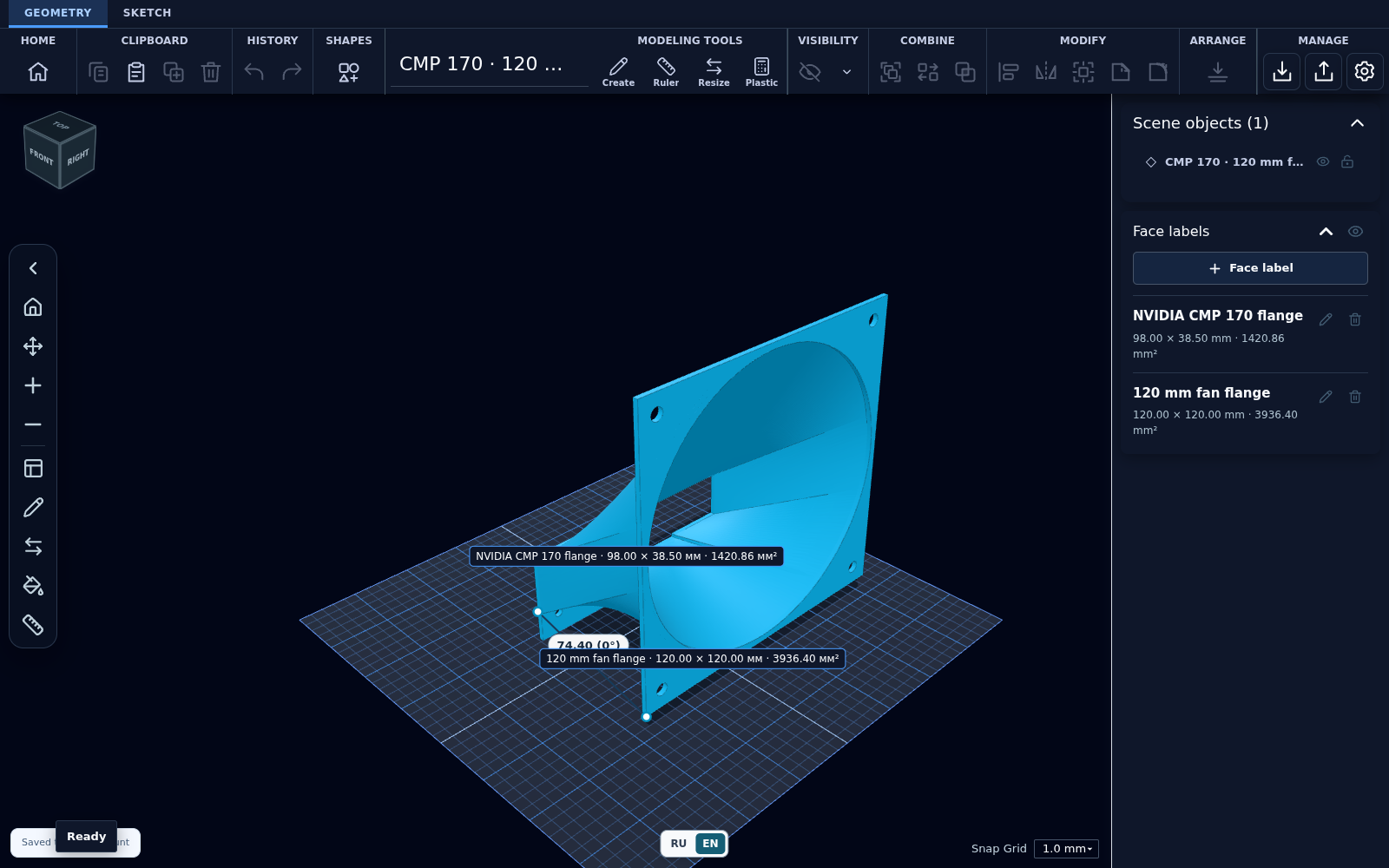
Adds a real fitted hardware model as a built-in editable example: a flange adapter connecting a 120 × 120 mm fan to an NVIDIA CMP 170 graphics card.
Changes
- Added the CMP 170 fan adapter card to Home, with one-click opening as a new editable project and automatic camera framing.
- Included separate SKF and STL downloads in the interface, source repository, and release assets.
- Preserved the final fitted geometry, named both flange faces, and restored the verified 74.4 mm point-to-point ruler measurement.
- Added real model/editor screenshots and documented dimensions, checksums, and printing limitations.
- Kept the robot demo and all existing user projects intact.
- Added regression checks for SKF import, flange labels, the ruler, and mesh integrity.
Downloads
- Windows x64:
Scketch3Dweb-Setup-1.0.11-x64.exe. - Linux x64:
Scketch3Dweb-1.0.11-x86_64.AppImageorScketch3Dweb-1.0.11-amd64.deb. - Model:
cmp170-120mm-fan-adapter.skfandcmp170-120mm-fan-adapter.stl. - SHA256SUMS.txt: checksums for the released application, model, and updater files.
Packages include Electron and the local web service; Docker and a separate Node.js installation are not required. These builds are unsigned. Windows may display an unknown-publisher/SmartScreen warning. Download only from this repository and verify the checksums.
For installation instructions and desktop data locations, see the 1.0.10 guide. Substitute the 1.0.11 filenames above. The separate MCP bridge remains configured from the source/Docker setup.
About the model
The saved ruler distance is 74.4 mm, with an 11 mm lateral difference; the axial mesh span is approximately 73.5823 mm. The fan size is nominally 120 × 120 mm. See the example documentation for the full specification.
Check fit, clearances, material, and slicer settings before printing. The model is an owner-provided example, not an official NVIDIA accessory or a certified production part.
Windows packages are cross-built on Linux; a native Windows desktop/installer acceptance test remains outstanding.
Verification
- Production web build, TypeScript checking, and all 429 unit tests passed.
- Opening the built-in model was checked in the browser and the packaged Linux desktop application: both flange labels are valid, the ruler reads 74.4 mm, and the editor renders with WebGL.
- Desktop account creation, the GitHub version link, asset downloads, and login after restart passed the packaged smoke test.
- The final model retains all 37,256 triangles. Basic closed-mesh checks passed; printing/thermal suitability still requires your own validation.
Scketch3Dweb 1.0.10
Scketch3Dweb 1.0.10
First public Linux and Windows desktop release.
Downloads
Get the files from release v1.0.10:
- Windows x64:
Scketch3Dweb-Setup-1.0.10-x64.exe. - Linux x64:
Scketch3Dweb-1.0.10-x86_64.AppImageorScketch3Dweb-1.0.10-amd64.deb. - SHA256SUMS.txt: checksums for the downloadable application packages and updater files.
Docker and a separate Node.js installation are not required. The application starts its own web service on loopback, not on the public network. Create your first administrator account when opening the app.
Changes
- Packaged the editor and local web service as an Electron desktop application.
- Moved desktop account/project data into the operating system's user-data directory instead of the installation folder.
- Added the project GitHub link next to the version in Settings.
- Included the English interface fixes, Russian language switch, and updated demo screenshot.
- Configured desktop update metadata for this repository's GitHub Releases.
- Removed a hard-coded Docker-only path from the geometry test setup.
Installation
Linux
For AppImage:
chmod +x Scketch3Dweb-1.0.10-x86_64.AppImage
./Scketch3Dweb-1.0.10-x86_64.AppImage
AppImage needs FUSE support. If FUSE is unavailable, use the Debian/Ubuntu package or the AppImage extraction mode. Install the Debian/Ubuntu package with:
sudo apt install ./Scketch3Dweb-1.0.10-amd64.debRun the installed application as a regular user, not root. Keep Chromium's sandbox enabled.
Windows
Run the x64 setup executable on Windows 10/11 and choose the installation folder. These builds do not carry a code-signing certificate. Windows may display an unknown-publisher or SmartScreen warning. Only use files downloaded from this repository and verify their checksums.
In PowerShell:
Get-FileHash .\Scketch3Dweb-Setup-1.0.10-x64.exe -Algorithm SHA256On Linux, download SHA256SUMS.txt alongside the release files and use sha256sum --check --ignore-missing SHA256SUMS.txt.
Data and compatibility
The desktop package includes the editor and local account/project services. The standalone MCP transport bridge is not bundled in this release; use the repository's source/Docker setup when you need that bridge.
The desktop application stores server-side data in Electron's per-user application-data directory, under projects and models. Browser working copies remain in the desktop browser profile. Keep that profile when upgrading; do not delete it as a way to update the app.
Older differently named applications and Docker/browser installations are not migrated automatically. Export important projects as SKF before moving to a different installation. Closing the window hides the app in the tray; use the tray's Quit command to exit completely.
Application code is MIT OR Apache-2.0. Third-party components and catalog assets retain their own licenses.
Verification
- Production web build and 426 unit tests passed.
- Linux unpacked application: account setup, editor/WebGL, version/repository link, and account persistence after restart passed in a headless test display.
- Windows x64 Electron runtime and SQLite import were checked under Wine. This is not a native Windows desktop/installer acceptance test; that manual check remains outstanding.