Repository navigation
Releases
OpenKatana 0.1.3

Six effect packs, written as code: 36 new effects your agent can keyframe, a ComfyUI node and App to
preview any of them, and a reel and a gallery of every effect. 75 shared tools (new: preview_effect), 88 Comfy nodes
and seven saved Apps.
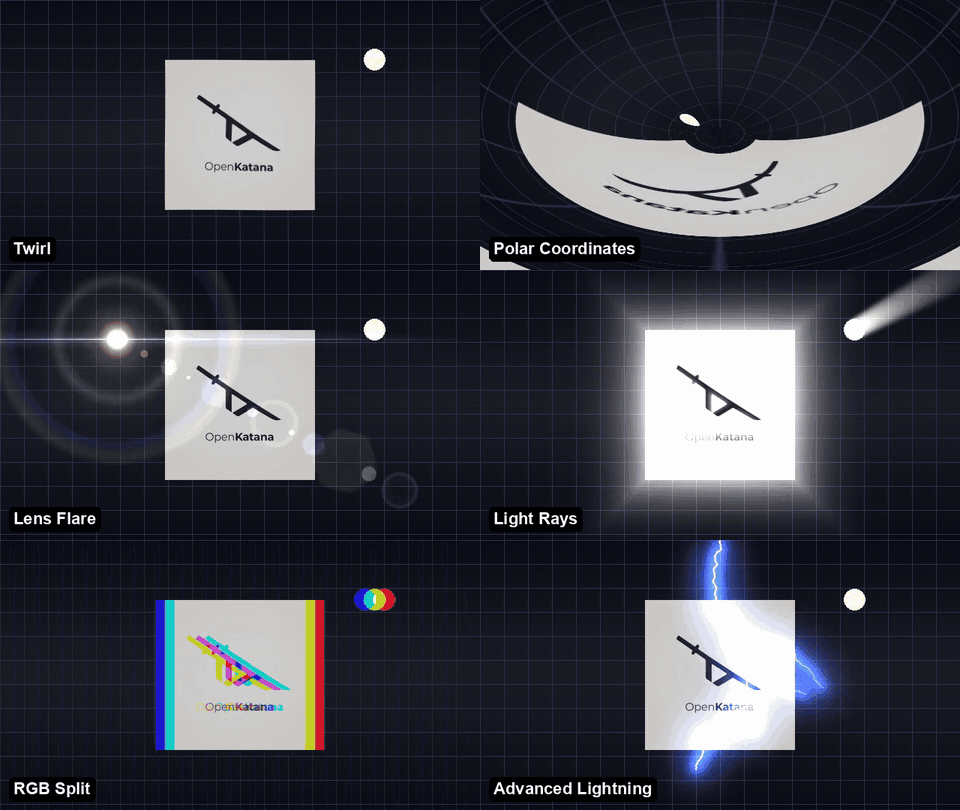
Effect packs
- Distort: Wave Warp, Ripple, Shockwave, Twirl, Bulge, Polar Coordinates, Kaleidoscope, Mirror.
- Light: Deep Glow, Lens Flare (50-300mm zoom, 35mm and 105mm prime ghost sets), Light Rays, Light Sweep.
- Time: Echo (all seven operators), Time Displacement, Posterize Time, frame blending. Each reads other frames of its
own shot through a nested render that stops at the effect, so later text and grades are drawn once. - Blur & Sharpen: Gaussian (separable and continuous, so keyframed blur-ins move on every frame), Directional,
Radial (spin and one-sided zoom) and Camera Lens Blur (iris shapes, bokeh highlights, blur maps), Unsharp Mask,
Channel Blur, Tilt-Shift. - Stylize: RGB Split (linear and radial), Motion Tile, Find Edges, Emboss, Mosaic, Scatter.
- Generate: Fractal Noise (with Cycle Evolution), Advanced Lightning, Radio Waves, Cell Pattern, Gradient Ramp,
4-Color Gradient, Grid.
All use standard parameter names, eased keyframes (easy ease, hold, cubic-bezier) and, where they apply, region,
edges and antialiased quality. Packs register from web/fx_*.js with one validator module each, so new effects can be
added the same way. See the effects gallery
(one frame and the timeline JSON of each), the reel of all 37 effects,
the timeline reference and the
effects playbook.
ComfyUI and agents
preview_effect: an MP4 and a six-frame contact sheet of any effect on a moving test card, a project image or a
video excerpt. In ComfyUI: the OpenKatana · Preview effect node and the new 06 Preview an effect App.- The agent skill points to the packs and to previewing a look before committing it to the timeline.
python examples/effects_reel.pyreproduces the reel.
Docs
- The README explains why OpenKatana is different and how it is built, and the Koji launch-film clip credits its Suno
music.
Comfy Registry: versions there wait for Comfy's review. Install 0.1.3 from the source ZIP or the wheel below; see
ComfyUI Apps for the node installer.
FFmpeg and a browser are separate prerequisites. This is not a standalone desktop installer. macOS and production
hosting remain unverified. See setup.
Downloads: the source ZIP includes setup scripts, examples and documentation; the wheel is for Python installation.
OpenKatana 0.1.2
Fractal displacement, texture overlays and frame-level reference matching. 74 shared tools (two new:
shot_sheet and eye_sheet) and 87 Comfy nodes.
Effects
local_turbulent_displace: turbulent displacement for plates,
graphics and type, with the familiar controls: turbulent, bulge and twist (each with a
smoother mode), horizontal, vertical and cross displacement; amount, size,
complexity (fractional, 1-10), evolution and offset with keyframes and eases (Easy
Ease, hold, cubic-bezier); Cycle Evolution for seamless loops; pinning including the
locked pins; antialiased high quality; edge reflect, clamp or wrap. Extras: a
stepped boil, drift and a feathered region for one word.local_displacement_map: a displacement map. Another clip's red,
green, blue, alpha, luminance, hue, lightness or saturation (or full / half / off)
moves the picture, with separate horizontal and vertical amounts, stretch, centre or
tile fit and wrap-around edges, so real heat-haze, glass and water plates bend the
footage.- Timeline
overlays: texture plates (dust, scratches, light leaks) with 13 blend
modes, keyframed opacity, their own picture rate (24p on a 60-fps canvas), black
floor, tint and fit; and adjustment layers that grade everything beneath them at
a partial strength. local_curve: a cut transition given frame by frame (scale, offset, blur, glow,
exposure), as measured from a reference.- Hooks declare the images they need with
prepare(); each is recorded with its
SHA-256 in the input manifest and the receipt.
See the timeline reference and the
effects playbook.
Reference analysis
- Every reference is analysed at 60 fps, never lower, so every motion is caught.
analyze_referencemeasureruns on a 60-fps clock and returns cuts versus
exposure dips, picture cadence, look per shot, texture speck rate and the median cut
transition aslocal_curvearrays. compare_referenceadds a side-by-side video and a look comparison;shot_sheet
numbers the shots of a render or reference;eye_sheetcrops the eyes across a take.- Timelines with NaN or Infinity anywhere are rejected; previews flag flat frames.
The tool reference lists all 74 tools, with what
is new in 0.1.2.
Comfy Registry
0.1.2 is not on the Comfy Registry yet. Version 0.1.1 there is still
under review (flagged, pending review, as of 2026-11-03). Install 0.1.2 from the source ZIP or the wheel below; see
ComfyUI Apps for the node installer.
FFmpeg and a browser are separate prerequisites. This is not a standalone desktop
installer. macOS and production hosting remain unverified. See setup
and publishing for release checks and installation.
Downloads: the source ZIP includes setup scripts, examples and documentation; the wheel is for Python installation. FFmpeg and Chrome/Chromium are separate prerequisites.
OpenKatana 0.1.1
Six ComfyUI Apps and 85 nodes, an effects playbook for agents and complete
installable packages. Watch the one-minute demo.
ComfyUI
- 00 Full workflow puts every App in one graph: one project ID feeds Open
Studio, video, music and photo uploads, Make edit → Render to video, a 3D
starter and any of the 72 tools. New installs and agents open it first. - Video, Music and Photo upload nodes bring the integration to 85 nodes. Empty
media slots are skipped instead of failing the run. - Running Open Studio opens Studio in its own app window.
- Make edit's
extra_media_idsaccepts one connected media ID as well as a
JSON list. - Preflight accepts autogrow ports whose template input is optional, required
autogrow containers and V3 MatchType links, so graphs with core nodes such as
ReferenceMultiLatent, BatchImagesNode and ComfySwitchNode pass.
Comfy Cloud and the Comfy SDK
- Cloud submissions pass
COMFY_API_KEYto partner (API) nodes, which
previously failed with "Unauthorized: Please login first to use this node".
The key is not written to job files. - The local Comfy SDK client is built without credentials, so local and private
endpoints do not receive the cloud API key in an Authorization header.
Agents
- The effects playbook covers motion and camera, light,
texture, colour, text and interface techniques, with how a launch film used
each one. Agents read it before planning every edit so they know the full
palette; nothing in it is compulsory and the user's brief decides. Setup
installs a copy beside the project skill and preserves customized copies.
Packaging and checks
- Version 0.1.1 is published on the Comfy Registry.
Installation of explicitly selected version 0.1.1 through Manager passed
with a fresh editor environment. Registry review was still pending on
2026-10-29; default/latest installation remains unverified. See the
installation steps. - Wheels include the effects playbook, the complete Comfy example script with
its source media and credits, the README visuals and the ComfyUI node installer. - A clean-wheel check creates a fresh environment, verifies installed
resources against the source files, renders both bundled examples and exercises
Studio outside the source checkout. It runs on the Windows and Linux CI matrix. - The README opens with the demo, and the node installer points new users to
00 Full workflow. - Hosting estimates separate a ten-reviewer CPU demo from optional model
generation. The hosted pilot remains experimental and undeployed.
FFmpeg and a browser are separate prerequisites. This is not a standalone desktop
installer. macOS and production hosting remain unverified. See setup
and publishing for release checks and installation.
Downloads: the source ZIP includes setup scripts, examples and documentation; the wheel is for Python installation. FFmpeg and Chrome/Chromium are separate prerequisites.
OpenKatana 0.1.0
Turn photos, footage and music into an editable film through Studio, CLI/MCP or
ComfyUI Apps. This release provides 72 shared tools, five Apps and 82 Comfy nodes.
Built with the Comfy Developer Platform for #OpenSourceHiggsfield.

Highlights
- Typed IMAGE, VIDEO and AUDIO import, recipe editing, full VIDEO export and
bounded IMAGE previews connect model outputs to the editor. - Optical flow runs in OpenKatana's environment; ComfyUI does not need OpenCV.
- Manager Git-URL installs load the repository root. Installer configuration
carries the browser path, including installed Playwright Chromium. - A bundled eight-second example produces a real edit without an agent or models.
- A real LTX-2.5 Cloud sample, exact MIT-licensed generation graph and local
ramp/freeze editing example are included. Repeating the edit needs no credits. - A generated tool reference lists all 72 tools by area.
- Font sources are pinned upstream; public validation receipts omit local paths.
- The hosted pilot remains experimental and undeployed. No hosting or model
generation is started by installation.
Install
Follow the setup guide, or:
git clone https://github.com/rk0neki/OpenKatana.git
cd OpenKatana
python scripts/setup.py
Python 3.11+ is required. FFmpeg and a supported browser are separate installations.
Files
| File | SHA-256 |
|---|---|
openkatana-0.1.0-source.zip (source with SOURCE-MANIFEST.json) |
ee748405ddd482453b65b7f0e83e546f0864619619eed61a4467c343641a4c0f |
openkatana-0.1.0-py3-none-any.whl |
d33f21b51ecd86e9537ff2a6108d29a379296ba52c435c5c5196d28c4e60b247 |
quick-edit.gif (preview of the bundled example) |
09eae4872384cb0e044f345cdce93bec91471a2d86ffaac70bf990af27628cb4 |
Limits
See validation,
setup and
limits.
Generative weights, FFmpeg and Chromium are not bundled. macOS is untested.
LTX-2.5 inference and the subsequent local edit were tested as separate stages.
OpenKatana's own Comfy Cloud submission (comfy-submit, then comfy-collect)
was tested separately with the LTX-2.5 graph; local LTX inference was not tested.
This functional smoke test does not establish competition bonus eligibility.
OpenKatana is inspired by Higgsfield's Katana and is not affiliated with, endorsed
by, or sponsored by Higgsfield AI. It contains no Higgsfield code, prompts, presets
or assets. Licensed under Apache-2.0.