Repository navigation

Proteoscope 0.10.0 takes prediction triage out of the window and onto clusters and pipelines, and checks ligands given to structure predictors as SMILES as thoroughly as dictionary ligands, including their stereocenters.
Ligands given as SMILES
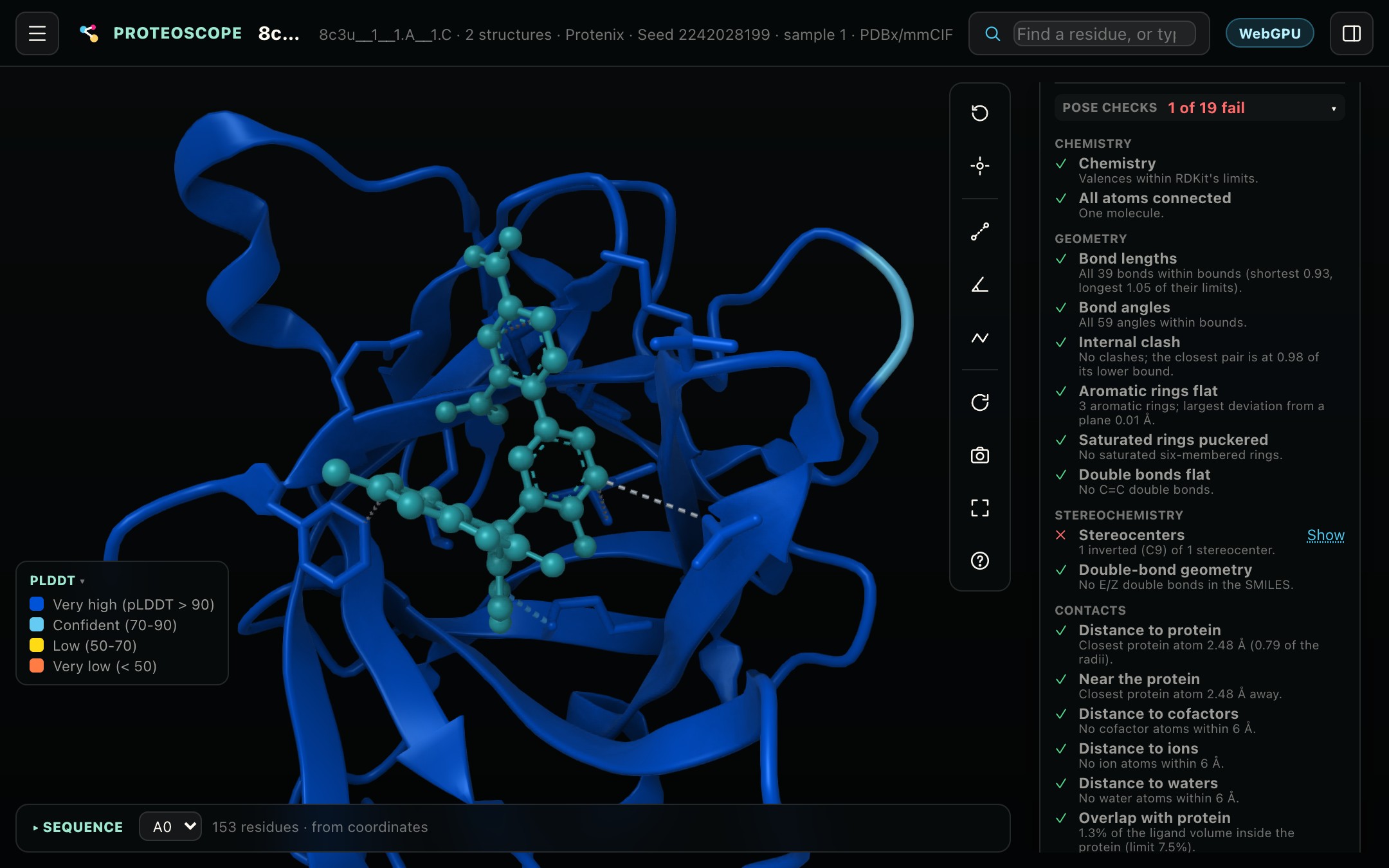
AlphaFold 3, Boltz, Chai-1 and Protenix write a ligand given as SMILES without bond orders, so until now it got only the contact checks. When the job's input is opened with its results, Proteoscope reads the SMILES and gives the ligand its bond orders, charges and hydrogens. The ligand is then drawn and its interactions typed like a dictionary ligand. It gets every pose check, with its stereocenters and double bonds compared with the SMILES, so a model that inverted a stereocenter fails.
| Predictor | Where the SMILES comes from |
|---|---|
| AlphaFold 3 | <job>_data.json, already in the output folder |
| Boltz | the job's .yaml or .fasta input, opened with the results |
| Chai-1 | the input FASTA, put in the output folder |
| Protenix | the job's <name>.json input, opened with the results |
| OpenFold3 | none needed: its model files list the bond orders, which are now read |
The SMILES is read as RDKit reads it, including @, @@, / and \. Stereo marks RDKit ignores are ignored too, such as a "center" with two identical neighbors, and symmetric molecules such as meso compounds are not called inverted. A new validation suite checks the reading against RDKit on 407 SMILES of 51 molecules, and 618 more all agree. On the example below, Proteoscope calls the same models inverted as RDKit does.
Triage without a window
proteoscope triage campaign/ --csv ranking.csv --json ranking.json --gallery best/
proteoscope triage ranks every model of every prediction job and prints the table, then writes the CSV, the ranked rows as JSON and images of the best models. It takes the same ranking options as the window: --by ipsae|pdockq2|pose|…, --top, --models and --pair A,B. It runs Proteoscope's page in a hidden Chrome, Chromium, Edge or Brave, so the scores are exactly the window's. Ctrl-C or a killed job stops the browser and removes its temporary profile, and it runs in containers. See proteoscope triage -h.
Prediction examples
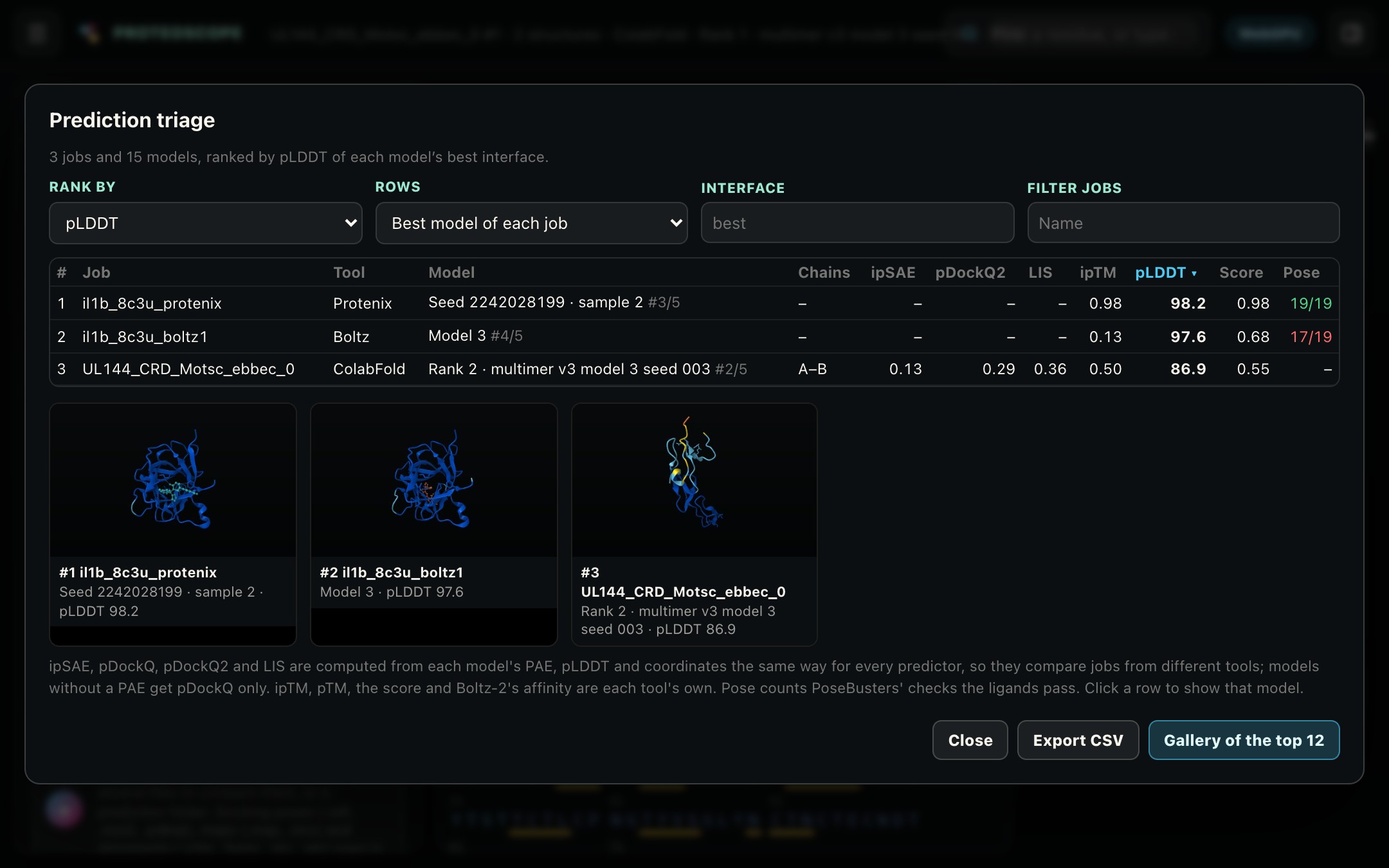
Two examples in the Examples menu are real prediction output. They open as if you had dropped the folders on the page, so the Prediction table, interface scores and pose checks can be tried without running a predictor:
- 8C3U-COFOLDING: interleukin-1β with a small-molecule antagonist, five models each from Boltz-1 and Protenix, from the Runs N' Poses benchmark. Ranked by pose checks, three Boltz-1 models and two Protenix models invert the ligand's stereocenter, and Boltz-1 places the ligand too close to Lys103.
- UL144-MOTSC: the five best of 80 ColabFold models of a cytomegalovirus protein with a 16-residue peptide (Büttiker, Zenodo 2026). Its interface is borderline, the kind the interface scores are there to question.
Both are openly licensed (Apache-2.0 and CC BY 4.0); data/predictions/README.md lists their sources and what was changed.
Also in this release
- Protenix runs whose file names include the seed now form one job across seeds, rather than one job per seed. Scripts that match Protenix job names should drop the
_seed_<n>suffix. triage gallery <n> width <px>renders gallery images up to 1,600 pixels wide.- Sessions keep the SMILES of predicted ligands. Sessions from 0.9.0 open unchanged, and CSV columns are the same as in 0.9.0.
Install or upgrade
macOS and Linux:
curl --proto '=https' --tlsv1.2 -fsSL https://raw.githubusercontent.com/robert-mcdermott/proteoscope/main/install.sh | sh
Windows (PowerShell):
irm https://raw.githubusercontent.com/robert-mcdermott/proteoscope/main/install.ps1 | iex
To download the files yourself, check them or pin a version, see Installing Proteoscope. All changes are listed in CHANGELOG.md.