Repository navigation
Releases: rohan2025/33rpm
Release list
33rpm 1.2.4

What's new
- The rooms can't be edited: every room image and layout file is checked against a fingerprint built into the app, and anything changed is ignored, even if the app is re-signed.
- Includes everything from 1.2.3: no personal Scenes folder or Open Scenes Folder, the art prompts guide is no longer bundled, and clearer first-open steps.
Install
- Download 33rpm-1.2.4.dmg, drag 33rpm into Applications and open it. The first time, macOS says "33rpm" Not Opened: click Done, then System Settings → Privacy & Security → Open Anyway.
- Add 33rpm Bridge from the Chrome Web Store.
Updating from 1.2.x: quit 33rpm from the menu bar and replace the app in Applications. Your pairing token and played songs are kept.
33rpm-1.2.4.dmg SHA-256: cb8cb517da5d28ba01e247dbada19fd2f647e9eddc372fc7cbc456f5a0ae6b94
33rpm 1.2.3
What's new
- The rooms are now locked to the art that ships with the app. The personal Scenes folder and Open Scenes Folder are gone.
- The AI art prompts guide is no longer bundled inside the app (it stays in the repo).
- Clearer steps for the first-open "Not Opened" warning.
Install
- Download 33rpm-1.2.3.dmg, drag 33rpm into Applications and open it. The first time, macOS says "33rpm" Not Opened: click Done, then System Settings → Privacy & Security → Open Anyway.
- Add 33rpm Bridge from the Chrome Web Store.
Updating from 1.2.x: quit 33rpm from the menu bar and replace the app in Applications. Your pairing token and played songs are kept.
33rpm-1.2.3.dmg SHA-256: 3169b411f002a64447c8b60c0f32c542f96a3c0776e7206f45452145e132cb3f
33rpm 1.2.2
The Chrome extension is now on the Chrome Web Store, so setup is one click.
What's new
- One-click extension install: add 33rpm Bridge from the Chrome Web Store. No more Developer mode or Load unpacked.
- Setup Guide: step 1 now has an Open in Chrome Web Store button.
- The DMG no longer includes the extension folder.
Updating from 1.2.1
- Quit 33rpm from the menu bar, then drag the new 33rpm from the DMG into Applications and replace the old one.
- If you loaded the extension by hand: remove it in
chrome://extensions, add 33rpm Bridge from the store, then paste your pairing token again (menu bar → Copy Pairing Token). The extension code is unchanged, so the old one keeps working too, but the store version updates itself.
Checksum (SHA-256)
33rpm-1.2.2.dmg:370eb00790d725e32cb92dc3d649ca8ca9601034d47b5ab6d9c97b5d343ef952
33rpm 1.2.1
A look pass: the stereo, the sleeves and the crate now belong in the room.
What's new
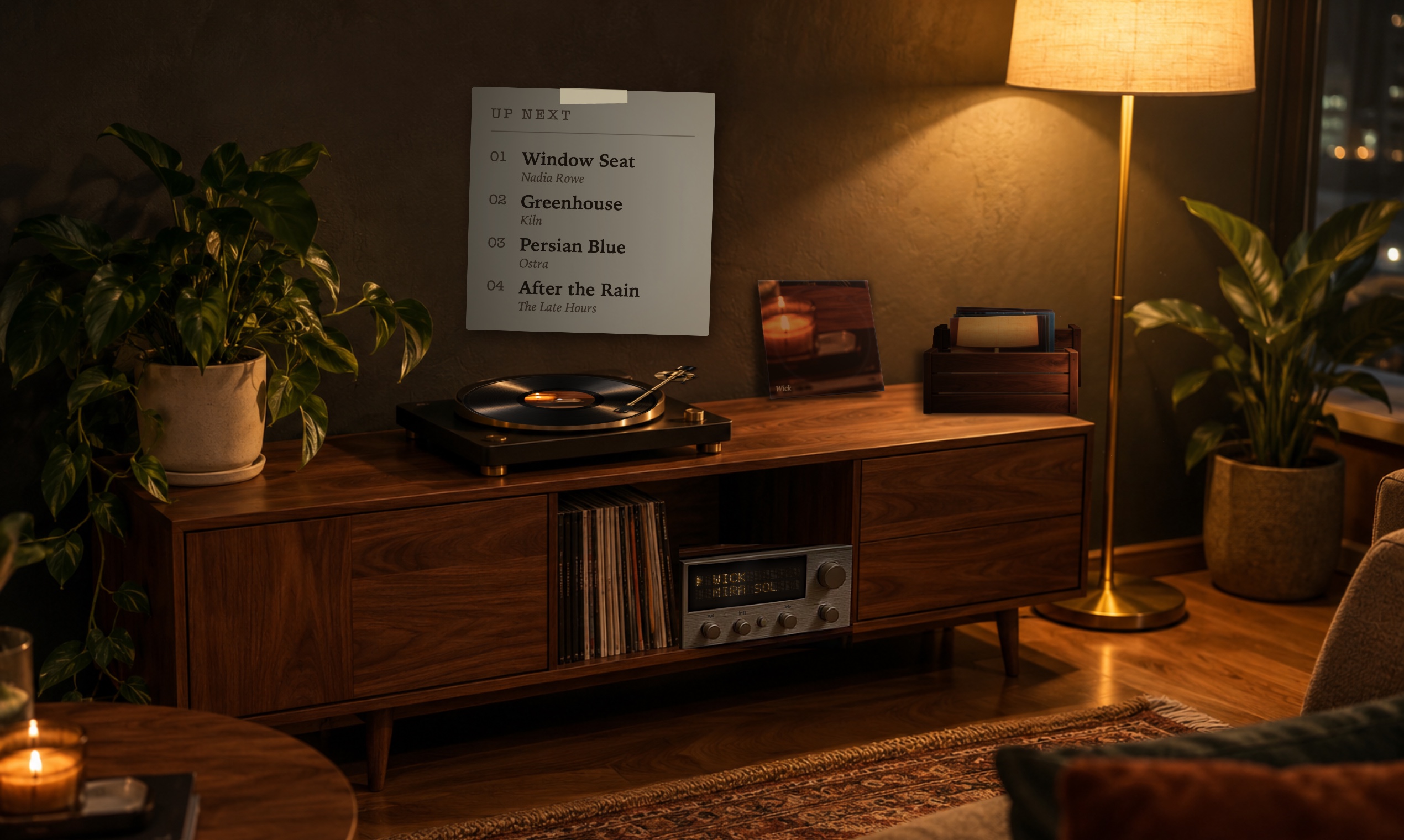
- Receiver display: a real two-line dot-matrix screen (5×7 characters on a faint grid of unlit dots) drawn into the stereo's actual slanted window, so the text lines up with the stereo. Long titles step along one character at a time. Non-Latin titles are romanised.
- Sleeves: album art looks like printed card under the lamp, with matte colours, paper grain, faint ring wear and worn edges, softened to match the photo. The wall sleeve leans back against the wall and casts a soft shadow away from the lamp.
- Crate: graded into the room's light with a visible back wall and side, so it reads as a wooden box rather than a cut-out. It casts its own shadow, and the sleeves darken where they go down into it.
Updating from 1.2.0
- Quit 33rpm from the menu bar, then drag the new 33rpm from the DMG into Applications and replace the old one.
- The Chrome extension only had its version number bumped. Updating is optional: replace the folder and press reload in
chrome://extensions.
Checksums (SHA-256)
33rpm-1.2.1.dmg:401a45e38c692d629d2b5d413ad01fd3e00e5d95307d9005b10f1b7664da539233rpm-bridge-1.2.1.zip:f3d840f55da215dfaba1d18796365291cdd5d0b5c0ab2a46f8ee441e9db301f9
33rpm 1.2
A vintage receiver joins the room.
New
- The receiver in the console is now the remote: its amber display shows the current song and artist (long titles scroll), and its three knobs are previous / play-pause / next, with a soft amber ring on hover and the display confirming each press. Clicking the turntable still plays or pauses.
- Painted into all three rooms (Evening, Rainy Window, Minimal), matched to each room's light.
- The Up Next card is smaller and quieter (next 4 songs).
- Replaces 1.1's brass plate and wall lettering.
Install / update
Download 33rpm-1.2.0.dmg, drag 33rpm into Applications (replace the old one) and open it. First time only: System Settings → Privacy & Security → Open Anyway (the app isn't notarized).
Updating from 1.0/1.1: also replace the Chrome extension with the new 33rpm Bridge folder from the DMG (or Setup Guide → Show Extension Folder), then press reload on it in chrome://extensions.
Requires macOS 14 Sonoma or later and Google Chrome.
SHA-256
574e89473ef9305d2b676885a942e5feab20874adbd7cc12947e231b1992f9d0  33rpm-1.2.0.dmg
545c2095f786e8a71c2f2fa23f4612b22c9e4506ea91d0abbed2874cc217ed38  33rpm-bridge-1.2.0.zip
33rpm 1.1
Brass controls and the song title on the wall.
New
- Brass controls: a brushed-brass faceplate on the console door with engraved previous / play-pause / next, shaded to the room's lamp light. Clicking the turntable still plays or pauses.
- Song title on the wall: the current song in gilt serif lettering, blended into the plaster, crossfading between tracks.
- Settings switches for both (menu bar → Settings…).
Install / update
Download 33rpm-1.1.0.dmg, drag 33rpm into Applications (replace the old one) and open it. First time only: System Settings → Privacy & Security → Open Anyway (the app isn't notarized).
If you already use 33rpm, also update the Chrome extension: copy the new 33rpm Bridge folder from the DMG over your old one, or use Setup Guide → Show Extension Folder, then press reload on it in chrome://extensions.
Requires macOS 14 Sonoma or later and Google Chrome.
SHA-256
02cb2e9f5a8fcf2d62ee43d84a510f8c2a36be2411af267a7c7a5854ff1d5720  33rpm-1.1.0.dmg
238fc00f8209e9abf473145760e5966be215b847322b549778956c3ffff4dce9  33rpm-bridge-1.1.0.zip
33rpm 1.0
A turntable on your Mac desktop that plays along with YouTube Music.
Install
- Download 33rpm-1.0.0.dmg, drag 33rpm into Applications and open it.
It isn't notarized (free hobby app), so the first time go to System Settings → Privacy & Security → Open Anyway. - Follow the Setup Guide that opens: load the bundled 33rpm Bridge extension in Chrome
(chrome://extensions→ Developer mode → Load unpacked), then paste the pairing token. - Play something on music.youtube.com.
What's in it
- Three photoreal rooms: Evening, Rainy Window, Minimal
- Record spins with your album art on the label; the tonearm tracks the song
- Played songs stack in a crate: hover to flip, click to replay
- Click the turntable to play/pause; Up Next card on the wall to jump ahead
- Settings for record speed and effects; small, medium or full-screen; every display and Space
- Runs 100% locally (127.0.0.1), no accounts or analytics, ~0% CPU
Requires macOS 14 Sonoma or later and Google Chrome.
33rpm-bridge-1.0.0.zip is the same Chrome extension packaged for the Chrome Web Store.
SHA-256
07caf0030d5d4c0f0627971b7645eb1eac62fdc135e6d2ed59cfefc165e86857  33rpm-1.0.0.dmg
53a9c99216b8513a7d2b486c81b2f72835f7ad6f09212a903f82dbdd445393c4  33rpm-bridge-1.0.0.zip