Repository navigation
Proper Error Handling Vanessa
What is error handling? Every developer has errors while running their code. Errors can be handled automatically by running alternative code to accomplish the same task or by informing the user or developer about the error. Trying to avoid and fixing these errors, is called error handling. There are two types of errors every developer has to deal with. Programmer errors and genuine problems.
Operational errors
Operational errors are runtime problems whose results are expected and should be dealt with in a proper way. The application itself has no bugs, but developers need to handle these operational errors thoughtfully.
Examples of operational errors:
- 'failed to connect server'
- an invalid input for an API endpoint
- parsing a string
- 'out of memory'
- forgetting to validate user input
- mistyping a variable name
You can find some of these errors back in your terminal after running your code.
Operational errors are a natural part of an application, and programmer errors are bugs caused by developers. A logical question that follows is
Programmer errors
Programmar errors are unexpected errors in poorly written code. A common programmer error is for example 'undefined'. To fix the error, the code needs to be changed by the developer. So Programmer errors are basically bugs caused by developers.
Examples of Programmer errors:
- forgetting characters like "," or ";"
- wrong written callback
- wrong written parameters
- forgetting letters in names
The challenge is to handle these errors whitout creating other errors. Luckily, there are different ways to solve these errors.
In this project, I worked whit Node.js. Node.js is a templating language that you can use, to work with MongoDB. There are different ways in Node.js to solve errors, I will explain some of them:
Try/catch
Try/Catch is a piece of code that you can use that handles errors for (a)synchronous operations. Try, defines a code block to run and catch, defines a code block to handle any error.
Example of try/catch in our project:
    const like = async (req, res) => {
    try {
    await dishesCollection.updateOne(
    {
    _id: ObjectId(req.body.like),
    },
    {
    $set: { like: true },
    }
    );
    res.redirect("/favorite-dishes");
    } catch (err) {
    res.status(400).send(err.message);
    }
    };
Async callback errors
Next, how to handle errors for asynchronous operations? But first, what are asynchronous operations?
Asynchronous operation ensures that if we perform an asynchronous operation at some point, the code will run after that operation and not wait for that asynchronous operation to complete.
An example of an asynchronous operation is an async funtion tot request some data from the database.
Errors that occur with asynchronous functions can be handled with callbacks. If there's an error in your asynchronous operation, you can call the callback function after an asynchronous operation is completed.
Example of a callback:
    function first() {
    console.log("HI");
    }

    function second() {
    console.log("BYE");
    }

    first();
    second();
Throw
Throw defines a custom error and stops the program and execute a catch. Using the keyword 'throw' the action that is going on will stop in its tracks. This prevents more functions from running. This way it will prevent the risks of any further errors in your code.
Example of throw:
   try
   {
     throw: "Error";
   }
   catch
What did we use?
In our project we used try/catch. My teammate used try/catch in her code, to be consistent I used try/catch with (res.status(400).send(err.message) as wel within the rest of the code that needed error handlings, like (a)sync functions.
   try {
   ...........
   } catch (err) {
   res.status(400).send(err.message);
   }
   };
But I also experimented a bit with try/catch. I experimented with the kind of error messages you can receive and how you can test if your error handling works in your code.
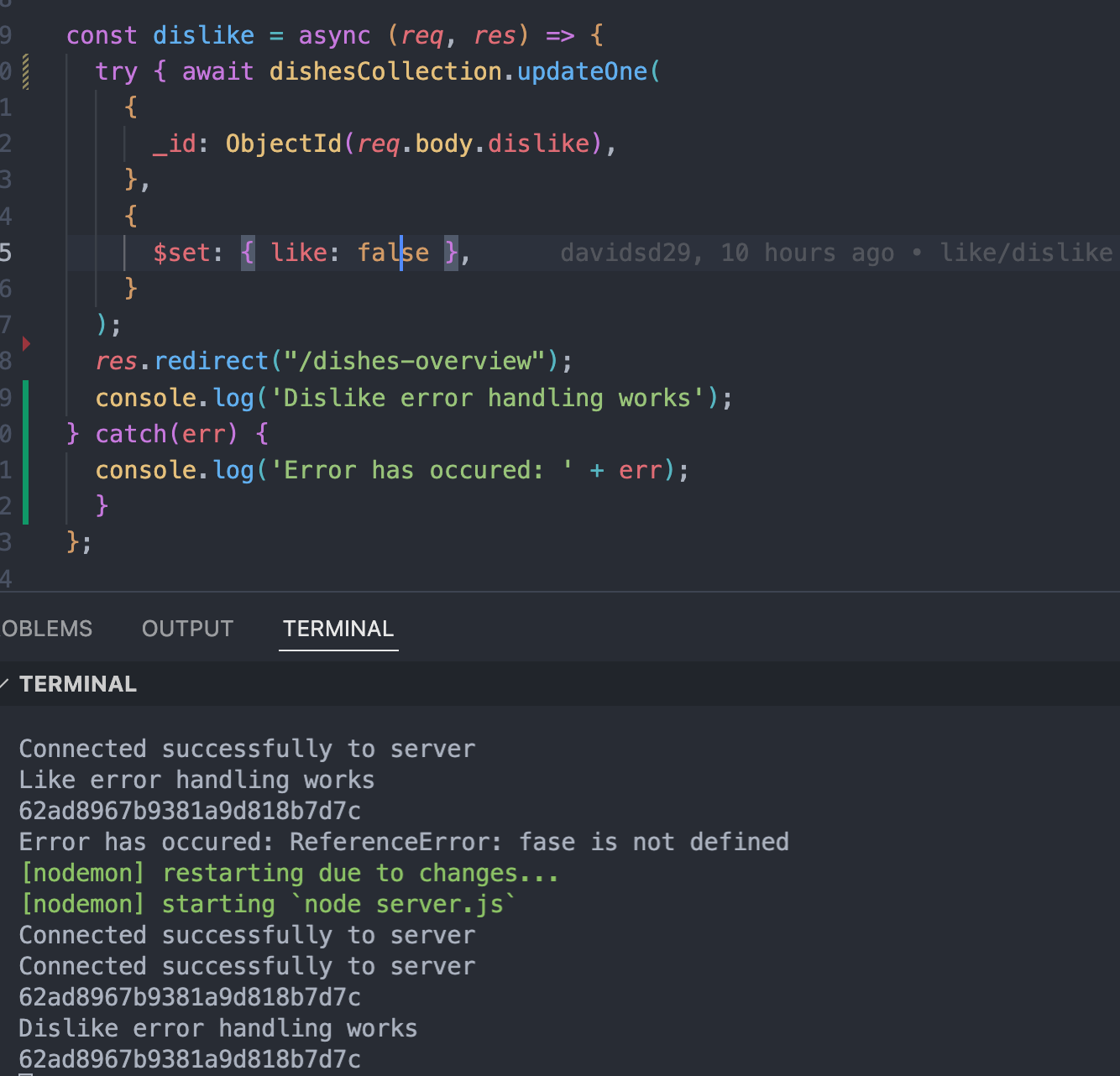
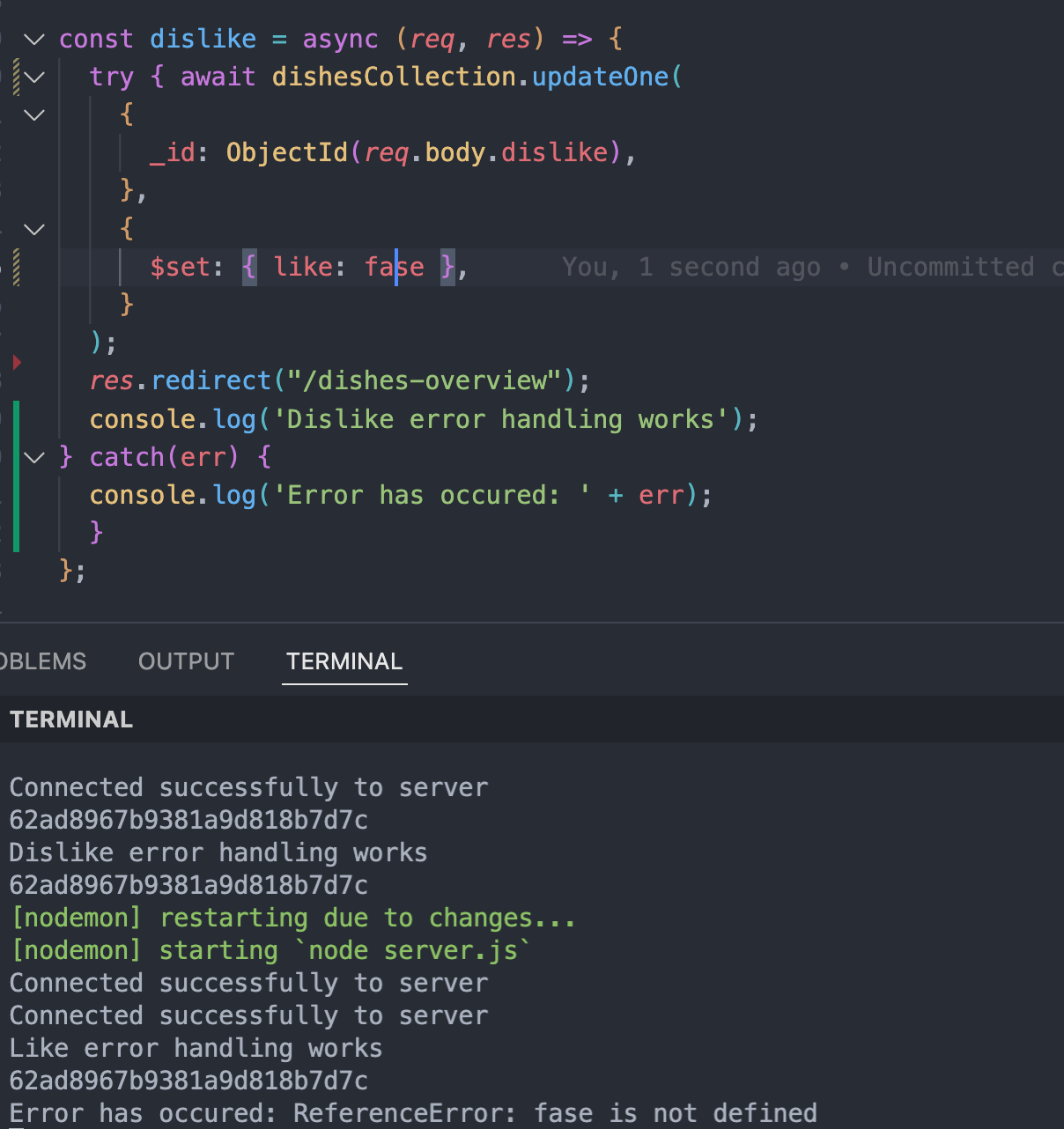
If you take a look at the image here above you can see I used console.log('Error has occured: ' + err) instead of (res.status(400).send(err.message). This way if you have an error you'll get the message 'Error has occured' + the kind of error. In the example here below you can see that I removed the letter 'l' in the word false and that it has an error now. Because if you take a look in the terminal you can see this line Error has occured: ReferenceError: fase is not defined.
Sources
Sources: https://stackify.com/node-js-error-handling/, https://www.codegrip.tech/productivity/how-to-implement-complete-error-handling/ , https://www.codegrip.tech/productivity/how-to-implement-complete-error-handling/ , https://developer.mozilla.org/en-US/docs/Web/JavaScript/Reference/Statements/try...catch, https://www.toptal.com/nodejs/node-js-error-handling