Repository navigation
Releases
DAWLoop Desktop v0.5.8-alpha.1 — Audio Transcription Studio

DAWLoop Desktop 0.5.8-alpha.1 — Audio Transcription Studio
音频导入、后台转写、多轨时间轴、Piano Roll 编辑、试听和原生 MIDI 文件拖出现在整合在「音乐智能 → Audio Transcription Studio」。当前保存的编辑用于另存和拖出;原始推理结果独立保留,可恢复,不需要重新分析整曲。
Audio import, background transcription, a multitrack timeline, Piano Roll editing, preview and native MIDI file drag-out now live in Music Intelligence → Audio Transcription Studio. Exports use saved edits while original predictions remain recoverable.
首次使用 / First use
解压 Windows x64 Portable ZIP 后运行 DAWLoop.exe。在组件管理中分别确认许可并安装随包提供的 Basic Audio 和 Basic Pitch 组件,再进入工作台导入 WAV。组件安装与推理在本地执行,不需要付费API或系统Python。
Extract the Windows x64 Portable ZIP and run DAWLoop.exe. In Component Manager, review the terms and install the included Basic Audio and Basic Pitch packs, then import a WAV into the Studio. Installation and inference are local; no paid API or system Python is required.
Basic Pitch 单独可用时,显示混音中高音候选与低音区候选;它们按音区拆分,不能冒充人声/器乐分离或精确主旋律。缺少的声部显示未提供,不生成伪造和弦。支持读取已有整曲转写目录。已有受审本地 SheetSage2 环境时可进一步分析人声、器乐与参考和弦;本发行不包含 SheetSage2 权重或其首次安装器。
With Basic Pitch alone, mid/high and low-register mixed-audio candidates are shown. Register splitting is not source separation or exact lead extraction. Missing parts remain unavailable; chords are not fabricated. Existing transcription folders can be restored. A separately reviewed local SheetSage2 environment enables additional vocal, instrumental and reference-chord analysis; its weights and first-install setup are not included.
交互与兼容性 / Interaction and compatibility
- 五类同步视图、缩放/滚动、原曲与MIDI试听、静音/独奏、音符移动/尾音编辑/删除、撤销重做及恢复原始结果。综合项不额外叠加播放。
- 导出前保存编辑。
↗ MIDI发起操作系统文件拖放;点击或键盘访问另存按钮可保存真实 MIDI 文件。导出文件不会因失焦或拖放结束立即删除。 - 原生拖放已在维护者环境由资源管理器和宿主 Piano Roll 接收。Playlist 直接接收未确认;Piano Roll 接收不代表全局tempo map自动同步。
- 与原Composer兼容,新增参考和弦JSON导出;本轮没有一键写入Composer画布。
Five synchronized views support zoom/scroll, original/MIDI preview, mute/solo and note editing with undo/redo. Combined is a view/export, not another playback layer. Save edits before dragging ↗ MIDI; keyboard-accessible save-as is also available. Export files persist after focus changes and drag completion. Explorer and host Piano Roll receipt were observed; direct Playlist receipt and automatic conductor-tempo import remain unconfirmed. Reference-chord JSON export is available without changing Composer.
范围 / Scope
公开组件的验收格式为WAV;MP3/FLAC处理取决于另行可用的解码能力。预测、参考Voicing及低音候选均需听审,技术回读不证明音乐准确。独立干净Windows机器兼容性仍待确认,程序二进制未签名。本机隔离组件安装测试不等于独立机器验收。
WAV is the validated public-component format; MP3/FLAC analysis depends on separately available decoding support. Predictions and candidate parts need musical review. Independent clean-Windows compatibility remains unverified; the application binary is unsigned. Isolated installation on the maintainer's machine is not an independent-machine test.
所有既有通知批准仅限对应旧版本;本发行不启用新版本通知,不自动下载安装。MIT原文与其他既有许可不改。Basic Audio、Basic Pitch 原生通知、SBOM、Microsoft条款及对应源码随发行提供;SheetSage2的非商业限制不因本次界面发布而改变。
Old notification approvals remain scoped to their original releases; this release enables no new public notification or automatic installation. Existing licenses, including MIT, are unchanged. Native notices, SBOMs, Microsoft terms and corresponding source are provided. The Studio release does not change SheetSage2's noncommercial restrictions.
DAWLoop Composer 0.2.0-rc.1 — Windows VST3
DAWLoop Composer — 0.2.0-rc.1
Reference-based music creation inside your DAW. Bring MIDI into Composer, describe your musical direction, compare and audition candidates, then export or drag MIDI back into the host.
在 DAW 中围绕参考音乐创作:导入或粘贴 MIDI,描述音乐目标,比较和试听候选,再将 MIDI 带回宿主。可配置自己的 API,或让 Agent 连接插件使用。
Included / 交付内容
- Composer Windows x64 VST3 complete bundle, sampled piano, worker, fonts, bilingual guide and third-party licenses.
- Reference/generated views, harmonic canvas, A/B comparison, candidate history and MIDI transfer.
- Composer only. No Mixer, standalone installer or production auto-updater.
Download / 下载
Windows x64 VST3 ZIP · SHA-256 · Binary use terms / 二进制使用条款

Install / 安装
- Save your project and close all hosts using DAWLoop.
- Extract the whole archive. Copy the complete
DAWLoopComposerDelivery.vst3folder intoC:\Program Files\Common Files\VST3\DAWLoop\. - Rescan plugins in FL Studio. Use the included Getting Started tutorial. Microsoft Visual C++ V14 x64 Runtime is required; no separate Python install.
先保存工程并关闭全部宿主;解压完整 ZIP,将整个 VST3 Bundle 复制到标准 VST3 目录,再在 FL Studio 扫描并打开入门教程。不能只复制内部二进制或替换运行中的文件。
MIDI and AI / MIDI 与 AI
Use standard MIDI files or FL Piano Roll → File → Copy to MIDI clipboard, then Paste MIDI in Composer. Ordinary Ctrl+C is not the standard-MIDI path. Audition with the built-in piano; drag MIDI to the intended Piano Roll and accept any host import dialog.
Configure your API or connect your own agent. Your model, prompts, musical references and configuration shape the result. Provider requests may incur charges and send reference notes and prompts to that provider. The plugin does not train models.
Version notes / 版本说明
This is an unsigned prerelease, tested in the maintainer's FL Studio 2026 Windows environment. Optional live snapshots/name browsing need separate FL helper setup; the saved-FLP external reader is not bundled. Back up the previous complete bundle before a manual upgrade. User data should be retained. Online automatic installation is not enabled.
Licensing / 许可
Composer is proprietary. You may install and use it free of charge for personal and commercial music creation; no source-code license or redistribution permission for its proprietary binaries is granted. Third-party licenses retain their own grants. See the binary-use terms attached above. Desktop and Runtime retain their existing open-source licenses.
Composer 允许免费安装,用于个人及商业音乐创作;不授予其专有实现源码或二进制再分发权。第三方组件保留原授权,Desktop / Runtime 的原开源许可不变。 Root repository source archives contain the open-source project, not private Composer implementation.
DAWLoop Desktop v0.5.6-alpha.2 — Music Intelligence
DAWLoop v0.5.6-alpha.2 — Desktop Alpha
中文
本版本恢复 Basic Pitch 的应用内首次安装,并延续音乐分析、旋律创作、Piano Roll、流式试听与保存工作流。
- 在组件管理中阅读许可、一键安装独立转录组件;无需系统 Python。
- 使用官方 Python 3.14.8、ONNX Runtime 1.31.0 与应用本地微软运行库,校验固定原件、模型与安装文件。
- 转录后试听、编辑音符和力度,保存乐谱,导出并读回 MIDI。
- 简化普通用户功能说明;更新检查采用轻量入口,手动查询与主动提醒分开。
- 安装健康检查及推理进程关闭 ONNX 遥测;原生许可、SBOM、Eigen 源码及微软原始条款随包提供。
本机隔离目录验收:自有3秒测试WAV、实际基础分析、真实ONNX转录、Piano Roll编辑、MIDI导出读回、分析及乐谱重启恢复。没有将单个测试结果作为通用转录准确率。
Basic Pitch适合乐器素材;复杂混音不等于多轨分离。SheetSage2保持实验性,YuE2按设备状态显示。FL Studio通用自动控制、AutoMix和风格学习不属于本次已验证功能。
English
This release restores in-app first installation of Basic Pitch while retaining music analysis, rule-based melody creation, Piano Roll editing, streaming playback and saved work.
- Review licenses and install isolated transcription components in Component Manager, without system Python.
- Official Python 3.14.8, ONNX Runtime 1.31.0 and app-local Microsoft runtimes; pinned artifact, model and file verification.
- Listen, edit notes and velocity, save scores, export MIDI and verify readback.
- Concise user-facing descriptions and a subtle update entry; manual checks remain separate from proactive reminders.
- ONNX telemetry disabled in installer health checks and inference workers. Original licenses, SBOM, Eigen covered source and Microsoft terms included.
Validated on the maintainer's Windows environment using isolated directories and an owned three-second WAV: real analysis and ONNX transcription, Piano Roll edits, MIDI roundtrip and analysis/score recovery after restart. This single case is not a general accuracy benchmark.
Experimental Alpha — Tested on maintainer's Windows environment. Clean Windows compatibility has not been independently verified.
Basic Pitch is intended for instrument material, not complete multi-track separation of complex mixes. SheetSage2 remains experimental; YuE2 availability follows device status. Unrestricted FL Studio automation, AutoMix and style learning are not certified by this release.
First run / 首次使用
Extract the whole portable directory and run DAWLoop.exe. In Music Intelligence → Component Manager, review licenses and install basic components, then Basic Pitch (~136.5 MiB archive; at least 1 GiB free). Import WAV, analyze or transcribe, edit and export MIDI. User data is separate from the program directory; upgrading does not remove user audio or existing environments. The executable is unsigned; verify the official source and SHA256SUMS.txt and keep Windows security protections enabled.
解压完整目录后运行DAWLoop.exe;在音乐智能→组件管理安装基础组件和Basic Pitch,导入WAV后分析或转录,编辑并导出MIDI。旧数据和原始音频独立保留。程序未签名,请核对官方来源与SHA256SUMS.txt。
Source and licenses / 来源与许可
Desktop source is on the version-specific release source branch identified in BUILD_SOURCE.json. Runtime main is not the source for rebuilding this Desktop package. DAWLoop software code remains MIT; third-party components retain their own licenses. See THIRD_PARTY_NOTICES, licenses/basic-pitch/NATIVE_REVIEW.md, OFFICIAL_SOURCE_OFFER.md and the accompanying corresponding-source archive. Brand assets retain their separate existing policy.
PUBLIC_NOTIFICATION_GATE = DISABLED. Release publication does not authorize Windows notifications. Do Not Disturb, OS notification permissions and clicks after the application exits remain NOT_TESTED. No automatic download, replacement or background update service.
附件中的构建记录与发行说明快照保留审核时的原始字节;本页为维护者正式批准后的公开发行说明。 / Attached build records and release-note snapshots preserve the reviewed candidate bytes; this page is the maintainer-approved public release description.
DAWLoop v0.5.6-alpha.1 — Music Intelligence Desktop Alpha
DAWLoop v0.5.6-alpha.1 — Music Intelligence Desktop Alpha
中文
把音乐试听、分析、旋律创作和MIDI编辑放在一个Windows工作区中。
版本亮点
- 导入与流式试听,查看WAV音乐分析报告并保存结果。
- 按和声、节奏和密度创建规则辅助旋律。
- 在Piano Roll编辑音符与力度、试听并导出MIDI。
- 中英文界面、基础组件管理及独立用户数据。
产品预览
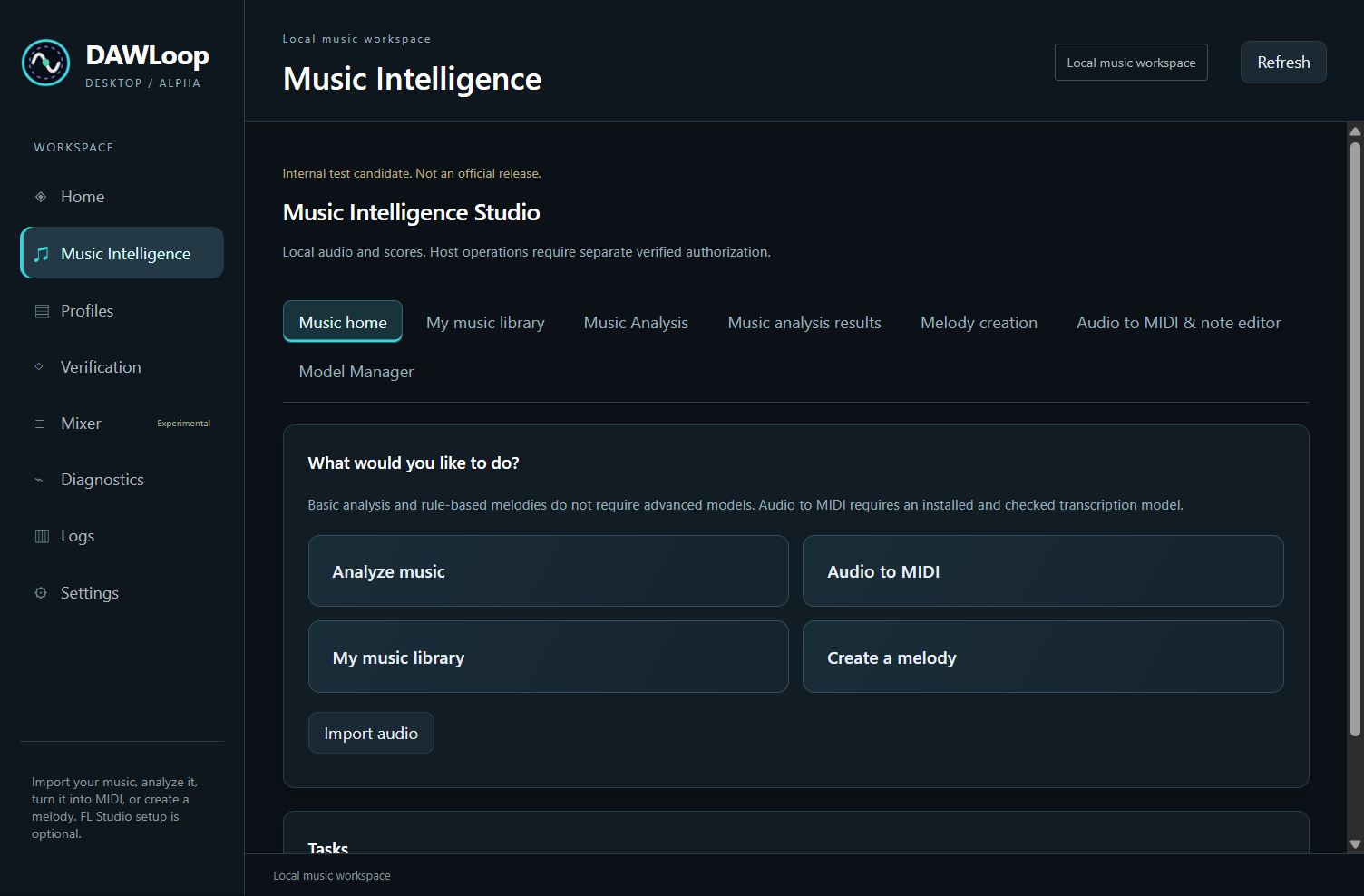
在一个工作区中探索素材、查看分析并进入旋律编辑。分析到 MIDI 的操作流程。图片来自此前开发版本。
下载
Windows x64 Portable ZIP · SHA256SUMS.txt
三步开始
- 解压完整目录,运行
DAWLoop.exe。 - 在 Music Intelligence → Component Manager 阅读许可,确认安装基础组件。
- 导入 WAV 试听与分析,或创建规则辅助旋律,进入 Piano Roll 编辑并导出 MIDI。
无需 Codex、Node 或系统 Python。
软件未签名:先核对官方来源和SHA256SUMS.txt,保留系统安全保护。源音频与保存结果独立于程序目录;升级前备份用户数据。
当前版本说明
这是Pre-release,已在维护者Windows环境运行;独立干净Windows兼容性待验证。基础分析支持WAV;Basic Pitch需要已有核验环境,首次安装在此版禁用,模型权重未打包。Desktop编辑与Runtime真实FL研究分别配置;通用AutoMix、自主工程控制和完整风格学习为后续研究。公开更新通知关闭,更新由用户主动下载。
源码与许可
Desktop源代码 对应提交 b5967ef50fca9d54590559559441ad7f964ec12e,main 上的 Runtime 不是此 Desktop 二进制的源码。BUILD_SOURCE.json 记录构建输入,SHA256SUMS.txt 记录摘要;原始通知、逐文件 SBOM 和组件许可随包提供,LGPL 对应源码与构建资料作为同一 Release 的独立资产提供。
DAWLoop 自有代码采用 MIT,第三方组件保留各自许可;品牌和部分图片按独立声明,既有来源审阅状态不因文案修改而改变。历史 Runtime 版本保持原样。此发布不授权用户通知、自动下载/安装或后台服务。
English
Bring listening, analysis, melody creation and MIDI editing into one Windows workspace.
Highlights
- Import and stream audio, explore WAV analysis reports, and save useful results.
- Create rule-assisted melodies with harmony, rhythm and density constraints.
- Edit notes and velocity in the Piano Roll, audition and export MIDI.
- Chinese/English UI, basic-component management and separate user data.
Product preview
Explore material, review analysis and move into melody editing in one workspace. Analysis-to-MIDI workflow. The screenshot is from an earlier development build.
Download
Windows x64 Portable ZIP · SHA256SUMS.txt
Start in three steps
- Extract the complete folder and run
DAWLoop.exe. - In Music Intelligence → Component Manager, review the licenses and confirm installation of basic components.
- Import a WAV to listen and analyze, or create a rule-assisted melody, edit it in the Piano Roll and export MIDI.
Codex, Node and system Python are unnecessary.
The binary is unsigned: verify the official source and SHA256SUMS.txt and keep system security enabled. Back up user data before updating.
Current Release Notes
This Pre-release has run in the maintainer's Windows environment; independent clean-Windows compatibility awaits validation. Basic analysis supports WAV. Basic Pitch needs an existing verified environment; first installation is disabled in this release and model weights are not bundled. Desktop editing and Runtime FL research are separate workflows. General AutoMix, autonomous project control and full style learning remain research directions. Public update notifications are disabled; users initiate downloads.
Source and terms
Desktop source corresponds to commit b5967ef50fca9d54590559559441ad7f964ec12e; the Runtime on main is not the source for this Desktop binary. BUILD_SOURCE.json records build inputs and SHA256SUMS.txt provides integrity checks. Original notices, a per-file SBOM and component terms are included; LGPL corresponding source and build materials are separate assets in this release.
DAWLoop-authored code remains MIT; third-party components retain their own terms. Branding and certain images have separate notices, and existing provenance-review status is unchanged by this copy revision. Historical Runtime releases are preserved. This release authorizes no user notifications, automatic downloads/installations or background services.
DAWLoop v0.2.0-alpha.1 — Runtime V2 Research Preview
Runtime V2 Research Preview
此次更新把原有离线/Community工具扩展为结构化、证据化的Native FAST runtime,并公开用户自己的音乐学习框架。首页已重新布局,部署按离线可用、FAST受限研究集成、MCP候选接口三个成熟度说明。这是alpha预览,不是stable生产版。
最终行为
- FAST:完整计划先校验,Controller导航与观察性目标确认,deterministic source/AST/hash守卫,一次Native批量派发,用户Accept,实时HumanReport/application receipt领取和宿主callback,结果
COMPLETED_UNVERIFIED。 - 现场范围:已有disposable Pattern 1 / 808 Kick、PPQ96、第5–8小节、固定16音符、add-only、0retry、0fallback;no-save退出、基线摘要与端口关闭已记录。已有Kick↔Clap整链导航只认证观察性绑定。
- 音乐合同:Section/Harmony/Voice/Variation与通用StyleConstraints,保留phrase/motif/constraints/provenance。学习框架提供来源、特征、统计、profile revision四份严格Schema,四套Agent prompts和完整合成例子;用户Agent学习自己的材料,Core没有内置个人艺术家逻辑。
- MCP:三个stdio工具与后台RunManager已离线接线,operation幂等、truthful readiness、现有FAST factory与observer证据通道保留。现场MCP与zero-Agent-CU路径未认证,暂停于外部browser page identity依赖。
- 来源:MIT根许可保持,补NOTICE/AUTHORS/CITATION/品牌范围、精确许可政策及内容provenance。第三方原版权和创作者致谢保留;CC BY-NC文本只是备选,当前单独许可资产为空。
边界
producer binding / Native structured readback / Exact Set未认证,VERIFIED研究冻结;Auto Accept延期,connection reuse未测试,正常作品连续写入未认证。图像与callback不能代替Exact Set。原始私人FLP、截图、Memos、token与大型session/debug数据未发布;公开脱敏摘要和必要回归输入。
发布清理迁移私有session依赖的测试输入,明确本机安装参数;合成学习例子的reference hash与Git规范化字节保持一致;关闭的文件快照入口在状态缺失时也拒绝。没有开启新现场实验或扩大16-note认证。
验证与部署
发布目录完整回归:710 tests passed + 331 subtests passed;另对packaging/provenance资源调整运行127项相关回归。两个第三方弃用警告不作为功能失败。wheel/sdist构建、包资源/安装隔离、公开路径/凭据扫描与本地链接检查记录在evidence/public/release_validation.json。
从源码安装 .[learning] 即可跑合成学习教程,无需FL。Windows Controller、Native研究入口、MCP暂停状态与必要配置见docs/DEPLOYMENT.md。固定现场fixture未分发,不提供绕过守卫的“一键写当前作品”指令。
此alpha的tag/artifact没有维护者身份签名或attestation,内容hash只校验字节;未创建DOI。GitHub保留历史release。后续路线见docs/ROADMAP.md,外部记忆同步仍待服务恢复。
FLSkill v0.1.0-alpha
FLSkill v0.1.0-alpha
The first clean public alpha of FLSkill.
FLSkill is an experimental framework for building verifiable, resumable AI-assisted music-production workflows for FL Studio.
Instead of treating a DAW operation as successful merely because an agent attempted it, FLSkill is designed around a stricter principle:
Plan → Write → Read Back → Verify → PASS / STOP
This first public release intentionally contains only the clean, DAW-independent core.
What's included
Musical Grid
Represent musical positions using deterministic bar / beat / tick coordinates.
Absolute Tick Resolution
Convert musical positions into absolute timeline locations that can later be mapped to a DAW.
Note Plan
Structured note events containing pitch, start position, duration and velocity.
Writer / Reader abstraction
A generic boundary for future DAW adapters. The core does not require FL Studio, Computer Use, MCP or SysEx.
Exact-Set Verification
After writing events, FLSkill reads the resulting event set back and compares it with the plan. Duplicate-event counts are preserved, and mismatches are diagnosed instead of being treated as success.
PASS / STOP semantics
Write failures, read failures, missing events, extra events or mismatched event fields result in STOP.
Verification status
Offline Algorithm Verified
The release was published after:
- 14 passing offline tests
- Python compile checks
- JSON Schema checks
- clean public provenance tracking
Important:
Offline Algorithm Verified ≠ FL Studio Verified
This release does not yet claim successful live FL Studio operation.
Why FLSkill exists
Most AI + DAW experiments focus on whether an agent can perform an action. FLSkill focuses on a second question:
Can the system prove that the musical operation it intended to perform is what actually happened in the target?
The long-term architecture separates composition planning, musical timing, note-event planning, execution adapters, state readback, verification and recovery/resume workflows.
Planned execution paths
Future optional adapters may include:
- Native Computer Use
- Community FL Studio MCP integration
- FLSkill SysEx RPC
- compatibility Computer Use bridges
These are intended to remain adapters around FLSkill Core rather than mandatory dependencies.
Roadmap
Planned work includes:
- live FL Studio note write/readback verification
- multi-channel / multi-pattern workflows
- SysEx RPC
- Mixer control with readback verification
- plugin parameter read/write/readback
- Computer Use and community MCP adapters
- audio analysis and section-level composition workflows
See docs/ROADMAP.md for the current development plan.
Provenance
The public repository is a clean implementation of the FLSkill core. Experimental third-party integrations and unknown-provenance implementation files from the private development environment are not included.
See PROVENANCE.md for file-level provenance.
Current limitations
v0.1.0-alpha does not yet provide:
- live FL Studio control
- SysEx RPC
- Computer Use integration
- community FL Studio MCP adapter
- Mixer control
- plugin parameter control
- autonomous song production
Those capabilities remain on the roadmap.
Download
The GitHub release source archives contain the exact v0.1.0-alpha tagged source tree.
Licensed under the MIT License.