Repository navigation
Releases
v0.8.0: monsters everywhere, Nagedra's dungeons, the new boss rush

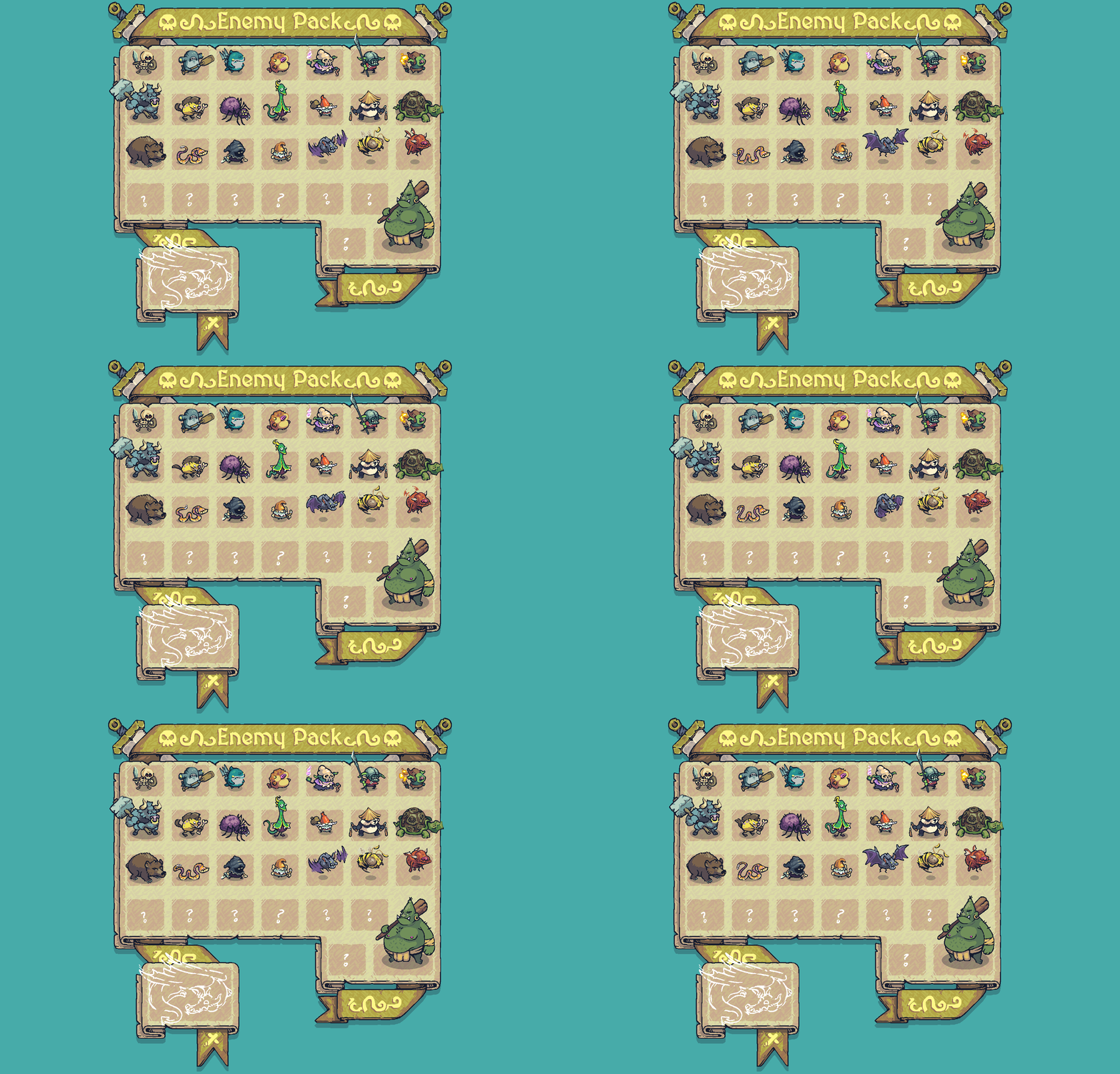
Download EmbervilleModPack-v0.8.0.zip and unzip it into the Emberville Demo folder. Everyone playing together needs the same version.
Monsters everywhere
- 60 new creatures from the Tiny Swords packs, each with its own AI and tricks: bees that charge, gnomes that split, a Thief you can barely see, a Minotaur that flips your controls, Spiders that web you, a Hex Shaman that turns you into a chicken, TNT Goblins whose lit sticks you can kick back at them, a Barrel Goblin that blows itself up, five armies (knights, lancers, monks, berserkers, catapults...) and the Mad King. What each one does
- Explosions hit 3x and stun everyone in them for 3 s, the thrower too.
- Art by Pixel Frog (Tiny Swords), included.
Nagedra's dungeons
Ask Nagedra "Know any good dungeons?": she sends you into the demo's hidden dungeons, now full of monsters, a new layout every time. At the far end a boss guards a big chest (gear 5-8 levels stronger than yours that you can still wear) and the portal home. Her forest has the Queen Bee; Kaldhor's Throne has the Mad King and his sword; Mordaxius' lab has a basement.
The arena
- Boss rush, rewritten: every boss there is, the game's and ours (about 60), in a random order every time.
- Tiny Swords waves, the King battle, and Nagedra can send you to any of them. There is no chicken level.
Endless dungeons (the descent)
Compact floors, both worlds' creatures, chests with a 25% chance of a weapon better than yours, stairs that glow red while their guardian lives.
Fixes
- Twitch is off until you sign in (Better Streaming).
- Much faster: two mods were wasting 5-6 ms every frame (often 40-60 fps → 70-90), and hitches every second or two are gone.
/perfmeasures it. - Walls, water, pits and floors in the generated dungeons: no more walking on lakes or into walls, no more invisible walls on floors.
- Webbed: no attacking until you wriggle free. The emote wheel (Y) works with the mouse and the stick.
v0.7.1: change your look with Nagedra
Download EmbervilleModPack-v0.7.1.zip, unzip it into the game folder (next to Emberville.exe), start the game. Press Insert for the mods menu.
Change your look with Nagedra
Talk to Nagedra at the camp next to Ellie (the tutorial area) and pick "Could you help me change my look?". The game's own character creator opens: hair, beard and moustache, face extras, skin, hair and clothes colours, body type and your name. Your new look is saved with your character the next time the game saves, and friends in your session see it too.
Take your hat off first: use the show / hide toggle next to the head slot in your inventory, or your hat covers the new hair and you won't see what you're picking.
(The name box is on that screen too: leave it alone if you don't want to rename yourself.)
Everything from v0.7.0 is included: the camp (Atwor, Gumu, Nagedra), the hidden dungeons, junk and favourites, water reflections.
v0.7.0: a camp in the tutorial area, hidden dungeons, junk
Download EmbervilleModPack-v0.7.0.zip, unzip it into the game folder (next to Emberville.exe), start the game. Press Insert for the mods menu.
A camp in the tutorial area
Three characters the demo has the art for but never lets you meet are now standing near Ellie:
- Atwor the blacksmith, at his anvil: talk to him with a weapon in your hands and he sharpens it (+1, more damage, every time).
- Gumu, with his shop: his usual stock plus 3-5 pieces of good-to-legendary weapons and armour, better the higher your level, fresh every day in the game. (Gumu in Town opens his shop too now.)
- Nagedra the carpenter: her quests from the full game (a wooden chest, then her tools) for building blueprints, and she'll send you into the dungeons she knows.
Dungeons hidden in the demo
The demo ships about 20 of the full game's dungeons. Type /dungeons to list them (in the ~ console you can click one) and /dungeon <name> to go in: negedra, lab, library, morcha, kl, mines, basements... You arrive a few steps inside the door, and a dungeon you went straight into leads back out through its own entrance.
Junk and favourites
- J on an item marks it junk (red X), Shift+J drops all your junk at your feet. Favourites (F) show a gold star.
- On the ground, a small gold star or red X sits in front of a marked item's name.
- F and J over an item no longer close the chest or open the quest log.
Also
- Water reflections (Better Weather): people and creatures reflect in water. Weather tab back in the menu.
- Companions: no more crash when they make a kill; their head no longer copies your hood.
- Chat: a % in a message or a name no longer breaks it.
v0.6.1 - Twitch reconnect fix
Download: EmbervilleModPack-v0.6.1.zip below: everything in one zip. Unzip it into the Emberville Demo folder (Steam > right-click Emberville Demo > Manage > Browse local files). Everyone playing together needs the same version.
Fix (Better Streaming 0.2.1)
- When Twitch rejected a saved sign-in, Better Streaming crashed trying to renew it and kept failing to reconnect ("connection lost ... un-representable DateTime"). It now renews the sign-in quietly, or the Streaming tab says to Connect again.
- A failing connection no longer retries every 2 seconds.
Everything else is as in v0.6.0: responsive combat (Better Combat 0.4.0), the casino and chat games, the full class tree.
Not made or supported by Cygnus Cross.
v0.6.0 - responsive combat, the casino and chat games, full class tree
Download: EmbervilleModPack-v0.6.0.zip below: everything in one zip. Unzip it into the Emberville Demo folder (Steam > right-click Emberville Demo > Manage > Browse local files). Everyone playing together needs the same version.
Better Combat 0.4.0: combat that answers you
- Spell keys answer every press. The game ignores a spell key for 1 s after each press and drops presses made mid-swing. Now every press counts; one made while you're busy (or just before the cooldown ends) is remembered for 0.4 s and cast the moment it can.
/spellkeys,/spellkeys 0.6. - A spell cuts a swing short, but only after the swing's hit has landed.
- Dodge and attack presses remembered: a dodge you couldn't do yet, or an attack clicked mid-roll, goes the moment you can.
- No stun lock: after a stagger you can't be staggered again for 0.5 s (you still take the damage). The stagger length is a slider too (the game's 0.3 s, down to never).
- Move while attacking now has a slowdown slider (0% = the game's stop).
- Before / after (
/gamecombat): every Better Combat switch off and back on, to show the difference.
Better Streaming part 3
Spin the Wheel, Roll the Dice, the casino (slots, plinko, coin flip, roulette), a monster race chat cheers on, raid parties, chatters as enemies, votes, polls, "Will they survive?" predictions and a leaderboard. Weapon roulette is now every 5 s, and chain lightning is fixed. If you connected Twitch before this version, sign out and connect again to allow predictions.
Testing
/unlockclassesnow also opens the class tree past the demo's level 15, to 40, its "coming soon" skills too (they may be unfinished in the demo)./lockclassesputs the cap back.
Not made or supported by Cygnus Cross.
v0.5.1 - the Ninja (early alpha), centred camera, faster loading, Better Streaming
Everyone playing together needs the same version.
Download
- EmbervilleModPack-v0.5.1.zip: everything in one. BepInEx, the co-op multiplayer mod and the Better mods. Unzip it into the Emberville folder (winhttp.dll and the BepInEx folder next to Emberville.exe). Each mod's README is in the
readmefolder. - Every command and the API for other mods: API.md
New: the Ninja (early alpha)
A new class (Better Classes), all about speed, things thrown and the Hunter's Hook. It works but it's rough: borrowed art (arrows until there are throwing stars), numbers still changing.
- Get it on the class screen (it takes the game's empty Archer slot) or with
/ninja(which also learns every Ninja skill, for testing). As a Ninja you get 20 extra skill points. - Fast: +15% move speed.
- Poison throws: bare hands throw green poisoned arrows instead of punching: half the creature's health over 5 seconds (bosses a tenth).
- Smoke step: the dodge vanishes in smoke and lands 1.5x as far, through walls, doors and fences.
- Skills: Hunter's Hook (drag a foe in, stunned), Fire Palm (hold for a cone of fire until your Kymia runs out; burning creatures panic and spread the fire), Chain Lightning (every creature on screen, stunned 5 s), Spike Trap (up to three; sparkly steel spikes hold the first creature to step on one).
- Without the mod, a Ninja save just has no class on; nothing else in the save changes.
New
- Centred camera (Better Combat, off to start):
/centercamkeeps the camera on you, so a dash doesn't leave you at the edge of the screen./centercam 30lets it trail a little. Also in MODS > Better Combat > Camera. - Faster loading: the game's loading runs at high priority while the loading screen is up. Loading a world went from about 67 s to about 25 s in our tests. Thanks to Snow for finding and measuring this fix!
- Better Streaming: your Twitch chat sets off effects in your game (MODS > Streaming): raids, chicken raids, heal, poison, chain lightning, freeze, mystery chests, a chaos dial, and lots of 30-second "messing with you" effects (camera, filters, controls, weapon roulette, fake cursors...). See the README.
Fixed
- Dying from two hits at once no longer cancels the death screen (and no double XP penalty).
- Skill bar: the right-click stack can no longer loop open/closed until the game crashes, and a half-unfolded stack is laid out properly.
Everything from v0.4.0 and before is included.
v0.4.0
Everyone playing together needs the same version.
Download
- EmbervilleModPack-v0.4.0.zip: everything in one. BepInEx, the co-op multiplayer mod and the Better mods. Unzip it into the Emberville folder (winhttp.dll and the BepInEx folder next to Emberville.exe). Each mod's README is in the
readmefolder. - Every command and the API for other mods: API.md
New
- MODS button on the main menu and the Esc menu: opens the mod menu (same as Insert). The menu has a close [x] and tidier tabs: Multiplayer (with who's connected), Font Options, Mouse Options, Better Combat, Better Looting, Companions, Respec, Pets, Log.
- Homes:
/sethome(or/sethome mansion) where you stand,/tp mansionor/hometo go back,/homeslists them,/delhomeforgets one. Each home has a green portal on the ground. With a home set, the Town Portal becomes the Home Portal; right-click it for a Go to list of your homes and town. - Portal and Stash buttons are now picture buttons in the game's own style.
- Respec tab: unlock screens, classes and masteries; raise or lower your level, classes, weapon and armour masteries, and gathering and crafting skills; reset attributes and class points.
- Companions: rename, a roster of your companions (swap one in, delete), clone a save slot or start fresh, ready-made Sabba (knight), Ellie (mage) and Rory (archer), and a Respec section for your companion.
- Ready-made companions, dressed: Sabba (blond knight in heavy armour), Ellie (a mage, styled like the Ellie NPC), Rory (an archer, styled like the Rory NPC) and GraveBear (a dark-haired wanderer in medium armour and a cloak), each with clothes and a weapon of their kind.
- Better Combat: a New Weapons section: the Staff of Clucking, the Staff of the Risen and the Hunter's Hook.
- Boss arena: There is no chicken level. Survive endless chicken waves (bigger chickens every minute, The Colonel every 3 minutes, spikes after 1 minute, arrows after 3), with your best time saved.
- Party strip: right-click a teammate: Bring them to me; Teleport works across scenes.
- Multiplayer defaults: instanced loot on, PvP off.
Fixed
- Dying no longer gets stuck with no death screen (a stun landing during the death animation cancelled it).
- Dungeon floors: creatures spawn in most spawn areas again.
Everything from v0.3.2 and before is included.
v0.3.2 - chase and first-person views, tilt-shift, controller lock-on
Everyone playing together needs the same version.
Download
- EmbervilleModPack-v0.3.2.zip: everything in one. BepInEx, the co-op multiplayer mod and eight companion mods. Unzip it into the Emberville Demo folder (winhttp.dll and the BepInEx folder next to Emberville.exe). Each mod's README is in the
readmefolder. - Every command and the API for other mods: API.md
New
- Chase and first-person views (experimental):
/chaseor/fpsin chat, or Insert > View. The camera low behind you, or through your own eyes. The mouse turns the camera (hold Alt to get the cursor back); W walks the way you face, A/D strafe, and attacks go straight ahead. The walls are raised as blocks around you. Sliders for distance, angle, eye height, field of view and mouse speed. - Tilt-shift:
/tiltshiftor Insert > View: the miniature look. A sharp band in the middle, the top and bottom blurred, richer colours. Works with any view. - Lock-on on a controller (partial controller support): hold the right trigger to lock on to the nearest enemy (hold again to let go), tap it for the next one. While locked you face the enemy whatever the right stick does, so arrows and spells go at it.
Fixed
- Lock-on: G works in the dungeons (it was ignored there), and the lock ring shows on the dungeon floor.
- Tilted view: houses stand whole (vines and windows stay on them, trees behind them sort behind the roof, the world's edge no longer cuts their tops); stairs, rugs and paths stay lying flat. Reset buttons on the sliders.
Known
- The chase and first-person views are a first try: name plates and other on-screen markers are still placed for the flat view, fences become walls, and some wall art may still show on the floor.
Everything from v0.3.1 (the tilted view) and v0.3.0 (lock-on on G, the shared stash, Ctrl+click into chests, Font Options) is included.
v0.3.1 - the tilted 2.5D view (experimental)
Everyone playing together needs the same version.
Download
- EmbervilleModPack-v0.3.1.zip: everything in one. BepInEx, the co-op multiplayer mod and eight companion mods. Unzip it into the Emberville Demo folder (winhttp.dll and the BepInEx folder next to Emberville.exe). Each mod's README is in the
readmefolder. - Every command and the API for other mods: API.md
New
- Tilted view (experimental):
/tiltin chat, or Insert > View. The world seen from behind and above at an angle, the floor receding and everything that stands (you, creatures, props, trees) stood up facing you, like a pop-up book. Only the picture changes: the game plays exactly as before, and your aim, mouse walking, pings and the Hunter's Hook follow what you see. Sliders for the tilt and the field of view.- Known in this first version: the ground's tiles (walls too) stay flat; name plates and other on-screen markers are still placed for the flat view; the lock-on's G picks targets the flat way.
Everything from v0.3.0 (lock-on on G, the shared stash, Ctrl+click into chests, Font Options) is included.
v0.3.0 - lock-on, shared stash, Ctrl+click into chests, Font Options
Everyone playing together needs the same version.
Download
- EmbervilleModPack-v0.3.0.zip: everything in one. BepInEx, the co-op multiplayer mod and eight companion mods: Favourite Weapons, Better Chests, Better Combat, Better Looting, Better Pets and Summons, Better Fishing, Better NPCs and Quests, Better Weather.
- Unzip it into the Emberville Demo folder (winhttp.dll and the BepInEx folder next to Emberville.exe). To leave a mod out, delete its folder in
BepInEx\plugins. Each mod's README is now in thereadmefolder. - Every command and the API for other mods: API.md
New
- Lock-on (G): point at an enemy and press G: you face it whatever the mouse does, and swings, spells and arrows go at it; a ring under it shows the lock. G again lets go; G at nothing locks the nearest enemy, then the next. Enemies only, never doors, barrels or furniture. The Hunter's Hook throws at the locked enemy too.
- Shared stash (U, or
/stash): 6 tabs of 30 slots, shared by every character on your PC. Right-click a tab to rename it and give it a colour. - Ctrl+click moves an item between your bag and an open chest.
- Font Options (Insert menu): story text size (dialogue, speech bubbles, quest tracker), the size of words in the world ("Open", "Examine", names), and the font for all the game's text (Emberfont, Noto Serif, Liberation Sans, Perfect DOS VGA).
Fixed
- Staff tooltips no longer overlap the second item card.
- A renamed chest shows its own name straight away.