Repository navigation
Releases
Playlist Studio v5.1

🎬 Playlist Studio v5.1
Windows Playlist Manager, Editor, EPG Tool & Player
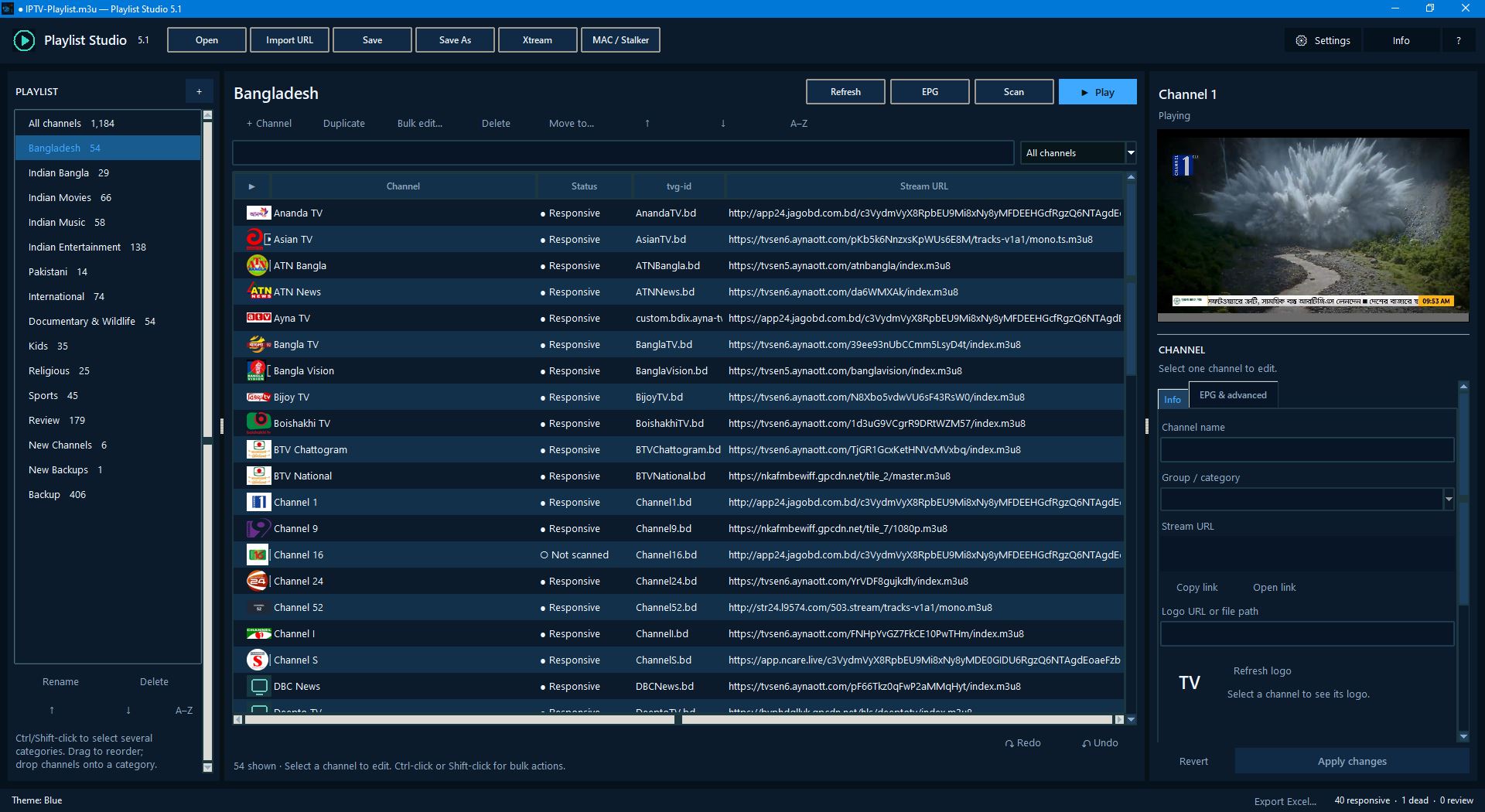
Playlist Studio 5.1 is a Windows application for managing, organizing, editing, testing, and playing M3U/M3U8 playlists from a single workspace. This release adds a complete EPG (programme guide) toolkit, a far more careful stream scanner, and safer handling of provider logins.
🖥️ Program Glimpse
✨ What's New in 5.1
📺 EPG Centre
- Load XMLTV guides from web addresses or local files (
.xml,.gz,.xz,.zip), including several sources at once - A damaged guide is reported and the rest still loads, with a Cancel button for long loads
- Coverage dashboard: totals, by category, by guide source, and how far ahead the guide reaches
- Clear statuses: matched, guide ending soon, expired, no programmes, ID not in guide, missing tvg-id, duplicate IDs
- Now / Next per channel with the time shift applied, shown in your local time
- ID suggestions need your approval: nothing is changed automatically
- Visible, sortable, searchable and editable tvg-id column (double-click to edit)
- Bulk metadata editor with preview and one-step Undo
- Manual EPG corrections are remembered and re-applied after Refresh, re-import and Xtream / Stalker updates, with a window to review, edit, disable or remove them
🔍 Smarter Stream Scanner
- New statuses: Responsive, Dead, Unreachable, Restricted, Stale, Unavailable, Unverified, Error
- Timeouts and blocked requests are never labelled Dead
- Pause, resume and cancel; per-server limits, timeouts and retries; choice of player identity
- HLS freshness checks and optional deep diagnostics
- Scan only the selected channels, the current category or the current view
- Your own verdicts (Good / Bad / Review, with notes) and scan history are remembered between sessions. A new scan never overwrites your verdict
- Export results to Excel or JSON
☁️ Xtream Codes & MAC / Stalker
- Logins and imports now run in the background with a Cancel button, so the window stays responsive
- Xtream falls back to the M3U download if the API route fails
- Stalker / MAC imports can be undone; a failed import leaves your playlist untouched
- Remembered logins are protected with Windows DPAPI and are never saved in plain text
💾 Safer Saving & Editing
- UTF-8 saving without BOM by default (optional BOM in Settings)
- Directives, comments and unknown header keys are preserved, and malformed lines no longer abort an import
- If a backup cannot be made, you are asked before the file is overwritten
- Credentials can be masked in the channel list
- Next / previous channel hotkeys (
Alt+→/Alt+←), player buffering setting, and a single running instance
✅ Everything You Already Know
M3U / M3U8 management · channel & category editing · multi-selection · duplicate detection · built-in playback with fullscreen and volume · import from files or URLs · Save / Save As · multiple themes · GitHub integration
💾 Portable Windows Application
No installation required. Download the EXE and run it on 64-bit Windows. VLC playback is bundled.
⬇️ Download Playlist Studio 5.1 Portable
Windows SmartScreen may warn about an unsigned program the first time: choose More info → Run anyway.
🛠️ Windows Build Kit
Want to rebuild the application yourself? The kit sets up its own isolated build environment, installs pinned dependencies, runs the automated tests, bundles VLC (checksum-verified) and produces the EXE.
Requirements: Windows 10/11 x64 and 64-bit Python 3.13 (3.10–3.13 are accepted; Python 3.14 / 3.15 are not supported with the pinned dependencies, and installing them alongside is fine).
Build Instructions
- Download Playlist-Studio-5_1-Windows-Build-Kit-r2.zip
- Extract the ZIP file and open the extracted folder
- Run
BUILD-WINDOWS.cmd - Wait for BUILD COMPLETE
- Run
Playlist-Studio-5.1.exefrom the main folder
No Python Launcher? The launcher is recommended but not required. In one Command Prompt window run:
set "PS_PYTHON=C:\Program Files\Python313\python.exe"
cd /d "D:\Software\Playlist-Studio-5_1-Windows-Build-Kit-r2"
BUILD-WINDOWS.cmd --fresh
If anything fails, open BUILD-LOG.txt next to the script; README.txt explains how to read it. Known limits are listed in KNOWN-LIMITATIONS.md.
💻 System
| Item | Details |
|---|---|
| Platform | Windows 10 / 11 |
| Architecture | x64 |
| Edition | Portable (no installation) |
| Playlist Formats | M3U / M3U8 |
| EPG | XMLTV (URL, file, gz / xz / zip) |
| Playback | Built-in (bundled VLC engine) |
| Build Python | 3.13 recommended (3.10–3.13) |
📦 Release Files
- Playlist-Studio-5.1.exe: Portable Windows application
- Playlist-Studio-5_1-Windows-Build-Kit-r2.zip: Windows build kit
Playlist Studio v5.1
Manage. Edit. Match. Test. Play.
Playlist Studio 5.0.0
🎬 Playlist Studio v5.0.0
Windows Playlist Manager, Editor & Player
Manage. Edit. Test. Play.




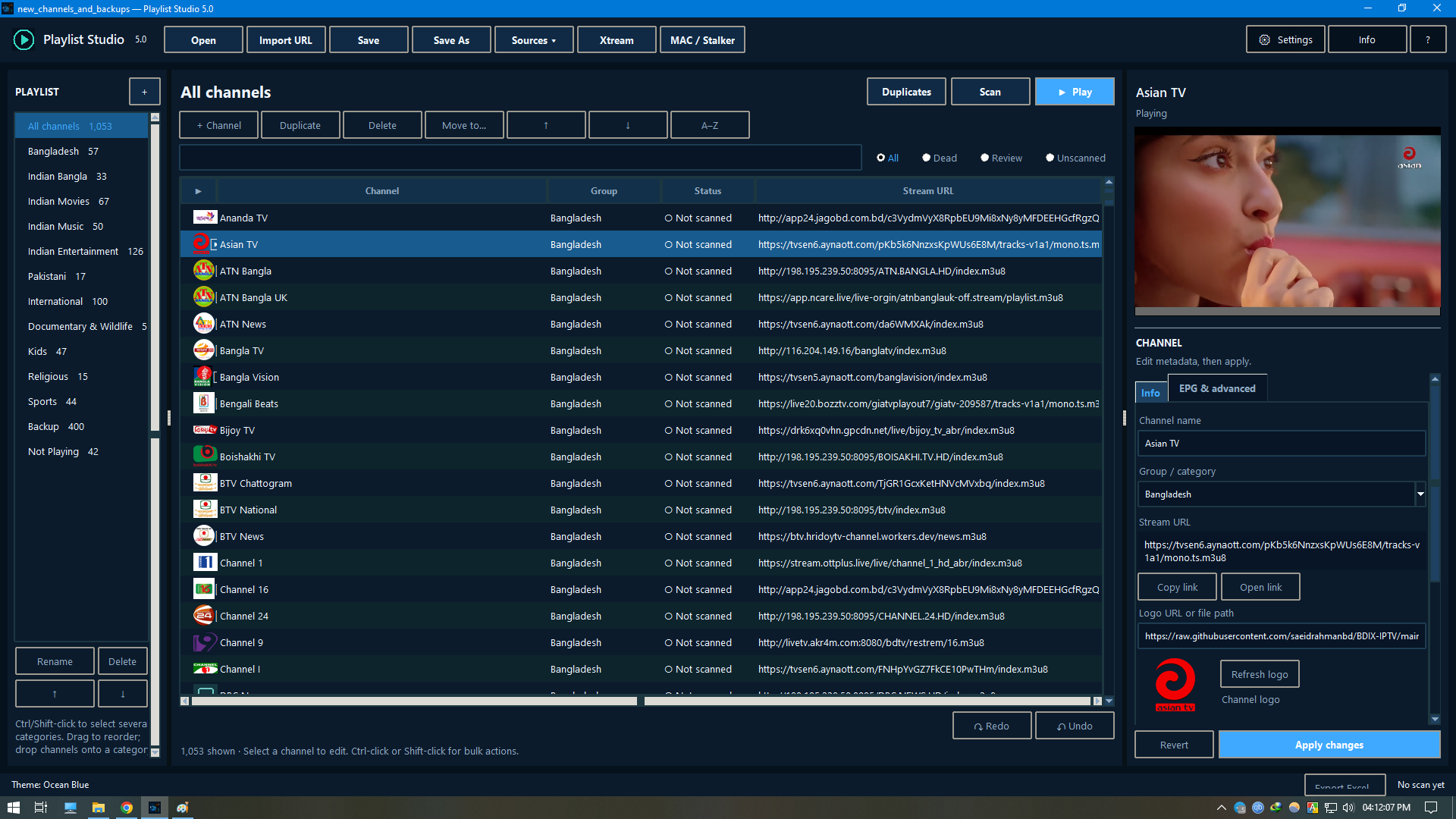
Playlist Studio 5.0 is a complete Windows application for managing, organizing, editing, testing, and playing M3U/M3U8 playlists from a single workspace.
🖥️ Program Glimpse
✨ Key Features
| 📂 Playlists | ✏️ Editing | 🔎 Testing & Playback | 🔌 Connections |
|---|---|---|---|
| M3U / M3U8 playlist management | Channel & category organization | Built-in video playback | Xtream Codes support |
| Import from files or URLs | Channel info, logo, EPG & stream URL editing | Stream scanning & status checking | MAC / Stalker Portal support |
| Save / Save As | Multi-channel & multi-category selection | GitHub integration | |
| Multiple interface themes | Duplicate channel & stream detection |
▶️ Playback & Testing
Play and test streams directly inside Playlist Studio with built-in playback controls, fullscreen support, volume control, and stream status handling.
The scanning tools can also help identify channels by status:
| Status | Meaning |
|---|---|
| 🔴 Dead | Streams that failed the scan |
| 🟡 Review | Streams that need a manual check |
| ⚪ Unscanned | Channels not scanned yet |
☁️ Xtream Codes & MAC / Stalker
Playlist Studio supports Xtream Codes and MAC / Stalker Portal connections for compatible services.
💾 Portable Windows Application
The application is portable and requires no traditional installation.
✅ Simply download the EXE and run it on a supported Windows system.

🛠️ Windows Build Kit
A Windows Build Kit is included for users who want to rebuild the application.
💡 Most users do not need the Build Kit. The portable EXE above is all you need to get started.
🔨 Build Instructions
| Step | Action |
|---|---|
| 1 | Download Playlist-Studio-5_0-Windows-Build-Kit-Debug22.zip |
| 2 | Extract the ZIP file |
| 3 | Open the extracted folder |
| 4 | Run BUILD-Windows.cmd |
| 5 | Wait for the build process to finish |
| 6 | The generated application will be available in the main folder and dist folder |
| 7 | Run Playlist-Studio-5.0.exe |
📖 See Readme.txt inside the build kit for detailed instructions.
💻 System
| Item | Details |
|---|---|
| 🪟 Platform | Windows |
| 🧱 Architecture | x64 |
| 💼 Edition | Portable |
| 📋 Playlist Formats | M3U / M3U8 |
| 📥 Installation | Not required |
| Built-in |
📦 Release Files
| File | Description |
|---|---|
| 🖥️ Playlist-Studio-5.0.exe | Portable Windows application |
| 🔧 Playlist-Studio-5_0-Windows-Build-Kit-Debug22.zip | Windows build kit |
🔗 Related Project
📺 BDIX-IPTV is the associated IPTV playlist project for Playlist Studio, providing the BDIX-Playlist.m3u and IPTV-Playlist.m3u playlists used with the software.
⚠️ Usage
Playlist Studio is intended for IPTV services and playlists that you are authorized to access and use.
Playlist Studio v5.0
Manage. Edit. Test. Play.