Repository navigation
Home
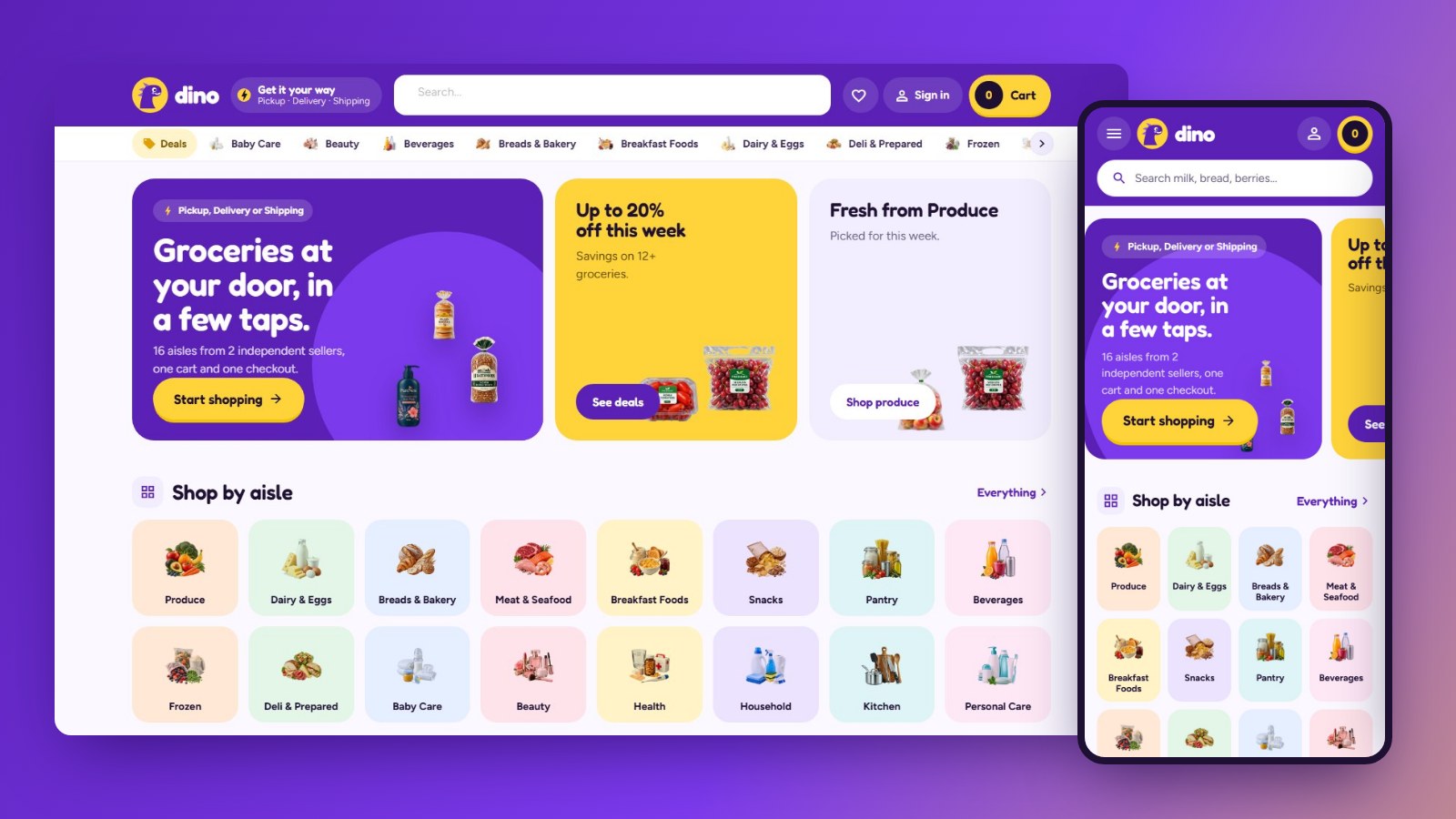
Dino Market is a custom storefront Layout for Selldone shops: a multi-vendor grocery marketplace dressed as a purple quick-delivery app: a violet bar with a delivery pill and a yellow cart pill showing the total, swipeable promo cards, the aisles as a tile grid, app cards with a round yellow + on the picture, an aisle column beside every listing, a rounded cart sheet with a free-shipping bar, a violet seller banner and a friendly dinosaur on About, sign-in and the 404. It runs on dino.selldone.shop, a second address of the shop molino, whose main address carries Molino Market Hall: one shop, one Layout per domain (see Go Live). It is built on the official selldone/storefront, so Selldone's basket, checkout, payments, vendor offers and orders keep working underneath a completely new design.
| I want to… | Page |
|---|---|
| Have an AI agent set it up on my shop | Install with AI |
| Set it up myself | Manual Setup |
| Know what my shop's data needs | Shop Requirements |
| Build, upload and verify a release | Build and Upload |
| Put it live on my shop and domain | Go Live |
| Change colours, fonts, sections, pages | Customize |
| Fix a problem | Troubleshooting |
- A Layout is a complete storefront app (Vue 3) that runs on Selldone's own servers instead of the default storefront.
- You build it, zip it, and upload it to your Selldone developer account with the official selldone-cli. Each upload is a new version.
- You attach a version to your shop: shop dashboard › Domains › Default layout › Change layout. Every domain of the shop can inherit it.
- Selldone injects your shop into the Layout: its products, categories, sellers, prices, theme, languages and settings. Nothing about molino is hard-coded.
- Home: rounded promo cards (the shop's promise on violet, this week's savings on yellow, the fresh aisle on lavender), the aisles as a tile grid, today's deals with a countdown to midnight, the fresh aisle, the sellers as round avatars, top picks, and how the order reaches you.
- Cards: a lavender square with the packshot large, a yellow saving pill, and a round yellow "+" on the picture that turns into "− n +" in place; "Options" for products with sizes; the seller is named on every card.
- Shop pages: a sticky column with every aisle and its icon, then the filters built from product specs; the aisle's banner with its icon; on a phone the aisles become a row of icon tiles.
- Product page: a rounded picture stage, the delivery methods and the sellers as rounded choice cards, a big yellow "Add to cart", pill tabs for the details.
- Seller storefronts: a violet banner with the seller's mark, live numbers and their aisles as chips.
- Cart and checkout: the cart as a rounded sheet from the right on every screen with a free-shipping progress bar, a checkout with step chips, a map-first address sheet and delivery choices.
- Orders: the receipt, delivery, the trip and chat.
- Buyer account: a violet banner with the sections as pills, pastel tiles.
- Content pages: journal, article, About (with the dinosaur and the shop's live numbers), Terms and Privacy, a friendly 404.
- Live shop: https://dino.selldone.shop
- Repository: https://github.com/selldone-custom-layouts/official-dino
- Design notes and release log:
KALIO.md - All official custom Layouts: https://github.com/selldone-custom-layouts
- Selldone: https://selldone.com