Repository navigation
Releases
v0.5.0


Grooves, the 32 mm system, prices and weight, mass replacement, a ruler, OBJ export — and the interface is English by default with a full Russian translation.
⚠️ Early alpha. Expect bugs, and the.dcraftproject format may still change. Double-check sizes and drilling before anything goes to production.
What's new
- Grooves. A cabinet's back panel can sit in grooves (offset, depth and width adjustable; shelves and partitions stop in front of it). Grooves along any panel edge. Grooves show on drawings and in “Panels for production” and are kept in
.b3dexport. - 32 mm system. Fastener spacing is a multiple of 32 mm and centred on the joint, as drilling heads need; shelf supports get spare holes (2 below and 2 above) so a shelf can be moved.
- Prices and weight. Price per m², per metre and per piece; sums, the total cost and the product weight in the estimate (CSV), under the project name and over MCP.
- Selection and replacement. A Shift+drag selection frame, “Select the same material”, and “Replace with…” for materials and edge banding — in the whole project or only in the selection.
- Drawer fronts “auto”. Auto fronts share the free height of an opening or a cabinet without doors equally.
- Ruler (M). Measure between part corners and contour points in 3D and the front view; every measurement stays on screen until the ruler is switched off.
- OBJ export for visualisation (Blender, 3ds Max, SketchUp Pro): named parts, hardware meshes, materials with textures in a
.mtl. - Language. Code and default interface are English; Russian is a full translation (Edit → Settings → Language). Commands and the MCP server answer in Russian with
--lang ruorDOWEL_LANG=ru. - Smaller things. The 3D grid stays on the floor (no flicker), its step goes 1-2-5; compact material and edge banding cards; size handles keep up with a dragged part; fixes for state leaking between project tabs.
Projects saved by older versions still open (built-in fastener names were Russian; they are converted on load).
Downloads
| System | Installer | Archive |
|---|---|---|
| Windows x86_64 | dowel-craft-windows-x86_64.msi |
dowel-craft-windows-x86_64.zip |
| macOS Apple Silicon | dowel-craft-macos-arm64.dmg |
dowel-craft-macos-arm64.tar.gz |
| macOS Intel | dowel-craft-macos-x86_64.dmg |
dowel-craft-macos-x86_64.tar.gz |
| Linux x86_64 | — | dowel-craft-linux-x86_64.tar.gz |
Or with Homebrew: brew upgrade dowel-craft dowel-craft-app.
Builds are not notarized yet:
- macOS: right-click the app → Open, or
xattr -dr com.apple.quarantine "/Applications/Dowel Craft.app". - Windows: SmartScreen → “More info” → “Run anyway”.
Full changelog: v0.4.0...v0.5.0
Русский: пазы (задняя стенка в паз, паз вдоль торца), система 32 мм и запасные отверстия под полкодержатели, цены и вес в смете, рамка выделения и замена материалов и кромки, фасады ящиков «авто», линейка (M), экспорт в OBJ. Интерфейс по умолчанию на английском, русский — полный перевод («Правка → Настройки → Язык»); команды и MCP по-русски — --lang ru. Описание на русском — docs/ru/README.md.
v0.4.0
One program instead of three, and the AI link to the open window now works on Windows too.
⚠️ Early alpha. Expect bugs, and the.dcraftproject format may still change. Double-check sizes and drilling before anything goes to production.
What's new
- One program:
dowel-craft.dowel-craft-guianddowel-craft-mcpare gone:Downloads are about half the size.dowel-craft # the window dowel-craft project.dcraft # the window with a project dowel-craft cut project.dcraft # command line (spec, cut, smeta, raskroy, drawings, …) dowel-craft mcp # MCP server for AI dowel-craft --version
- AI edits the open window on Windows.
window_connectused to work on Linux and macOS only; now it uses a named pipe on Windows, open to your user account only. - Windows terminal.
dowel-craft.comships next todowel-craft.exe, so commands typed in cmd or PowerShell print their output there; Start menu launches still open no console.
⚠️ Upgrading: re-add the MCP server
The separate dowel-craft-mcp no longer exists. In Claude Code:
claude mcp remove dowel-craft
claude mcp add dowel-craft -- dowel-craft mcp
Other clients: "command": "dowel-craft", "args": ["mcp"].
Downloads
| System | Installer | Archive |
|---|---|---|
| Windows x86_64 | dowel-craft-windows-x86_64.msi |
dowel-craft-windows-x86_64.zip |
| macOS Apple Silicon | dowel-craft-macos-arm64.dmg |
dowel-craft-macos-arm64.tar.gz |
| macOS Intel | dowel-craft-macos-x86_64.dmg |
dowel-craft-macos-x86_64.tar.gz |
| Linux x86_64 | — | dowel-craft-linux-x86_64.tar.gz |
Or with Homebrew: brew upgrade dowel-craft dowel-craft-app.
Builds are not notarized yet:
- macOS: right-click the app → Open, or
xattr -dr com.apple.quarantine "/Applications/Dowel Craft.app". - Windows: SmartScreen → “More info” → “Run anyway”.
Full changelog: v0.3.0...v0.4.0
Русский: теперь одна программа dowel-craft: без аргументов — окно, с командой — командная строка, dowel-craft mcp — сервер для ИИ. Связь ИИ с открытым окном работает и на Windows. При обновлении подключите MCP заново: claude mcp remove dowel-craft, затем claude mcp add dowel-craft -- dowel-craft mcp. Описание на русском — docs/ru/README.md.
v0.3.0
Installers for Windows and macOS, and part names on cutting maps.
⚠️ Early alpha. Expect bugs, and the.dcraftproject format may still change. Double-check sizes and drilling before anything goes to production.
What's new
- Windows installer (
.msi). Installs into Program Files, adds Dowel Craft to the Start menu, opens.dcraftprojects with a double click and putsdowel-craftanddowel-craft-mcponPATH. The.exenow has the app icon. - macOS disk image (
.dmg). Open it and drag Dowel Craft onto Applications. - Part names on cutting maps. Each part shows its name under the number (“11 Left side”), in PDF/HTML maps and in the Cutting view; long names are shortened with “…”.
Downloads
| System | Installer | Archive |
|---|---|---|
| Windows x86_64 | dowel-craft-windows-x86_64.msi |
dowel-craft-windows-x86_64.zip |
| macOS Apple Silicon | dowel-craft-macos-arm64.dmg |
dowel-craft-macos-arm64.tar.gz |
| macOS Intel | dowel-craft-macos-x86_64.dmg |
dowel-craft-macos-x86_64.tar.gz |
| Linux x86_64 | — | dowel-craft-linux-x86_64.tar.gz |
Or with Homebrew: brew install dowel-craft (command line) and brew install --cask dowel-craft-app (macOS app).
Builds are not notarized yet:
- macOS: right-click the app → Open, or
xattr -dr com.apple.quarantine "/Applications/Dowel Craft.app". - Windows: SmartScreen → “More info” → “Run anyway”.
Full changelog: v0.2.0...v0.3.0
Русский: установщики для Windows (.msi: меню «Пуск», открытие .dcraft двойным щелчком) и macOS (.dmg), иконка у .exe, названия деталей на картах раскроя. Описание на русском — docs/ru/README.md.
v0.2.0
Install with Homebrew, and a real macOS app with an icon.
⚠️ Early alpha. Expect bugs, and the.dcraftproject format may still change. Double-check sizes and drilling before anything goes to production.
What's new
- Homebrew tap. macOS and Linux:
brew tap shoman4eg/tap
brew install dowel-craft               # dowel-craft-gui, dowel-craft, dowel-craft-mcp
brew install --cask dowel-craft-app    # macOS: Dowel Craft in Applications and Launchpad
- App icon. The window has an icon on every system (Dock, taskbar, window list).
Dowel Craft.app. The macOS archives now include the app bundle: drag it to Applications.- MCP setup is shorter. After a Homebrew install the server is on
PATH:claude mcp add dowel-craft -- dowel-craft-mcp.
Downloads
| System | File |
|---|---|
| Linux x86_64 | dowel-craft-linux-x86_64.tar.gz |
| macOS Apple Silicon | dowel-craft-macos-arm64.tar.gz |
| macOS Intel | dowel-craft-macos-x86_64.tar.gz |
| Windows x86_64 | dowel-craft-windows-x86_64.zip |
Builds are not notarized yet:
- macOS: if the app does not open, run
xattr -dr com.apple.quarantine "/Applications/Dowel Craft.app"(or right-click → Open). - Windows: SmartScreen → “More info” → “Run anyway”.
Full changelog: v0.1.0...v0.2.0
Русский: установка через Homebrew (brew tap shoman4eg/tap, затем brew install dowel-craft или brew install --cask dowel-craft-app), иконка программы, на macOS — приложение Dowel Craft.app в «Программах» и Launchpad. Описание на русском — docs/ru/README.md.
v0.1.0 — early alpha
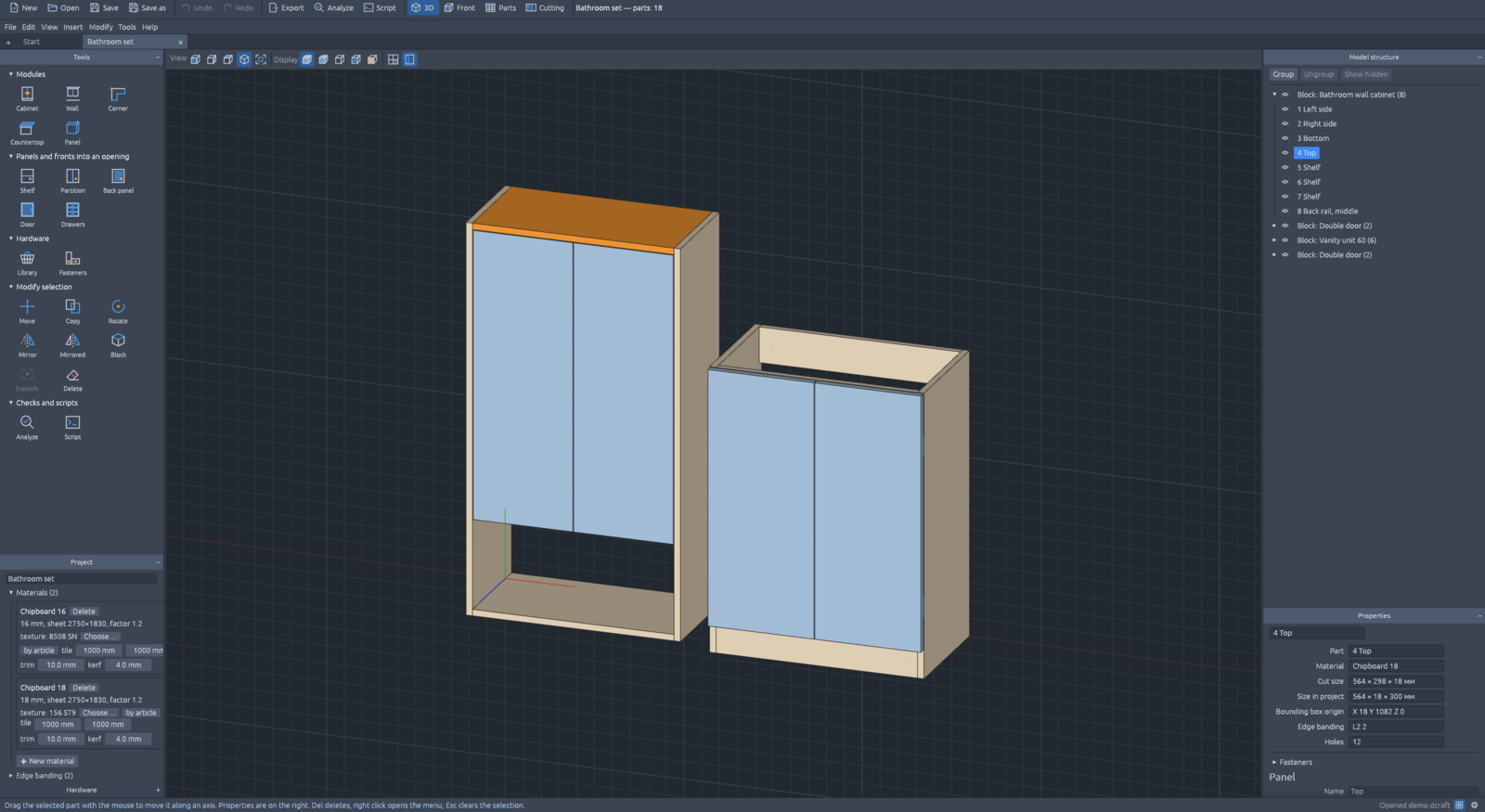
First public build of dowel-craft — a desktop app for designing cabinet furniture: wardrobes, kitchens, vanities, shelving.
⚠️ Early alpha. Expect bugs, and the.dcraftproject format may still change. Double-check sizes and drilling before anything goes to production.
What it can do
- Design: cabinet templates (floor, wall, corner, countertop), shelves, partitions, doors and drawers placed into an opening with a click, free panels with fillets and cut-outs, groups, formulas in fields, undo/redo.
- Fasteners and drilling: confirmat screws, cam locks (Minifix), dowels, shelf supports, “Minifix + dowel”, hinges and runners — holes with coordinates on both parts of every joint.
- Views: 3D with solid, hidden-line, wireframe, x-ray and textured modes; 4 windows (front, left, top, 3D); front view with drag and snapping.
- Output: parts list, sheet cutting with usable offcuts, cutting maps and drawings (HTML/PDF), specification and cost estimate (CSV), BAZIS-Raskroy project (XML).
- Bazis compatibility: opens and exports Bazis-Mebelshchik
.b3d/.fr3d, runs BAZIS-Script scripts. - AI: MCP server — an assistant such as Claude can design furniture and edit the project open in the window.
- English and Russian interface, configurable hotkeys.
Downloads
| System | File |
|---|---|
| Linux x86_64 | dowel-craft-linux-x86_64.tar.gz |
| macOS Apple Silicon | dowel-craft-macos-arm64.tar.gz |
| macOS Intel | dowel-craft-macos-x86_64.tar.gz |
| Windows x86_64 | dowel-craft-windows-x86_64.zip |
Unpack and run dowel-craft-gui. Builds are not signed yet:
- macOS:
xattr -dr com.apple.quarantine dowel-craft-macos-*or right-click → Open. - Windows: SmartScreen → “More info” → “Run anyway”.
Known limitations
- Linking the MCP server to the open window works on Linux and macOS only.
- Windows and macOS builds have had little hands-on testing — please report what breaks.
Feedback and bug reports are welcome in Issues. Full guide: README.
Русский: первая публичная ранняя альфа программы для проектирования корпусной мебели — детали, раскрой, присадка, чертежи, совместимость с Базис-Мебельщиком. Описание на русском — docs/ru/README.md.