Repository navigation
Releases
model-share 1.0: limits, pace, context and a cleaner pane

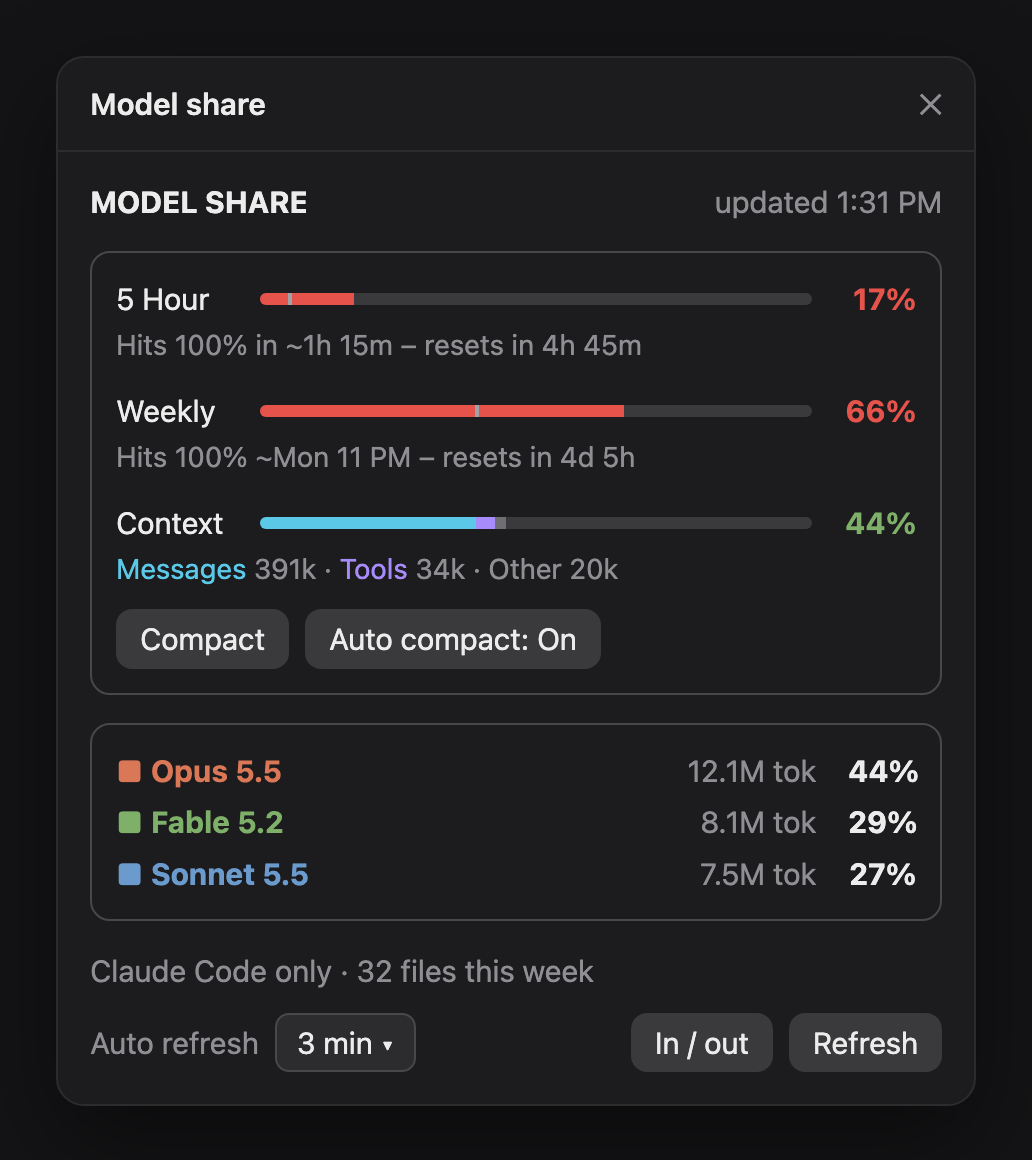
model-share is now a full usage dashboard for Claude Code: which models used your week, your 5-hour and weekly limits with pace, and this session's context, all in one compact pane.
What's new since v0.4
Limits with pace
- 5-hour limit: a bar plus where you'll land by its reset at this rate, e.g. Hits 100% in ~1h 15m – resets in 4h 45m
- Weekly limit: same idea, e.g. Hits 100% ~Mon 11 PM – resets in 4d 5h
- A small pace tick on each bar marks where you'd be at an even pace. Past the tick means you're burning faster than time is passing.
- Percentages turn green / amber / red with your pace.
Context
- Context bar for the current session, stacked into Messages / Tools / Other
- Compact button (same as
/compact) and Auto compact: On/Off (Claude Code's own setting). Both only act when you press them.
Cleaner design
- Thin rounded bars on the desktop app, with coloured blocks in the terminal
- Limits and context grouped in a rounded box, the model list in another
- One short status line per bar; nothing wraps at pane width
- Header shows when it last updated
Also in the pane
- Each model's share of your week (all usage = 100%), with token counts
- In / out toggle: each model's input, output and cached tokens (from v0.4)
- Auto refresh every 1, 3, 5 or 10 minutes, or off
Still 100% local and zero tokens: it reads Claude Code's own session files and figures, makes no network requests, and never calls a model.
Install
/plugin install model-share --marketplace shubhamverma8991/claude-model-share
Update
claude plugin update model-share
then /reload-plugins in an open session (or start a new one).
model-share v0.5.1: cleaner pane
Cleaner pane
- Thin rounded bars on the desktop, with a small tick showing where even pace would be
- Context bar is stacked: messages, tools, other
- One short status line per bar, including the reset time; no more wrapped rows
- Header shows when it last updated
Update
claude plugin update model-share
then /reload-plugins in an open session.
model-share v0.5.0: 5-hour limit, context and compact
New in the pane
- 5-hour limit: a bar with where you'll land by its reset at this pace, e.g. On pace for about 43% by reset · resets in 4h 52m.
- Context: how full this session's context window is, split into Messages / Tools / Other, with how much is free. Estimated locally by Claude Code, so still zero tokens.
- Compact button (same as
/compact) and Auto compact: On/Off (flips Claude Code's own Auto-compact setting). Both only act when you press them. - The weekly bar is now labelled Weekly.
Update
claude plugin update model-share
then /reload-plugins in an open session (or start a new one).
model-share v0.4.0: input / output split
New: input / output split per model
Press In / out in the pane to see each model's tokens broken down:
■ Opus 5.5        10.6M tok   40%
    in 2.2M · out 386k · cached 79.6M
- in: fresh input plus cache writes
- out: tokens the model generated
- cached: cache reads
Handy for spotting which model writes the most output. The toggle is remembered across sessions, and /model-share prints the split too.
Thanks to @DashCanvas on X for the idea.
Update
claude plugin update model-share
then /reload-plugins in an open session (or start a new one).
model-share v0.3.0
See which Claude models your weekly Claude Code usage went to, in a pane beside the chat.
What's in it
- Share per model: everything you used this week is 100%, and each model gets its share (e.g. Fable 5.2 37% · Sonnet 5.5 34% · Opus 5.5 29%), with token counts.
- Weekly limit and pace: your 7-day limit used, as a bar that turns green, amber or red with your pace, plus when you'd hit 100% at this rate.
- Follows your reset: the window matches your plan's weekly reset and starts over with it.
- Auto refresh: 1, 3 (default), 5 or 10 minutes, or off. Set it in the pane or with
/model-share every 5m. Refreshing only reads local files, so it uses no tokens. - Works in the terminal, the Claude desktop app's Code tab and the VS Code extension.
Install
/plugin install model-share --marketplace shubhamverma8991/claude-model-share
Needs a recent Claude Code with mod support and python3. Counts Claude Code sessions on your computer only (not claude.ai chats). Shares are of tokens, not of the limit. See the README for details.