Repository navigation


|
Hi, I've started a new clean docker compose setup with an auto-registered BIND9 agent container. The same question applies for zones. Are they inevitably bound to a group? Meaning, can I move a zone to another group? Best regards. |
Replies: 4 comments

|
Hi — good questions, and the honest answer to both is: not today. Moving a server between groups. There's no way to do it from the API or UI. A DNS server is only addressable as a nested resource under its group ( There is a workaround that works cleanly on your setup. The agent registers into whatever group
The one cost is that any query-log and RPZ-hit history attached to that server row is deleted with it. Zones, records and group config are untouched. Moving a zone between groups. Also not currently possible — zones are bound to their group, and there's no move endpoint. This one is a bigger change than it looks, because a zone holds references to things that are themselves group-scoped: its view, the TSIG keys its dynamic-update ACLs authorise against, any ACLs and pools, and — most importantly — its DNSSEC keys. BIND holds the private keys on the servers in the current group, so moving a signed zone to another group is effectively a key rollover, not a row update. Filed as #935, with a preview→commit design so you can see what will and won't survive the move before committing to it. The workaround for now, if you need a zone in a different group: export the zone file ( Thanks for the report — both gaps are now tracked. |
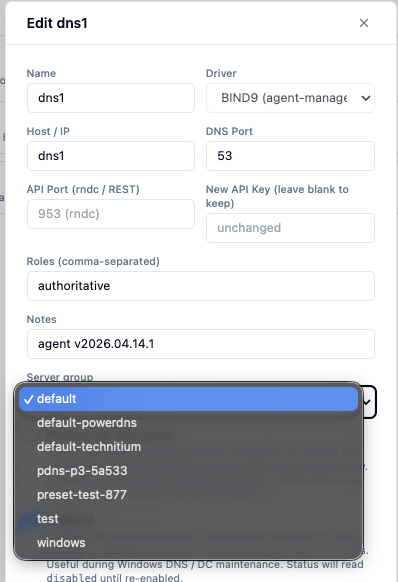
|
|
Update: the first half of this is now implemented — that screenshot is the new Server group picker on the server edit modal, and it landed on Moving a server is now a
Two things it will refuse: a name clash in the target group, and a move that would leave the target group running two different drivers — a group is single-driver, so you can move a BIND9 server into an empty group or another BIND9 group, but not into your Also worth knowing for your setup: you don't need to touch While in there, Zones are still group-bound — that's #935 and it's the bigger of the two, since a zone's view, its dynamic-update TSIG keys and its DNSSEC key material are all group-scoped, so a signed zone changing groups is effectively a key rollover rather than a row update. The export/import workaround above is still the answer there for now. |
|
Both halves are done now — the zone move landed on There's a Move button on the zone detail. It's a preview → commit flow rather than a single click, because a zone doesn't just belong to a group the way a server does — it holds references into one, and several of them can't come with it. The reason it makes you read a preview first. Under split-horizon, a record pinned to a view answers only in that view; a record with no view is shared and answers in every view. So if the group you're moving to has no view by the same name, dropping the pin doesn't take the zone out of a view — it puts it into all of them. A zone that only answered on your internal view would quietly start answering on the external one. Views and TSIG keys are therefore matched by name across the two groups wherever they can be (a view called Three things it will make you tick a box for, each separately:
Plus typing the zone name back, the way the IPAM block move asks for a typed CIDR. Things it will simply refuse, since none of them leave a state you could look at and fix afterwards: a name collision in the target; a signed zone moving to a group whose servers can't sign (it would keep reporting as signed while being served unsigned); a zone naming an ACL the target group doesn't define (BIND rejects a config file whole, so that would stop the entire target group converging, not just this zone); and a forwarders-less forward zone landing on a Technitium group. A zone created by an integration (Tailscale, NetBird) can't be moved at all — its reconciler would just recreate it. What does come along: all records, pools, dynamic-update grants whose keys exist in the target, and the linked subnet / customer / tags / DNSSEC policy — everything the zone-file export couldn't carry. Per-server sync state and queued record updates for the old group are discarded, since they describe servers the zone has left. If either group is agentless (Windows DNS, a cloud provider, Technitium's API) the zone is created on the new servers and removed from the old ones as part of the move. Thanks again for raising both — the second one turned out to be the more interesting of the two, and the view behaviour above was something we got wrong in our own issue write-up before building it. |


Hi — good questions, and the honest answer to both is: not today.
Moving a server between groups. There's no way to do it from the API or UI. A DNS server is only addressable as a nested resource under its group (
PUT /api/v1/dns/groups/{group_id}/servers/{server_id}), and the update payload has nogroup_idfield. This is a genuine gap rather than a deliberate constraint — the DHCP side already supports exactly this, and handles it properly (it wakes both the old and new group's config channels so both converge). I've filed #934 to bring DNS to parity.There is a workaround that works cleanly on your setup. The agent registers into whatever group
AGENT_GROUPnames, creating it if it doesn'…