Repository navigation

Release Notes
- Initial public release.
SPRacingH7RF
If your OSD is working, do not update your FC, there are no changes to the original SPRacingH7RF factory firmware in this release.
Flashing instructions (dfu-util):
- Place FC in SPRacing DFU bootloader mode (see manual).
- Flash using DFU-UTIL 0.10 or newer.
dfu-util -i 0 --alt 0 -s 0x900de000:0x8000 -D SPRACINGH7RF_PRODUCTION_RELEASE.bin
Flashing instructions (Betaflight Configurator):
You should also be able to flash the .hex file using Betaflight Configurator, ensure you use a recent version, 10.10.0 with fixes up to c20d52734360a7794aad0e8bbdfcce4621976b1b is know to work. With earlier versions YMMV.
- Place FC in SPRacing DFU bootloader mode (see manual) and ensure it appears in the BF configurator.
- Enable
Expert Mode. - Enable
No Reboot sequence. - Disable
Full chip erase. - Click
Load Firmware, open theSPRACINGH7RF_PRODUCTION_RELEASE.hexfile. - Click
Flash Firmware, the OSD partition will be erased, firmware will be uploaded and verified.
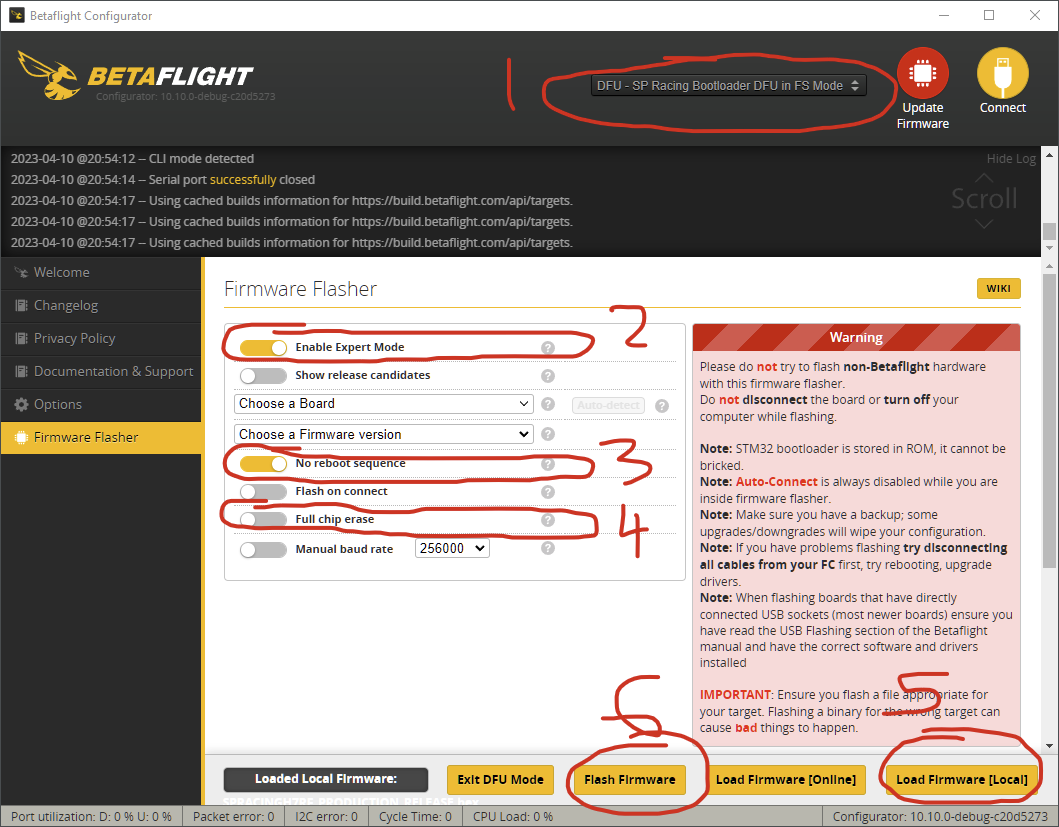
At this point you can now also flash FC firmware (BF), as normal, making sure you keep 'Full chip erase' DISABLED.
For additional assistance refer to the SPRacingH7RF manual and the SPRacing Discord Server - https://discord.gg/99amK5K8ye