Repository navigation
The Distributed Chaffin Method Search
The Distributed Chaffin Method Search is a search for the shortest superpermutations of six digits: that is, the shortest possible strings built from the digits 1-6 that contain all 720 permutations of 123456 as substrings.
The search commenced in May 2019, and involves people and institutions all around the world contributing their computing resources by running client software that performs pieces of the search, and communicates with a central server that coordinates the overall effort.
Any superpermutation of the digits 1-6 will be a string of around 870 digits. The current record-holders, discovered by Robin Houston in 2014, are 872 digits long, but so far no one knows if there are shorter ones.
The number of possible strings of that length, using the digits 1-6, is astronomically huge. If we assume we start with 123456, and never allow two consecutive repeated digits, there would still be 5^864, or about 8×10^603, different strings of 870 digits.
But the number of strings actually examined can be reduced dramatically by “pruning” branches of the search tree: ruling them out as not containing any candidates for the kind of strings we are looking for. To achieve this, we build up information in stages on the number of permutations a string can contain, if it “wastes” only a certain number of digits. A digit is described as “wasted” if adding it to the string doesn’t contribute a new permutation, but it still serves a vital purpose in joining together other sections of the string.
To give an example of the way the search is pruned, suppose we have established that a string that wastes no more than 80 digits can contain at most 439 permutations (and having built up to this result in stages, we also know the limit for 79 digits, 78 digits, and so on down to 1 wasted digit). If we then move on to a search that aims to find the result when we are allowed to waste 81 digits, as soon as we have wasted 1 digit, we will know that we can only add a further 439 permutations, since we can’t exceed the 80 wasted digits that we have left from our original quota of 81. Knowing these limits for all the lower numbers of wasted digits lets us prune away any branch of the search where it turns out that whatever we do, we won’t be able to improve on our current result.
The algorithm is described in more detail in this article on the Chaffin method.
The ongoing results of the search are displayed on the Distributed Chaffin Method Results web page. This includes a “leader board” for the various participating teams, ranked by the number of GigaNodes they have checked: that is, the number of different strings in the search tree they have examined, counted in units of billions.
Below the leader board is an overview of the status of the search, which proceeds in iterations that gradually increase the number of wasted digits allowed in the strings. The aim, of reaching strings that contain all 720 permutations, might be achieved with either 146 or 147 wasted digits; if it is 146, that will set a new record for the shortest superpermutations for six digits.
Client software that lets you contribute CPU (or GPU) time from your computer is available in four main forms. Before joining the project, you should be aware that:
- You’ll need a more-or-less continuous internet connection.
- You’ll need to be willing to let the program run, uninterrupted, preferably for days at a time, but at least for five or six hours.
The individual tasks that the server hands out run for an unpredictable length of time, but it can be up to 90 minutes, so there isn’t really any value in running a client for a short period.
The Java client will run on any reasonably modern desktop or laptop system. You will need to install Java release 8, which is available from java.com, if you don’t already have it on your computer. The client itself is installed simply by downloading the file DCM.jar from the project’s GitHub repository. This jar file will run with a double-click from most operating systems, though you might need to navigate some security warnings about running programs downloaded from the internet. The client runs in a “sandboxed” mode, which means it can’t read or write any files on your computer.
NB: Most browsers no longer support Java applets on the web, but that does not mean the operating system running the browser cannot support Java applications, such as this client. If you’re not sure whether you already have Java installed, you can always download the jar file and see if it runs immediately. If it doesn’t, you will need to get Java from java.com.
The Java client displays a simple graphical user interface, with an information window and a few buttons that you use to register your team name and start, and to stop the program when you wish. Although it is more helpful to the project if you only quit after finishing the current task the client is working on, using the Finish task & quit button, if you urgently need to stop the client, the Give up task & quit button lets you do that, while informing the server so it can re-assign the task to a different client.
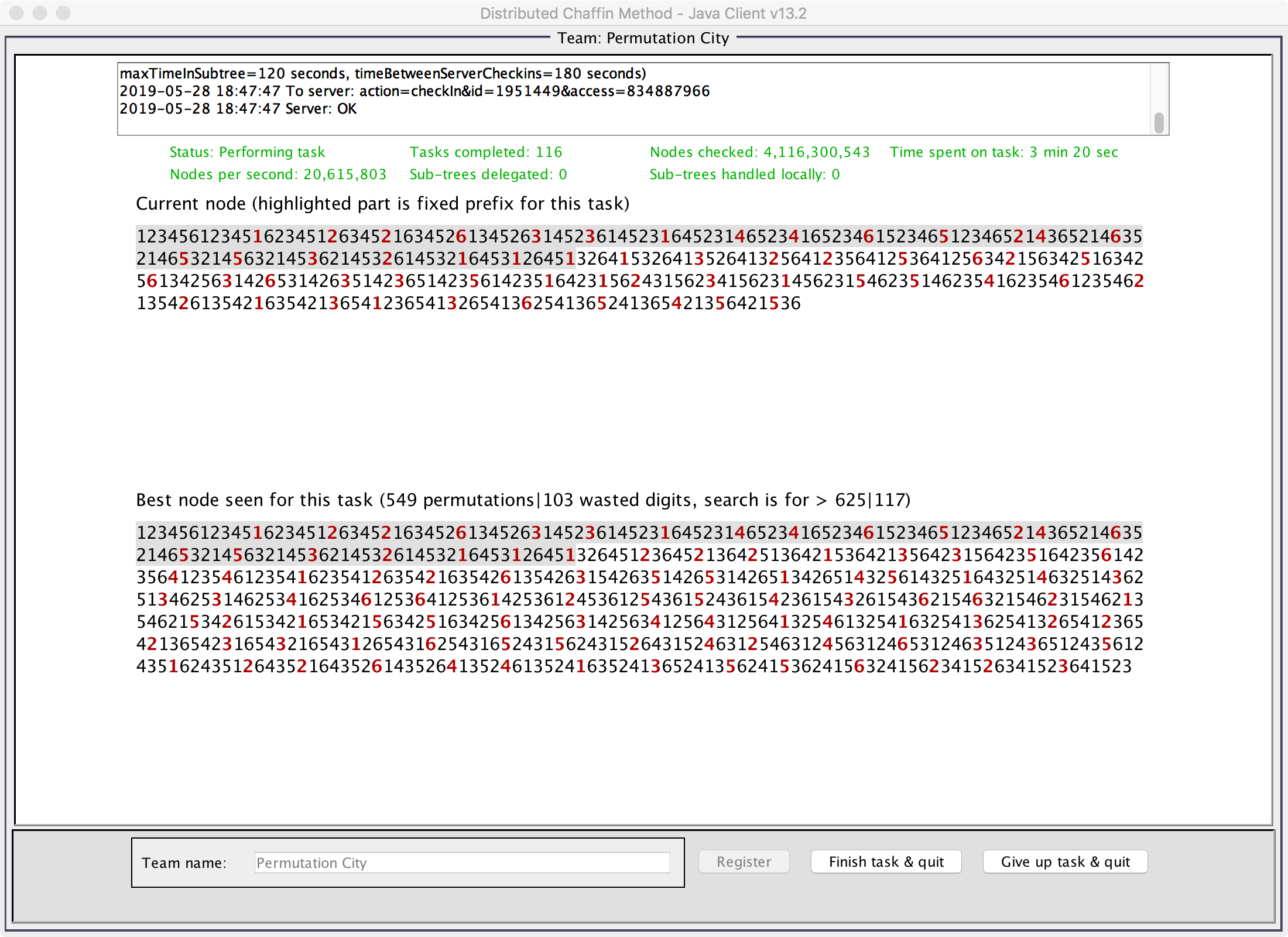
The alternative to the Java client is a command-line program written in C. If you are experienced with compiling C programs, you can download the source code and do this yourself, but a pre-compiled version of the program, a .exe file that runs under all 64-bit editions of Windows, is available to download from the Windows64 folder of the project’s repository.
This client runs from a command line, not a graphical interface. The full details of all the command line options, and the various ways to stop the program, are described in the README file for the client, but with this Windows package you can also build some simple scripts for starting and stopping the program by double-clicking from the desktop, as described in the Windows64 README.
NB: It is more helpful for the project if you never kill a running Windows client by typing CTRL-C on the command line, or shutting down your computer. The scripts that you can build with this Windows package will allow you to shut the program down cleanly, so that it tells the server it is quitting rather than just going off-line without warning. If you decide not to build those scripts, please read the section in the README file on how you can manually instruct the client to shut down by placing “stop” or “quit” files in its working directory.
If you are using MacOS or a version of Linux, it is fairly easy to compile and run the C source code from a command line. The details are described in the article How to run the distributed Chaffin method.
If you are running the client this way, make sure you also read the README file, for all the details on the various command-line options and different ways to shut down the program.
As well as the DistributedChaffinMethod client, which runs on the CPU of your computer, there is a client available that uses the GPU (Graphics Processing Unit) for the bulk of its calculations: FastDCM. Depending on the exact specifications of your system, FastDCM might run several times faster than a single instance of DistributedChaffinMethod.