Repository navigation
Releases
Chisel 0.3.10 — Relative pen

Relative pen (browser)
Burger menu > Relative pen (off by default): the pen moves Chisel's cursor like a mouse. Lift it, put it down elsewhere, and the cursor carries on from where it was. Keep the tablet driver in its normal pen (absolute) mode so the browser still gets pressure.
- pen sensitivity (0.25x to 4x) sets how fast the pen moves the cursor.
- Sliders hold the cursor at the grab point; Chisel draws its own arrow.
- Clicks only reach Chisel while the real pen tip is over its window: play fullscreen, or map the tablet to the browser window.
- Linux: works in Firefox and Chrome. Chrome/Chromium under Wayland still show the pen's own arrow (a browser limitation); Firefox hides it.
Desktop builds: the setting is web-only for now; native Windows support comes next.
Play in the browser: https://tpn.itch.io/chisel-sculpt
Chisel 0.3.9 — Autosave, Stipple, 63M triangles
Play in the browser: https://tpn.itch.io/chisel-sculpt
Never lose a sculpt
- Autosave (desktop builds) in the background after you pause; after a crash the work waits under File > Recover.
- A File menu on the project name (New, Recents, Recover, Save, About, Exit).
- A new file browser for every dialog: places, bookmarks, recent folders, a clickable path bar, type-ahead with Tab to complete, and + for a numbered copy.
Brushes
- Stipple (R): stamps of the current alpha with random spin, size and depth; Scatter turns one dab into a field of them (pores from the Round dot). In Paint mode, colour Stipple (two colours) and Blend (G), a blur that drags the way you move; D goes back to the plain brush.
- One brush feel for mouse and pen: the pen gets its strength from pressure, a mouse dab hits at 0.6 of the max. The separate mouse/tablet profiles are gone, and switching between them is silent.
- The smooth brush keeps poles even; no more hitch on pen-down at 16M triangles.
Big meshes
- Up to 63M triangles on a 10 GB card, there and back again between levels.
- Graphics memory setting (burger menu): tell Chisel your card's size so the skull prompt and level rebuilds use it.
Retopo and SDF
- Retopo Points (V): click four points on the model, get a quad; quads join onto islands and mirror.
- SDF merge wraps thin-film models (AI-generated GLBs), with a Detail control, grid up to 512, and Close holes (filled holes take their colour from the rim).
- Remesh follows Mirror X; fewer and better-sized poles; normal maps survive merge and remesh, and the normal bake reads an imported normal map.
Windows
- Pen side buttons read from the tablet itself (the driver dropped some presses).
- Sliders no longer jump on grab and work with the pen in Pen mode; the ring no longer swings after a stroke.
- Borderless fullscreen; GL screen readback is as fast as on Linux.
Full details in CHANGES.md; how-to in MANUAL.md.
Chisel 0.3.8 — UV unwrap and bake
Play in the browser: https://tpn.itch.io/chisel-sculpt
UV unwrap and bake (key 9)
- Paint seams on the retopo mesh, unwrap and pack it with Chisel's own island packer; move, turn and scale islands by hand, with padding and undo.
- Several meshes can share one texture (an atlas), each island at its real size.
- Bake the sculpt into normal, colour and Color ID maps, 512 to 4K, with a live preview.
- Export the low-poly with its maps as GLB (textures inside), OBJ + MTL or STL, and the UV layout as a PNG to paint over.
Also new
- Meshes panel: show, hide, rename and delete meshes (with undo); every mesh has its own retopo.
- Textured GLB / glTF import: the colour texture comes along, shows on the sculpt and bakes.
- Retopo: Contours (T) wraps a limb in rings with one line; a wand lasso on bare sculpt fills it with a quad grid.
- Pose brush (K) as a hinge: draw along a limb, drag the lever to bend it at the joint.
- Remesher: no more triangles-within-triangles at the mirror seam, no pyramids, more even triangles, and a progress bar.
Full details in CHANGES.md; how-to in MANUAL.md.
Chisel 0.3.7 — Retopology mode
Chisel picks up a new feature: drawing the low-poly that goes over your sculpt. Press 0, sketch strips and rings across the surface, and they land as clean quads, ready to bake.
Retopology mode (0)
- Draw, get quads. A stroke is built the moment the pen lifts: closed, it's a ring (eyes, mouths); open, it's a strip. Size, Rings and Density sit in a small panel by the pen.
- Pieces join up. A strip that reaches another island joins it and spaces its rows evenly; one drawn alongside zips onto its edge. Lines drawn from an edited island bridge gaps, close notches, fill a hole round a spine drawn across it, or extrude a picked loop.
- Shape it by hand. Grab, Smooth, Cut, Erase and Mask on the built quads. Fill (H) closes even holes, Del dissolves picked edges, double-click picks an edge loop.
- The Wand (Q). Click a hole and hover through every way to fill it. Drag a lasso to clean up near-miss welds, slivers and tiny holes. Right-click to copy an island and paste it somewhere else: copy the ring off one horn, lasso the next, paste, and it fits itself on. Scale, Twist and Offset handle the rest.
- Mirror-aware. With X on, everything comes in pairs, and vertices stop at the middle instead of crossing it. Symmetrize rebuilds one half from the other.
- Part of the project. Saved in the
.chisel, its own undo history, and Export OBJ for baking in whatever you bake in.
It works on the active object, and the sculpt underneath can keep changing: the cage snaps back onto whatever is there. Walkthrough and keys: MANUAL → Retopology.
Play it in the browser: https://tpn.itch.io/chisel-sculpt
Full notes: CHANGES.md · Full changelog: v0.3.6...v0.3.7
Chisel 0.3.6 — Brush properties, deeper crease
Crease gets a rework and a new Brush properties window to tune it; paint hardness reaches further, Clay builds faster, and strokes start at the speed your hand is already moving.
Crease
- Rolls into the surface: the groove is flat at the rim, so no edge line where it meets the mesh. Still a V at the centre, and deeper than before.
- Follows turns instead of trailing behind them; scribbles still hold their axis.
- Dot (default 60%): from a groove along the stroke (0%) to a round pit per dab (100%).
- Build (default 10%): resting mid-stroke keeps dabbing in place, so a click-and-hold sinks a pit.
Brush properties window
- Burger menu → Brush properties... holds the per-brush knobs beyond the four meters: Crease's Dot and Build, and Clay's Melt (moved out of the options dock). Changes apply as you drag.
Strokes and paint
- Speed falloff, running start: a stroke begins at your hover speed instead of from standstill, so a crease pressed mid-sweep no longer starts with a heavy blob.
- Paint hardness spans further (0% fades from the centre, 100% is a crisp core), and speed falloff no longer drains it mid-stroke.
- Clay lays a thicker layer per stroke (0.12 → 0.16 of the radius).
Look and settings
- Burger menu → Unselected colour... sets the tint of deselected objects; the default is now a neutral grey
#A5A5A5. - Modern skin: buttons and dock controls react to the pointer.
- A fresh install starts with one shared brush size again.
Play it in the browser: https://tpn.itch.io/chisel-sculpt
Full notes: CHANGES.md · Full changelog: v0.3.5...v0.3.6
Chisel 0.3.5 — Steady ring
Small follow-up to 0.3.4: the brush ring stays put after a slider drag in the browser, and speed falloff now thins fast strokes a little.
Browser
- After a size, strength or hardness drag (hold S / W / A), the brush ring carries on from where the drag began. In 0.3.4 it could jump a whole drag's distance on release; that fix didn't hold, and this one does. Works in Chromium and Firefox.
Speed falloff
- With speed falloff on, a fast mouse or finger stroke also gets slightly thinner, never below 80% of the brush size. Slow strokes keep their size, and dab spacing follows, so fast strokes stay gap-free.
Play it in the browser: https://tpn.itch.io/chisel-sculpt
Full notes: CHANGES.md · Full changelog: v0.3.4...v0.3.5
Chisel 0.3.4 — Quality-of-life stuff

Quality-of-life release: a sharper crease, strokes that respond to speed, and smoother sliders in the browser.
Crease cuts a sharp V
- The crease is now a V with a sharp point instead of a flat-bottomed trough. Its flanks are nearly straight, and Hardness narrows the V.
- The pinch gathers the sides into a tight band, so the tip has the mesh density to stay sharp.
- Scribbling back and forth over one spot no longer piles vertices to one side or breaks the shading.
Speed falloff
- New speed falloff slider in the menu, under max effect. It's off by default.
- With a mouse or finger, faster strokes land lighter and a little softer; slow strokes keep full strength.
- A pen uses its real pressure instead, and Move and Limb ignore the setting.
Browser
- Size, strength and hardness drags (hold S / W / A) move smoothly again in Firefox. They used to snap to 0 or 100.
- In Chromium the pointer returns to where the drag began, with no flash on release.
Play it in the browser: https://tpn.itch.io/chisel-sculpt
Full notes: CHANGES.md · Full changelog: v0.3.3...v0.3.4
Full Changelog: v0.3.3...v0.3.4
Chisel 0.3.3 — Steady strokes, tidier layers
Strokes stay where you put them. On Linux (Wayland), quick strokes laid side by side no longer creep down the screen, and a stroke now reaches the exact point where you let go. Dragging past the window edge still wraps around to the other side, now by moving the pointer itself instead of grabbing it.
Layers: double-click a name to rename it, drag a row to reorder.
In the browser, drags stop at the edge instead of wrapping. Browsers can't move the pointer, and the old wrap left it somewhere you didn't put it.
Play it in the browser: https://tpn.itch.io/chisel-sculpt
Full log: CHANGES.md
Full Changelog: v0.3.2...v0.3.3
Full Changelog: v0.3.2...v0.3.3
Chisel 0.3.2 — Paint, stacked and poured
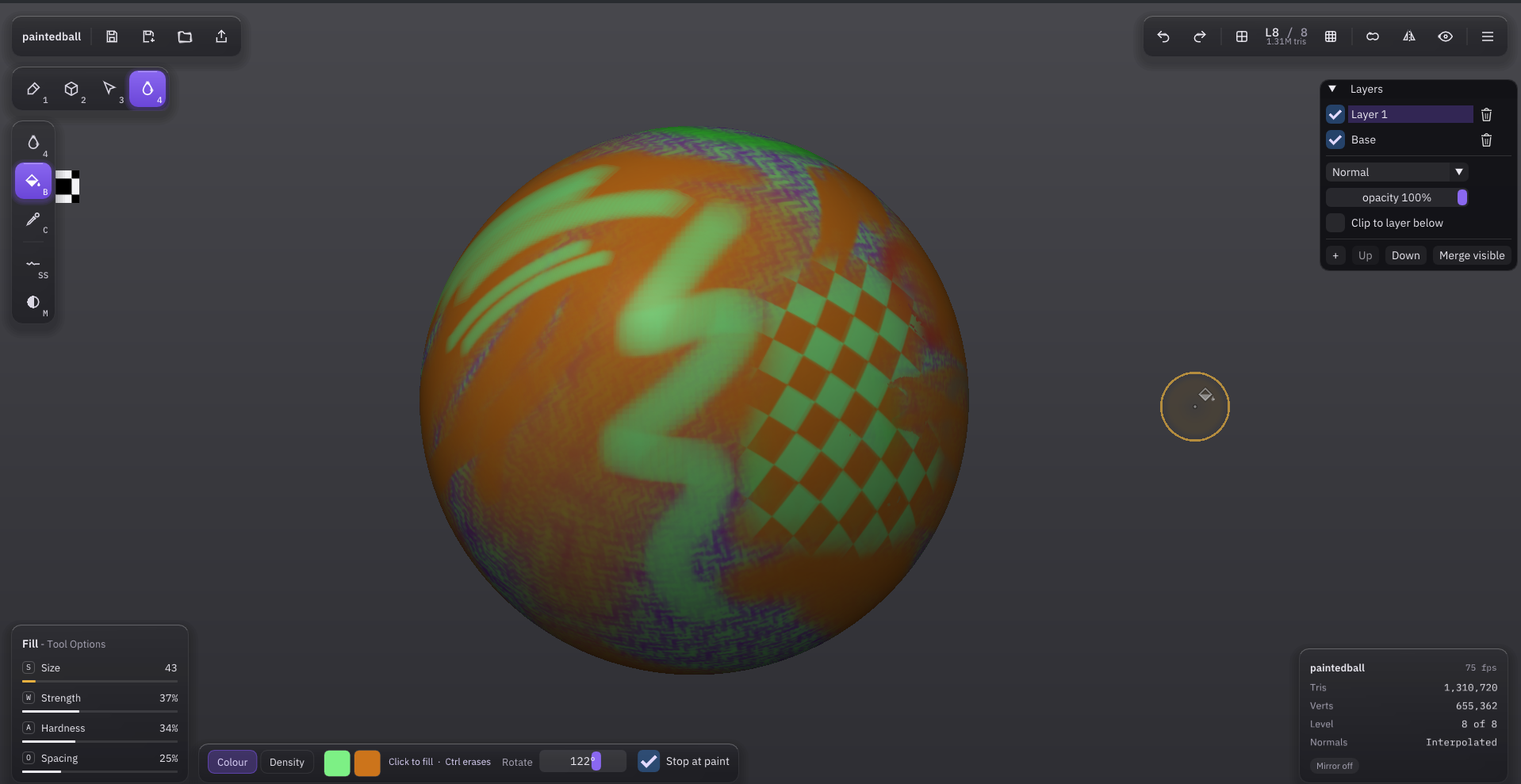
Paint layers. Stack, hide, reorder and blend them (Normal, Multiply), clip one to the layer below, merge visible. They save with the file and ride through level changes, remesh and SDF merge.
Fill bucket — B in paint mode. Fills the area you click; the mask and existing paint wall it in. Patterns (stripes, checks, grid, dots, zigzag) and drag gradients, in your two colours. Hardness melts the edge into the wall, repeat clicks creep it further. Ctrl erases.
Paint mode has its own dock and keys.
Phones. Pinch zoom, two-finger pan, on-screen Ctrl/Shift, installable offline web app.
Fixes. PLY exports stand upright in Blender. Native WebGPU survives a missed frame. An idle model costs almost nothing. Cleaner folds. SDF merge carries paint without fringes.
Play it in the browser: https://tpn.itch.io/chisel-sculpt
Full log: CHANGES.md
Full Changelog: v0.3.1...v0.3.2
Chisel 0.3.1 — UI improvements and small changes
UI improvements and small changes.
- Brush dock sliders are click/drag editable; the cursor ring's thickness shows strength
- Mouse drags wrap around the screen edge on Wayland and in the browser
- Closing only asks when there's unsaved work; Save & Quit in the quit dialog
- Rebindable keys, reworked Modern skin layout, new app icon
Full details in CHANGES.md.
Full Changelog: v0.3.0...v0.3.1