Repository navigation
v0.3.0

v0.3.0 (Regions Overlay)
New in 0.3.0
-
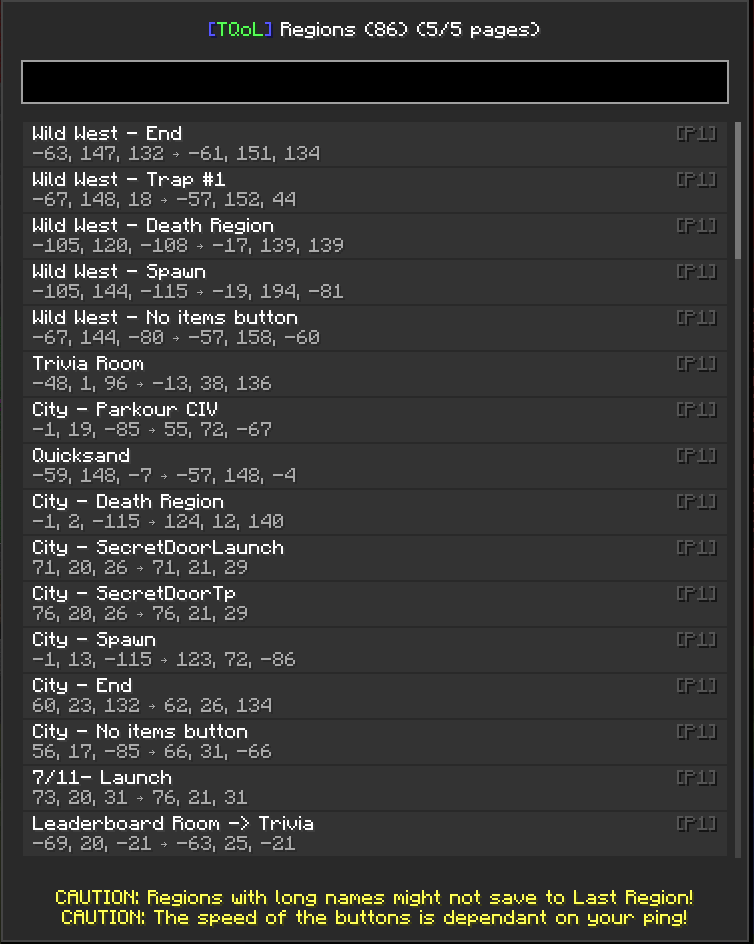
Regions Overlay
- When you open a Regions GUI, a new panel will appear showing all regions.
- Scroll through the list or use arrow keys to navigate.
- Click or press Enter on a region to instantly edit it.
-
Search Bar
- Type part of a region’s name or coordinates to quickly find it.
- Results update live as you type.
-
Navigation & Selection
- Arrow keys / Scroll wheel to move through the list.
- Enter / Click to select and edit a region.
- ESC to close the overlay at any time.
-
UI
- Panel moves left/right depending on screen space.
- Selected region is highlighted in green, hovered region in yellow.
- Scrollbar added for long lists.
How to Use:
- Open a Regions GUI in-game.
- Use the search bar to filter regions by name or coordinates.
- Select a region with click or Enter to edit it instantly.