Repository navigation
v0.3.3

v0.3.3 (Auto-Scan Menus)
New in 0.3.3
Per-Menu Auto-Scan
- Added auto-scanning & menus for:
- Functions
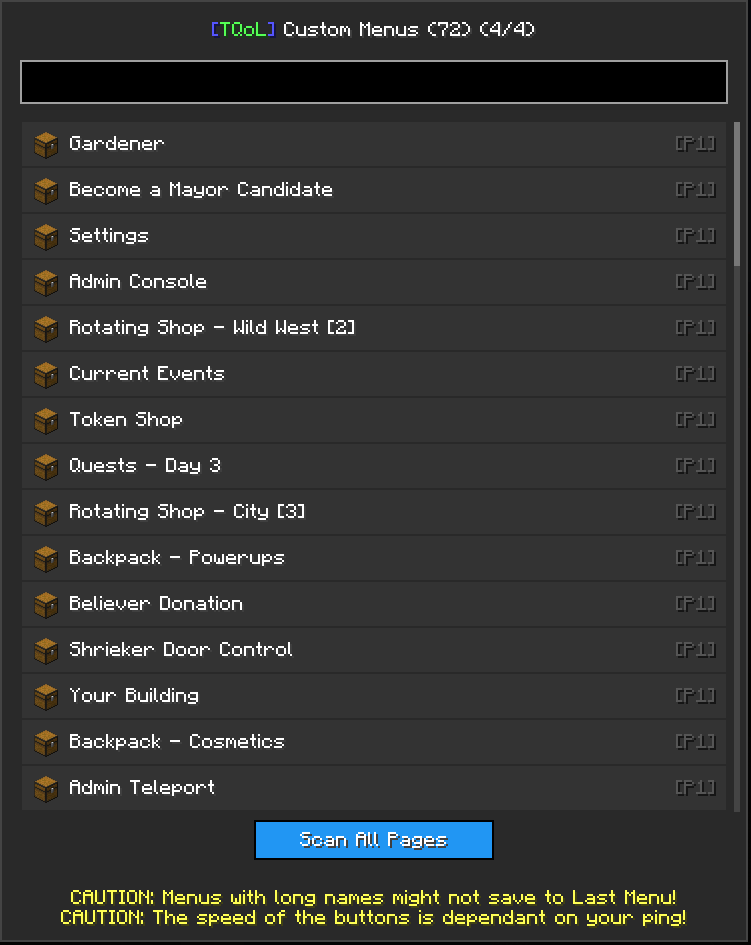
- Custom Menus
- Commands
- Regions
- Each menu can scan its own pages automatically and builds a navigable list.
Navigation & Interaction
- Scroll wheel / arrow keys to browse items within each menu.
- Click or press Enter to open and edit an item directly.
- ESC to close the menu at any time.
Search & Filtering
- Each auto-scan menu includes a live search bar to quickly find items.
- Results update instantly as you type.
UI & Consistency
- Items use icons or fallback rendering (colored square + first letter).
- Highlight colors: green for selected, yellow for hovered.
- Layout adapts to screen space with scrollbars for long lists.
How It Works
- Select a menu (Functions, Custom Menus, Commands, or Regions).
- Press Scan All Pages to begin auto-scanning.
- Progress messages appear in chat as pages are scanned.
- Sounds play during scanning, and on completion.
- Scanning can be stopped at any time (the menu will keep all results already found).