Repository navigation
Releases
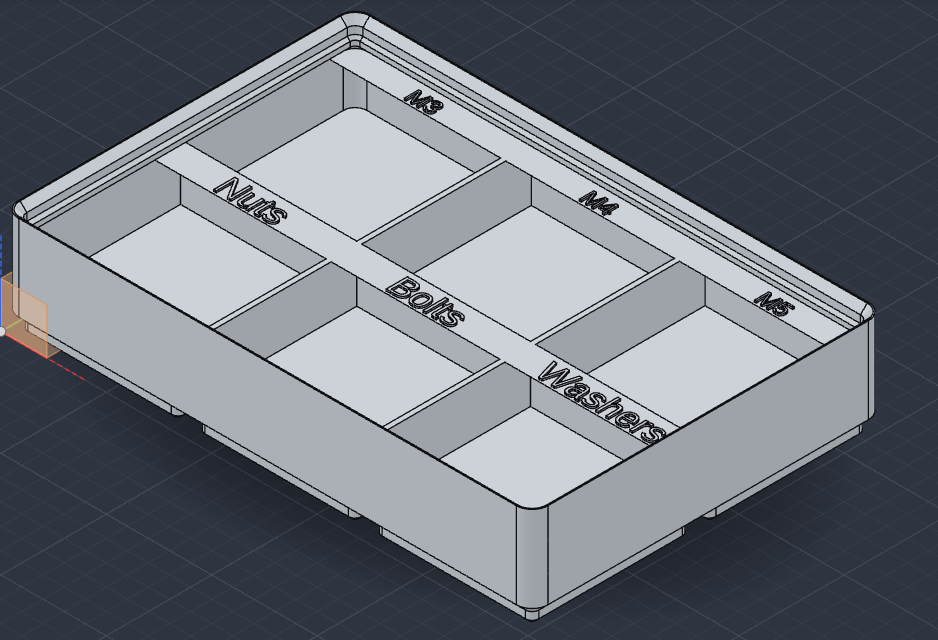
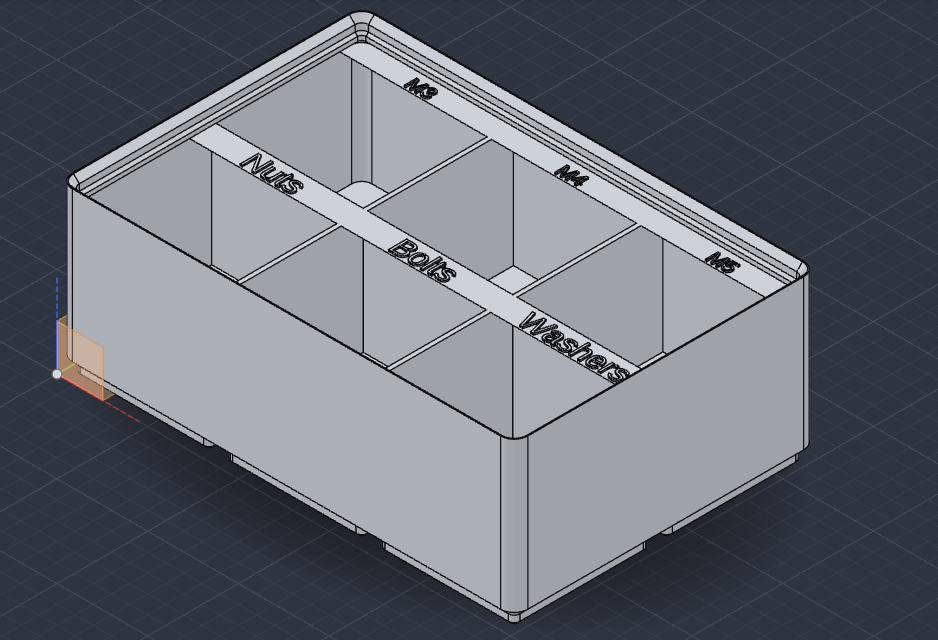
1.0.0: bin height as a parameter

New
Height as a parameter (Height_units)
- Every bin gets a
Height_unitsparameter (Bin2_Height_unitsfor the next bin, and so on). Change it in Parameters and the bin grows or shrinks with its walls, lip, dividers, fill and labels, without running the plugin again. - Scoops and label tabs keep the size they were made with, and the body keeps its name.
| A 3-unit bin… | …set to 6 units in Parameters |
|---|---|
 |
 |
Bins come out exactly as before; only the extra parameter is new.
Install
Download gridfinity-1.0.0.zip below, then in SolidCraft: Plugins › Install plugin… and pick the zip. From a script, add "replace": true to update an installed version.
Tested with SolidCraft 0.42.0.
0.9.0: label font and label parameters
New
Label text font (inside_label_text_font)
- Any installed font by name, e.g. Arial or DejaVu Serif. Empty uses SolidCraft's built-in font. A font that isn't installed stops the run with a clear message.
Labels are text parameters
- Each label becomes a text parameter (
Label_1,Label_2, ...,Bin2_Label_1for the next bin). Change it in Parameters and the label follows, raised or flush, without running the plugin again. The size stays as it was fitted, so keep a new label about as long. - The label stays one body whatever the text becomes. Its extrude shows a warning that the letters don't touch the label body: that is expected.
Fixed
- A second bin with the same name in one design got an automatic name that SolidCraft doesn't keep when it rebuilds, so after reopening the file it lost its cavity and feet. It now gets a name of its own (
... (2)).
Bins without label text come out exactly as before.
Install
Download gridfinity-0.9.0.zip below, then in SolidCraft: Plugins › Install plugin… and pick the zip. From a script, add "replace": true to update an installed version.
Tested with SolidCraft 0.42.0.
0.8.1: flush label text
New
Label text style (inside_label_text_style): "Raised" (as in 0.8.0) or "Flush (inlaid)"
- Flush sinks the text into the label tab by the label text height, with its top level with the tab, for a flat two-colour label. The text is still a body of its own, so you can give it another filament in the slicer.
- Flush text is cut out of the bin as well, which takes about twice as long in SolidCraft, so each letter counts twice in a run: 22 letters with 6 compartments, 7 with 36. The plugin says so before it starts.
Label text field is now called "Label text (a; b; c)", so the ; between labels shows in the form, and its hint has an example.
Bins without label text come out exactly as before.
Install
Download gridfinity-0.8.1.zip below, then in SolidCraft: Plugins › Install plugin… and pick the zip. From a script, add "replace": true to update an installed version.
Tested with SolidCraft 0.42.0.
0.8.0: label text
New
Label text (inside_label_text)
- Text on the label tabs, one label per compartment separated by
;(back row first, left to right;M3x6; M3x8;; Washersleaves the third one empty). Writing text adds the label tab by itself. - The text stands up from the tab as one body of its own, so you can give it another filament in the slicer.
- Label text height (
inside_label_text_height): how far it stands up, 0.4 mm by default (one or two layers), 0.1–3 mm. - Label text size (
inside_label_text_size): capital height. 0 (the default) picks the biggest size that fits the tab. - Text is slow in SolidCraft (every letter is checked), so letters and digits plus compartments may add up to 50 in one run: 44 letters with 6 compartments, 14 with 36. The plugin says so before it starts.
Bins without label text come out exactly as in 0.7.0.
Install
Download gridfinity-0.8.0.zip below, then in SolidCraft: Plugins › Install plugin… and pick the zip. From a script, add "replace": true to update an installed version.
Tested with SolidCraft 0.42.0.
0.7.0: fill height for solid bins
New
Solid bins: fill height (inside_fill_height, mm)
- Stop the fill of a solid bin lower than the walls. Above the fill the bin is hollow, with normal walls and the stacking lip, so a bin stacked on top clears whatever sits in your cutouts.
- Measured from the bottom of the bin. 0 (the default) fills it to the top, as before.
- From 6 mm (the top of the floor) up to 1 mm under the inside top, e.g. 17.15 mm on a 3-unit bin with stacking lip.
Bins without it come out exactly as in 0.6.0.
Install
Download gridfinity-0.7.0.zip below, then in SolidCraft: Plugins › Install plugin… and pick the zip. From a script, add "replace": true to update an installed version.
Tested with SolidCraft 0.41.0.
0.6.0: scoop and label tab, baseplate filler
New
Bins: scoop and label tab
- Scoop (
inside_scoop, 0–40 mm): a rounded floor along the front wall of each compartment, so small parts slide out. - Label tab (
inside_label_tab): a 12 mm shelf along the back wall at the top of each compartment, for a label. Its underside slopes at 45°, so it prints without support. - Both follow the dividers, so every compartment gets its own. Solid bins skip them.
- With a scoop or label tab, a bin can have up to 36 compartments in one run (SolidCraft gives a plugin 30 seconds).
Baseplate: filler
filler_left,filler_right,filler_front,filler_back(0–200 mm): solid filler on any side of a baseplate, to fill out a drawer without the drawer settings. Position X/Y is the corner of the plate with its filler.
Install
Download gridfinity-0.6.0.zip below, then in SolidCraft: Plugins › Install plugin… and pick the zip. From a script, add "replace": true to update an installed version.
Bins and baseplates with the new options off come out exactly as in 0.5.0. Tested with SolidCraft 0.41.0.
0.5.0
- Drawer baseplate (new, for #3): enter the drawer size and your printer's bed size. The plugin fits as many cells as the drawer takes, fills the leftover space with solid filler (split evenly or all on one side), and splits the plate along the grid lines into pieces that fit the printer.
- The pieces lock together with press-fit dovetail tabs (1.8 mm deep, 0.05 mm clearance). They sit low in the wall between pockets, so they don't show. Test-printed on an Elegoo Centauri Carbon 2 in PETG.
- Big drawers are built one piece at a time: set Piece to 1, 2, … and run once for each. Pieces built separately land where they belong.
- Bigger bins and baseplates now build. The plugin makes one cell and copies it, so it stays inside SolidCraft's 256-command limit. One run builds up to 100 cells (42 with magnet holes, fewer for bins with screw holes); the plugin tells you before it starts if a part is too big.
- Shapes are unchanged: bins and baseplates measure the same as in 0.4.0.
Install: SolidCraft → Preferences › Plugins › Install plugin… → gridfinity-0.5.0.zip.
0.4.0: custom grid size
- Custom grid size:
Grid sizenow has a third choice, "Custom (sizes below)". Set the cell size along X and Y (15–100 mm each) inCustom cell X/Custom cell Y, so bins and baseplates divide evenly into your drawer or organizer. The two fields are ignored for the full and half grid. - Bins and baseplates with the same custom size fit each other, but not standard Gridfinity parts.
- Magnet and screw holes on a custom grid sit 8 mm in from the cell edges, or one in the middle of cells under 29 mm, the same on bins and baseplates.
- A bin or baseplate can be up to 504 mm and 24 cells per side.
- Full and half grid are unchanged.
Install: SolidCraft → Preferences › Plugins › Install plugin… → gridfinity-0.4.0.zip.
v0.3.0
- Solid bins (
inside: "Solid (for custom cutouts)"): the bin is filled to the top of the walls with the stacking lip around it, so you can sketch on the flat top and cut holders for your own tools. Magnet/screw holes and half grid work as before; dividers only apply to hollow bins. See examples/solid-holder.json. - Hollow bins and baseplates are unchanged.
Install: SolidCraft → Preferences › Plugins › Install plugin… → gridfinity-0.3.0.zip.
v0.2.0
- Half grid (
grid: "21 mm (half)"): bins with 21 mm feet, four of them fit one baseplate pocket; their magnet holes sit on the same spots as a full-grid baseplate's magnets. Half-grid baseplates with 21 mm pockets too. Up to 24 half cells each way. - Open-frame baseplates (
bottom: "Open (frame only)"): just the frame, the pockets go right through (4.6 mm high). Magnet holes need a solid bottom. - Full-grid bins and solid baseplates are unchanged (same geometry as 0.1.x).
Checked by building in SolidCraft 0.41.0 and measuring the STL (feet 20.5 mm at the top, 14.6 mm at the bottom; holes at 8/34 mm).
Install: SolidCraft → Preferences › Plugins › Install plugin… → gridfinity-0.2.0.zip.