Repository navigation
Releases
Open Study 1.0.0


Open Study 1.0.0
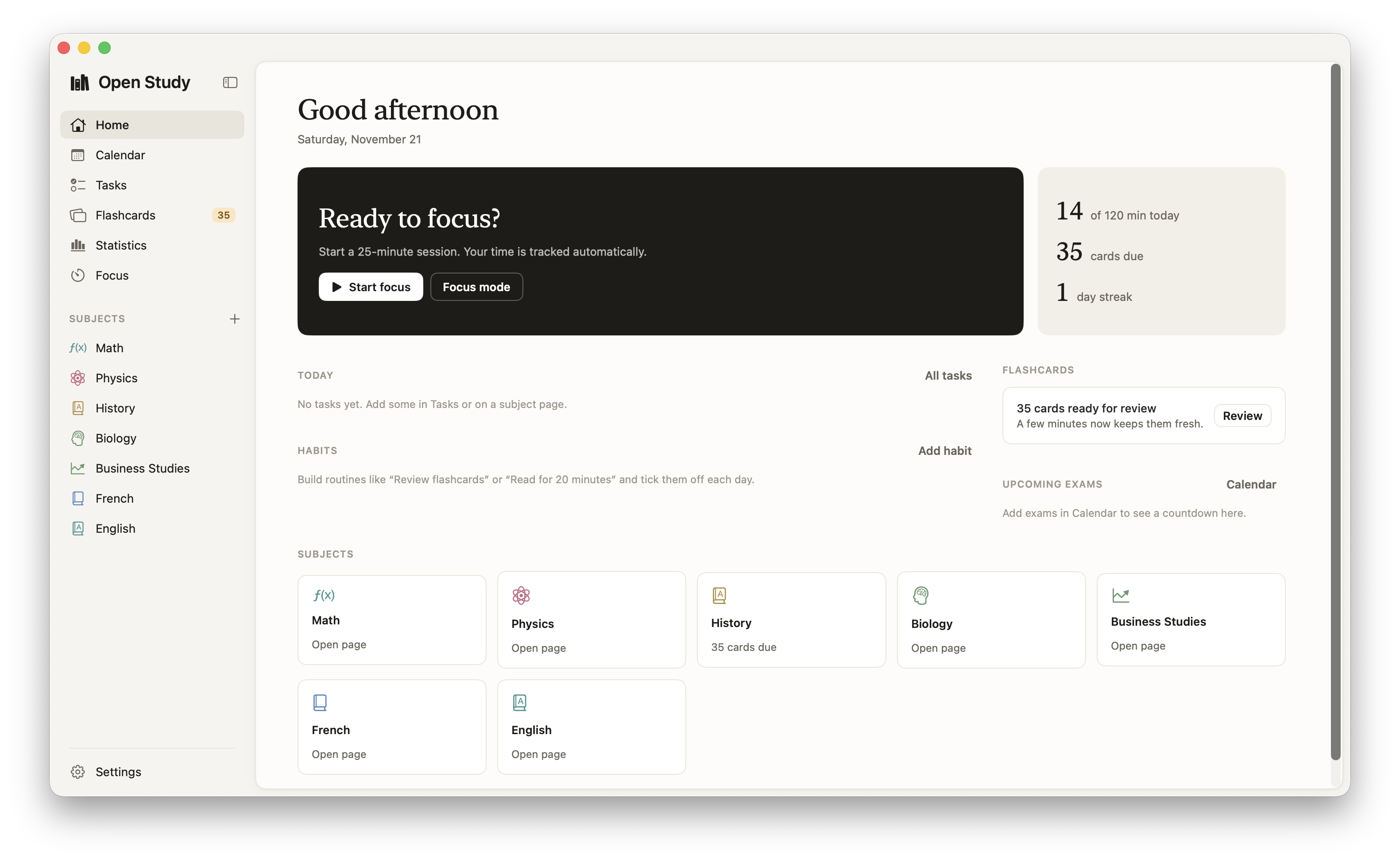
A calm, private study workspace for macOS. Notes, flashcards, PDFs, quizzes, tasks and a focus timer — organised by subject, stored only on your Mac.
This is the first production release of Open Study. It runs on macOS 14 Sonoma or later, needs no account and works fully offline.
Download
| File | Size | Platform | SHA-256 |
|---|---|---|---|
open-study.v1.0.0-prod.zip |
6.7 MB | macOS 14+ | 7d03c72daa24f1075eee596320919b232cf157741bc708cf28145b981996e31c |
Important
This build isn't signed with an Apple Developer ID or notarized by Apple. Open Study is a free, volunteer-run project without a paid Apple Developer membership, so macOS will warn you the first time you open it. The app is the same code you can read and build yourself. Follow the steps below once; after that it opens normally.
Install
- Download open-study.v1.0.0-prod.zip from the Assets section below.
- Double-click the zip to unzip it (Safari may already have done this for you).
- Drag open-study.app into your Applications folder.
- Open it using the steps for your macOS version:
macOS 15 Sequoia or later
- Double-click open-study.app. macOS says it can't verify the app. Click Done (don't move it to the Bin).
- Open System Settings → Privacy & Security and scroll down to the Security section.
- Next to the message about open-study, click Open Anyway, then confirm with your password or Touch ID.
- Click Open Anyway again in the dialog that appears.
macOS 14 Sonoma
- In Applications, Control-click (or right-click) open-study.app and choose Open.
- In the warning dialog, click Open.
- Follow the short setup (about a minute, and skippable).
Troubleshooting: "open-study is damaged and can't be opened"
macOS sometimes shows this for downloaded apps that aren't notarized. The app isn't actually damaged. Make sure you downloaded it from this page and the checksum matches, then run this in Terminal to remove the download quarantine flag:
xattr -dr com.apple.quarantine /Applications/open-study.appThen open the app as usual.
Verify your download
In Terminal, run:
shasum -a 256 ~/Downloads/open-study.v1.0.0-prod.zipThe output should match the SHA-256 in the table above exactly. If it doesn't, delete the file and download it again from this page only.
Highlights
✨ First-run setup that builds your workspace
A guided setup that turns your answers into a real, ready-to-use workspace: your name, subjects (with suggested icons and colours), the study tools each page starts with, a focus rhythm and daily goal, upcoming exams, daily habits, appearance, notifications and usage data. A live sidebar preview fills in as you answer. Setup can be skipped and re-run any time from Settings — re-running only ever adds, never deletes.

📚 Subjects built from blocks
Organise your work into subjects, split them into topic pages, and build each page from 11 block types via a / command menu or a + popover: Text, Heading, Divider, Callout, Checklist, Task list, Flashcards, PDF document, Pomodoro timer, Study statistics and Quiz.

🃏 Flashcards with spaced repetition
SM-2 scheduling with Again / Hard / Good / Easy ratings and interval previews, keyboard-driven review (Space, 1–4), and Anki-style CSV / text import with separator detection, column mapping and a per-row preview.

📄 PDF reader with annotations
A native PDFKit reader with highlights, sticky notes and an annotations list — inline on a page, in its own window, or full screen for distraction-free reading. Imported PDFs are copied into the app, and annotations are saved atomically so a failed write never corrupts your file.

⏱️ Focus timer and progress
A configurable Pomodoro timer with breaks, auto-start, alert sounds and notifications; a distraction-free Focus mode; and a live timer pill visible from any screen. Sessions feed Statistics, Habits streaks and your daily goal on Home.

🗓️ Planning
Tasks grouped into Overdue, Today, Upcoming and No date; a month Calendar of study sessions, exams and due tasks with exam countdowns; and Quizzes with multiple-choice, true/false and short-answer questions.

Everything in v1.0.0
Rich notes
- Native
NSTextViewediting with headings, lists, checklists, links, images, tables and code. - Markdown-style shortcuts at the start of a line:
#,##,###,-/*,1.,[]and```. - A floating formatting bar while editing; ⌘B / ⌘I / ⌘U for bold, italic and underline.
- Paste or drop images and resize them by dragging or with Small / Medium / Large / Fit Width.
Native macOS experience
- Full light and dark mode with a warm, calm design system.
- Collapsible sidebar (⌃⌘S) and shortcuts for every section (⌘1–⌘6), new subject (⇧⌘N), timer (⌥⌘P) and Focus mode (⇧⌘F).
- Native menus, context menus, focus rings and Reduce Motion support.
Fixes since the preview builds
- Lowered the minimum macOS version from 26 to 14 Sonoma, with pointer-style fallbacks on macOS 14.
- PDF reader: fixed a crash in the annotations list, kept the Highlight button usable while highlighter mode is on, and kept the selection state in sync when a reader opens.
- Fixed the task due-date popover closing unexpectedly; Home now shows upcoming tasks.
- Fixed a crash when removing an exam during setup, and clarified the alert shown if setup can't be saved.
- Re-running setup now restores a minimised main window.
- Note editor: outer list numbering continues after nested items, Font menu traits apply to the whole selection, image sizes are kept on click and never upsampled, and only real image files are treated as images.
- Deleting a subject keeps its topic pages safe; moving a page also moves its tasks.
- Sidebar section switches are instant, and rapid collapse toggles with Reduce Motion no longer misbehave.
- Improved sheet readability in dark mode.
Privacy
- Local-first. Everything is stored on your Mac inside the app's sandbox container. No account, no sync, no internet requirement; iCloud/CloudKit is disabled.
- Anonymous usage data is on by default, and you can turn it off during setup or at any time in Settings → Privacy → Share anonymous usage data. When it's off, the analytics SDK is never started.
- When on, Open Study sends only: app start and database status, focus-session length/completion (and whether a subject was linked, not which), and automatic error reports. Your notes, cards, task or subject names and files are never sent.
Requirements
| Minimum | |
|---|---|
| Run | macOS 14 Sonoma or later |
| Build from source | Xcode 26 or later |
Your data
Your data lives at ~/Library/Containers/xyz.elipseday.open-study/Data/Library/Application Support/OpenStudy/. Open it from Settings → Data → Show Data Folder in Finder. To back up or move your data, quit the app and copy the OpenStudy folder.
Known limitations
- Not signed or notarized by Apple, so macOS warns you on first launch (see Install). Only download Open Study from this Releases page.
- No automatic updates. Check this Releases page for new versions. To update, quit the app and replace open-study.app in Applications. Your data is kept, because it's stored separately from the app.
- No sync between Macs — by design for this release. Back up the data folder to move your workspace.
- There is no automated test suite yet; please report any bugs you find.
Feedback and support
- 🐞 Bugs and feature requests: open an issue
- 🔒 Security issues: report privately via [SECURITY.md](https://github.com/theopenlauncher/open-study/blob/main/SECU...