Repository navigation
Releases
Varos 0.1 Preview (pre-alpha)

Varos 0.1 Preview (pre-alpha)
A first look for invited designers. Varos is a free, open-source vector editor, Arabic and right-to-left first, built on VectorCraft. This preview is unfinished: features are missing and some things are broken. Work on copies of important files and save often.
Download
Varos-0.1-preview.1-arm64.zip: Apple Silicon Macs only (M1 or later), macOS 11 or newer. Intel Macs will not run it.- Check the download:
shasum -a 256 Varos-0.1-preview.1-arm64.zipshould print the SHA-256 listed below.
First open
The app is not notarized by Apple yet, so macOS says it cannot verify the developer. Unzip, move Varos to Applications and open it once. Click Done (not Move to Trash), then System Settings → Privacy & Security → scroll down → Open Anyway, and confirm with your password. Once only.
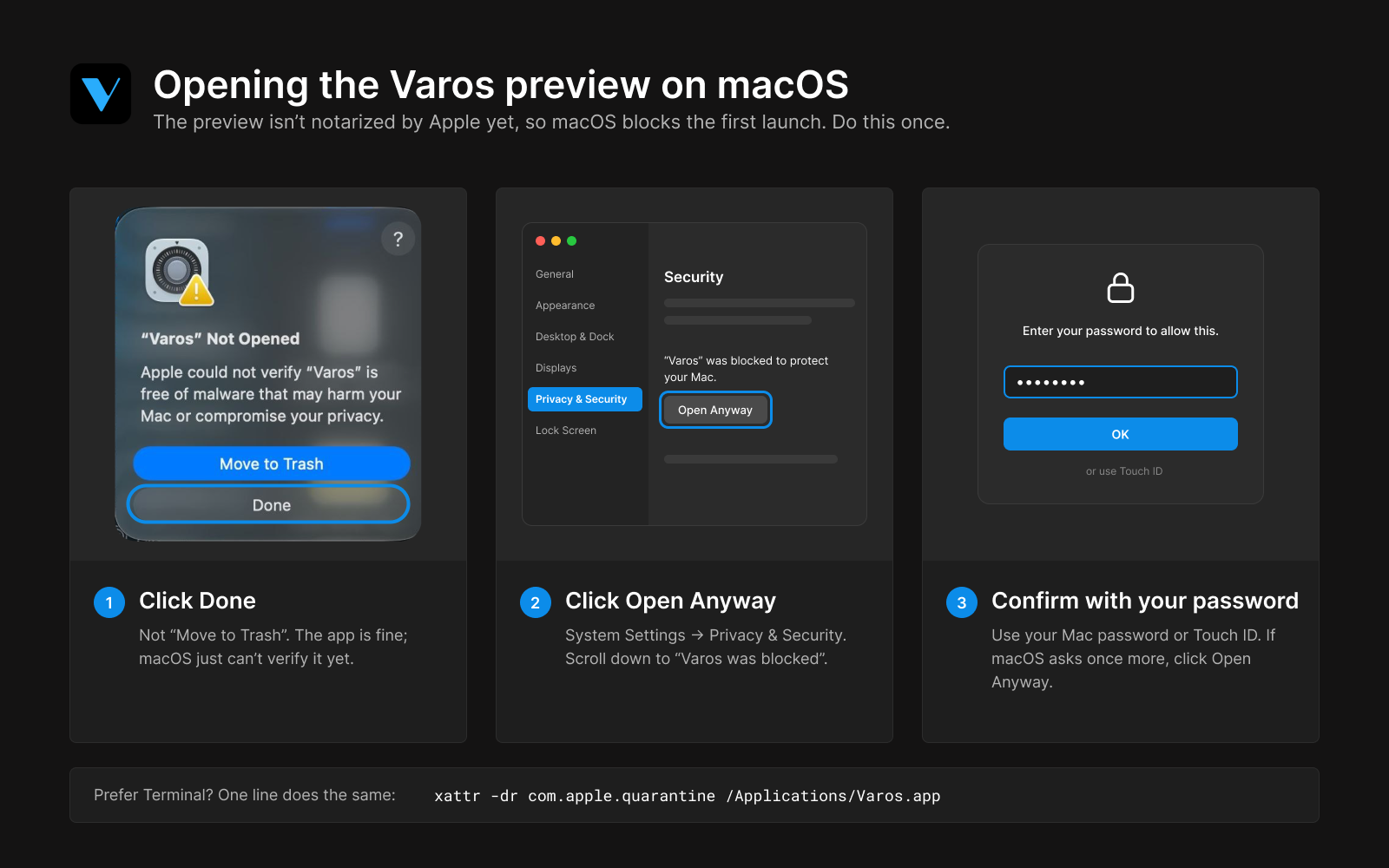
Prefer Terminal? xattr -dr com.apple.quarantine /Applications/Varos.app
What is in it
- Vector drawing, Pathfinder, layers, artboards and pages; PDF, SVG and PNG export with print options (bleed, marks, CMYK, PDF/X).
- Arabic type: kashida justification (Off / Auto / Force), Arabic font discovery, harakat colouring that keeps letters joined.
- One designed workspace: dockable panels that size to their content, a unified visual system.
- AI-native: any agent you run on this Mac (Codex, Claude Code…) can open, edit and save your board through the MCP bridge; its edits show on the canvas and in History.
- Soon: greyed entries mark where planned features will live (AI chat and images, dielines, preflight, 3D box preview, sharing…). They do nothing yet.
Known issues
See KNOWN_ISSUES.md. No auto-update and no telemetry: Varos never sends anything anywhere.
Feedback
Open an issue in English or Arabic. The question we care about most: what made you close Varos and open another app?
Varos 0.1 Preview (نسخة تجريبية مبكرة)
نسخة أولى لمصممين مدعوّين. Varos محرر رسوم متجهة مجاني ومفتوح المصدر، يضع العربية والكتابة من اليمين إلى اليسار في المقدمة، ومبني على VectorCraft. النسخة غير مكتملة: بعض الميزات ناقصة وبعض الأشياء لا تعمل، فاعمل على نسخ من ملفاتك المهمة واحفظ كثيرًا.
- لأجهزة ماك بمعالجات Apple Silicon فقط (M1 أو أحدث)، وmacOS 11 أو أحدث.
- أول مرة تفتحه: فك الضغط، وانقل Varos إلى Applications، وافتحه مرة. سيقول macOS إنه لا يستطيع التحقق من المطوّر: اضغط Done وليس Move to Trash، ثم System Settings ← Privacy & Security ← انزل للأسفل ← Open Anyway، وأكّد بكلمة المرور. مرة واحدة فقط (الصورة أعلاه).
- العناصر الرمادية المكتوب بجانبها Soon ميزات قادمة، ولا تفعل شيئًا الآن.
- لا تحديث تلقائي، ولا يُرسل البرنامج أي بيانات.
- رأيك يهمنا: افتح issue بالعربي أو الإنجليزي. وأهم سؤال: ما الذي جعلك تغلق Varos وتفتح برنامجًا آخر؟
SHA-256: f6b6e95c87d3d216ac4b578a633588ff6fa0079ffb304a2d29460faf1265e80b