Repository navigation

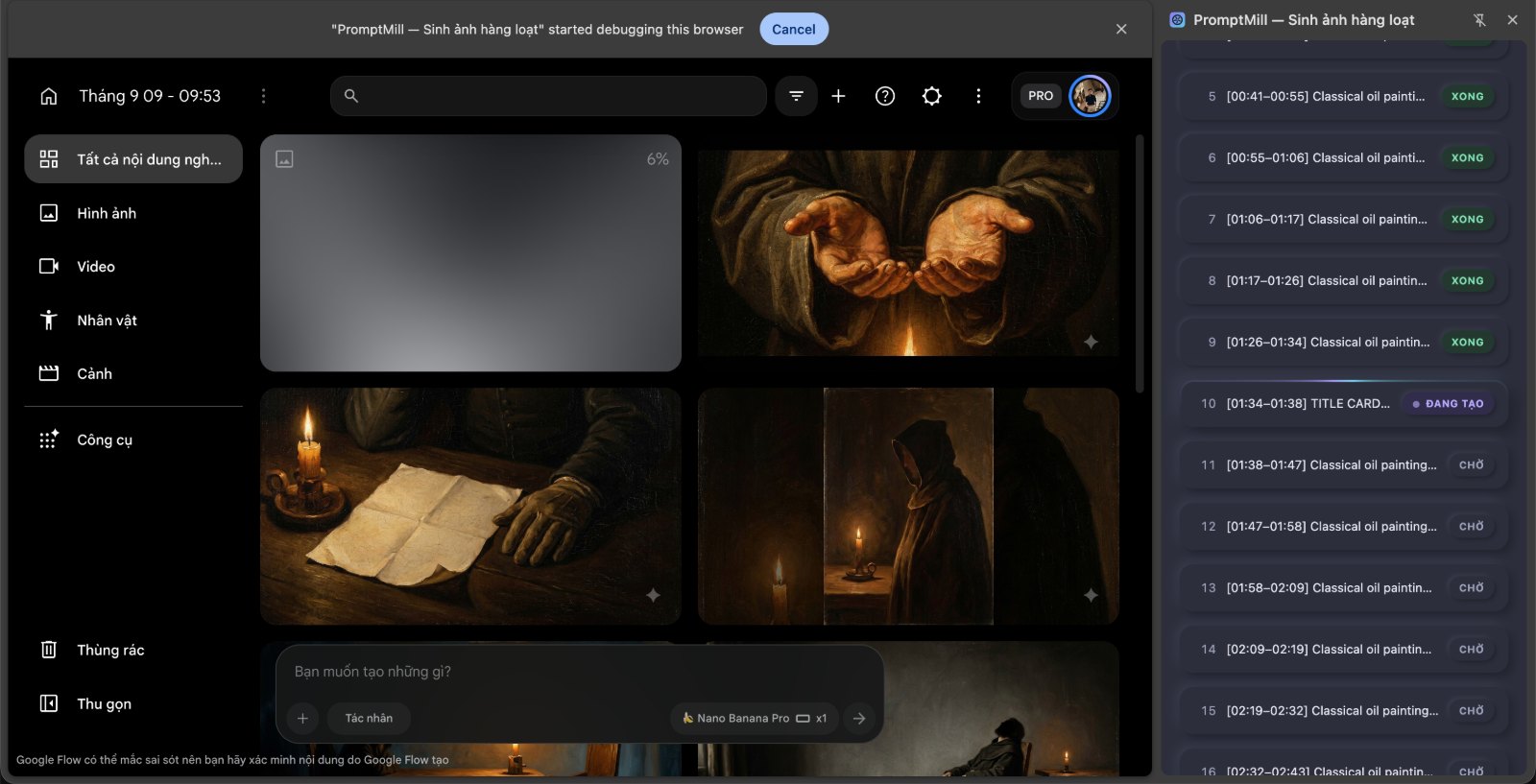
Batch-generate images on Google Flow. Paste your prompts, press Start, walk away.
Install
- Download
promptmill-v1.0.0.zipbelow and unzip it. - Open
chrome://extensionsand turn on Developer mode (top right). - Click Load unpacked and pick the unzipped folder.
- Open a Google Flow project, click the ⚡ icon, paste your prompts, press Start.
No developer account, no build step, no npm.
The extension's interface is Vietnamese only for now. The code and docs are in English.
Internationalisation is a wanted contribution.
What it does
- Queue any number of prompts — paste them, drag in
.txt/.md/.csv/.json, or load a file. - Downloads every image into
Downloads/<your folder>/, numbered and named after its prompt, with the extension matching the real image format. - Skips prompts that already succeeded, so a re-run never pays twice for the same image.
- Pause, stop, retry, reorder — the queue is yours to steer mid-run.
- Human-shaped pauses between prompts, drawn from a log-normal distribution rather than a flat random range.
- Stops and tells you why — it reads the prompt box back before submitting, and catches Flow's own error notices instead of waiting out a timeout.
Privacy
No account, no server, no analytics, no telemetry. Nothing leaves your machine. One grep verifies it — see the privacy policy.
Known issues
- Lists above ~2,000 prompts make typing in the prompt box laggy — work in batches of a few hundred.
- "Done" means the download started, not that the file finished writing.
Notes
Typing goes through the Chrome DevTools Protocol because Flow's prompt box is a Slate.js editor that ignores synthetic keystrokes. So: close DevTools on the Flow tab before running, and leave the yellow "debugging" banner alone. Full explanation in the README.
Tiếng Việt
Sinh ảnh hàng loạt trên Google Flow. Dán danh sách prompt, bấm Bắt đầu, đi làm việc khác.
Cài đặt: tải promptmill-v1.0.0.zip bên dưới, giải nén → mở chrome://extensions → bật Chế độ nhà phát triển → Tải tiện ích đã giải nén → chọn thư mục vừa giải nén.
Có gì: hàng đợi không giới hạn số prompt (dán, kéo thả file, hoặc nạp .txt/.md/.csv/.json) · tự tải ảnh về Downloads/<thư mục>/ đã đánh số và đặt tên theo prompt, đuôi file đúng định dạng thật · bỏ qua prompt đã xong khi chạy lại · Tạm dừng / Dừng / Tạo lại / kéo đổi thứ tự · khoảng nghỉ theo nhịp người thật · đọc được thông báo lỗi của Flow để dừng sớm.
Riêng tư: không tài khoản, không server, không thu thập gì. Chính sách đầy đủ.
Lưu ý: phải đóng DevTools (F12) trên tab Flow trước khi chạy, và để yên thanh vàng "đang gỡ lỗi". Giải thích trong README.