Repository navigation
Releases
Odeion 0.9.0

Quieter jumps and easier playlists: seeking no longer clicks, and songs drag straight
onto a playlist.
New
- Playlists changed outside Odeion while it runs (by a script editing
playlists.json,
say) show up within a second, instead of being overwritten by Odeion's next save. - Drag a song from the list onto a playlist in the sidebar to add it.
Fixed
- With backing tracks found but no songs yet, the library says why it's empty (still
looking, a folder it can't read, no songs found) instead of showing nothing. - Moving a song up or down in a playlist always moves it past the song you see next to
it. With a song from the playlist gone from your library, it could swap places with
that hidden song, so the move seemed to do nothing. - Jumping to another spot (
o, a section, the arrow keys, a click on the waveform) no
longer clicks: the old spot blends into the new one over 5 ms, as a loop does. - Loud songs keep their peaks when slowed down, with the EQ on or exported: the limiter
that stops clipping now leaves everything alone up to 95% of full scale, where it
started at 90%. - In practice, ⌘D favourites the playing song, and ⌘A and ⇧⌘A leave practice for its
album and artist, instead of acting on a song highlighted in the hidden list. - The hints for a first song say to double-click it, as a single click only highlights.
- Odeion for Windows no longer says "this Mac" while it looks for music.
macOS: download Odeion-macOS.zip, unzip it and drag Odeion into Applications. This build isn't notarized by Apple, so macOS blocks it the first time: open it once, then go to System Settings, Privacy & Security, and click Open Anyway. Or run xattr -dr com.apple.quarantine /Applications/Odeion.app in Terminal.
Windows (trial): download Odeion-Windows.zip, unzip it and run odeion.exe. Windows warns about an unknown publisher the first time: click More info, then Run anyway.
Full Changelog: v0.8.0...v0.9.0
Odeion 0.8.0
Jam along without cluttering your library: backing tracks get a place of their own.
New
- Backing tracks that aren't songs, like jam tracks you bought or downloaded, get a place
of their own. Add their folder under Backing tracks in settings: they stay out of the
library, show under Backing tracks in the sidebar, and play and practise like any
song. A search lists them after the songs. They can't be favourites, since the
favourites head your library.
macOS: download Odeion-macOS.zip, unzip it and drag Odeion into Applications. This build isn't notarized by Apple, so macOS blocks it the first time: open it once, then go to System Settings, Privacy & Security, and click Open Anyway. Or run xattr -dr com.apple.quarantine /Applications/Odeion.app in Terminal.
Windows (trial): download Odeion-Windows.zip, unzip it and run odeion.exe. Windows warns about an unknown publisher the first time: click More info, then Run anyway.
Full Changelog: v0.7.0...v0.8.0
Odeion 0.7.0
Smoother practice: loops that no longer click, slow-down without the gap, and stems
that come back exactly as you left them.
Changed
- A click on a song only highlights it; a double-click plays it, as Enter does.
- A song you play starts from the top. Its loop, speed and stems still come back as you
left them, and Odeion still reopens where you stopped. - Stems you muted stay muted when you come back to the song, as their levels already
did.
Fixed
- A loop no longer clicks each time it comes round: its end blends into its start over
5 ms. - Slowing down, or jumping around in a slowed-down song, no longer goes silent for a
moment first, and going back to full speed no longer skips. - Above 100% speed the playhead moves smoothly instead of lagging and jumping.
- A song whose stems you were playing comes back playing them, instead of paused.
- An exported MP3 now starts on its first note and keeps its last 40 ms, so an exported
loop loops cleanly in other players too. - Search finds names with accents however they're stored: "motorhead" finds a
Motörhead file name, "dvorak" finds Dvořák. - Moving up or down in an empty list (a search that finds nothing, an empty playlist)
no longer quits Odeion. - Odeion opens at the size you left it, also when it can't find the display it was on.
- A folder called riff that belongs to another app is no longer taken for Odeion's old
data and moved. - macOS lists Odeion under Music.
macOS: download Odeion-macOS.zip, unzip it and drag Odeion into Applications. This build isn't notarized by Apple, so macOS blocks it the first time: open it once, then go to System Settings, Privacy & Security, and click Open Anyway. Or run xattr -dr com.apple.quarantine /Applications/Odeion.app in Terminal.
Windows (trial): download Odeion-Windows.zip, unzip it and run odeion.exe. Windows warns about an unknown publisher the first time: click More info, then Run anyway.
Full Changelog: v0.6.0...v0.7.0
Odeion 0.6.0
New
-
Export a section or the loop as an MP3 or Ogg file, one pass of it: right-click the
section (or the loop bar), choose whether it keeps your speed and pitch and, with
stems, whether it's the mix as you hear it, then where to save it.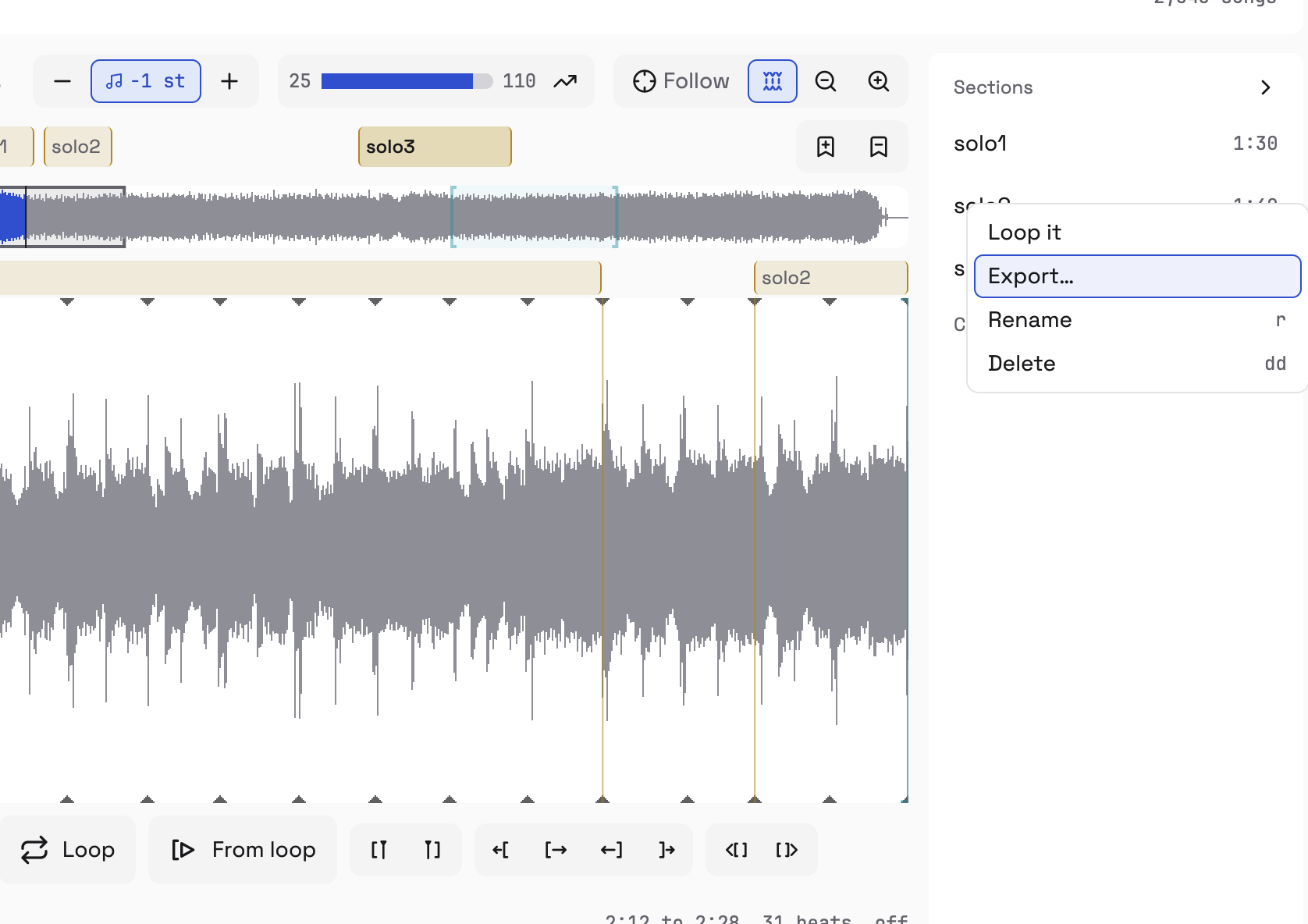
macOS: download Odeion-macOS.zip, unzip it and drag Odeion into Applications. This build isn't notarized by Apple, so macOS blocks it the first time: open it once, then go to System Settings, Privacy & Security, and click Open Anyway. Or run xattr -dr com.apple.quarantine /Applications/Odeion.app in Terminal.
Windows (trial): download Odeion-Windows.zip, unzip it and run odeion.exe. Windows warns about an unknown publisher the first time: click More info, then Run anyway.
Full Changelog: v0.5.0...v0.6.0
Odeion 0.5.0
New
- Check for Updates installs a new version itself: it downloads it in the background,
checks it's genuine, puts it in place, and the title bar offers Restart to update.
Getting this version is a download by hand one last time; the ones after it install
themselves. - The big waveform shows the sections above it, with their edges through the waveform,
so a loop is easy to set inside one. Section edges are dragged there. - A list of the song's sections beside the practice view to jump to them. It folds
away to a button.
Changed
- A click on a section jumps to it, and
nNand the previous and next buttons do the
same, showing the section centred in the waveform, about two thirds of it, until the
playhead leaves it; a double-click loops it. A loop you made stays: when the section is outside
it, looping switches off and the loop button brings it back. - Sections can no longer be resized in the lane over the whole song, where small ones
were too narrow to grab. - Tooltips over the waveforms and sections are shorter and wait longer.
macOS: download Odeion-macOS.zip, unzip it and drag Odeion into Applications. This build isn't notarized by Apple, so macOS blocks it the first time: open it once, then go to System Settings, Privacy & Security, and click Open Anyway. Or run xattr -dr com.apple.quarantine /Applications/Odeion.app in Terminal.
Windows (trial): download Odeion-Windows.zip, unzip it and run odeion.exe. Windows warns about an unknown publisher the first time: click More info, then Run anyway.
Full Changelog: v0.4.0...v0.5.0
Odeion 0.4.0
New
- Column headers over a playlist's songs sort it by title, artist, album or length.
Click again to reverse, a third time for the playlist's own order. The songs play in
the order shown; the playlist itself stays as it was. - The gauge beside the speed is a button: full speed, and again back to the slowed
speed.
Changed
sand the gauge change only the speed. A pitch shift stays until you change it.
A song you left at full speed withswhile it had a pitch shift now opens with that
shift; the pitch control's right-click menu puts it back to as recorded.
Fixed
- Left and right no longer swap after playing from the loop's start or the marker, or
clicking around, in a slowed-down or pitch-shifted song, nor when the speed changes. - The song Odeion reopens with goes on to the next one when it ends, through the list
it was started from. - Switching to a backing track or stems that start later than the song no longer
crashes Odeion. - Windows: the cover shows in the media controls when its path has a space.
macOS: download Odeion-macOS.zip, unzip it and drag Odeion into Applications. This build isn't notarized by Apple, so macOS blocks it the first time: open it once, then go to System Settings, Privacy & Security, and click Open Anyway. Or run xattr -dr com.apple.quarantine /Applications/Odeion.app in Terminal.
Windows (trial): download Odeion-Windows.zip, unzip it and run odeion.exe. Windows warns about an unknown publisher the first time: click More info, then Run anyway.
Full Changelog: v0.3.0...v0.4.0
Odeion 0.3.0
New
- Drag songs to put a playlist in a new order.
- Sort a playlist by artist or by title: right-click the playlist or its header.
- In an artist's view, the grouped list puts the songs under each album.
- The mouse's back button works like Esc: back out of an album, artist, playlist or
practice.
Fixed
- On MP3s the beat grid and waveform no longer run 25 ms behind the music, so a loop
snapped to a beat starts on the attack. Stems or a backing track added to an MP3
before this keep their old alignment: remove them and add them again to line them up
anew. - Muting, soloing or changing the level of a stem no longer clicks.
- The queue is no longer lost when the library cache is deleted or damaged.
- Favourites are saved the way playlists are, so Odeion crashing while it saves no
longer wipes them. - Tooltips wait a moment before they show.
- Windows: the shortcut sheet no longer lists keys that can't work there, like
"Ctrl+Ctrl+F".
macOS: download Odeion-macOS.zip, unzip it and drag Odeion into Applications. This build isn't notarized by Apple, so macOS blocks it the first time: open it once, then go to System Settings, Privacy & Security, and click Open Anyway. Or run xattr -dr com.apple.quarantine /Applications/Odeion.app in Terminal.
Windows (trial): download Odeion-Windows.zip, unzip it and run odeion.exe. Windows warns about an unknown publisher the first time: click More info, then Run anyway.
Full Changelog: v0.2.1...v0.3.0
Odeion 0.2.1
macOS: download Odeion-macOS.zip, unzip it and drag Odeion into Applications. This build isn't notarized by Apple, so macOS blocks it the first time: open it once, then go to System Settings, Privacy & Security, and click Open Anyway. Or run xattr -dr com.apple.quarantine /Applications/Odeion.app in Terminal.
Windows (trial): download Odeion-Windows.zip, unzip it and run odeion.exe. Windows warns about an unknown publisher the first time: click More info, then Run anyway.
Full Changelog: v0.2.0...v0.2.1
Odeion 0.2.0
Windows (trial): download Odeion-Windows.zip, unzip it and run odeion.exe. Windows warns about an unknown publisher the first time: click More info, then Run anyway.
Download Odeion-0.2.0.zip, unzip it and drag Odeion into Applications. This build isn't notarized by Apple, so macOS blocks it the first time: open it once, then go to System Settings, Privacy & Security, and click Open Anyway. Or run xattr -dr com.apple.quarantine /Applications/Odeion.app in Terminal.
Full Changelog: v0.1.0...v0.2.0
riff 0.1.0
Download Riff-0.1.0.zip, unzip it and drag Riff into Applications. This build isn't notarized by Apple, so macOS blocks it the first time: open it once, then go to System Settings, Privacy & Security, and click Open Anyway. Or run xattr -dr com.apple.quarantine /Applications/Riff.app in Terminal.
Full Changelog: https://github.com/timvancann/riff/commits/v0.1.0