Repository navigation
Releases: tinpotnick/folio
Release list
folio v0.2.2: the presenter view works

The presenter view works. A small release that fixes presenting with your notes on your own screen.
- Desktop: the presenter window now shows the deck. It used to open with a blank "Untitled" document while the slides played in the main window.
- Web: the presenter window now opens in Chrome.
- With two screens, the slides go full screen on the projector.
- With one screen, the slides stay in a window beside the presenter view, so you can see both. The full-screen slides used to cover it, so it looked as if it never opened.
- If your browser blocks the new window, folio now says so: allow pop-ups for the site and choose Open presenter view again.
To present: press ▶ → Open presenter view (or Ctrl+K, "presenter"). Move that window to your own screen: it has your speaker notes and the next slide, and either window moves the show.
Everything from 0.2.1 is here too: slides, Python on your data, reading a chart's values, web and open-data import with citations, and more.
Try it in your browser, or install below.
- Linux: the Flatpak, Fedora (dnf) and Debian/Ubuntu (apt) repositories update with your system's update tool. Flatpak updates through GNOME Software, KDE Discover or
flatpak update, notdnf. See the install steps. - Windows (
.msi,-setup.exe) and macOS (.dmg, Apple silicon and Intel) aren't code-signed yet:- macOS: right-click the app and choose Open the first time.
- Windows: if SmartScreen warns, choose More info → Run anyway.
folio v0.2.1: slides, Python on your data, reports with references
Present any document as slides, run Python on your data, and write reports with real references. folio's biggest release yet: still one plain Markdown file.
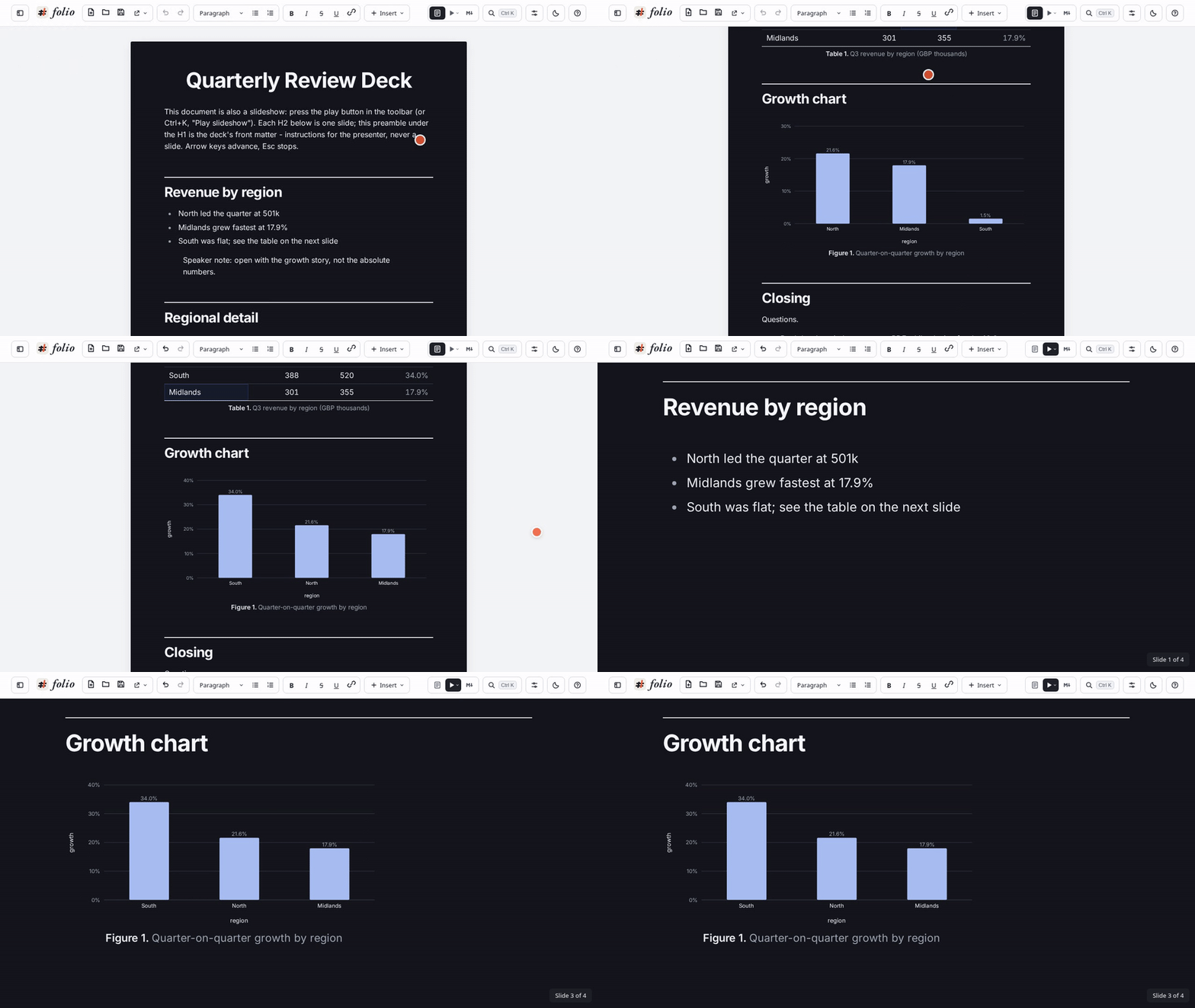
Try it in your browser: no install, nothing uploaded.
Present as slides
- Press ▶ and any document becomes a deck: one slide per section (each
##heading), full screen. The file doesn't change: it's still the same Markdown. - A presenter window shows your speaker notes on your screen while the projector stays clean.
- Deck themes come with dark and light looks. Export to PDF while playing gives a 16:9 handout.
Python on your data
- A
pythonblock withdata=@sales out=fit,slopereads your tables and publishes results back into the document.- Tables become datasets that charts and other tables can use.
- Single numbers become values a formula reads, e.g.
@slope * 30.
- It runs offline, sealed off from the network. Its results are saved in the document, so charts appear before Python has even loaded.
- See the Coffee forecast example.
Data you can trust
- Import data from the web, or from open-data publishers (Bank of England, ONS, OECD, HM Land Registry, ECB, Eurostat), cited automatically with the date it was retrieved.
- Data you may not share is marked Personal use only on the table, its charts and its reference. Print and Export remind you before it leaves your hands.
- Money and date formulas:
pmt,fv,rate,npv,irr,edate,eomonth,xlookup,asofand more. You can type them the spreadsheet way:=PMT(4.5%/12, 300, 250000). - Blank cells stay blank in formulas and charts, instead of quietly becoming 0.
- Read a chart's values: point at a chart, or Tab to it and use the arrow keys, to see the exact numbers at each point.
- See the Repay or invest? example: a mortgage question answered with real data back to 1975.
Writing like a report
- Footnotes in GitHub's syntax.
- Citations and a reference list in Pandoc's syntax, from your own BibTeX.
- Numbered tables and figures, and cross-references ("see Table 2") that stay right as things move.
- A table of contents that keeps itself up to date.
- Page numbers and a running header on printed and exported pages.
Tables and drawings
- Tables:
- A table recalculates when you leave a cell, so typing in a table that feeds others no longer lags.
- Choose how many rows each table shows in the page; charts still use every row.
- Pressing Enter to confirm a value no longer leaves a stray empty row.
- Drawings: a drawing can show its drawing, its code, or both, and printing follows your choice. A 3D model follows the table row you're editing.
- Big documents open fast: charts, diagrams and models draw as you scroll to them, and the page doesn't jump when they appear.
Help when you need it
- Help opens in a panel beside your document, so you can read a topic and try it at the same time. Search it from the panel or with Ctrl+K.
- F1 opens and closes help, even while typing.
Install
- Linux:
- Flatpak, Fedora (dnf), Debian/Ubuntu (apt): add folio's repository once and it updates with your system. See the install steps.
- Or download the
.AppImage,.rpmor.debbelow.
- Windows: the
.msior-setup.exebelow. - macOS: the
.dmgbelow, a universal build for Apple silicon and Intel.
The Windows and macOS builds aren't code-signed yet:
- macOS: right-click the app and choose Open the first time.
- Windows: if SmartScreen warns, choose More info → Run anyway.
About 0.2.0: it was published by mistake from an earlier commit. It has Linux packages only, and bugs fixed in this release (3D models not drawing, slides overflowing). Please use 0.2.1.
folio is young: expect rough edges, and please report them. Your documents are plain Markdown, so they stay readable whatever happens to folio.
folio v0.2.0 — present any document as slides

folio is the complete office suite in one plain Markdown file: tables and embedded datasets, charts, Python compute, diagrams, equations, SVG drawings, JSCAD 3D models, music (ABC + Strudel), audio, and slides.
Highlights
- Compute blocks (Python): a
pythonfence withdata=@sales/out=fitruns offline in a sealed Pyodide worker, reads your datasets and publishes tables, values and chart sources back into the document — regressions, statistics, anything beyond what charting can express. - Slideshow: play any document as one full-screen slide per H2 — deck themes, image divider slides, and a presenter view (a second window on your own screen showing the speaker notes, the current and next slide, and a slide counter, synced both ways) while the projector stays clean. Notes never print.
- Book-scale documents: charts, diagrams, math and 3D models now draw lazily as you scroll, so large documents open and switch views fast.
- New documents carry a YAML header comment pointing at the app; saving always writes the canonical Markdown form.
Plus the README front page now shows the slideshow and Python compute, with a fresh social preview image.
Full history: v0.1.2...v0.2.0
Install
- Web app: https://tinpotnick.github.io/folio/
- Linux (Flatpak/dnf/apt, self-updating): see the README
- Windows/macOS: the
.msi/.exe/.dmgassets on this release
folio v0.1.2
See the README for what folio is, or try it in your browser first: https://tinpotnick.github.io/folio/
Downloads
- Windows: the
.msi, or the-setup.exe. - macOS (Apple silicon and Intel): the
.dmg. - Linux: add folio's own repository for automatic updates - Flatpak, Fedora (dnf) or Debian/Ubuntu (apt); see Install. Or download
folio.flatpak(added when the release is published), the.rpm, the.debor the.AppImage.
These builds are not code-signed yet. On macOS, the first time, right-click the app and choose Open. On Windows, if SmartScreen warns, choose More info → Run anyway.
v0.1.1
What's Changed
- Flatpak for Flathub by @tinpotnick in #76
- Open .md files with folio; a way to support the project by @tinpotnick in #77
- Version 0.1.1 by @tinpotnick in #78
Full Changelog: v0.1.0...v0.1.1
