Repository navigation
Releases
v0.4.0-beta.1

The bonus fighters unlock as on the Xbox, the menus' lettering in HD from the texture pack, weapon swing sounds, and
fixes for stuttering and repeating sound. Both players need this version to play each other online.
An unofficial native port of Soulcalibur II (Xbox). No game files are included: you need your own Soulcalibur II
(USA) Xbox disc image, and for the guests your own GameCube and/or PlayStation 2 disc.
Download
| Your system | Download |
|---|---|
| macOS 26 or later, Apple silicon | Soulcalibur2Recomp-macOS.zip |
| Linux x86_64, Steam Deck, Steam Machine | Soulcalibur2Recomp-linux-x86_64.tar.gz |
| Windows 10 or 11, 64-bit (untested) | Soulcalibur2Recomp-windows-x64.zip |
| Android 10 or later, 64-bit ARM phone or tablet | Soulcalibur2Recomp-android.apk |
SHA256SUMS.txt has the downloads' checksums. The update-*.txt files are what the launcher reads to update
itself; you don't need them.
Install
macOS
- Open the zip: it gives Soulcalibur II Recomp.app. Move it to your Applications folder (it updates
itself, so it must be somewhere it can write). - The app is not notarized by Apple, so the first time: right-click it and choose Open, then Open. If
macOS only offers Done or Move to Trash, choose Done, then open System Settings → Privacy &
Security, scroll down and press Open Anyway. - On the Game page, choose your disc image (
.iso). On the Guest page, give it your GameCube and/or
PlayStation 2 disc and press Build for Link and Heihachi. Press Play.
Linux, Steam Deck and Steam Machine
- Unpack it where it can stay:
tar xzf Soulcalibur2Recomp-linux-x86_64.tar.gz -C ~/Applications(on a Steam
device, in Desktop Mode). - Run
~/Applications/Soulcalibur2Recomp/soulcalibur2-launcher. SDL 3 is inside; the presenter needs Vulkan
and shaderc (SteamOS has both). - Choose your disc on the Game page, build the guests on the Guest page, and press Play. On a Steam
device, Add to Steam puts it in your library for Game Mode.
Windows
Not yet tried on a Windows machine. Extract the zip to a folder of your own (not Program Files) and open
soulcalibur2-launcher.exe; Windows may say it protected your PC: More info, then Run anyway.
Android
- Open Soulcalibur2Recomp-android.apk on the phone or tablet and allow installing it (Android asks once for the
app you opened it from). Later releases install over it. - In the launcher, choose your disc image on the Game page (it is copied into the app's folder, about 4.5 GB),
build the guests on the Guest page, and press Play. The touch controls are player 1's pad; Back opens
the in-game menu.
In the game, Esc, F1 or a gamepad's Back opens the in-game menu. Online, both players need the same version.
What's new in 0.4.0-beta.1
- Assassin, Berserker and Lizardman (#47): once
unlocked (in Weapon Master), they can be picked in every mode, and their Arcade plays to the end. The character
select screen's small portraits no longer show a seam and a doubled step beside Random in widescreen. - Sound stuttering (#54): sound could stick on one
short piece and repeat it for several seconds (most often after a pause, in busy fights). It plays on now. - HD menu lettering (#56): the HD texture pack
import now covers the menus' lettering (the titles, choices and help lines on every screen), in all 16 of its
colours: 9 from the pack, the rest made from the pack's grey lettering in the game's own colours, read from your
Xbox disc. Import the pack again on the Textures page to get it. - Weapon swing sounds: the whoosh of a swing is heard again. Its pitch moves every frame, and each change started
the sound over on silence, so it never played (on every system). - Music repeating a phrase (#32,
#34): when the game was held up for a moment (the
Steam overlay opening, a slow card, the system taking a while to hand back the window's picture), the music went on
from part of the track it had already played and repeated it. Now the music waits and goes on from where it was. - Link's hair: the locks framing his face are drawn again, fixing the dark gaps near his temples in character select and fights. The guests' file is rebuilt once.
v0.3.0-beta.1
The GameCube HD texture pack, the European disc in its five languages on the Mac, and fixes: Linux starts without
shaderc installed, Heihachi's hair, and a Museum freeze. Both players need this version to play each other online.
An unofficial native port of Soulcalibur II (Xbox). No game files are included: you need your own Soulcalibur II
(USA) Xbox disc image, and for the guests your own GameCube and/or PlayStation 2 disc.
Download
| Your system | Download |
|---|---|
| macOS 26 or later, Apple silicon | Soulcalibur2Recomp-macOS.zip |
| Linux x86_64, Steam Deck, Steam Machine | Soulcalibur2Recomp-linux-x86_64.tar.gz |
| Windows 10 or 11, 64-bit (untested) | Soulcalibur2Recomp-windows-x64.zip |
| Android 10 or later, 64-bit ARM phone or tablet | Soulcalibur2Recomp-android.apk |
SHA256SUMS.txt has the downloads' checksums. The update-*.txt files are what the launcher reads to update
itself; you don't need them.
Install
macOS
- Open the zip: it gives Soulcalibur II Recomp.app. Move it to your Applications folder (it updates
itself, so it must be somewhere it can write). - The app is not notarized by Apple, so the first time: right-click it and choose Open, then Open. If
macOS only offers Done or Move to Trash, choose Done, then open System Settings → Privacy &
Security, scroll down and press Open Anyway. - On the Game page, choose your disc image (
.iso). On the Guest page, give it your GameCube and/or
PlayStation 2 disc and press Build for Link and Heihachi. Press Play.
Linux, Steam Deck and Steam Machine
- Unpack it where it can stay:
tar xzf Soulcalibur2Recomp-linux-x86_64.tar.gz -C ~/Applications(on a Steam
device, in Desktop Mode). - Run
~/Applications/Soulcalibur2Recomp/soulcalibur2-launcher. SDL 3 is inside; the presenter needs Vulkan
and shaderc (SteamOS has both). - Choose your disc on the Game page, build the guests on the Guest page, and press Play. On a Steam
device, Add to Steam puts it in your library for Game Mode.
Windows
Not yet tried on a Windows machine. Extract the zip to a folder of your own (not Program Files) and open
soulcalibur2-launcher.exe; Windows may say it protected your PC: More info, then Run anyway.
Android
- Open Soulcalibur2Recomp-android.apk on the phone or tablet and allow installing it (Android asks once for the
app you opened it from). Later releases install over it. - In the launcher, choose your disc image on the Game page (it is copied into the app's folder, about 4.5 GB),
build the guests on the Guest page, and press Play. The touch controls are player 1's pad; Back opens
the in-game menu.
In the game, Esc, F1 or a gamepad's Back opens the in-game menu. Online, both players need the same version.
What's new in 0.3.0-beta.1
- HD textures (#11): the GameCube version's HD
texture pack for Dolphin (Soulcalibur 2 Complete HD Textures), imported from your own download on the launcher's
new Textures page and matched to the Xbox's textures (about 4,300 of them: characters, Link included, stages,
menus), drawn while HD textures is on (it also switches in the in-game menu, while playing). Dump textures
writes each texture the game draws to a folder, for making your own pack. - The European disc (#17): the launcher also takes
the PAL (Europe, Australia) disc, which plays in English, German, French, Spanish or Italian (the Language
feature). For now on the Mac only, and without the guests. - Linux: the game starts without shaderc installed (#40):
on a system without the shaderc library (Debian and Ubuntu withoutlibshaderc1, Arch withoutshaderc) the
game stopped at once with "code 2". The Linux folder now carries its ownlibshaderc_shared.so.1. - Heihachi's hair: his white hair no longer shows teal and yellow highlights (the PlayStation 2 disc's material
colours were read from the wrong place). The launcher asks to rebuild the guests' file once. Thanks to Unitghit
(#24). - No more freeze in the Museum on a new save: with the guest characters loaded, Mode Select showed Museum
before anything in it was unlocked, and pressing Down in its empty menu froze the game. The Museum now shows once
something in it is unlocked, as on the Xbox.
v0.2.2-beta.1
A fix for the game closing with "The game stopped with code 2" as a fight loads, and clearer messages when the game
stops: what happened, in plain words, which log to send and where. Both players need this version to play each
other online.
An unofficial native port of Soulcalibur II (Xbox). No game files are included: you need your own Soulcalibur II
(USA) Xbox disc image, and for the guests your own GameCube and/or PlayStation 2 disc.
Download
| Your system | Download |
|---|---|
| macOS 26 or later, Apple silicon | Soulcalibur2Recomp-macOS.zip |
| Linux x86_64, Steam Deck, Steam Machine | Soulcalibur2Recomp-linux-x86_64.tar.gz |
| Windows 10 or 11, 64-bit (untested) | Soulcalibur2Recomp-windows-x64.zip |
| Android 10 or later, 64-bit ARM phone or tablet | Soulcalibur2Recomp-android.apk |
SHA256SUMS.txt has the downloads' checksums. The update-*.txt files are what the launcher reads to update
itself; you don't need them.
Install
macOS
- Open the zip: it gives Soulcalibur II Recomp.app. Move it to your Applications folder (it updates
itself, so it must be somewhere it can write). - The app is not notarized by Apple, so the first time: right-click it and choose Open, then Open. If
macOS only offers Done or Move to Trash, choose Done, then open System Settings → Privacy &
Security, scroll down and press Open Anyway. - On the Game page, choose your disc image (
.iso). On the Guest page, give it your GameCube and/or
PlayStation 2 disc and press Build for Link and Heihachi. Press Play.
Linux, Steam Deck and Steam Machine
- Unpack it where it can stay:
tar xzf Soulcalibur2Recomp-linux-x86_64.tar.gz -C ~/Applications(on a Steam
device, in Desktop Mode). - Run
~/Applications/Soulcalibur2Recomp/soulcalibur2-launcher. SDL 3 is inside; the presenter needs Vulkan
and shaderc (SteamOS has both). - Choose your disc on the Game page, build the guests on the Guest page, and press Play. On a Steam
device, Add to Steam puts it in your library for Game Mode.
Windows
Not yet tried on a Windows machine. Extract the zip to a folder of your own (not Program Files) and open
soulcalibur2-launcher.exe; Windows may say it protected your PC: More info, then Run anyway.
Android
- Open Soulcalibur2Recomp-android.apk on the phone or tablet and allow installing it (Android asks once for the
app you opened it from). Later releases install over it. - In the launcher, choose your disc image on the Game page (it is copied into the app's folder, about 4.5 GB),
build the guests on the Guest page, and press Play. The touch controls are player 1's pad; Back opens
the in-game menu.
In the game, Esc, F1 or a gamepad's Back opens the in-game menu. Online, both players need the same version.
What's new in 0.2.2-beta.1
- No more "code 2" as a fight loads (#20,
#22): the game closed itself when a sound reached a
piece of data it couldn't decode (seen before Inferno in Arcade and in Weapon Master). That piece now plays as
silence, as on the Xbox, and the game goes on. - When the game stops, the launcher says why and what to do: what the code means in plain words (a part of the
game this version can't handle yet, or a crash), the log of that run kept aslogs/stopped-<date-time>.log(the
game's log is written over at every start), Show the log, and Report on GitHub, which opens a new issue
with its title filled in. Started straight from a Steam shortcut, the game shows the same in a box.
v0.2.1-beta.1
Online play on Windows works: hosting no longer closes the game when the other player comes. Both players need
this version to play each other online.
An unofficial native port of Soulcalibur II (Xbox). No game files are included: you need your own Soulcalibur II
(USA) Xbox disc image, and for the guests your own GameCube and/or PlayStation 2 disc.
Download
| Your system | Download |
|---|---|
| macOS 26 or later, Apple silicon | Soulcalibur2Recomp-macOS.zip |
| Linux x86_64, Steam Deck, Steam Machine | Soulcalibur2Recomp-linux-x86_64.tar.gz |
| Windows 10 or 11, 64-bit (untested) | Soulcalibur2Recomp-windows-x64.zip |
| Android 10 or later, 64-bit ARM phone or tablet | Soulcalibur2Recomp-android.apk |
SHA256SUMS.txt has the downloads' checksums. The update-*.txt files are what the launcher reads to update
itself; you don't need them.
Install
macOS
- Open the zip: it gives Soulcalibur II Recomp.app. Move it to your Applications folder (it updates
itself, so it must be somewhere it can write). - The app is not notarized by Apple, so the first time: right-click it and choose Open, then Open. If
macOS only offers Done or Move to Trash, choose Done, then open System Settings → Privacy &
Security, scroll down and press Open Anyway. - On the Game page, choose your disc image (
.iso). On the Guest page, give it your GameCube and/or
PlayStation 2 disc and press Build for Link and Heihachi. Press Play.
Linux, Steam Deck and Steam Machine
- Unpack it where it can stay:
tar xzf Soulcalibur2Recomp-linux-x86_64.tar.gz -C ~/Applications(on a Steam
device, in Desktop Mode). - Run
~/Applications/Soulcalibur2Recomp/soulcalibur2-launcher. SDL 3 is inside; the presenter needs Vulkan
and shaderc (SteamOS has both). - Choose your disc on the Game page, build the guests on the Guest page, and press Play. On a Steam
device, Add to Steam puts it in your library for Game Mode.
Windows
Not yet tried on a Windows machine. Extract the zip to a folder of your own (not Program Files) and open
soulcalibur2-launcher.exe; Windows may say it protected your PC: More info, then Run anyway.
Android
- Open Soulcalibur2Recomp-android.apk on the phone or tablet and allow installing it (Android asks once for the
app you opened it from). Later releases install over it. - In the launcher, choose your disc image on the Game page (it is copied into the app's folder, about 4.5 GB),
build the guests on the Guest page, and press Play. The touch controls are player 1's pad; Back opens
the in-game menu.
In the game, Esc, F1 or a gamepad's Back opens the in-game menu. Online, both players need the same version.
What's new in 0.2.1-beta.1
- Online on Windows: hosting closed the game when the other player came, and no match began. The host's game
starts over for the match, and on Windows the new copy was given its arguments without quotes, so a path with a
space in it (the game's own save folder has one) came apart and the copy never started. It now starts with each
argument quoted, and waits a moment for the copy before it to let go of the save.
v0.2.0-beta.1
Soulcalibur II on Android phones and tablets, sharper pictures for 4K screens (up to 8x the Xbox's resolution),
steadier frames on 120 Hz Macs, an FPS counter, the character select laid out around the guests, and Unlock
everything now kept in your save. Both players need this version to play each other online.
An unofficial native port of Soulcalibur II (Xbox). No game files are included: you need your own Soulcalibur II
(USA) Xbox disc image, and for the guests your own GameCube and/or PlayStation 2 disc.
Download
| Your system | Download |
|---|---|
| macOS 26 or later, Apple silicon | Soulcalibur2Recomp-macOS.zip |
| Linux x86_64, Steam Deck, Steam Machine | Soulcalibur2Recomp-linux-x86_64.tar.gz |
| Windows 10 or 11, 64-bit (untested) | Soulcalibur2Recomp-windows-x64.zip |
| Android 10 or later, 64-bit ARM phone or tablet | Soulcalibur2Recomp-android.apk |
SHA256SUMS.txt has the downloads' checksums. The update-*.txt files are what the launcher reads to update
itself; you don't need them.
Install
macOS
- Open the zip: it gives Soulcalibur II Recomp.app. Move it to your Applications folder (it updates
itself, so it must be somewhere it can write). - The app is not notarized by Apple, so the first time: right-click it and choose Open, then Open. If
macOS only offers Done or Move to Trash, choose Done, then open System Settings → Privacy &
Security, scroll down and press Open Anyway. - On the Game page, choose your disc image (
.iso). On the Guest page, give it your GameCube and/or
PlayStation 2 disc and press Build for Link and Heihachi. Press Play.
Linux, Steam Deck and Steam Machine
- Unpack it where it can stay:
tar xzf Soulcalibur2Recomp-linux-x86_64.tar.gz -C ~/Applications(on a Steam
device, in Desktop Mode). - Run
~/Applications/Soulcalibur2Recomp/soulcalibur2-launcher. SDL 3 is inside; the presenter needs Vulkan
and shaderc (SteamOS has both). - Choose your disc on the Game page, build the guests on the Guest page, and press Play. On a Steam
device, Add to Steam puts it in your library for Game Mode.
Windows
Not yet tried on a Windows machine. Extract the zip to a folder of your own (not Program Files) and open
soulcalibur2-launcher.exe; Windows may say it protected your PC: More info, then Run anyway.
Android
- Open Soulcalibur2Recomp-android.apk on the phone or tablet and allow installing it (Android asks once for the
app you opened it from). Later releases install over it. - In the launcher, choose your disc image on the Game page (it is copied into the app's folder, about 4.5 GB),
build the guests on the Guest page, and press Play. The touch controls are player 1's pad; Back opens
the in-game menu.
In the game, Esc, F1 or a gamepad's Back opens the in-game menu. Online, both players need the same version.
What's new in 0.2.0-beta.1
-
Unlock everything is kept (#5): the cheat
unlocked everything only until the game was closed. The game saves its unlocks from a packed copy, which the
cheat left as it was; it now updates that too, so the next save keeps everything. -
Resolutions up to 8x: 5x (3200x2400), 6x (3840x2880) and 8x (5120x3840) on the Graphics page, for 4K
screens and fast graphics cards.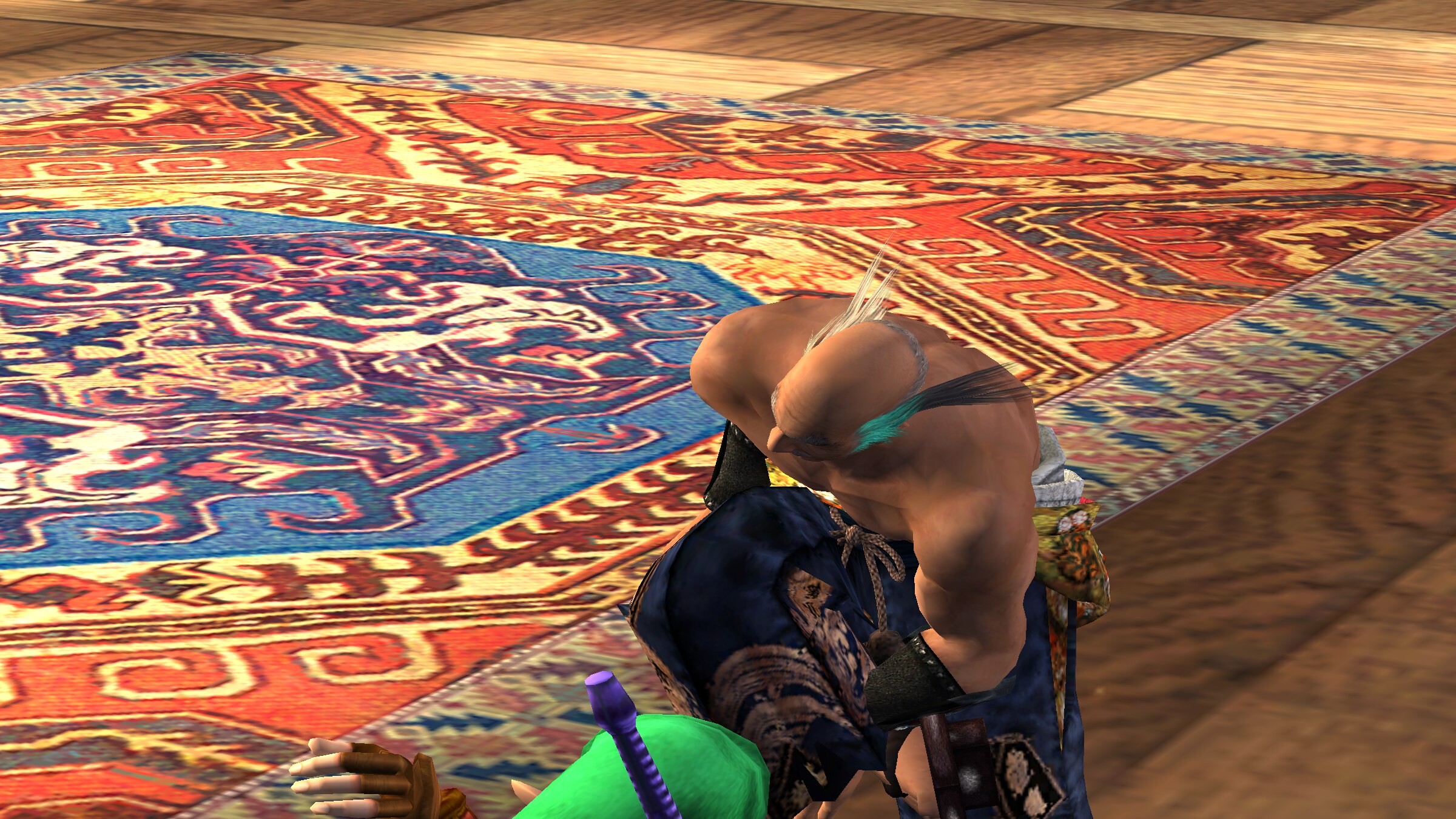
-
Steadier on 120 Hz screens (Mac): the game's 60 frames a second now follow the display's refreshes, so on a
120 Hz (or 60, 180, 240 Hz) screen each frame stays up for the same number of refreshes. Before, about one frame in
thirty was shown for one refresh and the next for three, a small hitch every second or two. -
FPS counter: frames shown each second in the top right corner, on the Graphics page and in the in-game menu
(off at first).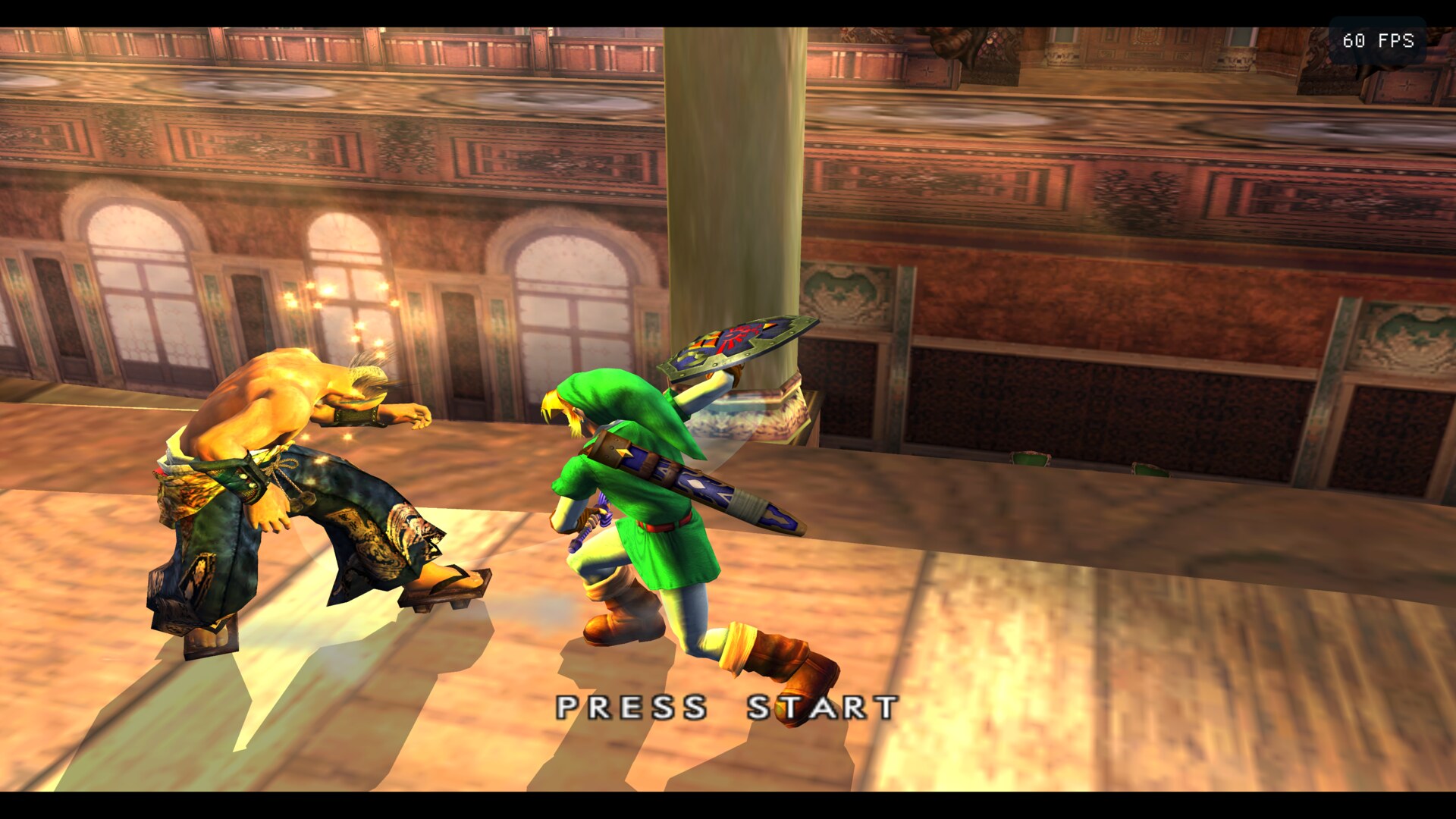
-
Android: the launcher and the game in one app (
Soulcalibur2Recomp-android.apk, 64-bit, Android 10 or later),
with touch controls that are player 1's pad and work the in-game menu; Android's Back opens the menu. The discs
you choose are copied into the app's folder.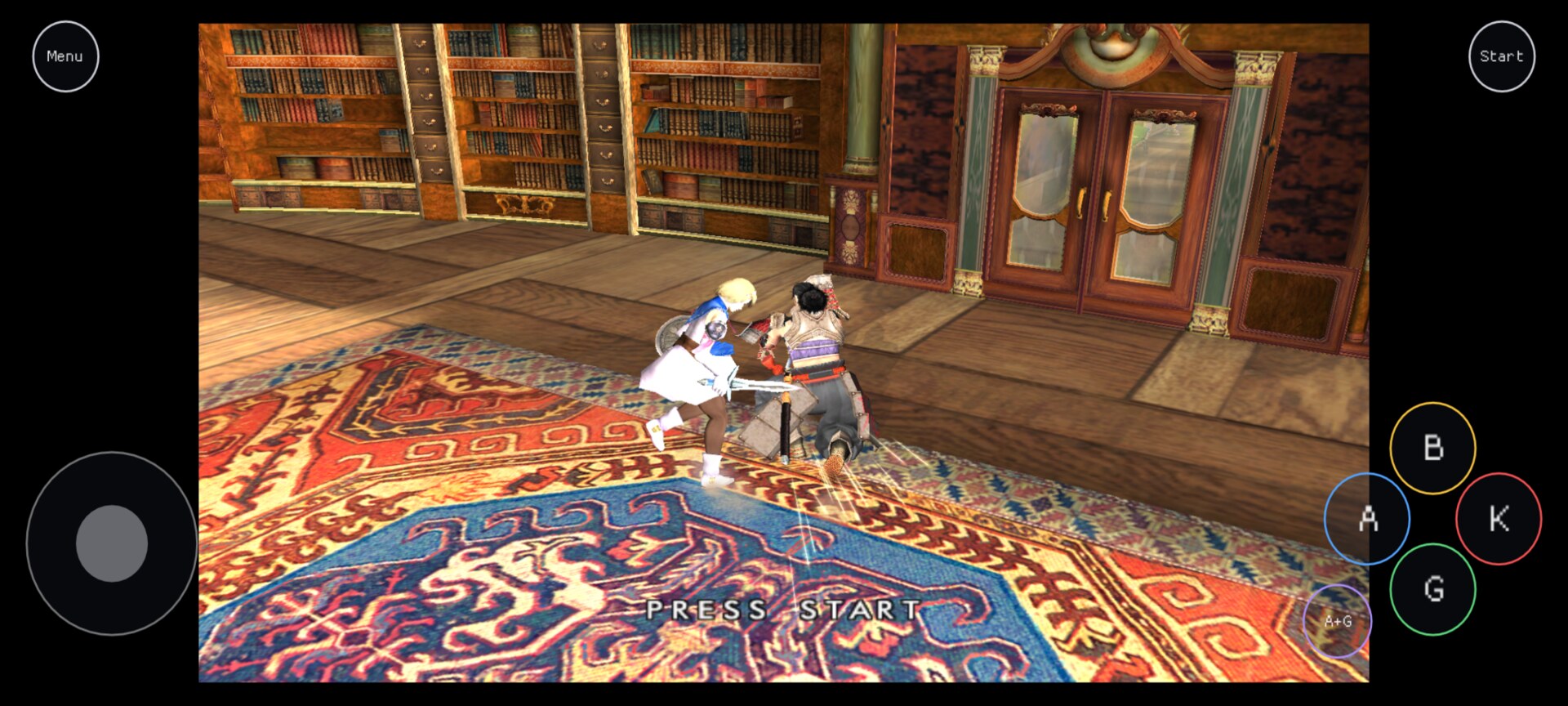
-
Character select centred with the guests: the grid, which the guests' fifth column made half a column
wider on the right, is centred again, clear of player 2's model. -
Character select in rows of five (#6): with the
guests, the 25 characters fill five rows of five, Link and Heihachi beside Spawn, and Random sits alone under the
middle column. Down from the bottom of any column, or Up from the top row, goes to Random.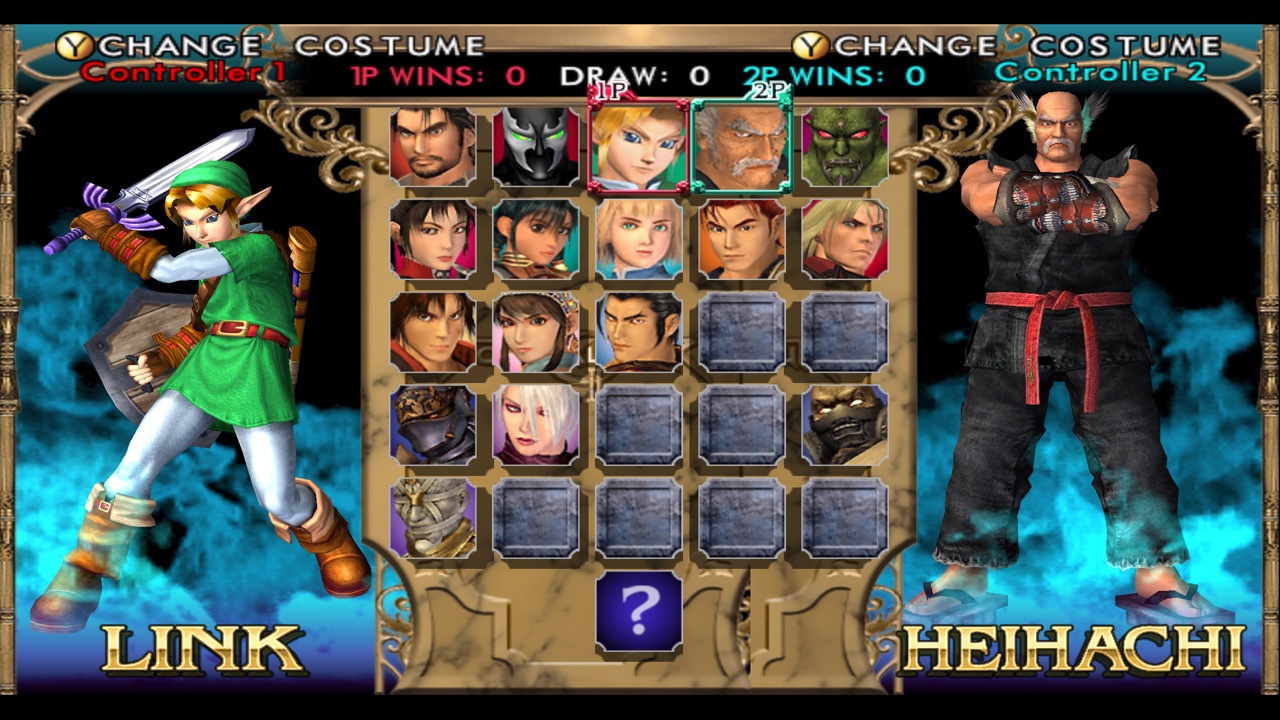
v0.1.0-beta.2
The first public release. Online play is smoother and easier to start: fights run at full speed on a Steam Deck, a host keeps playing while waiting for someone to join, and joining explains itself when the two players' guests differ. Also new: RetroArch's CRT and scanline shaders. Both players need this version to play each other online, and guests built by beta.1 should be rebuilt (the launcher's Guest page asks).
An unofficial native port of Soulcalibur II (Xbox). No game files are included: you need your own Soulcalibur II
(USA) Xbox disc image, and for the guests your own GameCube and/or PlayStation 2 disc.
Download
| Your system | Download |
|---|---|
| macOS 26 or later, Apple silicon | Soulcalibur2Recomp-macOS.zip |
| Linux x86_64, Steam Deck, Steam Machine | Soulcalibur2Recomp-linux-x86_64.tar.gz |
| Windows 10 or 11, 64-bit (untested) | Soulcalibur2Recomp-windows-x64.zip |
SHA256SUMS.txt has the downloads' checksums. The update-*.txt files are what the launcher reads to update
itself; you don't need them.
Install
macOS
- Open the zip: it gives Soulcalibur II Recomp.app. Move it to your Applications folder (it updates
itself, so it must be somewhere it can write). - The app is not notarized by Apple, so the first time: right-click it and choose Open, then Open. If
macOS only offers Done or Move to Trash, choose Done, then open System Settings → Privacy &
Security, scroll down and press Open Anyway. - On the Game page, choose your disc image (
.iso). On the Guest page, give it your GameCube and/or
PlayStation 2 disc and press Build for Link and Heihachi. Press Play.
Linux, Steam Deck and Steam Machine
- Unpack it where it can stay:
tar xzf Soulcalibur2Recomp-linux-x86_64.tar.gz -C ~/Applications(on a Steam
device, in Desktop Mode). - Run
~/Applications/Soulcalibur2Recomp/soulcalibur2-launcher. SDL 3 is inside; the presenter needs Vulkan
and shaderc (SteamOS has both). - Choose your disc on the Game page, build the guests on the Guest page, and press Play. On a Steam
device, Add to Steam puts it in your library for Game Mode.
Windows
Not yet tried on a Windows machine. Extract the zip to a folder of your own (not Program Files) and open
soulcalibur2-launcher.exe; Windows may say it protected your PC: More info, then Run anyway.
In the game, Esc, F1 or a gamepad's Back opens the in-game menu. Online, both players need the same version.
What's new in 0.1.0-beta.2
- Licenses in every download: each archive carries
THIRD_PARTY_NOTICES.mdand the third parties' license texts. - Online: a host plays while waiting: hosting (from the launcher or the menu) no longer takes the controls away
until someone joins; the game starts over for the match when they do. - Online: guests that differ are named: joining a match whose guest characters were built differently (or on one
machine only) says so, instead of "different builds". - Online: full speed in fights: a fight saved the whole game's memory every frame for rollback, which held a Steam
Deck (and its opponent) to about 48 frames a second; it is now saved only on frames played on a guess of the other
player's controls. - Online: T opens the chat again: the key was taken as already held before it was looked at.
- Guests: a version stamp: the guests' file records which release's converter built it, and the Guest page asks
for a Rebuild when it is from an earlier one (online play needs both players' guests from the same). - Shaders: RetroArch's CRT, scanline and edge-smoothing shaders (CRT Royale, CRT Guest, CRT Lottes and more),
or your own preset, on the Graphics page and in the in-game menu. - Run-ahead removed: it cost too much speed, even on fast machines. A
run_aheadline left insettings.ini
does nothing.