Repository navigation
Releases
Lumela v0.2.0

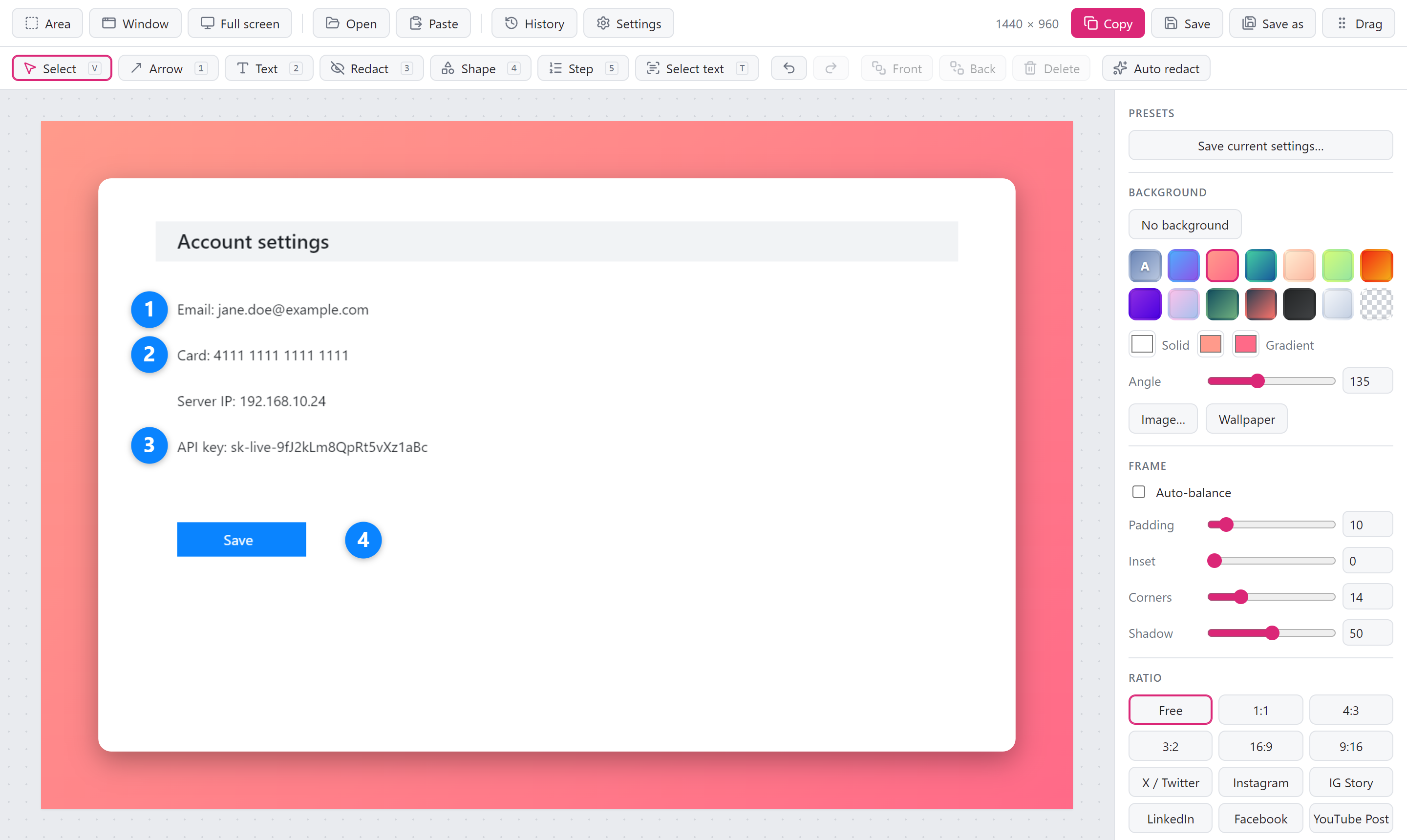
Lumela 0.2.0: numbered steps, and screenshots without the frame
If you write guides, file bug reports or explain things to colleagues, this release is for you. You can now number the steps on a screenshot with a single click each, and share a screenshot exactly as you took it when a background would only get in the way.
Numbered steps
Press 5 and click wherever something happens: 1, 2, 3, in the order you click. No text boxes to line up, no counting.
- Delete a step and the rest move up. Remove step 2 and step 3 becomes step 2, so you never end up with 1, 3, 4. Undo puts everything back.
- Readable on any colour. Pick a colour and size from the toolbar. The number turns white or black to stay readable, and two-digit steps still fit.
- Like everything else in the editor. Move, resize, restyle, undo. Steps are saved with the screenshot in your history.
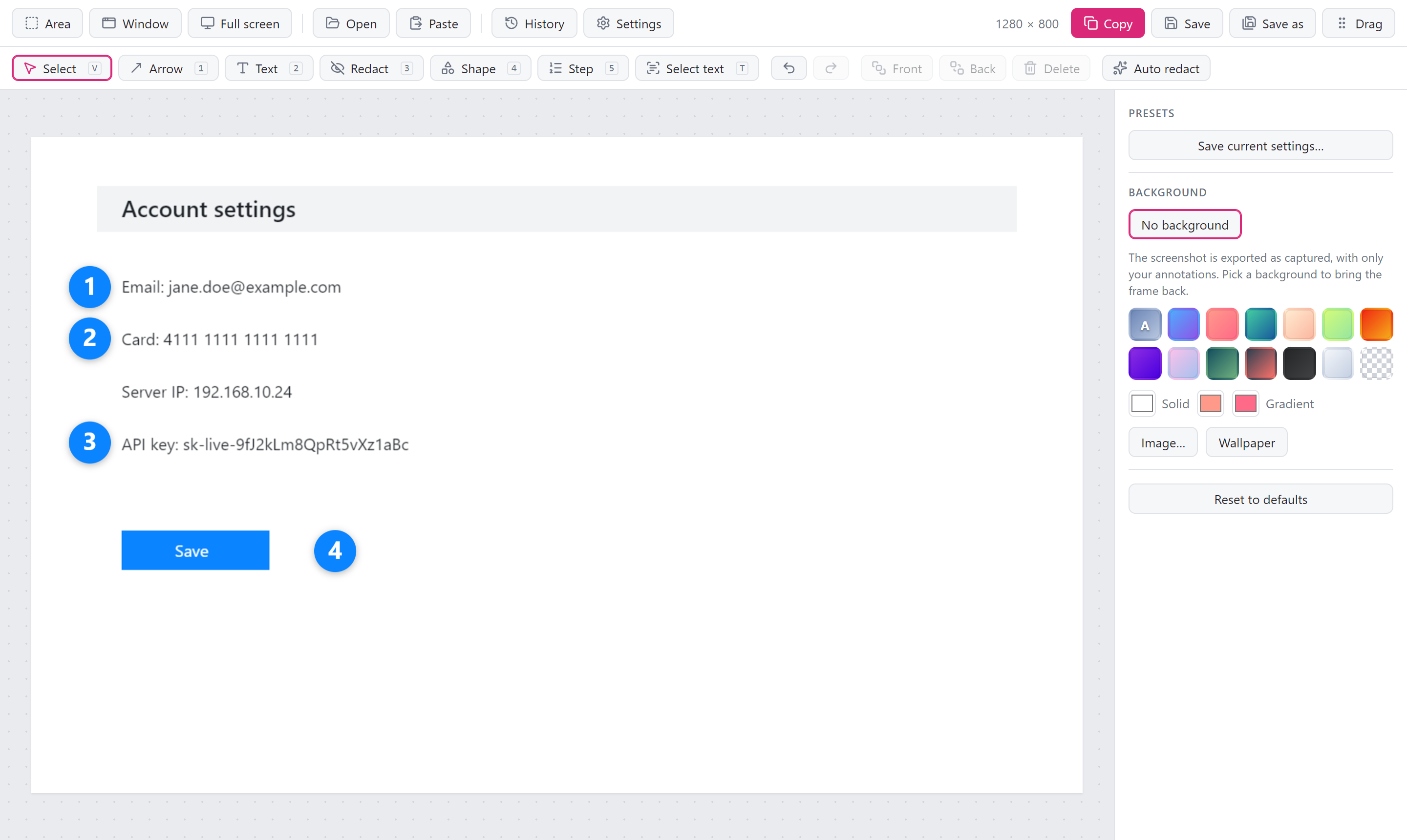
No background, when you don't want one
Lumela frames every screenshot with a background, padding and a soft shadow, which is great for a tweet or a blog post. For a bug report, a wiki page or a quick message to a teammate, you often want the screenshot as it is.
Click No background and you get exactly that: the screenshot at its original size, with your arrows, text, steps and blurs on top. No margin, no rounded corners, no black edges in a JPEG. Pick any background to bring the frame back with the settings you had.
Your choice carries over to the next screenshots, and you can save it as a preset, so plain screenshots can be your default.
Auto redact knows your own words
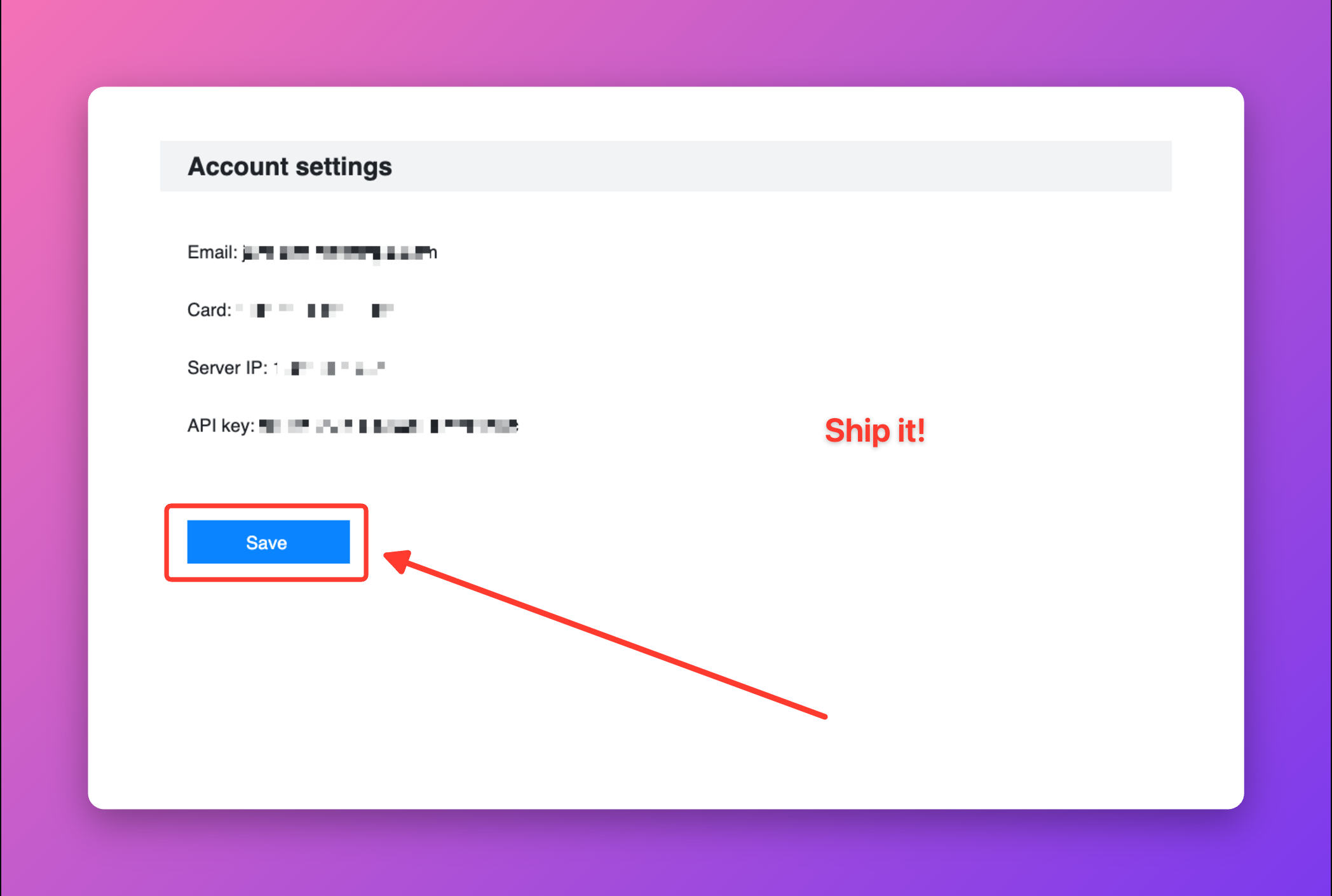
Auto redact already hides emails, card numbers, IP addresses and API keys. Now you can teach it what else is private for you: your company's name, customer names, project codes, internal hostnames. Add them in Settings → Text recognition, one per line, and they are covered along with everything else. Case does not matter, and acme also catches acme-prod-db.
Thank you @fate-lab for building this one.
Also in this release
- The background colours in the side panel fit again. The last column used to be cut off.
Download
| Your system | Download |
|---|---|
| Windows 10 / 11 | Lumela_0.2.0_x64-setup.exe (recommended) or Lumela_0.2.0_x64_en-US.msi |
| macOS (Apple silicon and Intel) | Lumela_0.2.0_universal.dmg |
| Linux (x64): Ubuntu 24.04+, Debian 13+, Fedora 40+ or similar | Lumela_0.2.0_amd64.AppImage or Lumela_0.2.0_amd64.deb |
Already using Lumela? It updates itself. You can also install with Homebrew (brew trust tw4/tap && brew install --cask tw4/tap/lumela) or Scoop.
New to Lumela? It is a free, open-source screenshot tool for Windows, macOS and Linux. Capture, make it look good, point things out, hide what is private, and share. No account, no subscription, no watermark, and nothing leaves your computer.
First launch
Installers are not code-signed yet, so the operating system warns on first launch.
- Windows: More info → Run anyway.
- macOS 15 and later: open Lumela once and close the warning, then System Settings → Privacy & Security → Open Anyway. Installing with Homebrew skips this step.
Help shape the next release
- If Lumela saves you time, a ⭐ on GitHub helps other people find it.
- Missing something? Suggest a feature or start a discussion. Both features in this release started as ideas like that.
- Lumela speaks English and Turkish. Adding your language takes one file.
Contributors

Assets 12
Lumela v0.1.4
Lumela 0.1.4
A fix for Windows.
What's fixed
- Windows: Settings no longer freezes the app. Opening Settings from the editor showed a white window and the app stopped responding. The window now opens normally.
Download
| Your system | Download |
|---|---|
| Windows 10 / 11 | Lumela_0.1.4_x64-setup.exe (recommended) or Lumela_0.1.4_x64_en-US.msi |
| macOS (Apple silicon and Intel) | Lumela_0.1.4_universal.dmg |
| Linux (x64): Ubuntu 24.04+, Debian 13+, Fedora 40+ or similar | Lumela_0.1.4_amd64.AppImage or Lumela_0.1.4_amd64.deb |
If you already have Lumela, it updates itself.
First launch
Installers are not code-signed yet, so the operating system warns on first launch.
- Windows: More info → Run anyway.
- macOS 15 and later: open Lumela once and close the warning, then System Settings → Privacy & Security → Open Anyway. Installing with Homebrew skips this step.
Lumela v0.1.3
Lumela 0.1.3
Safer auto redact, and updates that reach you on their own.
What's new
- API keys that wrap onto the next line are now covered. Auto redact used to look at one line at a time, so the tail of a long key that wrapped stayed visible, and a key split into two short halves was missed. Thanks to the person who asked about this on X.
- Linux: text recognition no longer mixes up images. Two OCR runs at the same time could read each other's image. Each run now uses its own temporary file.
- Updates while Lumela sits in the tray. Lumela now checks for a new version at launch and every few hours, and tells you once per version. Updating is still one click and up to you: it downloads, checks the signature, installs and restarts.
- Linux
.deb: the update button now opens the release page, because a.debcannot replace itself. The AppImage updates in place. - README in 简体中文, 日本語 and 한국어.
Download
| Your system | Download |
|---|---|
| Windows 10 / 11 | Lumela_0.1.3_x64-setup.exe (recommended) or Lumela_0.1.3_x64_en-US.msi |
| macOS (Apple silicon and Intel) | Lumela_0.1.3_universal.dmg |
| Linux (x64): Ubuntu 24.04+, Debian 13+, Fedora 40+ or similar | Lumela_0.1.3_amd64.AppImage or Lumela_0.1.3_amd64.deb |
If you already have Lumela 0.1.0 or 0.1.1, it updates itself.
First launch
Installers are not code-signed yet, so the operating system warns on first launch.
- Windows: More info → Run anyway.
- macOS 15 and later: open Lumela once and close the warning, then System Settings → Privacy & Security → Open Anyway. Installing with Homebrew skips this step.
Lumela v0.1.1
Lumela 0.1.1
A small polish release.
What's new
- Icons in the toolbars. Every button now has an icon, so tools are easier to find at a glance.
- System font. The interface uses your system's UI font (San Francisco on macOS, Segoe UI on Windows).
- Linux: text recognition works out of the box with the
.deb. It now installstesseract-ocras a dependency. With the AppImage, installtesseract-ocryourself. - Package managers. Install with Homebrew (
brew trust tw4/tap && brew install --cask tw4/tap/lumela) or Scoop. winget is on its way.
Download
| Your system | Download |
|---|---|
| Windows 10 / 11 | Lumela_0.1.1_x64-setup.exe (recommended) or Lumela_0.1.1_x64_en-US.msi |
| macOS (Apple silicon and Intel) | Lumela_0.1.1_universal.dmg |
| Linux (x64): Ubuntu 24.04+, Debian 13+, Fedora 40+ or similar | Lumela_0.1.1_amd64.AppImage or Lumela_0.1.1_amd64.deb |
If you already have Lumela 0.1.0, it updates itself.
First launch
Installers are not code-signed yet, so the operating system warns on first launch.
- Windows: More info → Run anyway.
- macOS 15 and later: open Lumela once and close the warning, then System Settings → Privacy & Security → Open Anyway. Installing with Homebrew skips this step.
Lumela v0.1.0
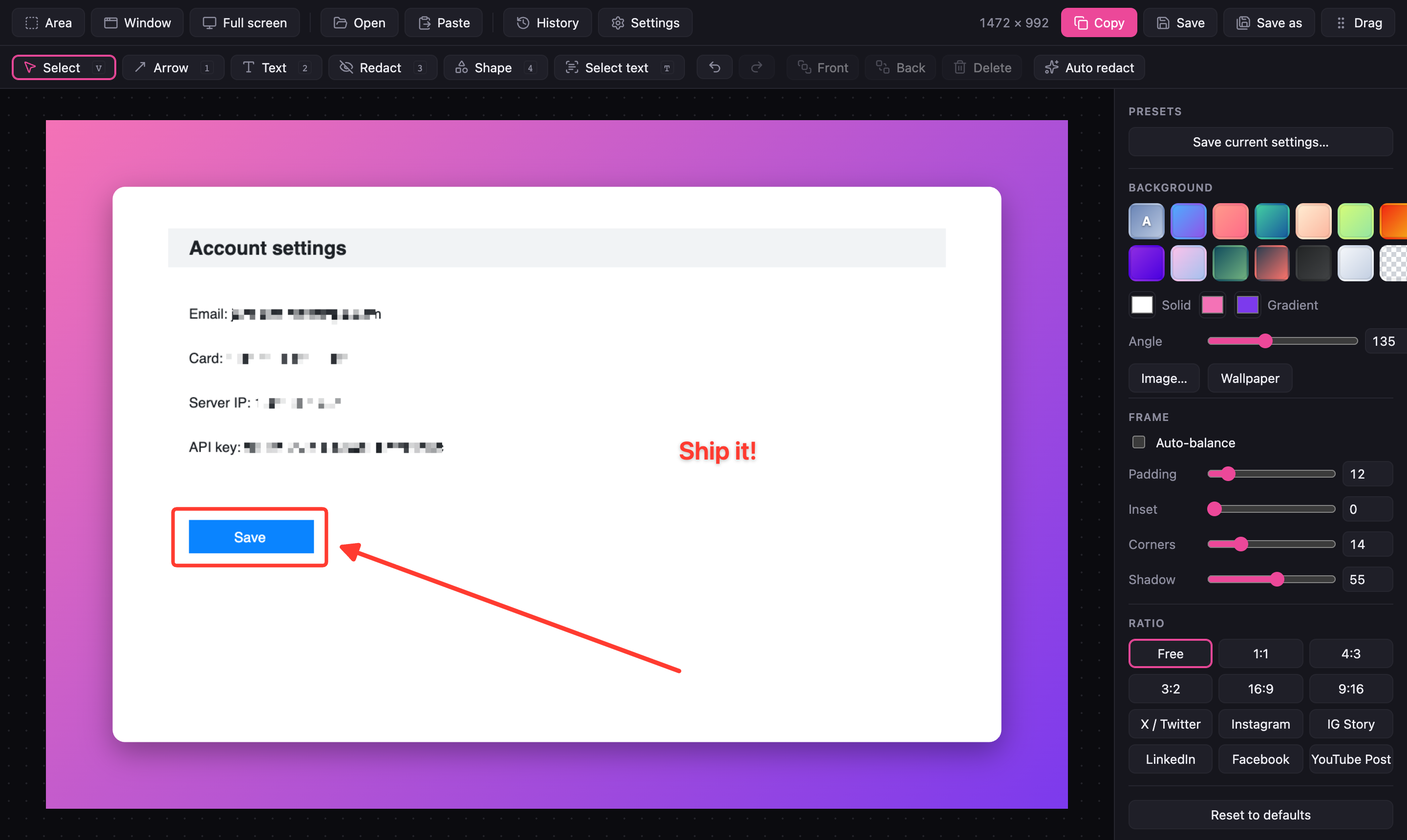
Lumela 0.1.0: beautiful screenshots in seconds
The first public release of Lumela, a free and open-source screenshot tool for Windows, macOS and Linux.
Take a screenshot and Lumela turns it into something you are happy to share: a matching background, balanced padding, rounded corners and a soft shadow, applied automatically. Point things out with arrows and text, and hide emails, card numbers, IP addresses and API keys with one click before anyone sees them.
No account, no subscription, no watermark, no telemetry. Everything runs on your computer.
✨ Highlights
- 📸 Capture anything: an area, a window (press Space while capturing) or the full screen, with global shortcuts and a tray menu. Or paste, open or drop an image.
- 🎨 Beautiful by default: automatic background from your screenshot's colours, auto-balance, gradients, your own image or wallpaper, padding, corners and shadow.
- 📐 Ready for social media: one-click sizes for X/Twitter, Instagram, LinkedIn, Facebook and YouTube, plus 1:1, 4:3, 16:9 and more.
- ✏️ Annotate: arrows (straight, curved, double), text, rectangles, ellipses and highlights, with full undo/redo.
- 🛡️ Auto redact: Lumela reads the text on your screenshot and covers emails, credit card numbers, IP addresses and API keys. Pixelate, blur or solid.
- 🔤 Copy text from images: select words on any screenshot and copy them (on-device OCR).
- 📤 Share fast: copy, save, or drag the result straight into Slack, a chat or a document. Lossless PNG compression keeps files small.
- 🗂️ Stay organised: presets for your favourite look, a history of past screenshots with their edits, and your own shortcuts.
- 🌍 English and Turkish, with more languages welcome.
⬇️ Download
| Your system | Download |
|---|---|
| Windows 10 / 11 | Lumela_0.1.0_x64-setup.exe (recommended) or Lumela_0.1.0_x64_en-US.msi |
| macOS 10.15+ (Apple silicon and Intel) | Lumela_0.1.0_universal.dmg |
| Linux (x64): Ubuntu 24.04+, Debian 13+, Fedora 40+ or similar | Lumela_0.1.0_amd64.AppImage or Lumela_0.1.0_amd64.deb |
Files are listed under Assets below. Lumela keeps itself up to date from here on, and every update is signature-checked.
First launch
The installers are not code-signed yet, so your system may ask for confirmation once:
- Windows: in the SmartScreen window, click More info → Run anyway.
- macOS: right-click Lumela in Applications → Open → Open. Then allow Screen Recording when asked (System Settings → Privacy & Security), and restart Lumela.
- Linux: for text recognition and auto redact, install Tesseract:
sudo apt install tesseract-ocr. On Wayland, capture goes through your desktop's screenshot portal; window mode is X11-only.
⌨️ Get started in 10 seconds
- Press Ctrl+Shift+2 (Cmd on macOS) and drag over what you want.
- Pick a background on the right; Lumela has already balanced and framed it.
- Press Ctrl+C and paste it anywhere.
💬 Tell us what you think
This is the very first release, and your feedback shapes the next one.
- ⭐ Star the repo if Lumela saves you time. It helps others find it.
- 🐛 Found a bug? Open an issue.
- 💡 Have an idea or a question? Join the Discussions.
- 🌍 Want Lumela in your language? Translating takes one file; see CONTRIBUTING.md.
Lumela is free software under the GPL-3.0 licence.